- Apitd_api_top_bar_template::update_key
- Apitd_api_top_bar_template::update
- Apitd_api_single_template::update_key
- Apitd_api_single_template::update
- Apitd_api_footer_template::update_key
- Apitd_api_footer_template::update
- Apitd_api_smart_list::update_key
- Apitd_api_smart_list::update
- Apitd_api_thumb::update_key
- Apitd_api_thumb::update
- Apitd_api_category_top_posts_style::update_key
- Apitd_api_category_top_posts_style::update
- Apitd_api_category_template::update_key
- Apitd_api_category_template::update
- Apitd_api_module::update_key
- Apitd_api_module::update
- Apitd_api_block::update_key
- Apitd_api_block::update
- Apitd_api_header_style::update_key
- Apitd_api_header_style::update
 Vlad S
 Hello !
Updating the theme will not affect your settings. Please make sure you are creating a backup before updating.
Please follow our update tutorial as you can see here: https://forum.tagdiv.com/how-to-update-the-theme-2/
Page speed is not covered by the support team. This can be done by our custom work team here: https://tagdiv.com/premium-customization-services/
Thank you for your understanding !
 MJO84
MJO84 I have the same problem. I believe the problem is with changes in YouTube API. It needs an update or something from you guys. Please advise. Thanks.
 alanrup
 Whenever there are updates to the site I’ve always had to do them manually.
 energeticcity.ca
Hello
I’m running 10.1 and we can no longer update any cloud templates. I have disabled all the plugins on the site except for the ones needed to run the theme and still can’t save any of the template changes. The composer says the changes are saved, but they aren’t. Any suggestions on what do try next?
I even cloned the site and updated it to 10.3 and we are still experiencing the same problem.
 chulay
with the problems they have with the google API they made a guide for version 10.3
How do you update to version 10.3?
 erescultura
 That´s not embedding a youtube channel, it´s embedding a video. That works, but what I want is embedding a channel, or at least a playlist. But I want to embed it not in an static way where I must manually put the IDs of the videos. I want a dynamic embedding that refreshes when the channel updates. Is that possible?
I guess there should be a way. I already have an ivoox widget in the sidebar that refreshes with the podcast channel automatically.
 theuncommonbox
Hello Team,
I recently update the theme version and while Edit a post template; I can view the sidebar correctly (https://imgur.com/SYvuoKX) but on LIVE site post its overlap and disturb along with footer (LIVE site URL.
I tried change settings but in vain. Please advice
 cmc
cmc If you’ve determined a fix can you please send us the code to update it on our end ASAP instead of waiting for a version of theme to come out.
 Calin
Calin Hi,
I will add this on the list, our developer team will take a look and see if this can be improved in future updates.
Thank you for your suggestion!
Calin Hi,
Please update the theme to version 10.3 in this version this problem should be fixed.
How to Update the Newspaper Theme for WordPress -> https://tagdiv.com/update-newspaper-theme/
Thank you!
 Innova
 Updated the old version of WP, and that had no effect. So there must be something that gets copied down that is not captured by the export/import.
 marcos.jimenez@n-people.es
Hello,
I am going to update my wordpress to newspaper X, do you have any official videos where I can follow the steps?
Where can I follow some safe steps?
I don’t want to have problems with the page.
Thank you 🙂
 Nr32OnTheBack
Hi!
First of all I wanted to know, that if I update the theme, will all my settings and pages be deleteted? Just worried, that it will get lost.
2) For some reasons we get super bad rating for page speed. I’m not entirely sure cause I’m super bad with IT, HTML, etc. but I think it’s some technical stuff. Is there maybe a setting that I mistakenly clicked?
That’s the site: http://www.cavanisfriseur.de
Thanks a lot,
Marco
Vlad S Hello @cmc !
This issue has been fixed in the 10.3 Update. Please update the Newspaper Theme by following carefully our tutorial here: https://forum.tagdiv.com/how-to-update-the-theme-2/
Thank you !
 roydee
 Hi Vlad, Thank you. I updated to 10.3 and all is good now. Thank you for your response.
 fatih-2
 Thanks for the update Calin
Calin Hi,
All the customization made using tagDiv Composer will be saved on database and these will not be lost when you’ll make the theme update.
Please make sure that you check our documentation from here before you make the theme updated:
Updating the Core of the tagDiv Themes for Envato WordPress Requirements -> https://tagdiv.com/updating-the-core-of-tagdiv-themes/
How to Update the Newspaper Theme for WordPress -> https://tagdiv.com/updating-the-core-of-tagdiv-themes/
We recommend to make the theme update via FTP, remove/delete the old theme and set the new one after that install/update the theme plugins from Welcome section -> https://i.imgur.com/67wdVGf.png
Thank you!
Calin Hi,
Sorry for this inconvenience, we just made some updates to our documentation -> https://i.imgur.com/RuowKPT.png -> https://forum.tagdiv.com/the-mobile-theme/
Thank you!
Vlad S Hello !
Please update to 10.3 and let us know if the issue still remains. Also please make sure that you do follow our update tutorial carefully: https://forum.tagdiv.com/how-to-update-the-theme-2/
Thank you !
 haykdigital
 Thanks Vlad. Please send us an update when they fix the AMP plugin and post an update.
 picturemeclubbing
 Very odd. So this is what I see when composing and/or editing a page:
https://www.screencast.com/t/wG3WkkKLmR
This is the results:
https://www.screencast.com/t/JLzW1kji
This is the most updated version of your template.
 r1kay
r1kayHi,
I am running on 9.5 and want to update to 10 because on version 9.5 the Infinite Scroll isn’t working properly. I have set up the site with Cloud Templates. If I update to 10, will all templates still work? I just want to make sure that i don’t have to redesign the whole website again.
Thanks.
 INVESTOR
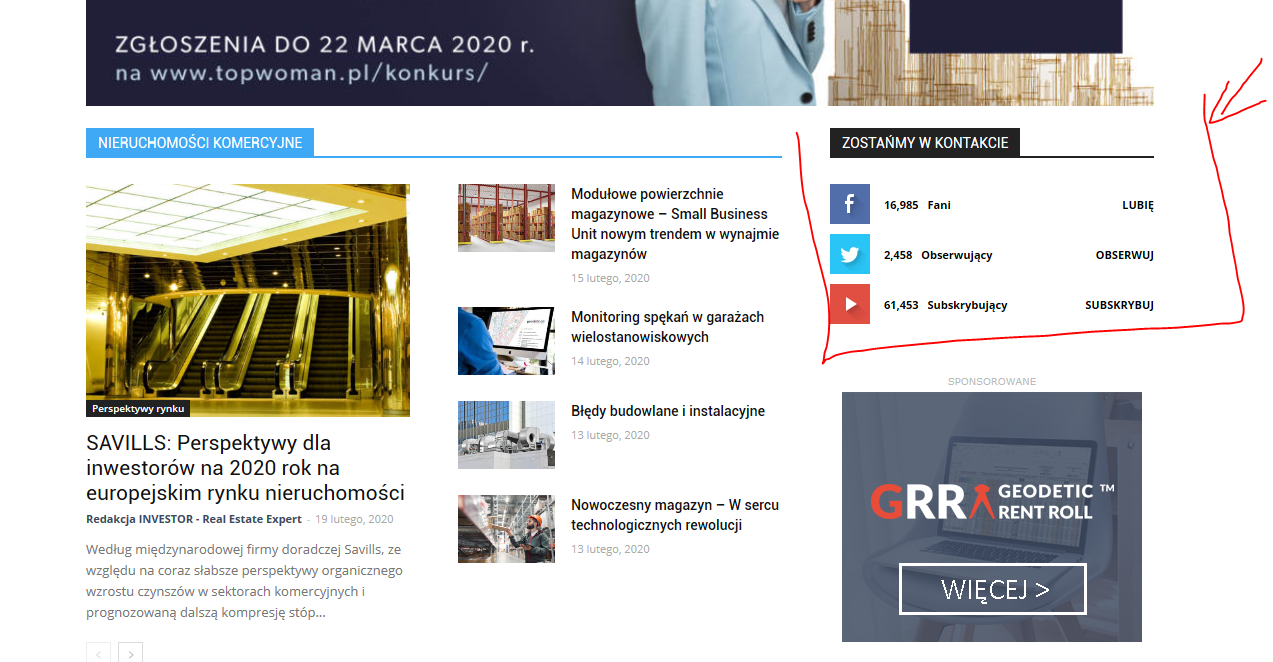
Hi, I have the Newspaper theme on my site, I want to update my social networks on the home page but after changing all links that I need in the theme panel – nothing changes. I still can see icons that I don’t want to be active (for example I don’t want Twitter, but want LinkedIn instead) and links which are visible don’t work properly, for example YouTube doesn’l link to my chanel .
How can I edit this block anyway? I can’t even change the area where this is placed on my homepage. Can’t find the way to edit this part.
My site homepage is: https://investorrealestateexpert.co/
What I’m talking about is:
https://investorrealestateexpert.co/wp-content/uploads/2020/02/investor-wycinek.png
thanks in advance for your help
Vlad S Hello !
Please update the Newspaper Theme to 10.3 This should fix your issue.
Find out how to update here: https://forum.tagdiv.com/how-to-update-the-theme-2/
Thank you !
Calin Hi,
Please note that this issue is not caused by the mobile theme, or the theme, there are other users with the same issue after the latest AMP update – https://support.google.com/webmasters/thread/29367056 The AMP plugin developers provided a fix for it here – https://wordpress.org/support/topic/the-script-tag-contains-invalid-json-that-cannot-be-parsed-6/ – https://wordpress.org/support/topic/the-script-tag-contains-invalid-json-that-cannot-be-parsed-3/ but they say it’s not needed anymore. Maybe mark the warnings as fixed in the console, and they should not appear anymore according to those topics.
What you can do is to install the previous version of amp.
Thank you!