- NewsmagHow to update a plugin
- NewsmagHow to update the theme
- NewsmagHow to update the WPBakery plugin
- NewsmagCategory templates
- NewsmagWhat’s included in Newsmag theme package
- NewsmagAjax view count
- NewsmagSmart Lists
- NewsmagFeatured images
- NewsmagFeatured image or video
- NewsmagModal window
- NewsmagtagDiv slider gallery
- NewsmagVideo playlist
 GoingFor2
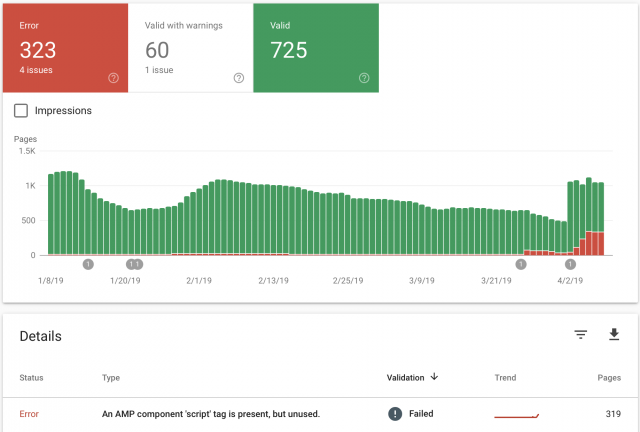
I recently updated the theme and the feature to use “mobile”, “Mobile + AMP” or “AMP” has started to create AMP errors, when previously there were none. It keeps telling me there, “An AMP component ‘script’ tag is present, but unused”. This was never an issue until after the upgrade. I had AMP Ads formatted the correct way without using the “Script” tag. As you can see from the image I attached, the errors started around March 26th, right around the time I updated. My website is GoingFor2.com. I currently have it set at “Mobile Only” because I don’t want to keep racking up errors, but I want to be able to use AMP as well. Thank you. Here is the link to the image: http://goingfor2.com/wp-content/uploads/2019/04/Screen-Shot-2019-04-08-at-10.12.43-PM.png
 PaulEide11
 Bogdan,
I followed all the steps via “C. Update the theme automatically” in the how to update theme page.
I got to step 6 and could see “Update Available” so I clicked it. And it WORKED from what I can tell!
PaulEide11 Hi Bogdan,
I confirmed that I am not using a demo version of the theme; thank you for your screenshot. I noticed in that same section it gives a message that says, “Please install and activate the tagDiv Composer plugin – Our plugin is required for this theme to work best.” That would not have anything to do with successfully updating my theme correct? I can’t imagine that it would, but want to be thorough and ask.
I don’t necessarily need an automatic update or notice.
But what I desperately want is an EASY way to do this, that doesn’t create these same issues that I mentioned in this thread from 12/26/18:
“But upon new theme installation, certain homepage content was missing and I’d like to know why/how to avoid in the future:
– Site identity switched to blog from static front page
– Title tag and meta description removed
– Content blocks deleted
– Footer deleted”
Of the multiple ways to update the theme that you sent the link to, what is the preferred method?
Why does this have to be manual every time? Why doesn’t this theme update like every other theme I have encountered or worked with?
Thanks.
 haxigi
Hello. Till this new update, everything worked fine for me. Since Newspaper changed AMP plugin, my website doesn’t look like before in mobile view.
I have created static site and it work fine for desktop, but same site looks different.
It only shows: “Latest articles” and none of what i created with tdcomposer.
Why is that? My website: alilove.pl
 Bogdan B.
 Hello,
In order to tell if you have a demo installed or not, please check this section of the theme panel: https://www.screencast.com/t/Uf7tTi0f
As for the theme update, if you need an automatic update and a notice for each update,you have to install the envato market plugin as mentioned in this guide:
https://forum.tagdiv.com/how-to-update-the-theme-2/
Thank you!
Bogdan B. Hello,
1. Sorry but there is no such functionality in our theme and there is no simple solution we can provide in this regard. I will add it to our list and maybe in future updates, we will consider implementing such a features.
2. Different smart lists offer different implementation for the URL. Try a different smart list style for different results.
Thank you!
 Calin
Calin Hi,
This can be done using a the fast news header template from tagDiv Cloud Library -> https://www.screencast.com/t/wOZS6rAfWBV
Also this can be achieve making some changes in theme files, you can check the sugestions from this topic -> https://forum.tagdiv.com/topic/fast-news-demo-header-color-gradient/
Thank you!
 GiacomoLaw
 W3 works well with version 9.5 on both themes, and therefore I am not updating unless there are speed updates to the code itself. Are there any in later versions, such as code improvements that will give more speed to my site?
Thanks
Bogdan B. Thank you for pointing this out. We will look into this and fix it for coming updates.
Thank you!
 Catalin
 Hi,
Sorry for the inconvenience but it seems to be a problem in this case. I have added to our list of improvements and we hope to fix it in future updates. Also, please notice that you have correctly added the classes for your sections, remove all of untested plugins and check the results.
Thanks for your understanding!
 inav
inavHello,
From a SEO perspective it is not good that all the video post titles (especially in the menu) are set to be <H3>. In my case this leaves the impression of lots and lots of duplicated (major) content on ALL pages.
Any workarounds or updates on when we can expect development on the issue?
Thanks,
Ina
Calin Hi,
If you are using the mobile menu you can change the menu from Appearance > Menus
-> https://www.screencast.com/t/bGcit1Zoyn
If you are not using mobile theme you can use the header editor and edit the menu -> https://www.screencast.com/t/hoQItj7LO
Thank you!
Catalin Hi,
Until now, notice that we do not have any bad reports in this case, sorry! Please try to make a new sub-domain for testing where you need to have installed only the theme and the required plugins, clear all the caches, purge CDN files and check the results. Please notice that before each theme update, we make a lot of tests to make sure everything works in the parameters.
Thanks.
Calin Hi,
This is on our list ( to test the php 7.3 with our theme ) and I Think this will be compatible in coming update.
Thank you for your understanding!
 bmdaly
Dear team, I updated all the plugins and everything, System Status looks ok, but Composer is not saving the changes that I am making. Please help. Thanks!
Calin Hi,
If I understand right when you say update post you are referring to modified date.
Please check the settings from theme panel -> https://www.screencast.com/t/H7CFzAKVw7 set the option with tagDiv Composer-> https://www.screencast.com/t/OAoAK9oUu make update on post -> https://www.screencast.com/t/vcQoLkQByxc now check the date of that post -> https://www.screencast.com/t/sKbLrp1jz also you can can sort after modified date -> https://www.screencast.com/t/VSePr63B
Also the modified date on post can be set with tagDiv Composer on single post template -> https://www.screencast.com/t/eYkeLqbCqV -> https://www.screencast.com/t/3qCSo9Nxtt
Hope this will help you!
Thanks.
Catalin Hi,
Ensure that you have correctly updated your theme via FTP way, clear all the caches, purge CDN files and check the results. Check here -> https://forum.tagdiv.com/install-via-ftp/ Also, notice that the WPBakery sohuld not be updated. If you will use the latest version of the theme, you will have the latest version of this plugin which comes bundled with it.
Hope this helps and let us know how it goes!
Thank you!
Catalin Hi,
Regarding your first problem, after some investigations, it seems to be a mini bug in our theme, when you are using the Mobile Theme plugin for mobile mode, sorry! Unfortunately, the duplicated posts are not excluded from the latest articles. I have added to our list of improvements and we hope to fix it in future updates.
I have checked your website AMP errors and all of these seems to comes from your Facebook Pixel implementation, as you can see here -> https://www.screencast.com/t/ww1POIXpoc1 Unfortunately, this conversion tracking has not been tested with our theme (AMP version) and we cannot say for sure if you will bring good theme results, sorry!
Thank you for your understanding!
Calin Hi,
Yes, now this is possible, since Newspaper v9.5 our theme have a new option, header builder -> https://www.screencast.com/t/1jwi2J4d -> https://tagdiv.com/whats-new-in-newspaper-theme-9-5-update/
Get a beautiful Overlay Header with Newspaper Theme ->https://tagdiv.com/overlay-header-newspaper-theme/
In order to use the header manager you need to have tagDiv Composer and tagDiv Cloud Library activate.
If you do not want to use them you can choose one of the 3 multipurpose header -> https://www.screencast.com/t/ahe0UhQ5 and set the button in Theme panel>Multipurpose
Thank you!
Catalin Hi baranos,
Please update the theme to the latest version of it because I saw that you are using only v.4.6. update it to v.4.7, clear all the caches and check again. If the problem will persist, please send us an email at contact@tagdiv.com with your log-in information (wp-admin) so we can further investigate it closer your setup page.
Thank you!
PaulEide11 Hi Bogdan,
I am having the same issue with the latest them update.
How can I tell if I have installed a “demo” version as you mentioned in this thread?
Also, under “Updates,” it says this: “Themes Your themes are all up to date.”
But I know I am at least 1 version behind, per emails from Themeforest.
Why does this theme not behave like a regular theme?
GiacomoLawTitle. Can’t update as W3 Total is broken, and so is amp, in the latest version.
If there are significant speed updates I’d look around it however.
Thanks
 GGiugliano
Hi,
I updated the theme to the latest version. Now there is the new AMP plugin, but since I installed it my feed json doesn’t work.
Link photo:
https://www.mondonapoli.it/wp-content/uploads/2019/04/feed.png
How to solve it?
GGiuglianoHi,
I updated the theme to the latest version. Now there is the new AMP plugin, but since I installed it in search console I get this error:
“There is a” script “tag of the AMP component, but it is not used.”
and to solve it Google give me this link: https://github.com/ampproject/amphtml/blob/master/spec/amp-html-format.md
Furthermore, in the new AMP pages there is a white space that cannot be taken away. Photo link:
https://www.mondonapoli.it/wp-content/uploads/2019/04/WhatsApp-Image-2019-04-06-at-17.28.19.jpeg
 Francy
 Hi Calin,
I did everything you told me and did what was written in the articles you indicated to me, but the 404 errors are still there.
All posts have the same three 404 errors after the last update of the theme. And only for the mobile version. For example:
https://thekeenet.com/enable-launcher-android/%7B%7Btd_query_all_results
https://thekeenet.com/enable-launcher-android/%7B%7Bpost_url
https://thekeenet.com/enable-launcher-android/%7B%7Bpost_cat_link
Kinds Regards
Francesca