- NewsmagHow to update a plugin
- NewsmagHow to update the theme
- NewsmagHow to update the WPBakery plugin
- NewsmagCategory templates
- NewsmagWhat’s included in Newsmag theme package
- NewsmagAjax view count
- NewsmagSmart Lists
- NewsmagFeatured images
- NewsmagFeatured image or video
- NewsmagModal window
- NewsmagtagDiv slider gallery
- NewsmagVideo playlist
 Nachrichtenexpress
 It worked all fine till the last newsmag update.
 skyscorcher
Hello there, after activating the Newspaper theme my Admin and frontpage go blank.
I have updated everything to the latest version and de-activated all plugins but it’s still not working.
Can you help me out please?
Thanks
 Calin
Calin Hi,
I just try with your video example and is work
https://www.screencast.com/t/2R3luxRN
-> https://www.screencast.com/t/NB9sjrupNP
-> https://www.screencast.com/t/Fdb9KUNg
-> https://www.screencast.com/t/xIWWIFcxlO
Please go in one post with feature video and set again the feature video and click on update, if this is working, please use -> Thumbnails – Fix strange looking images on blocks -> https://forum.tagdiv.com/thumbnails-fix-strange-looking-images-on-blocks/
Thank you.
Calin Hi,
Please make update to the latest version of theme.
Also please change the permalinks and save it -> https://www.screencast.com/t/nt7ZOMbw5B , clear all cache and try again.
Also please check the settings that you made in Yoast.
If there is still a problem please deactivate all plugins, clear all cache and try agin.
Thank you.
 Catalin
 Hi,
At the moment, this option is not available in our theme, sorry! We will make some improvements in this case in our future updates.
Thanks for the message!
Calin Hi,
Please make update to the theme (this problem was fixed in the last update).
Here you can see what was change, add and fix -> https://themeforest.net/item/newspaper/5489609?s_rank=1
Thank you.
 Simion C.
 You could also enter the ad codes in text elements, like column text or text with title.
There is a way to add more custom ad spots but it will require modifications to the theme
– https://forum.tagdiv.com/topic/costum-ad/
Also these modifications can’t be made in a child theme so they will be lost after a theme update.
Or maybe consider using a plugin to manage the ads, some users recommend the Adrotate plugin which based on user feedback works properly with the theme. Some more info about it here if you should consider it
– http://www.wpbeginner.com/plugins/how-to-manage-ads-in-wordpress-with-adrotate-plugin/
– https://ajdg.solutions/manuals/adrotate-manuals/
 nouveau
At the moment the current template applied to all authors is somewhat standard and in dire need for an update. I have found a preference to the (tag div cloud templates) Author Template 6 and would like to apply this template to all of our author’s pages (contributors).
Could you please advise the steps needed to change the current default templates.
Many Thanks
nouveau
 Bekir Kocadag
 thank you simion
but
host provider support 128m memory.
newspaper template 8.7 running successful
and update version 9, web site down.
host provider update memory for 45 minute.
down again.
error message :
[19-Dec-2018 19:37:54 UTC] PHP Fatal error: Allowed memory size of 134217728 bytes exhausted (tried to allocate 130968 bytes) in /home/bekirkoc/public_html/wp-includes/class-wp-term-query.php on line 288
[19-Dec-2018 19:53:29 UTC] PHP Fatal error: Allowed memory size of 134217728 bytes exhausted (tried to allocate 130968 bytes) in /home/bekirkoc/public_html/wp-includes/class-wp-comment-query.php on line 395
then update memory 512m, update and running template.
but host company automatically update 128m then web site down.
newspaper template
php.ini memory limit: 40MB (recommended: 96M)
but down
 Rob576
 Please close this.. ALL I HAD TO DO WAS UPDATE. Thanks.
 Dwight
 Nevermind – it was an update issue – for anyone else reading this / having this issue, the tagDiv Composer didn’t update itself with the theme, same for WP Bakery / Visual Composer, and you’re required to go to Plugins -> deactivate and delete both of them, then manually upload them once again, after downloading the updated Newspaper theme from themeforest. Activate them, and it’ll work.
 design.circuitmedia
Hello, my company’s site http://www.lawweekcolorado.com is currently running the latest update of the Newspaper theme and we are experiencing some serious issues. The problems started after the latest update to WordPress. Since the issues were discovered, we have had GoDaddy support and our developer review the site but haven’t had success in stabilizing the site.
Both GoDaddy and our developer have pointed to the theme as being the root cause of the issue and before we abandon Newspaper all together, we wanted to reach out to see if you had any solutions. Below is a list of solutions we have already tried.
• Update Newspaper to the most current version
• Activate and deactivate plugins
• Restoring the database with an older backup (which helped get the site to display, but load time is still extremely slow)
• Tested a new theme (site loaded without any issues and was fast on the backend and frontend)
Any insights you could provide would be greatly appreciated.
 peterpan72
Dear …..
We want to thank you because your NEWSPAPER is really very nice and flexible.
We need to ask you for advice.
According to you it is possible (working on the code and through the theme panel) to cover the headers / menus and submenus as the screens we have drawn.
There are 2 different submenus based on the buttons
Example: http://bit.ly/2rKkUaF
Our concern is having to face a situation and having problems with the possible updates you will make.
You can help us?
Thank you
Simion C. Hi,
If code is displayed then the tagDiv composer has not been updated automatically. After you update please check in the theme plugins panel and there should be an update button for the composer and other theme plugins
– https://www.screencast.com/t/pUnc33V290
Update the composer and the other plugins that need updating and the problem should be solved. Let us know.
Thanks
Simion C. Hi,
A license for WPBakery is provided by the plugin author only if you purchase the plugin.
We provide a bundled version, this does not require any activation
– https://forum.tagdiv.com/how-to-update-visual-composer-plugin/
Please ignore the activation messages from WPBakery, there will be no problem.
Thanks
Simion C. Hi,
By default buttons in AMP have this color – https://www.screencast.com/t/MDynkkb4
This can only be changed in the AMP plugin stylesheet, change that will be lost after a theme update. So doing this would not be a good idea. Unless maybe changing the color of the text I can’t think of any other solution.
 brue
brueHi
I ll try to explain what happened this morning
0. I already had installed Nespaper 8.7 site with Multi-purpose set pages and visual edited with tagDiv Composer
1. i have updated WP to newest version 5.01
2. Everything worked with all additional plugins as it was before point 1, except page where i had tagDiv Composer made block showing all posts sorted by newest first and with Load more option. This page suddenly gave white blank page
3. I thought that maybe its because new WP and i need new version of Newspaper theme, so i downloaded it from Envato and installed it (9.2.2)
4. I ve activated theme and suddenly all pages turn blank white, even admin page. Managed to fix this and at least to get admin page by renaming manually Newspaper theme folder.
5. Then I thought that its maybe because of plugins that goes with Newspapers, so i reinstalled tagDiv Composer and others td’s with those provided files in installation
6. Finally i have following situation:
– only tagDiv Composer is activated, of all plugins, site works (w/o some additional functionalities which other plugins provide)
– if i activate Classic Editor plugin and/or td speed booster, site still works
– if i activate any other plugin, even td Social counter to not mention other as those important Wordfence Security, Yoast and similar, entire site goes again in white blank pages
I ve tried to make theme inactive, deleted Newspaper folder and reinstalled it again. Problem hasn’t changed.
What to do? What could be so wrong? I m not skillful with this and WP, just common user.
 fratermaui
Hello support and team,
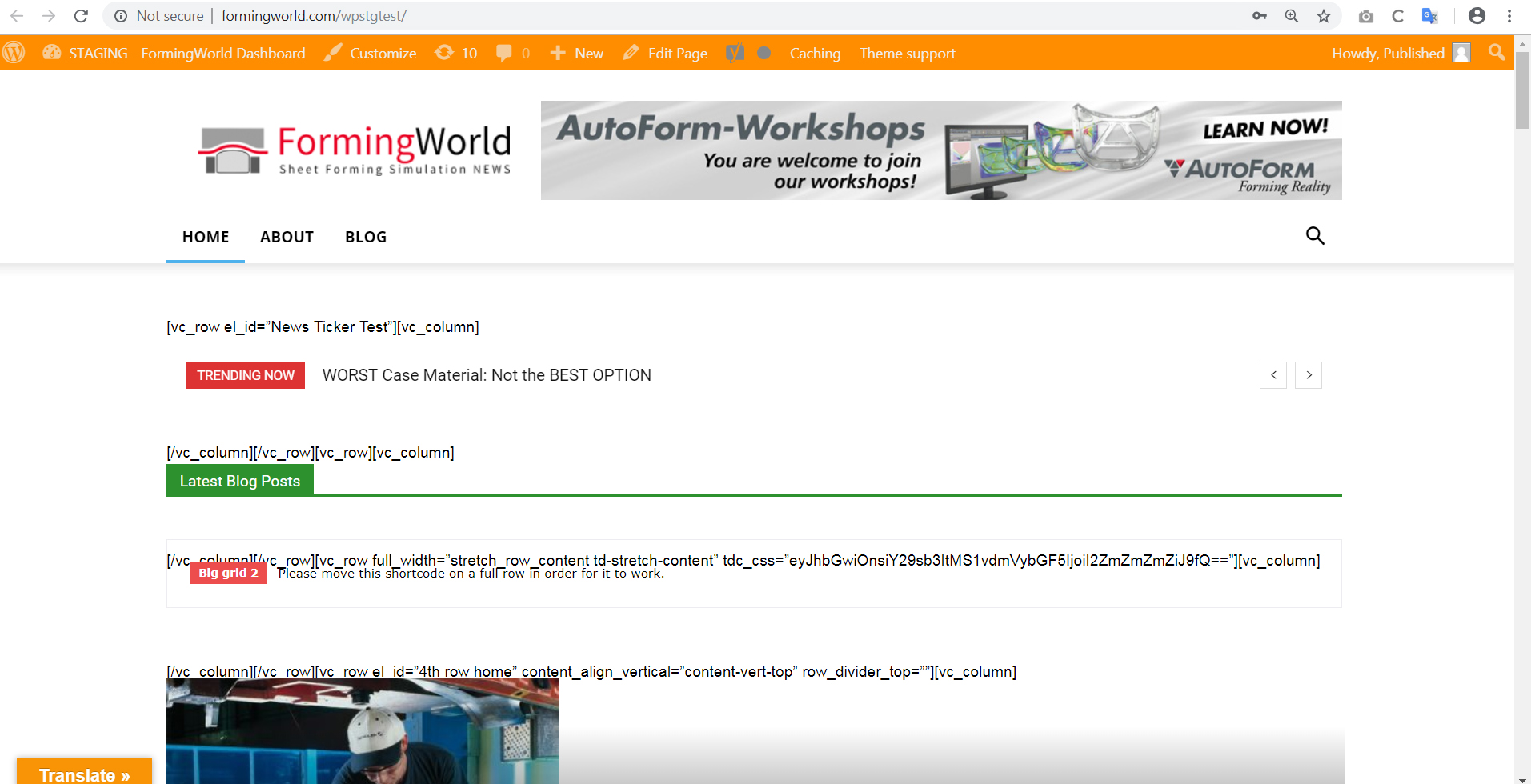
After doing an update of the theme my site falls apart. The structure of the homepage is broken, then code appears all over the homepage. I’ve tried the update in the older version of WordPress as well as the newest version.
This is what the damaged site looks like, please see link:
http://formingworld.com/wp-content/uploads/2018/12/Staging-Newspaper-Update-Sam-Clough.jpg
I can’t find any plugin conflicts, could someone please contact me, I can’t update the theme.
Many thanks, Sam Clough
Simion C. Hi,
We have identified the issue and will fix it as soon as possible. The next theme update will contain it most likely. Sorry for the inconvenience.
Thanks
 dmsl
dmslHello,
I just updated the theme and the composer plugin. However images are not showing up on frontpage and in the menu after update and the composer editor doesn’t work either anymore. Can you please help me to solve this issue? Images works in posts though.
Site is china-underground.com
 Demir
DemirHello,
I have problems with the mobile performance of my website. I use the latest updated version 9.2.2 of the Newspaper theme. When I test with GTmetrix, I get the results of “PageSpeed Score = 85%” and “Fully Loaded Time = 6.2s”. According to these results, the desktop performance of my blog is quite good.
But when I test my site’s mobile performance with “testmysite.withgoogle.com”, I get 8 seconds of loading time. It’s too slow. Many people who try to access my blog from their mobile devices report that my site is very slow. Probably because of this many users are losing.
Is there anything you would suggest to improve my site’s mobile performance?
Link: http://www.arthenos.com
Thanks in advance for your interest and help!
 git
gitDear support team,
For add fonts, I need to modify td_fonts.php
Would you please these fonts as default selections for future updates?
YuGothic, Yu Gothic ,Hiragino Kaku Gothic ProN, Hiragino Kaku Gothic Pro,
Meiryo, HiraKakuProN-W3, TakaoExGothic, Droid Sans, Roboto, Helvetica, Osaka’,
You can refer to famous website for font-family set.
http://shiru-web.com/2017/04/27/01-29/
Regards,
Calin Hi Vikram,
Please make sure that you have the latest version of theme and all theme plugins are updated
https://www.screencast.com/t/0qQatVDGI3xh
https://www.screencast.com/t/V7qjzIbXac
Thank you.
Simion C. @awilbanks I searched the internet for a while, I did found some information
– https://www.instagram.com/developer/
– https://www.dialogfeed.com/best-tips-for-instagram-graph-api-change-in-december-2018/
– https://developers.facebook.com/blog/post/2018/01/30/instagram-graph-api-updates/
But in all our tests it works same as before, as I mentioned above I tested multiple IDs. Send us an email with admin login (if you haven’t already) and we will check in your case.
It could be the Jetpack photon causing the issue, please disable it, clear the cache and check again. or disable the entire plugin and check.
Simion C. Hi,
You could add that in this section of the theme panel
– https://www.screencast.com/t/l098MIdAsN5g
The code will be loaded at all times, and it will not be lost after a theme update.
Or create a child theme, copy the header.php file in it and enter it there
– https://forum.tagdiv.com/the-child-theme-support-tutorial/
Updating the theme will not affect the child theme files.
Thanks