
 Calin
Calin Hi,
After install amp plugin please check if the plugin is activate, if not activate it,
also please read this documentation from here https://forum.tagdiv.com/tagdiv-amp-plugin-tutorial/
To help you I will give you a short example, please be noticed that the amp work only on simple post/pages that make with tagDiv Composer will not work.
Go in WP Dashboard click post, ad new, create it and publish/update ( https://www.screencast.com/t/5poF1isPje3W ).
I hope this will help you.
Thank you for your understanding.
 Catalin
 Hello bonnierbusiness,
Please update the theme to the latest version of it, clear all the caches, purge CDN files and check the results. If the problem is still there, please send us an email at contact@tagdiv.com with your log-in information (wp-admin) so we can further investigate it closer to your setup page. Provide there the link to this topic so we can quickly identify you.
Thanks for the message!
 bobbymc
 Update: I have tried on another computer. Issue still same.
bobbymc Any updates on this? Need to launch new site Monday 🙂
bobbymcHaving a problem on one of my site where I drag and drop something into TagDiv composer and the circle just keeps spinning and it’s not updating the design.
Have bought two themes and have tested on the other site on the same host with no problem.
Have cleared cache, tried multiple browsers and still persists for this one site which has run perfectly since the update. http://www.brandinginasia.com
Any ideas?
Bobby 🙂
 ravimakwana
 Hello Edward,
Thank you for the reply.
I have replace the old newspaper theme (7.8.1) folder to newspaper theme (v9). But unfortunately, I’m getting this error.
Can you please help me to update the theme?
Fatal error: Unknown: Cannot use output buffering in output buffering display handlers in Unknown on line 0
I have used all the way which you have mentioned the in this URL: https://forum.tagdiv.com/how-to-update-the-theme-2/
But It’s not working.
Can you please help me with other way?
Thank you
Ravi
-
This reply was modified 8 years by
ravimakwana.
 swakasha
A year has gone by and I havent been helped.
I was told future updates would fix this widget bug. After installing the latest version, my social counter still says 0 followers but when you click the button my followers are in the hundreds on the official instagram site.
Please help me resolve this issue.
Thanks.
 legalmediacompany
There are 2 places I used to be able to add additional css 1.) was clicking on dashboard > customize css and now this option is gone. 2.) Theme panel > custom code > custom css and for this section the box I would type the additional css in is not letting me type. I understand I can add css to the stylesheet, but at the moment I have already added custom css to both of these sections that I have to update. Before I start removing all plugins to my site that is live and uses all the plugins I have active, is there a fix for this?
Thanks
Sean
 Olya
Olya I am interested in this particular way show / admin-ajax.php?td_theme_name=Newspaper&v=9.0.1
Heartbeat Control plugin is required to reduce requests to admin-ajax.php it does not give errors
After the latest updates, requests to admin-ajax have increased.php at the same time I do nothing on the site, only publish articles. The load goes to the hosting, the hoster replied that it was in the theme of Newspaper
OlyaHello! After the latest updates, the load on the site has increased significantly, all daily limits have been exhausted.The main load is on wp-admin / admin-ajax.php
Installed the plugin Heartbeat Control but no changes. Hosting write that theme gives this load.
Calin Hi,
This can be done by using a template from Cloud templates > Single > Reviews ( https://www.screencast.com/t/K5zsQZ1RfWC5 ) after you get your template will auto open like this ( https://www.screencast.com/t/z82JcRoali ) hover the “Simple post content” and drag it after Review overview, when you see a green row drop it (https://www.screencast.com/t/kblkhN0TNty), save and go back wp dashboard in your post select your post you will like to put your reviews after future image scrool down at Post Settings > General and select at Post template as in our case “Reviews Template 1” and click update ( https://www.screencast.com/t/L17p30mZsA ) ; I hope this will solve your problem.
Thank you.
Catalin Hello G&TStaff,
Please notice that our theme is in continuous development and some features are released in latest updates. Please keep in mind that we do not recommend using an old theme version if you want to achieve better theme’s results, sorry! Also, if you need an older theme version, like NP 8.7.5, please send us an email at contact@tagdiv.com and request there this thing.
Thanks for your understanding!
 Outdoorinfo
Hi,
Recently i have update to version 9. Somehow the post setting tab is now missing on the post page.
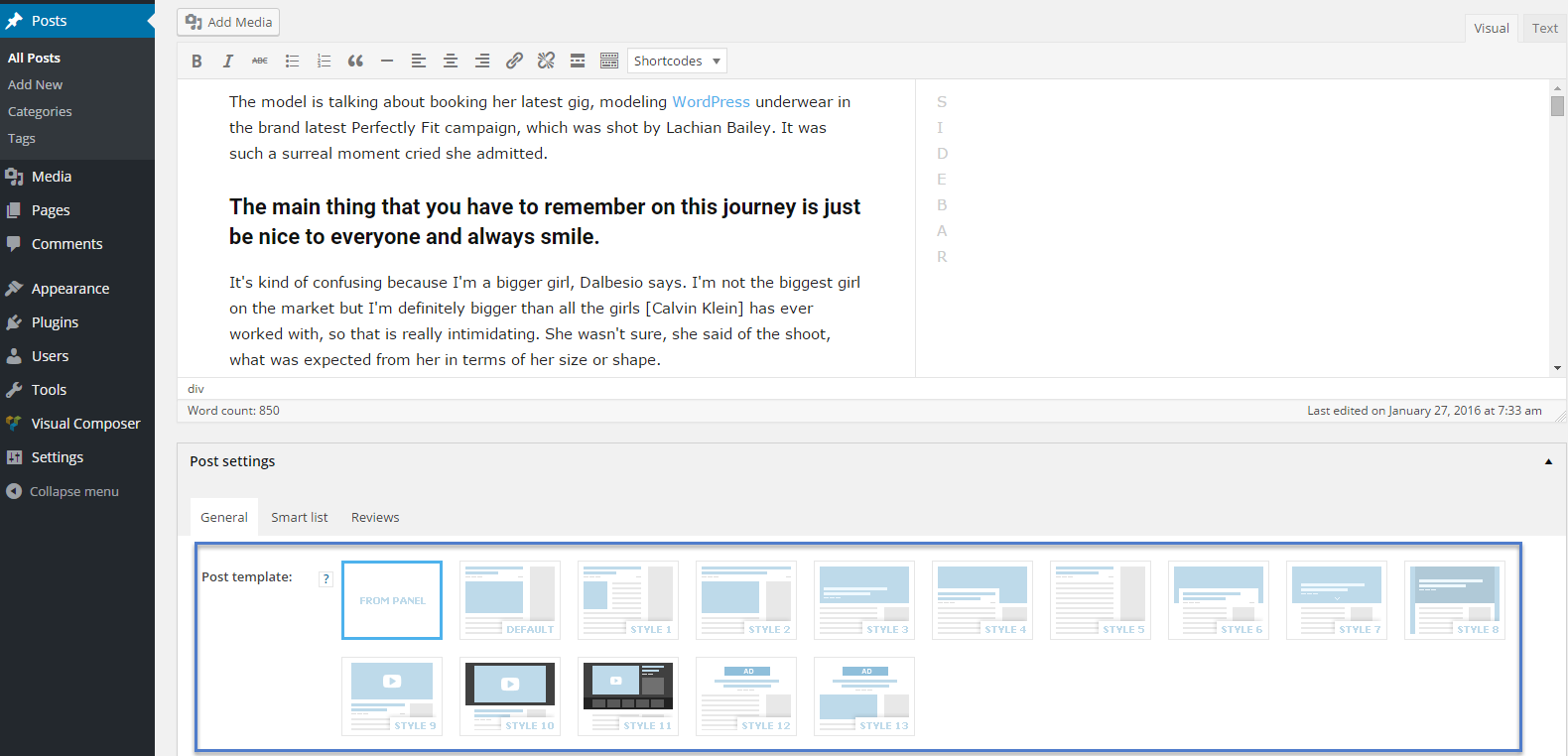
How can i make it visible again?
 Simion C.
 You won’t lose anything, updating the theme will not remove the website. All your posts, pages, theme panel settings are saved in the database.
Only if you made modifications to the theme files, these will be lost as the files get replaced.
Simply follow the steps from the update guide
– https://forum.tagdiv.com/how-to-update-the-theme-2/
It is good practice and also recommended to make a full backup before you update just to be safe.
 ericlevai
Hi,
I can’t get my site title and tagline to update. They’re correct in the “General” settings, and they look fine with other templates.
Any idea how I can fix this?
Thanks!
 deanysus
 Hey,
Just to update you, we’re now seeing a bigger issue:
the site occasionally goes down for about 1-2 hours. So far, this happened three times since we’ve updated the theme with the latest version. This has never happened before.
Me and the host/developer investigated the downtime issue, and they say it’s related to the theme update but they cannot figure out the exact cause.
I’ve removed the new theme updated and put back the previous version, and that immediately solves the problem. Adding the new theme update causes the site to go down again.
I’ve removed the new version again to keep the site up.
How do we go about solving this issue?
Thanks!
 G&TStaff
Question. We had some trouble after we updated to version 9, still not entirely sure what happen but he site crashed. They had a version 8.0 sitting around from a previous update so they were able to get the site back up for us but would like to go back to 8.7.5 but we no longer have that backed up anywhere. Is the older versions available anywhere?
 simchris
 Updated tip:
If you are using Google Chrome, you can now run updated ‘audit’ via console (press F12 key); which can show vulnerable versions of javascript libraries used by old plugins. For instance older versions of JQUERY are not secure!
In Chrome
press > F12
from tabs > “Audits”
check [x] best practices
-run audits’
 rothweller
 do you like other add-ons (news page ) in this kind of slider topic in the update ?
Thank You,
Catalin Hi Anton-a,
Please update the theme to the latest version of it and before this, make a full back-up to your database to avoid losing all of your data. Clear all the caches and check the results. Also, if the problem is still there, please send us an email at contact@tagdiv.com with your log-in information (wp-admin) so I will be able to provide a more accurate response. Include in this mail the link of this conversation so we can quickly identify you.
Thanks for your understanding!
Simion C. Hi,
I don’t know exactly what modifications were made for that, may have been in the theme javascript, not sure. The modified files are listed in the themeforest theme page below each release.
Best you update the whole theme however, not just some files. That could cause problems. Update by WordPress, by FTP or by patch (patch provided in the full theme package).
Thanks
Catalin Hello ChampLife,
1)Regarding log-in functionality, our theme uses the default WordPress functionality which requests adding the email first, sorry!
If you want to change the background image for log-in pop-up you need to add a custom CSS code. Try the code below and place it in Theme panel -> Custom CSS area.
.white-popup-block:before {

background-image: url(http://localhost/spitzu/wp-content/uploads/2018/09/2.jpg)!important;

}
2)The only functionality for Sign in/Join in Top Bar can be updated from here -> https://www.screencast.com/t/ZH3NdxlJp
3)This functionality is set up by default. It’s just an WordPress setting. Try to check it with a default theme and check the behavior.
4)Try to remove that plugin and check the results. All of the untested plugins should have to be removed if you want to achieve good theme results.
Thanks for your understanding!
 MOKANA
Having bad experiences in the past with major updates, I installed this on a subdomain and tested it. System Status report passes on all parameters. I installed multiple FULL demos and all I get is a blank screen with each demo. I have installed Visual Composer and made sure all Plugins are installed. Still no joy. I roll back to a default Word Press install and things work. Only when I go to Newspaper 9 does nothing work.
Calin Hi,
The issue will be fixed for the next theme update, and this will be as soon as possible.
Thank you.
 Chinguunmaad
Hello,
I know your theme has not tested Facebook Comments Plugin and i already did the Facebook Comments Topic. It was working before the update but it’s not working now.
Before i added the header code in header.php and added <div class=”fb-comments” data-href=”<?php echo get_permalink($td_mod_single->post->ID); ?>” data-width=”100%” data-numposts=”10″> to every loop-singles and it was working. Now it is not working. I did everything like before but it’s not showing.
Also i need to implement this code to my Cloud Template but RAW HTML or Text Column element is not showing Facebook Comment Box.
Please, you need to test Facebook Comments Plugin for your theme. There is lot of people who uses this plugin and really don’t want to change this codes every time.
