

 Edward Edward Edward
 Your theme:
Theme: Newspaper by tagDiv.com 2017

Version: 8.6 (rara)
Update your theme to the latest version.
The latest version is Version 8.7.4 – May 4th, 2018
The problem with instagram was fixed in ver. 8.7.3:
…
…
Edward Check text of your articles in the tiny mce editor in text mode, not in visual mode and remove any unnecessary formatting codes.
The text of the article is inserted by copying / pasting from the MS Word editor or a website for example?
Edward See Translations section in the Theme panel and change field “ABOUT US” to any other.
Edward Waiting for the theme update.
https://forum.tagdiv.com/topic/cookies-law-pop-up/
A theme update is planned in the matter of GDPR, it should be available soon. Please have a little more patience.
The update is currently in final stages. It will be released before the deadline, the team is working fast to provide this update as soon as possible.
Edward 1. Please keep in mind that theme has no infected. To be sure, you should re-download the latest theme version for Theme Forest and make a new clean install from scratch via FTP way because this is the subject theme method in this case (https://forum.tagdiv.com/install-via-ftp/).
2. Also read carefully this forum thread: https://forum.tagdiv.com/topic/traffictrade-malware-newspaper-8-1-all-updated/
Edward https://forum.tagdiv.com/topic/cookies-law-pop-up/
A theme update is planned in the matter of GDPR, it should be available soon. Please have a little more patience.
The update is currently in final stages. It will be released before the deadline, the team is working fast to provide this update as soon as possible.
Edward In User Profile check Mail field:

Result:

Edward https://forum.tagdiv.com/topic/cookies-law-pop-up/
https://forum.tagdiv.com/topic/cookies-law-pop-up/#post-233899 A theme update is planned in the matter of GDPR, it should be available soon. Please have a little more patience.
https://forum.tagdiv.com/topic/cookies-law-pop-up/#post-234075 The update is currently in final stages. It will be released before the deadline, the team is working fast to provide this update as soon as possible.
Edward Check this points:

Edward The theme Recommended (tested) plugins:
WordPress SEO – SEO plugin
WP Super Cache – caching plugin
Contact form 7 – used to make contact forms
WooCommerce – eCommerce solution
bbPress – forum plugin
BuddyPress- social network plugin
Font Awesome 4 Menus- icon pack, supported in the theme menus
Wp User Avatar – Change users avatars
Jetpack – plugin with lots of features *it may slow down your site
Cache plugin – install and configure: https://forum.tagdiv.com/cache-plugin-install-and-configure/
Please note that the developers do not provide support for untested plugins.
Edward Just delete code from required area: https://forum.tagdiv.com/header-ads-adsense/
Edward One more thing: to disable untested plugins (WP Rocket, etc.) and try again.
Edward Edward Edward From my side get pop up Facebook notification:
Warning: This Message Contains Blocked Content
Your message couldn’t be sent because it includes content that other people on Facebook have reported as abusive.
And by the way, your Facebook profile isn’t available: https://www.facebook.com/fourlook/
Edward Delete # in your link: http://instagram.com/all4gamingro#
Edward This links do not givin 404 error.
404 error for example give this link (on your site): https://soluzioneveloce.com/error
Firstly disable all untested plugins.
Edward 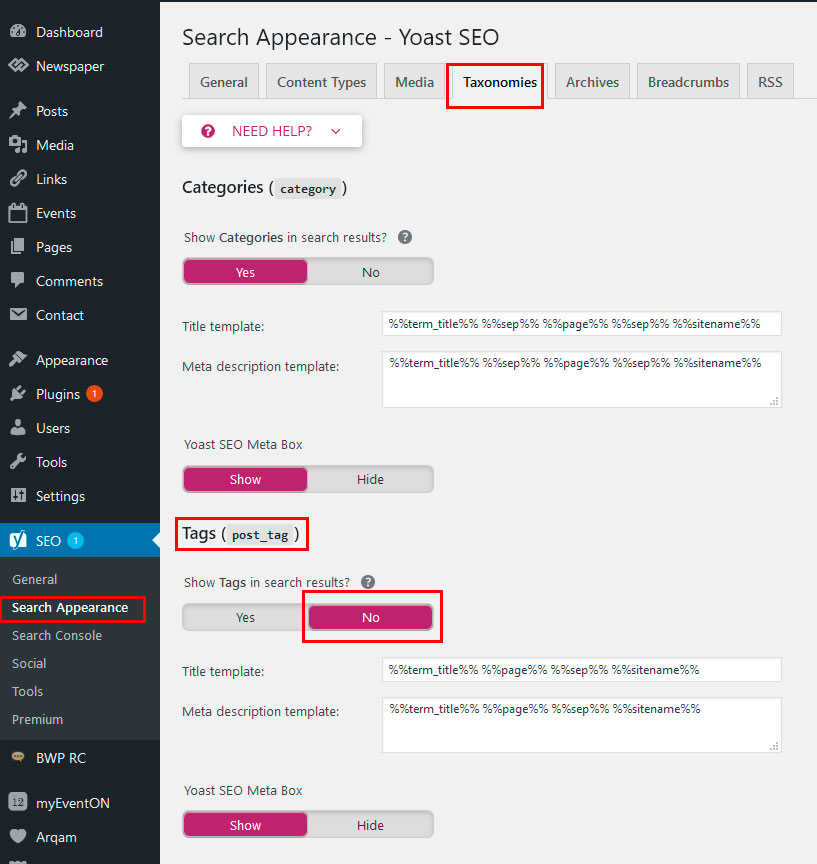
Edward Why is the main image on this page on my site pushed over to the left?
Give screenshot please.
On my side is all ok:

If you mean the sidebar on the right side, you can remove it in the article display settings.

Edward The body tag starts in the header file and is closed in the footer – http://screencast.com/t/FpNkgaj8q – http://screencast.com/t/ErFWd0OLO
Edward Try update (reinstall) the theme via ftp: https://forum.tagdiv.com/how-to-update-the-theme-2/
Edward Download archive from Envato account:

https://forum.tagdiv.com/how-to-update-visual-composer-plugin/
Edward Кстати, сегодня РКН снял блокировку с миллионов IP-адресов Google.
Всё должно работать нормально.
