

 Edward
 You should check your system status parameters: http://screencast.com/t/bpnfaltKJ and try to get them all green by following this tutorial: https://forum.tagdiv.com/system-status-parameters-guide/
Then try again.
Edward Edward Surprised that nobody mentioned anything that might be considered a proper security plugin.
For example, on our websites we use this plugin: iThemes Security (formerly Better WP Security) https://wordpress.org/plugins/better-wp-security/
Edward  Edward
 The links will inherit the theme accent color set in the theme panel. Or you can set the colors you want when creating the post
– https://www.screencast.com/t/MamMFckcJE
If you want to change the colors for all the links in the post content at once, use a code
– https://www.screencast.com/t/vryw7IhGC9a
.td-post-content a {

color: yellow;

}
https://forum.tagdiv.com/topic/need-help-for-customization/#post-218417
Edward May be best way – delete custom sidebar and create again?
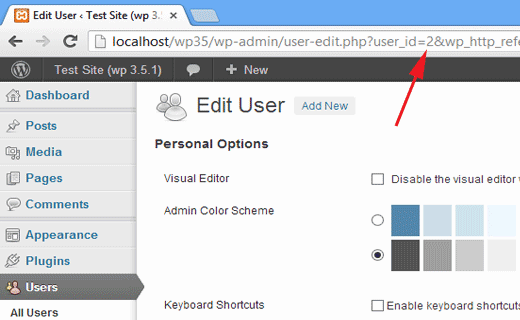
Edward A user ID can also be found by editing a user. Go to Users » All users and click on the user name. WordPress will open the user’s profile and you can get the user ID from browser’s address bar.
Edward The commentator must be logged into the system so that the counter correctly shows the number of comments.
Edward Update the plugins. The theme required and recommended plugins are included in the theme package inside the ../Newspaper-tf/plugins folder.
Edward Edward 

 Edward
 Only via plugins (for examples: https://wordpress.org/plugins/enhanced-media-library/ or https://wordpress.org/plugins/media-library-plus/ and etc).
But keep in mind that developers do not provide support for untested plugins.
Tested plugins which can be used without any problem can be found here -> https://www.screencast.com/t/LMtZ9dF90
Edward Example please.
Edward Edward Edward upd.
On your website (https://dreamingbig.rocks/) I see the installed version:
Theme: Newspaper by tagDiv.com 2017
Version: 8.6
After upgrading the theme to version 8.7.2, you do not have to recreate the pages.
Edward Built site, no child theme. No custom CSS. I chose a lot of settings in Newspaper Theme Panel.
Will I lose Panel settings if I update?
No. If you have not changed the core files of Newspaper Theme and used the settings only through the Theme Panel, updating the Theme will not affect any settings.
However, if you have a very old version of the Theme, you will have to re-create the pages after Updating.
Before each update, developers recommend doing a full backup to your database to avoid losing all of your data and then update the theme via FTP way because this is the surest method in this case.
Please check here -> https://forum.tagdiv.com/how-to-update-the-theme-2/
Read section A. Update the theme via FTP.
Edward Check your system status parameters to be increased according to documentation from here -> https://forum.tagdiv.com/system-status-parameters-guide/
Edward There are however plans to redesign how post pages, category pages, tag pages etc templates work. This will be a major change in the theme functionality in a future update.
======
Great news!!!
Edward Edward @wojo
https://wordpress.org/plugins/foobox-image-lightbox/
But keep in mind that developers do not provide support for untested plugins…
Edward Задавайте вопрос по-английски (я тут не работаю, просто вам подсказал совет выше) – разработчики, думаю, ответят…
Edward UPD. Попробуйте вставить этот код в Custom CSS:
/*  Post Content Body Text align Justify */

.td-post-content p {

    text-align:justify;

}
и проверьте его на сайте в статьях.
Edward А раньше выравнивание текста было “ширине”?
Разработчики WP убрали в редакторе кнопку форматирования текста по ширине: https://ru.wordpress.org/support/topic/%d0%bf%d0%be%d1%87%d0%b5%d0%bc%d1%83-%d1%83%d0%b1%d1%80%d0%b0%d0%bb%d0%b8-%d0%b2%d1%8b%d1%80%d0%b0%d0%b2%d0%bd%d0%b8%d0%b2%d0%b0%d0%bd%d0%b8%d0%b5-%d1%82%d0%b5%d0%ba%d1%81%d1%82%d0%b0-%d0%bf%d0%be/
Я думаю, что это можно исправить, внеся Custom CSS code в Тему. Разработчики подскажут.
2 Developers: can you please tell me what CSS code I should add to align paragraph text in articles across the width of the column, not to align in left?
Edward Что вы имеете в виду под словом “неровный”?
Выравнивание текста по левому краю?
Как текст помещаете в редактор?
