

 Edward
 To create a new page (check it carefully), then delete the old one, change the title of the new one so it can use the same URL.
Personally, I immediately opened the main page in the tagDiv Composer, edited and saved under the same name.
Edward 
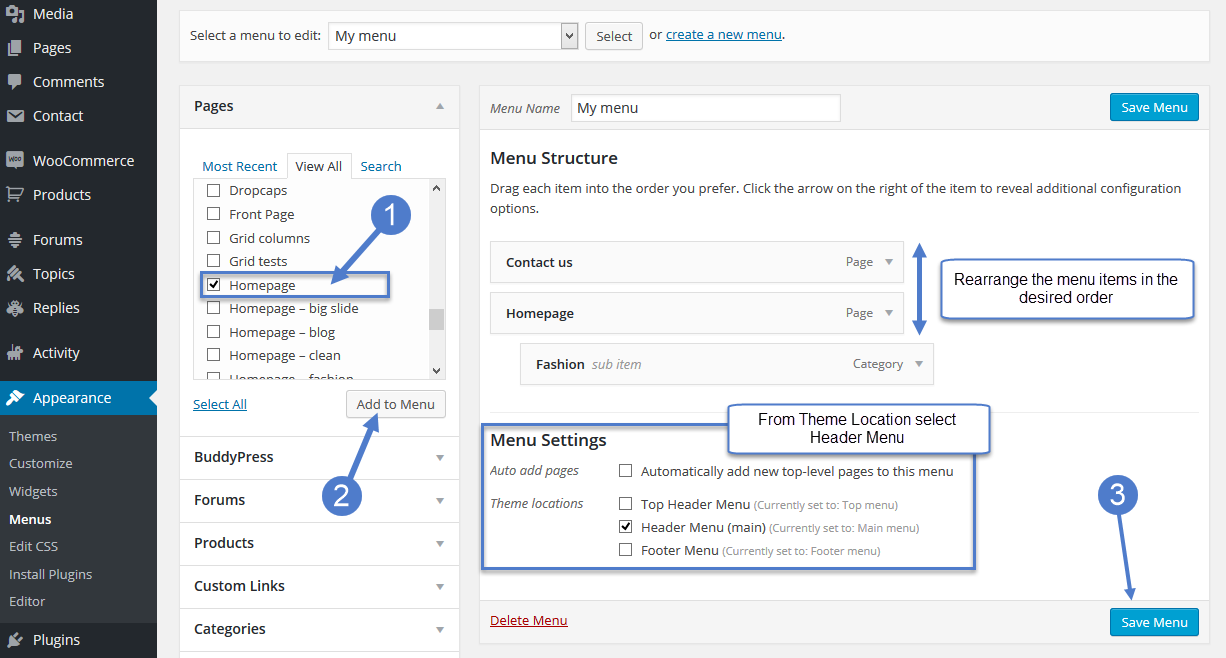
Edward Edward To customize your new Main Menu:
1. Start to add menu items from the left panels (Homepages, Pages, Links, Categories (in your case!))
2. You can manage your menus by using the drag and drop functionality and rearrange the menu items in the desired order.
3. After setting up your menu, scroll down to the bottom of the page and assign the menu to one of the 3 Theme Locations at the bottom. Select Header Main for Main Menu.
4. Click the Save Menu button
https://forum.tagdiv.com/main-menu/
-
This reply was modified 9 years by
Edward.
Edward How do you upload a photo for the author? Strange interface…
I have installed the plugin Wp User Avatar.
Try uploading the avatar directly in admin panel WordPress.
For example:

Edward > And do you have tutorial or course so I can get good at using the newspapaer theme?
See here: https://forum.tagdiv.com/tagdiv-composer-tutorial/
Edward Try this image (96х96px): http://s01.geekpic.net/di-SWV5Q3.jpeg
Edward Edward Your Facebook ID: https://www.facebook.com/envato ??

Read this manual: https://forum.tagdiv.com/tagdiv-social-counter-tutorial-2/
How to set up Social Counter
1. Facebook ID
-
This reply was modified 9 years by
Edward At the moment, I believe there are no plans to implements something like this. It could be available in future updates, but I could not say exactly if or when it will happen.
https://forum.tagdiv.com/topic/newspaper-amp-theme-2/#post-191089
Edward The social icons in the header and footer represent the networks you add in the social networks filed in the theme panel: https://www.screencast.com/t/IsOGy0Ge3HE
Edward Developers provide assistance only for tested plugins.
The only tested and recommended plugins to use with theme are these ones:
WP Super Cache – caching plugin
Contact form 7 – used to make contact forms
bbPress – forum plugin
BuddyPress – social network plugin
Font Awesome 4 Menus – icon pack, supported in the theme menus
Jetpack – plugin with lots of features *it may slow down your site
WooCommerce – eCommerce solution
WordPress (Yoast) SEO – SEO plugin
Wp User Avatar – Change users avatars
Registration button (How to enable the user registration) read this manual: https://forum.tagdiv.com/login-how-to-enable-user-registration/
Edward 
Edward Edward 
 Edward Edward
 По-английски пишите.
Edward > Do I still need to use that update patch @tagdivchick mentioned?
No. The most correct and safe way to update is update the theme via FTP: https://forum.tagdiv.com/how-to-update-the-theme-2/
Also remember to update the included plugins along with the theme, from the theme package.
Best way upgrade to wordpress 4.8.1 before upgrading the theme.
Edward 
Edward Edward Edward https://forum.tagdiv.com/how-to-update-the-theme-2/
Read section A. Update the theme via FTP.
Edward Check the theme system status section and make modifications to the WordPress and server parameters mentioned in this guide, if necessary
– https://forum.tagdiv.com/system-status-parameters-guide/
This will ensure the proper functionality of the theme and plugins. It could also be a solution if the theme panel is not saving properly.
Try making these changes, or ask the hosting to make them for you if needed. Then try again to make the settings you want.
Edward https://forum.tagdiv.com/topic/when-the-theme-is-activated-redirecting-to-other-sites-from-the-home/
P.S. My website “hacking.com” is being a hacker.
The situation is somewhat curious, isn’t it?
-
This reply was modified 9 years by
Edward 
