

 Josan
Josan Oh thanks. Didn’t notice that option of AMP only for mobile theme.
I have one More question. Is it possible to hide some of the block from tag div composer on mobile? I am using tag div cloud library and don’t want to show sidebar blocks on mobile.
Josan I had same problem. I solved it by removing static page for blog in wordpress setting > Reading > Posts page:
Josan Indeed we need more custom ad slots and if possible, also need an option to change the name of custom ad slot to identify it.
If we manually edit td_config.php file to add more slot than what about future updates? when I will update the theme file will be replaced with updated version and I have to manually edit again it to add custom slots.
I hope you understand.
Thanks
Josan Have same problem, I have activated many times AMP plugin but when page reload its still showing ACTIVATE as in your screenshot.
However, I think AMP is working perfectly on my site
Josan Thanks for reply, I am using WP rocket cache plugin with cloudflare.
I cleared cache and than deactivated wp rocket, then disabled cloudflare.
but still mobile theme was showing on tablet.
I have found this thread and reply by you
We’ve made some more checks and is look that after the last updates there is a problem with the mobile cache, this is apply on table, our developers will try to fix this problem as soon as possible, sorry for the inconvenience!
Thank you for your understanding!
Are you sure this issue’s been solved?
Thanks
Josan Thanks for reply. I have disabled mobile theme on that page and now responsive version of page load on mobile.
Thanks
I suggest you to update the plugin and add the feature to show sign up form by shortcode.
Josan Thanks for reply. Thats not problem. I want to hide featured image on certain the single post. By default I use and show the featured image on every post, but there are certain posts where I want to display featured image is only on homepage but hide inside the post.
Right now I have created a separate template from cloud library for such posts but I was thinking if its possible to add an option which allow us to choose whether we want to show/hide featured image.
Thanks
Josan same here. We need an option to disable/hide featured image.
Josan Still waiting for reply.
Josan Unfortunately this method didn’t solved my problem because I have disabled Facebook like button, posts views counts and author box on desktop so I can’t see them in mobile view. But they are visible when page load on Mobile device.
I suggest you to add this feature to future update so we can customize Mobile theme from Theme Panel.
I tried to use css to solve the problem.
.author-box-wrap {

    display: none;

}.td-module-meta-info .td-post-views {

    display: none;

}

.td-post-sharing-classic {

    display: none;

}
It solved the problem of posts view count and Facebook like button, It also solved the Author box problem but this css code hide Author box from all the pages, So Author box is hidden even from Author page. I want to display Author box on Author page and hidden only on single posts on mobile theme.
Josan just keep adding button until you get exactly what you want.
this is how it look. You can choose different style to for buttons to make them look like this.
-
This reply was modified 6 years by
Josan.
Josan My pleasure…
Than you can try adding multiple buttons in pagination style and add links to your blog pages 2, 3 and 4.
For example add button like 2, 3, 4, > and than add link to these buttons like http://www.example.com/blog/page2 to button 2 and repeat like this on button 3 and 4.
This is nice idea and i will try to implement it too on my site.
Josan Thanks for reply. I mean add another menu like mobile theme’s menu.
For example a menu like this on right side:
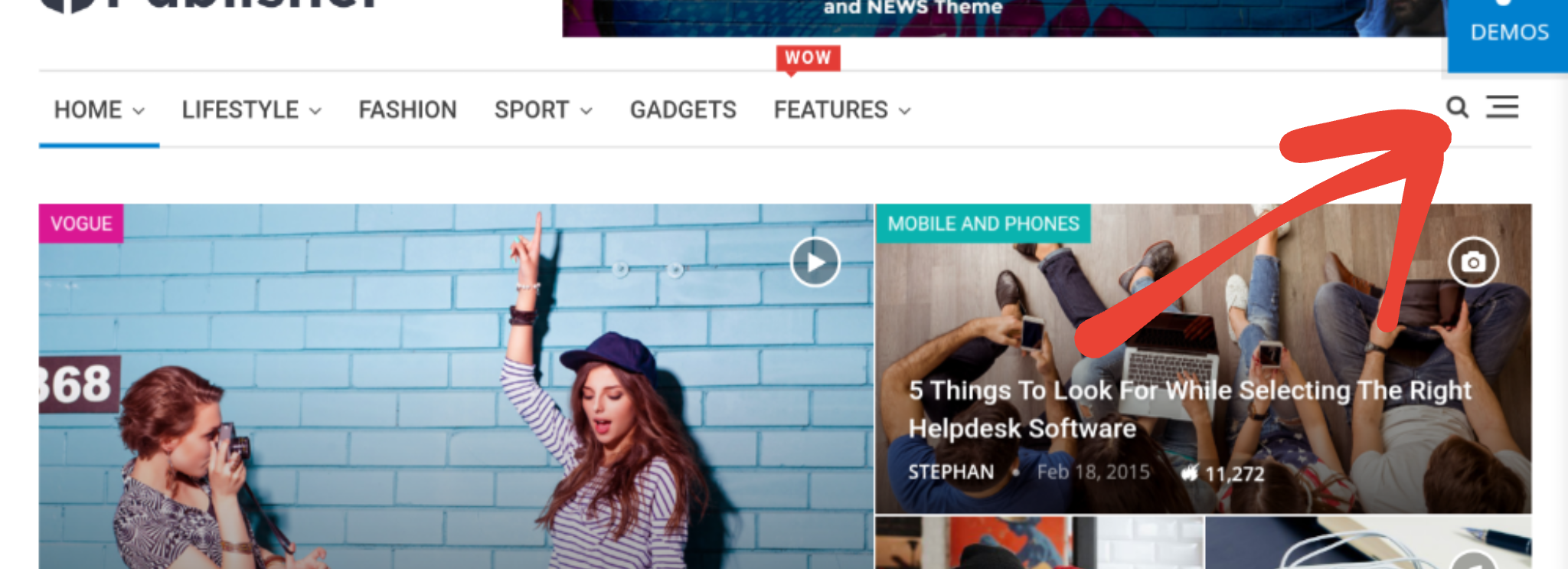
Which when clicked open a menu like mobile theme:
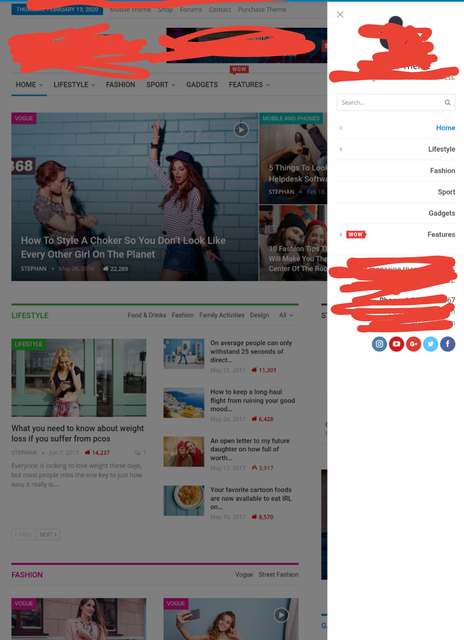
Thanks
-
This reply was modified 6 years by
Josan You can achieve this by using TagDiv composer. I did same on my site.
So here is what you have to do:
First create a Blog page to show your latest posts.
Than edit your homepage with tagdiv composer. In post loop section remove pagination and below the post loop add a button with link to your blog page. You can visit my site for an example.
Also you can customise your blog page in theme panel as you want.
Josan Problem is that I don’t have access to envato account as I lost login credentials. I have contacted Envato and here is their reply:
I want to let you know that I am forwarding your inquiry along to the necessary staff and we’ll be in touch as soon as we can.
So Let’s wait for their reply.
Josan I am waiting for a reply from Envato. I hope to get my account back, otherwise, I have to purchase theme again.
Josan I know it, but Easy Social Sharing plugin is also hosted on Envato Market. But After you activate plugin with Purchase code it is possible to update plugin directly from WordPress. It get updated like any other normal plugin. SO I was wondering if something similar is possible or will be possible in future?
Josan Thanks for reply, I have contacted Envato. Lets wait for their reply. However, Isn’t it possible to update theme directly from wordpress after activation of theme, like Easy social share buttons plugin?
Josan system Parameters are set correctly. I think problem was with Wordefence plugin. I removed it and installed All In One WP Security & Firewall
It working fine right now, but i face this problem again than i will contact you. But can you please recommand us which security plugin we can use with this theme?
Josan Do you want to show randome posts below the comment section like this? http://www.mysteryofindia.com/2016/04/awe-inspiring-shiva-temple-kakanmath.html
So here is guide:
1. create new page ( you don’t have to publish it)
2. Click backend Editer to use visual composer
3. Add Block 3 and select the options according to your preferences (like Title, category, Random posts or Latest posts)
4. After you finish adding the block click on Classic Mode to return on normal page
5. You will get a code like this [vc_row][vc_column][td_block_3 custom_title="" sort="random_posts" limit="3" ajax_pagination="infinite" ajax_pagination_infinite_stop="4"][/vc_column][/vc_row]
6. add PHP tag like this: <?php echo do_shortcode('your Visual composer code goes here'); ?>
7. Here is final code that we use on our site: <?php echo do_shortcode('[vc_row][vc_column][td_block_3 custom_title="" sort="random_posts" limit="3" ajax_pagination="infinite" ajax_pagination_infinite_stop="4"][/vc_column][/vc_row]'); ?>
8. Now you have to edit your SIngle_Template.php files. We are using template number 2,5,11 so We have added this code in these files. You can add this code in all the templates that you use.
9. Paste the code at end of file Single_template_##.php after this line </div> <!-- /.td-pb-row -->
and before this line: `</div> <!– /.td-container –>
</article> <!– /.post –>`
Thats it. it will work now.
Last thing add this code in Theme > Custom Code > Advanced CSS > Phones:
.td-pb-row {
    width: 100%;
    margin-left: 0;
    margin-right: 0;
}
It will fix some style issue in mobile phones.
-
This reply was modified 10 years by
Josan I Had similar problem. and Theme was unable to save so I have disable Wordefence Plugin and now its working. Can you please recommend any other security plugin which we can installed along with Newspaper theme?
Josan I want Previous Post to load automatically at end of current post like this website
Josan Visual Composer Shortcode display a list of all the Authors. But i want to display Author Box with his Bio below the post. If its possible?
Josan Probably some Caching porblem. Try disabling Lazy Load from Theme Panel
Josan Thanks Chris. I followed your suggestion and now my website is even more faster.
Thanks
