simchris
 Be sure you have the checkbox set for show on desktop, or show on mobile for it to be visible. Sometimes AdSense serves up a blank ad due to timeout from the server they grab the content from. Sometimes a new ad spot takes a bit for them to start serving. Sometimes an extra space or missing part of the adcode in the box will cause it not to work, so good to double double check those things.
Sorry if that didn’t help.
simchris Clear your caching plugin on your server; refresh your CDN if using one to expire old content and recapture current content (RTFM for how to use those tools if you have them).
Clear your browser cache (see help for web browser).
If it works one place on one PC/Mac, and then doesn’t work on another; that could be the local caching on that particular PC/Mac … sometimes the F5 key pressed can reload, but some like Chrome you need to go to the expiration settings to clear history/cache. Good thing to learn if you’re not already familiar with that.
If those were totally wrong answers … sorry about that 🙂
simchris Likely caching has code stuck from your old website.
Or, you have some kind of plugin conflict.
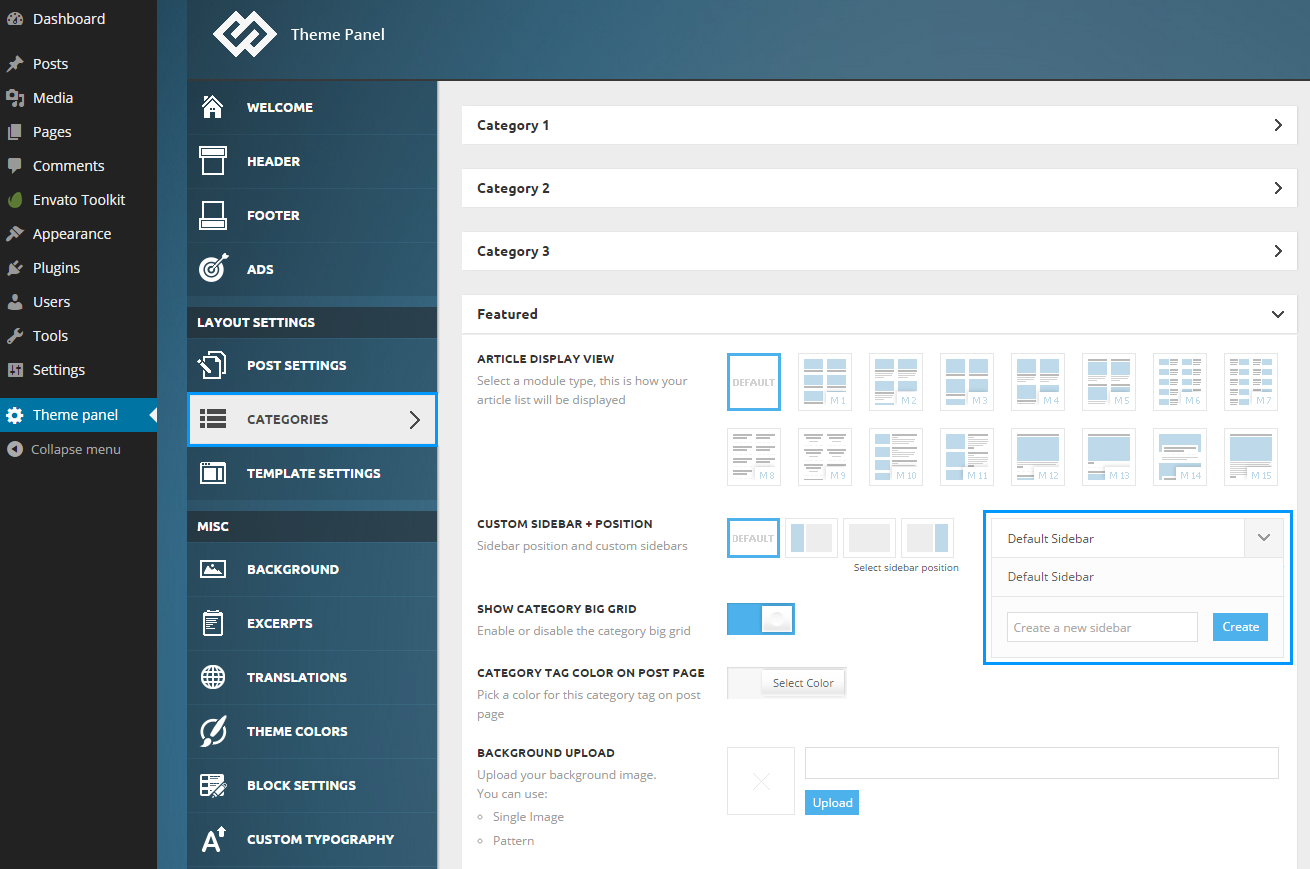
simchris Hi, create a new sidebar for homepage, then select that sidebar in your VC home page custom layout.
See theme docs for how to create new sidebar:
https://forum.tagdiv.com/wp-content/uploads/2014/10/theme-panel-catregories-sidebar-gen.png
simchris I don’t think the mega menu can work on the tip top menu, but dropdowns do if you set them up in your appearance > menus in the normal wordpress fashion.
I think the way the theme is setup, you can choose a different header style which swaps the locations of the tip to menu with the normal “main menu” (at least you can on Newsmag, and if not in latest version of Newspaper, should be in Newspaper 5 ‘coming real soon now’ !).
Not sure that helps. Just a comment for a Saturday where I should be working on something else but burnt out on that 🙂
simchris Presumably. I haven’t done that. I build my own content and don’t use the demo content for anything.
simchris Some sites can be blocked by FB’s API for doing “too many stats checking” — some of the junk “test my site for free” services out there. And FB often gets overloaded so stats being pulled via their API don’t always show the correct info. If you got to your FB page and it says 993 followers/likes… then that is what you have.
Obviously the plugin included with theme is pretty accurate, but it depends on whether the API is working on the other side or not.
Upshot – if the free testing sites can’t show accurate stats, then don’t use them 😉
simchris 1) turn off all plugins except VC
2) increase memory via the wp-config.php to 128MB or more (this is in addition to memory setting for php.ini in your hosting account – you need to do BOTH for WordPress to actually use more than 40MB)
3) be sure to turn off/clear all server caching to debug; turn off mod_pagespeed if using; if using CMS then you need to fully expire old files and refresh new ones.
4) create new page, save it; then EDIT it to add VC features.
Might help!
simchris Well, those are issues with WooCommerce, not the thene. So, you likely want to contact Woo for support, use their support forum, or perhaps join one of the great Facebook ‘groups’ for help with WooCommerce.
Obviously — those two errors are self explanatory. You need to contact your hosting provider.
For Visual Composer, perhaps try the full reset procedure from my sticky topic on moving to new template. Note my section on how to address the “500 error of doom” if the above suggestion didn’t work.
See bottom this post for how to recover from 500 error:
https://forum.tagdiv.com/topic/how-to-guide-to-moving-from-newspaper-to-newsmag/
simchris FYI …
you can try to do a full delete of the old folder via your hosting file manager;
then upload clean version via FTP — not the WP panel installer (!). Make sure your FTP software can “smart” upload txt vs binary files (some make you turn that feature “on”).
Make sure you have at least 128MB allocated to WordPress — which *must* be done from your wp-config.php file, in addition to the php.ini/panel settings in your hosting account.
Newsmag 1.71 *does* work fine with 4.4.2 if you are using that version vs the “latest” VC.
simchris You can add it at bottom of your single-loop.php template, or bottom of the post template you’re using.
For example I use loop-single-2.php for my default post template, along with single_template_2.php …
I moved the categories to right above my tags with a line break as they conflicted with Google News scraping the headline, but I did want them on the page.
SO, you could easily insert a shortcode your your HTML in that spot, such as here:
            <?php echo $td_mod_single->get_social_sharing_bottom();?>

            <?php echo $td_mod_single->get_next_prev_posts();?>

            <?php echo $td_mod_single->get_author_box();?>

	        <?php echo $td_mod_single->get_item_scope_meta();?>

[ your custom code ]

        </footer>
<?php echo $td_mod_single->related_posts();?>
[ your custom code ]
simchris You will need to remove the author meta tag from your header.php file and/or disable that option if using an SEO plugin like Yoast SEO, etc.
simchris 1) activating it with license code won’t wipe out your work
2) you can “export” your settings from bottom main theme admin panel.
🙂
simchris If you look through the recent threads here for Newspaper – often a good idea to know whassup with the theme — you might notice that they hope to have Newspaper 5 ready to go “really very soon now” … as in “almost done for real…”
And Newspaper 5 has the added features from Newsmag.
You cannot combine features from both themes any other way.
they have posted ‘teaser’ video here:
https://forum.tagdiv.com/topic/newspaper-5-3/
-
This reply was modified 11 years by
simchris.
simchris Yes! I did the same thing 🙂
simchris For basic minification of the CSS and possibly main js files, see my optimization guide.
Be aware that there is really no 100% way to fully optimize loading the above the fold content with any commercial theme like this one — this is because there are many options and functions being loaded in order to render the page at all, and to provide folks to create totally different designs.
Many articles have been written online about getting a perfect score with PageSpeed and WordPress and that requires custom building a theme from scratch and setting up regions where CSS and js are loaded conditionally and in series based on the content sections. Very complex and outside the scope of commercial themes.
Limiting things like mega menus can help, making sure any external resources load via async (we used to use addthis for social buttons on our sites and had to ‘hack’ that to add async loading of their js, because they were too stupid to do it with one line of code in their WP plugin).
Often to get the best “real world” score for your site, you need to disable any/all things which load externally (ads, etc.) and then test that. Optimize. Then switch on external things, optimize “if possible” and then realize the “real score” doesn’t count the Google ads stuff.
You can’t control caching of external elements (time to live), or minification of external resources. With Google fonts you can load the CSS locally in your own style sheet, then simply “draw” the fonts from their CDN. Now that “Roboto” is open source, one could in theory even load that font off your own server and bypass Google entirely. Or just use “web safe” fonts, to eliminate any external font loading.
For the above the fold render blocking blah blah. If your mobile score is above 85 you’re fine; if your desktop is above 90 you’re fine. But there is a notable “tuning” process to this, and again — it’s almost impossible to eliminate the “render blocking” or “above the fold stuff” entirely with *any* commercial theme.
Not sure any of that helps… just some feedback on my own suffering using commercial WordPress themes, and also building my own bootstrap 2 templates which are running our main business portal (using .shtml and custom page builder CMS; not WP).
simchris Often it’s easier to find a plugin for building an author page with all the options to query dbase, then simply drop the shortcode for the plugin onto a normal page you build like /authors/
At least that is what we used to do …
Chris
simchris You can’t cache things hosted on other people’s websites.
So none of those things you mention can be cached.
Welcome to stupid Google PageSpeed Insights 😉
(They penalize you for their own sites in the “rating,” but not in the real world.)
I personally “tune” my sites, with the ads disabled.
simchris You basically delete old plugins, install new ones. All plugins are updated this way; you never “over-write” plugins. You might try my “how to move to new theme” sticky post 🙂
simchris Yes, you need the versions of plugins which come with newspaper 🙂
simchris Heh… I have totally “been there” — so sometimes my “guesses” are not totally wrong 🙂
Glad I could help!
(It is pretty stupid for WP to “default” to 40MB of RAM; which presumes everybody is on a $5 month account; and only way somebody would even know to change that is by reading the “how to edit your wp-config file” docs on the WP official ‘codex’ — and I totally missed this myself until I started doing a WooCommerce site. And then I felt kinda dumb about missing that one line, thinking the server settings would solve it — but noooooo……).
simchris I think it’s because a finite number of people want to share that info and/or are perhaps not interested, or just lazy/busy. Also some folks come/go, switch to Newspaper theme, or perhaps another theme altogether. Funnily enough this cane up again a few days back, also:
https://forum.tagdiv.com/topic/list-of-sites-using-newsmag/
I do think it would be neat to have a “showcase” topic but I don’t think anybody has the time to keep updating that, checking to see if sites still using the theme, etc.
Most folks are more anxious to solve a problem, than necessarily see what somebody else is doing. I tend to follow my own way and don’t look at others’ sites as a research thing, and the demo does a fairly decent job showing possibilities.
I think if 100 people participate it might be worthwhile; if 10 people do, not so much.
Probably somebody with a blog about WP could do a “10 awesome sites running NewsMag” or something like that.
If somebody were so inclined, they could (ahem) troll through all the posts where folks are pasting in their site URLS, compile that list then do a post with a list of sites by name, language and URL, and request THAT be made into a sticky … so, I encourage you to possibly do that if you have the time (I sure don’t).
If this were my theme, I admit I’d be inclined to do something like that.
simchris Welcome! Note there are already couple of threads for this topic and they eventually stop getting updated at some point:
https://forum.tagdiv.com/topic/showcase-of-sites-using-this-theme/
Oddly, why didn’t you include link to YOUR website if starting a new topic on showcasing sites using the theme ? 😉
Some of mine, if curious (all part of same network hence “sameyness” so won’t post them all …)
CaliforniaNewswire.com

eNewsChannels.com
simchris Might be running out of memory.
Try adding line in your wp-config.php file to increase default memory to at least 96MB, and preferably 128MB.
See my sticky post on site optimization for help on how to do that. 🙂
Line 14 basically is just a line saying to “use a theme” …
define('WP_USE_THEMES', true);
simchris I don’t use child themes myself for two reasons (keeping in mind I’ve been building wordpress sites for 9 years now; both for our company and clients — and 20 years as of March 1, 2015 doing websites by hand):
1) it’s a CSS redirect; bad for Google, bad for pagespeed, and introduces some oddball gremlins with things loading from two places at once … seriously; have some weird gremlin? often it’s caching or child theme issue
2) often with many themes these days, the child theme gets updated along with the main theme for major security patches, feature updates; etc. (e.g., if you move to Newspaper ‘5’ next month, there will be new child theme — so, defeats the purpose of not editing the main files)
3) better to simply edit the main files and keep track of what you’re doing. This allows you to have fewer elements to keep track of overall and easier to back-up; easier to manage renaming folders for customization, etc.
Your mileage may vary, but that has been my experience. Especially if you use any kind of caching or systems like mod_pagespeed (as we do). Having a CSS redirect (where you’re essentially saying … load my CSS in one folder, but oh wait, NOW go load the real CSS from this other folder) — is NOT recommended by Google, but that is a basic precept of WordPress usage — started by WP, but not necessarily the best way to actually manage a site and content.
So, it’s up to you.
I don’t work here; it’s not my theme. I have been using Newspaper since Fall 2013; and this is just MY way of doing it. So, it’s only a “suggestion” on my part. Up to you. If you can live with some gremlins in how WP works, possibly pagespeed penalty from Google, and loading two sets of style sheet for the site every time the page is loaded … then enjoy. Nothing inherently wrong with it — but TIME magazine isn’t using a child theme when running WordPress; nor do I.
-
This reply was modified 11 years by