
 Vlad S
 Hello !
Please contact us via email at contact@tagdiv.com and provide the following:
– admin url and credentials
– cPanel url and credentials
– A link to this topic in order to identify you
Our team will take a look !
Thank you !
Vlad S Hello !
Please make sure that you do not have a plugin conflict, please deactivate ALL plugins except tagDiv ones, also if you are using child theme or cache plugin, deactivate them, clear all cache and try again.
Thank you !
Vlad S Hello !
We have investigated your website and everything seems to work fine. Please make sure that you do not have a plugin conflict, please deactivate ALL plugins except tagDiv ones, also if you are using child theme or cache plugin, deactivate them, clear all cache and try again.
At the moment the Support team is not 24/7 available. Please note that we answer the topics from Latest to Newest Monday – Friday from 08:00AM to 05:00PM GMT+2 So multiple replies to your topic will only make us to get harder to your topic.
Thank you !
Vlad S Hello !
Please make sure that you do not have a plugin conflict, please deactivate ALL plugins except tagDiv ones, also if you are using child theme or cache plugin, deactivate them, clear all cache and try again.
Thank you !
Vlad S Vlad S Hello !
Menu must be edited from Appearance – Menus ; Follow this tutorial in order to learn more about wordpress use: https://www.wpbeginner.com/wp-themes/how-to-create-a-custom-page-in-wordpress/
Thank you !
Vlad S Hello !
Please note that there is indeed a bug. You can’t see that the AMP plugin is active but the plugin is. This issue will be fixed in the future update.
Thank you !
Vlad S Hello !
Yes, you can add the code in ads – header ad. Or you can manually insert it in here: https://www.screencast.com/t/mN7A8UowNmXS
Thank you !
Vlad S Hello !
That depends on your website width. At the moment it appears that your width is 640: https://www.screencast.com/t/pfDWoGpZeFn
Thank you !
Vlad S Hello !
If you’re seeing only NAVER please make this adjustment in the tagdiv composer plugin:
https://www.screencast.com/t/HGX40TlcJgb
Then hit a save in the theme panel and then revert the code back to original, this will make the social icons appear properly again.
Thank you !
Vlad S Hello !
By using tagDiv Composer on each page you can create your own header and footer: https://www.screencast.com/t/owDHabxdLXZn
Thank you !
Vlad S Hello !
Please provide a link to your website in order to inspect.
Thank you !
Vlad S Hello !
Pleae note that creating a privacy and advertising page is not covered by the Newspaper theme support team. You will have to create your own design in this matter.
Thank you !
Vlad S Hello !
Please contact us via email at contact@tagdiv.com and provide the following:
– admin url and credentials
– cPanel url and credentials
– A link to this topic in order to identify you
Our team will take a look !
Thank you !
Vlad S Hello !
As I can see you have managed to fix this: https://www.screencast.com/t/RakdcjkwXu This can be achieved using the tagDiv Composer.
Thank you !
Vlad S Hello !
All you have to do is open the svg file using notepad and copy that code into header logo tab.
Thank you !
Vlad S Hello !
If you have doubts of giving your personal id you can use gmail confidential: https://support.google.com/a/answer/7684332?hl=en
Thank you !
Vlad S Hello !
Please make sure that you do not have a plugin conflict, please deactivate ALL plugins except tagDiv ones, also if you are using child theme or cache plugin, deactivate them, clear all cache and try again.
Thank you !
Vlad S Hello !
Please contact us via email at contact@tagdiv.com and provide the following:
– admin url and credentials
– cPanel url and credentials
– A link to this topic in order to identify you
– Your ENVATO purchase code
Our team will take a look !
Thank you !
Vlad S Hello !
Please provide a link to your website in order to inspect.
Thank you !
Vlad S Hello !
Unfortunately this option is not available with Newspaper Theme. Also we cannot provide support for untested plugins: https://forum.tagdiv.com/newspaper-theme-support/
Thank you !
Vlad S Hello !
We have investigated your website on mobile / desktop, resize but couldn’t identify any bug. Please post a picture of your issue.
Thank you !
Vlad S Hello !
Please note that TagDiv Composer does not work inside a post. Only on the POST template.
Unfortunately your request cannot be achieved without custom coding.
Thank you !
Vlad S Hello !
In order to configure the widget please follow our tutorial here: https://forum.tagdiv.com/weather-widget/
Thank you !
Vlad S Hello !
That is a suggestion from gtmetrix and google to use the perfect sizes but that will affect your website in other ways. Because using another thumb for mobile will create additional images on your website which will lead to more space occupied on your server.
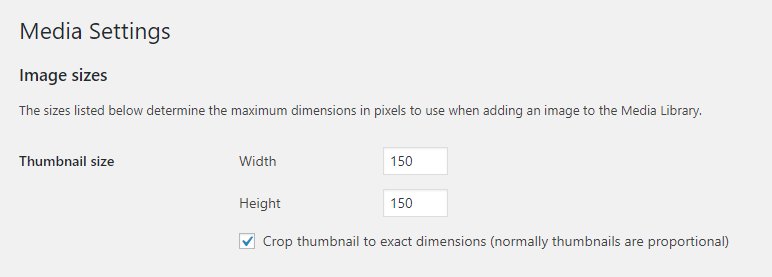
Most of the results from gtmetrix and google page speed are suggestions. You can add another size for your thumbs in wordpress here:
Go to your WordPress dashboard.
Navigate to the Settings > Media tab.
Look for the Image sizes > Thumbnail size section.
Change the default width and height of your thumbnails in pixels.
Thank you !
