
 Vlad S
 Hello !
I’ve just checked it but it looks the same. Please post a picture so we can see how it looks on your side.
Thank you !
Vlad S Hello !
Please contact us via email at contact@tagdiv.com and provide admin login, as well as cPanel or FTP if possible. We will take a look. Include a link to this topic in the email.
Thank you !
Vlad S Hello !
Hello !
Please contact us via email at contact@tagdiv.com and provide admin login, We will take a look. Include a link to this topic in the email.
Thank you !
Vlad S Hello !
I have reviewed your page and everything seems to be ok: https://www.screencast.com/t/S5S6pYicHLy
Do you want to have 2 tables side by side ?
Let me know if this was helpfull !
Thank you !
Vlad S Hello !
I have reviewed your page and everything seems to be ok: https://www.screencast.com/t/S5S6pYicHLy
Do you want to have 2 tables side by side ?
Let me know if this was helpfull !
Thank you !
Vlad S Hello !
If your coding skills are good enough you can edit it. Also I suggest you to first do the modifications on a local host or test server so you can be certain that you do not create issues.
Thank you !
Vlad S Hello !
Please use this CSS code: .tdb_search_form .tdb-search-form-placeholder {
display: none;
}
The code must be pasted here: https://www.screencast.com/t/J1Nxw5s5
Thank you !
Vlad S Hello !
1 – I can’t seem to find the red thing you want to edit: https://www.screencast.com/t/WrEVgid8a
2 – Yes, the header has an fade effect. That is not editable. You can change to another header if you want.
3. I will need a login to your admin page to inspect that issue: Please contact us via email at contact@tagdiv.com and provide admin login, Include a link to this topic in the email.
4. Unfortunately no, that will require some custom work to increase the size of it.
5. Please take a look at our documentation regardin the MegaMenu, i think you will find your answers here.
Let me know if this was helpfull !
Thank you !
Vlad S Hello !
Please make sure that you upload your pages in full size as you can see here: https://www.screencast.com/t/P3hnJFboOx62
Let me know if this was helpfull !
Thank you !
Vlad S Hello !
I have reviewed all of your pages and all the links are displaying properly. I’m sorry but i cannot seem to find the issue. Please point out a page or where exactly do you have your links broken: https://www.screencast.com/t/j67c0AVieC
Please create a test page and provide the link to me so i can inspect. Also you can set a permalink to your page if that’s the case: https://www.screencast.com/t/P3hnJFboOx62
Thank you !
Vlad S Hello !
Please make sure that you have set the Column to sticky as you can see here: https://www.screencast.com/t/da5z7cRq
And also make sure that you have set the same sidebar everywhere: https://www.screencast.com/t/XSkZHCCSzLs
Let me know if this was helpfull !
Thank you !
Vlad S Hello !
We have reviewd your page but everything looks perfect on our side. Make sure that your view is not affected by cache.
Thank you !
Vlad S Hello !
Please make sure that you have installed the Newspaper theme correctly and also make sure that all of our system requirements are completed: https://forum.tagdiv.com/requirements-for-newspaper/ If not, follow the steps found in the link in order to meet them.
Also make sure that you have installed the theme properly: https://forum.tagdiv.com/install-via-wordpress/
After installing the theme you should be able to activate the required plugins from the welcome screen with only one click: 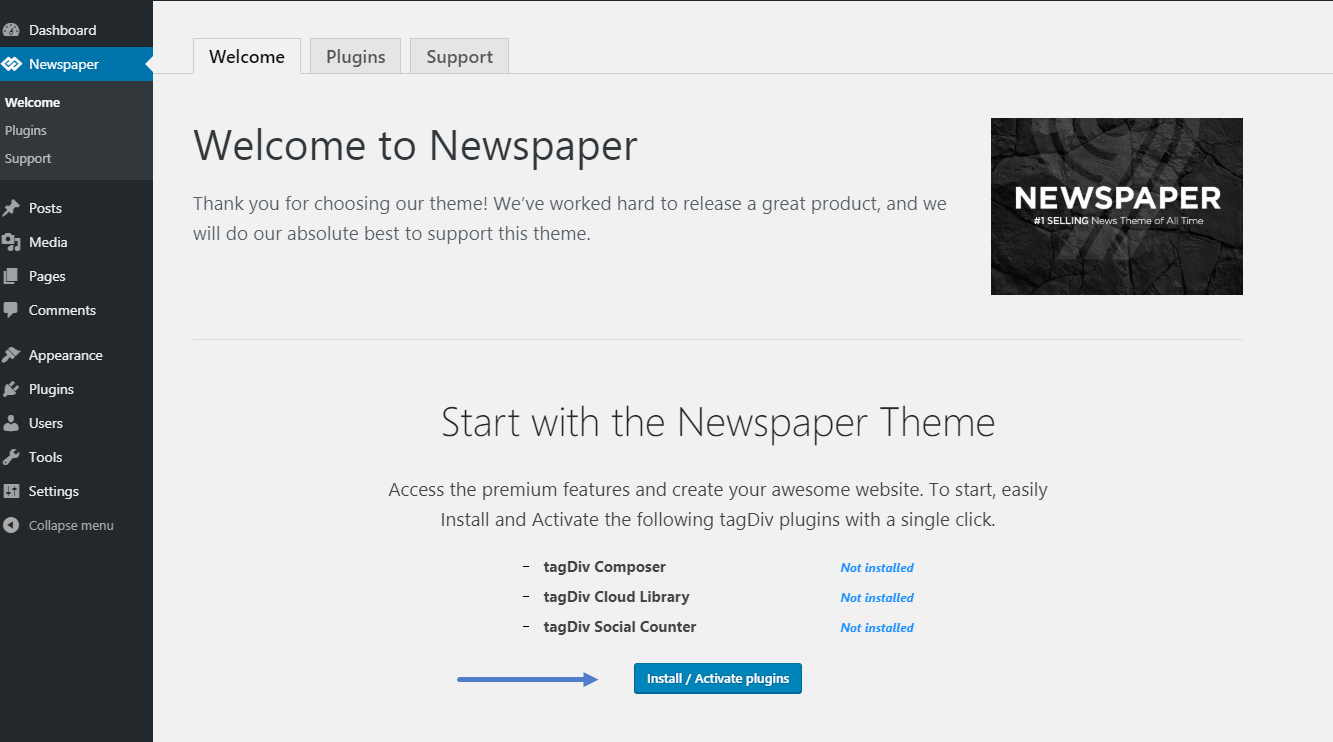
Thank you !
Vlad S Hello !
The fonts and more option can be edited by using the tagDiv Composer. Simply click on the block you want to edit and go into the STYLE tab. There you will see many modifications available for the block: https://www.screencast.com/t/okAi1MMPBt
It is weird that you have 2 exactly the same blocks and different fonts. Maybe that could be a plugin conflict. Try disabling all of your non-theme related plugins and see wich one creates a problem.
Thank you !
Vlad S Hello !
We have reviewed your pages and used the search box and everything seem to be ok. If you think the problem still persists on your side, Please make sure that you do not have a plugin conflict, please deactivate ALL non theme-related plugins, also if you are using child theme or cache plugin, deactivate them, clear all cache and try again.
Thank you !
Vlad S Hello !
In order to achieve that you will have to edit the Slider using tagDiv Composer. Simply click on the ROW button and go to ROW Stretch options and set them to the size you want. Take a look here: https://www.screencast.com/t/aaAByru9hx
Thank you !
Vlad S Hello !
My colleague answered on this topic: https://forum.tagdiv.com/topic/cannot-change-the-block-title-h4-in-h2-after-newspaper-9-7-update/
I hope this was helpfull !
Thank you !
Vlad S Hello !
Please tell me the number of the block or if it’s a homepage. I cannot seem to find the blocks that you are seeing in any of those. https://www.screencast.com/t/6xEdJUWP
Thank you !
Vlad S Hello !
Make sure that you are uploading the correct ZIP File.
Step 1 – Download the Newspaper files from your ThemeForest account. Navigate to your Downloads tab on ThemeForest and find Newspaper. Click the Download button.
Step 2 – On your local computer extract the ZIP folder called Newspaper-tf. After extracting files you will open the folder called Newspaper-tf where you will find more folders (child-theme, documentation, licensing, plugins, psd, etc.).
Step 3 – Locate the Newspaper.zip inside the Newspaper-tf folder (this is the theme you want to install).
Please take a look at our guide regarding the instalation of Newspaper Theme: https://forum.tagdiv.com/install-via-wordpress/
Thank you !
Vlad S Hello !
Without admin or cPanel we cannot identify any issue… We will have to see if you skipped something or there is something wrong.
Please make sure that you do not have a plugin conflict, please deactivate ALL non theme-related plugins, also if you are using child theme or cache plugin, deactivate them, clear all cache and try again.
Thank you !
Vlad S Hello !
We are sorry for the inconvenience !
You mean to add spacing like this example: https://www.screencast.com/t/37XGDB34dkBq ?
If so, please re-edit your page in Mobile editor and see if the problem fixes.
The Mobile Theme had no changes within the last update. You can also check to see if the new version conflicts with your plugins.
If you have done all this and the issue is still there. Please contact us via email at contact@tagdiv.com and provide admin login, as well as cPanel or FTP if possible. We will take a look. Include a link to this topic in the email.
Thank you !
Vlad S Hello !
Please contact us via email at contact@tagdiv.com and provide admin login, as well as cPanel or FTP if possible. We will take a look. Include a link to this topic in the email.
Thank you !
Vlad S Hello !
As you can see here it is ok now: https://www.screencast.com/t/Cu6GXjsi
Am I looking in the wrong place?
Thank you !
Vlad S Hello !
Mobile theme has a different non-editable design. The Mobile theme was specially designed for optimization on mobile devices. Unfortunately on mobile theme you cannot do much changes of design. If you want to have the same design as on desktop mode you can achieve that by simply disabling the mobile theme. So you will have to recreate your page in the Mobile Editor at the bottom of your page editor : https://www.screencast.com/t/tvLnK0Ae.
You can disable the mobile theme on certain pages if you want by going here:
You will have to edit your page from the Mobile editor of the page to fix the spacing. This is how your page looks to me: https://www.screencast.com/t/HgVM9URqqIEa
Thank you !
Vlad S Hello !
Please make sure that all the settings are like in our requirements, please follow the guide carefully
– https://forum.tagdiv.com/requirements-for-newspaper/
and please increase all requirements that are lower, and follow all steps.
WP_MEMORY_LIMIT try to increase it at least to 256mb.
Follow this topic for more informations: https://forum.tagdiv.com/topic/cannot-save-category-from-theme-panel/
Thank you !
