wpdiv
wpdiv That’s cool buddy and its works like charm via child theme here http://www.7gsolutions.com/download-like-2-discount-plugin-discount-based-on-facebook-like/
I love your theme as well as your support.
wpdiv I have specified wrong child theme CSS url have applied manual changes, here it is http://www.7gsolutions.com/wp-content/themes/WPDIV/style.css
wpdiv Does it means the file you specified does not supports child theme?
wpdiv Is this the bug in theme CSS?
wpdiv Hi lucian
Thanks for your reply. I have tried the same in mirror site http://www.7gsolutions.com and failed to achieve the results when i use custom fonts via theme options panel. So, i have declare the font face manually through child theme and overrided all the CSS selectors manually here http://div.wpdiv.com/wp-content/themes/WPDIV/style.css
Note : Your custom font CSS settings not up the mark.
1. When we use custom fonts via theme settings panel, your default custom fonts font face CSS not compatible with old browsers and its compatible with modern browsers only. Here is the CSS which generated through theme options panel of Newspaper theme and its not enough when we are using old browsers like IE8.
@font-face {
font-family: ‘Titillium’;
url(‘fonts/titillium-light-webfont.woff’) format(‘woff’),
}
2. Also Theme Options panel changes does not apply in front end when we are using custom font and it really frustrates us.
Here i request you to setup complete with website with custom fonts, you might experience issues.
Newspaper theme Way to go to enhance such features and i hope it will be rectified soon especially in next version.
-
This reply was modified 11 years by
wpdiv.
wpdiv Comment the fonts in functions.php to achieve your goal as illustrated in the below screenshort.
wpdiv And also custom font CSS not applying for home page and archive page post titles as well.
http://www.postimg.com/185000/home-page-post-title-font-184224.jpg
wpdiv When i read through the above article, i am really happy to have option to disable post specific ads via Advanced custom fields plugin to add some custom code in…
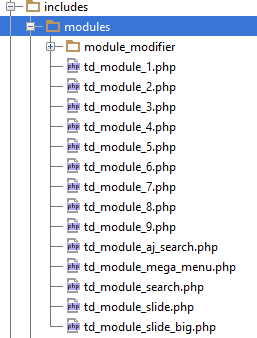
includes > modules > module modifier > td_module_blog.php
Newspaper child theme documentation https://forum.tagdiv.com/child-theme-documentation/ says that child theme supports for these files https://forum.tagdiv.com/wp-content/uploads/2014/03/04_modules.png
Does the above file supports via child theme?
Kindly help me..
wpdiv Thanks for your reply
1. Will you please list me the all selectors used in our theme?
2. Please help me to answer rest of the questions as well.
Expecting your reply
With regards
Selvam.S
wpdiv Please comment unwanted fonts as shown in the screenshot http://screencast.com/t/bP5jJ7DOv
wpdiv I am asking about to retrieve the favorite posts from forum.tagdiv.com
Not from the theme
Hope you might understand.
Expecting your reply
wpdiv your internet connection might be too slow and you have heavy content on home page. try to optimize it.
wpdiv Thats happened me too..
Clear your browser cache which resolves this issue.
Goodluck
wpdiv Change the permissions on the wp-content directory to 766. If you still have problems, try 767 or 777. Once your uploads are working, change the permissions on wp-content back to 755 again and check that everything still works OK.
http://codex.wordpress.org/Changing_File_Permissions
wpdiv wp-config-sample.php is not a part of newspaper theme and its one of the core file for wordpress CMS.
wpdiv Its a small contribution for this community.
And please help me asap if there is any ticket from me. 😀
Just a give more contribution to your community and make you impress. LOL
wpdiv hello fedor2333
Whenever you post the issue, please post the affected URL, that will saves lot of time to the support team.
http://wuyeteke.com/autorretratos-frutas-cristina-otero-7673/
First of all i will tell you what happen with the above URL, earlier when you save and published this post, you have used <—-next—-> page tag, so google bot crawls it quickly.
But you have removed next page tag after some time, thats what why its showing duplicate page URL in search index.
in future avoid indexing such paginated pages, Set canonical URL via yoast seo plugin, that will resolve this issue.
Once you added the canonical tag for the above URL, don’t forget to remove the duplicate URL via webmastertools.
wpdiv Thanks man
ummmmmmmmmmmmmmmmmmmmmmmmmmmmmmmmmmmaaaaaaaaaaaaa……..
Do you have any idea to add user rating along with existing review box. now a days, most of the themes comes with user rating along with admin rating to make it sense.
Any hacks?
wpdiv Hello lucian
Let me try your steps..
Thanks again
wpdiv I really thankful for your explanation, But the issue is bit peculiar.
When i select one category, issue seems resolved. But when i select two categories, then this happens.
Can i send you my WordPress login details via email to activate@tagdiv.com
I have some other issues as well. When i set points review, it breaks the theme.
http://i.share.pho.to/efbb4052_o.png
-
This reply was modified 11 years by
wpdiv Got the answers for first question not for the second question in this thread about review points issue.
-
This reply was modified 11 years by
wpdiv @nightwing2003
If you are really serious about blogging, you must learn some basics.
Lucian and chris both are very keen and try to explain you about to install newspaper wordpress theme. But i did not understand properly due to lack of knowledge, but that’s not a problem. Due faster evaluation of web, you must learn some basics. Otherwise, supports members unable to help everyone.
Anyway let me help you to troubleshoot the issue.
Mail me to hello@selvam.in and let me install this theme in real time via skype.
Goodluck
wpdiv You are welcome Rhino99 😀
wpdiv Some one please help me for the above issues?
wpdiv Also when i use point review, the bar extend beyond the page. Please check the screenshot