
- NewspaperWP Rocket and Newspaper Theme: Optimization Guide
- TutorialsFrom WPBakery to tagDiv Composer
- TutorialsOffset Feature
- TutorialsWhat is Ajax preloading?
 Bogdan B.
 Hello,
These sections can only be adjusted with custom css at the moment. Please provide an example of how you want them and we will try to provide the needed css codes.
Thank you!
Bogdan B. Hello,
Here is an example: https://www.screencast.com/t/pSNOj4aN
Then place the code in text mode like so: https://www.screencast.com/t/9enDQVeAYn3y
Result: https://www.screencast.com/t/Y6SZdIWgRWI8
Thank you!
Bogdan B. Hello,
By default that backgorund image should not be there in the arts and crafts demo. Here is an example: https://demo.tagdiv.com/newspaper_craft_ideas/tasty-and-easy-fruit-dessert-recipes/
If you added it custom, you will have to remove it.
By default this code removes the image from the related articles section:
.td-craft-ideas .td_block_template_6 .td-related-title{

background-image: none;

}
Thanks.
 ahujasahil
Hi All
My website http://www.AccountingCapital.com is currently facing a couple of issues with the newspaper theme, I will list them as follows;
1. When I go the menu bar and search something which is very common (keyword) on the website, e.g. try “journal entry” and press enter quickly (Don’t wait for the drop down), the site goes to Cloudflare offline page, very often. This is killing my audience please help me to either resolve or just make it a traditional search vs dynamic.
2. This issue is when search results pop-up after search results load they come up with the author name, I have already
removed author name from theme options & I don’t want author name to show up in search results.
Kindly help.
Regards
Sahil
 cezarsg
Hi, I’m migrating my site with Newspaper theme from dev to live, where it works with other URL, for example:
URL DEV: myportaldev.com.br
URL Live: myportal.com.br
But I find problems to update content inside pages made with tagdiv composer via MYSQL, because the content has strange code where a can’t select and update with sql commands. I can’t select all contents using my URL dev to update with new URL.
Could you help me?
 Anonymous
Hi,
1) I would like to hover the custom titles at my page http://www.next.blue/diensten. I’m using header template Block Header 7, Title background color #ffffff, Title text color #212121 and Accent hover color #00b0ff. What’s your advice?
2) The distance between main text & social icons & author text / date in my posts looks fine at my laptop. However on mobile the icons are not centered between the text & author / date. Please check: https://next.blue/2018/03/19/takalani-over-zijn-noodlot/. How to fix this?
3) How to change the title color of the Mailchimp Sign-Up Form Widget? Please check my sidebar at https://next.blue/2018/03/19/takalani-over-zijn-noodlot/. I would like to change the black title color of “Ontvang onze nieuwsbrief” into #212121.
Thanks a lot!
 mitechnews
 Hi Chris,
Does the example function code work for both desktop and mobile RSS feeds? or do we need to add something for mobile?
Thanks for your help.
 Lian
LiantagDiv AMP and Mobile plugins make my site extremely slow. Its worse on wp-admin area, it can merely load, sometimes it freezes. My site was loading fine before I installed the mentioned 2 plugins.
Is there a way to use these plugins without compromising site performance?
Thank you in adavance
 truth
truth Hello,
Please try with a video which doesn’t follow o-embed standard.
Example of website not working with this theme: http://www.dailymail.co.uk/
Take a video on this website and try to embed it on your theme.
-
This reply was modified 8 years by
truth.
 Simion C.
 Try as I suggested, create a page and use a theme block or element, use Visual composer as you are using now but place a theme block. Check to see how that loads in comparison with the current homepage. There should be a difference in favor of a theme block or grid for example.
 sanotes
Hello again.
1. Possible or not, to output a picture, which at the beginning of post in the excerpt? Or do I need to put a picture for each post in the featured image ?
2. I have added a special visitor counter of website in the CUSTOM HTML section. The counter appeared at the bottom of the page. Is it possible to add somewhere else. For example where FOOTER COPYRIGHT or FOOTER TEXT?
https://www.dropbox.com/s/i8eysj566kqr4g1/footer.jpg
3. In the theme settings in the section GENERAL theme colors, I can change the color of all links, which also affects the the headers of the posts and buttons “Read more” and buttons up. How do I set the color of links for these areas?
https://www.dropbox.com/s/r65qhqz4pvr38fz/link-color-posts.jpg
4. How can I change the quotation block in the comments? https://www.dropbox.com/s/f6ye0ab26x66zr6/blockquote.jpg?dl=0
Original link to article – http://sanotes.ru/comp-dlya-ofisa-2016/
My settings in Theme Fonts\Post Settings – https://www.dropbox.com/s/5ynnv1a9624ysp9/blockquote-settings.jpg
 kourkos
 This happens only in beauty theme. For example to other themes happens this 
my site is wikiherb.gr
Simion C. Hi,
There is no restriction for embedding content, even simply pasting the links will work. Some examples here (for Instagram and YouTube)
– https://www.screencast.com/t/dYfOWkyr0
– https://www.screencast.com/t/x81B2Z0hLAJn
– https://www.screencast.com/t/PsDhM9g5zU
– https://www.screencast.com/t/yZcuVwKgsR
There are no restrictions in the matter, it will work according to WordPress capabilities
– https://codex.wordpress.org/Embeds
Simion C. Indeed, for example you can first sort the users by author, then while hovering their names you can see the ID
– https://www.screencast.com/t/YmdomtJDN
Bogdan B. Hello,
Please provide a link to your site so we can inspect it and provide an example of what this space is. Most likely you are referring to the top padding of a page. If this is the case, please use this forum topic:
https://forum.tagdiv.com/topic/remove-the-blank-space-between-header-and-the-first-block/
Thank you!
 Catalin
 Hello crazyheart,
First of all, please notice that plugin has not been tested with our theme and also, we cannot say for sure if it will work or not with the theme, sorry! You should edit the post templates if you want to change that section. For example, if you are using the post template style 1, you should edit the loop-single-1.php from here -> https://www.screencast.com/t/TzVyAEpZcp
Thanks for your understanding!
Catalin Hello MrKeerthan,
Please keep in mind that there is talking about two different analytics code. You will need to have another analytics for AMP version. Please check here -> https://www.ampproject.org/docs/reference/components/amp-analytics
Thanks for your understanding!
 NexusFred
 Hello,
You can find it in your WordPress user panel
http://www.mywebsite.com/wp-admin/user-edit.php?user_id=2
or in your WordPress posts edit panel
http://www.mywebsite.com/wp-admin/edit.php?post_type=post&author=1
 pankaj221
i have done all that is being told at https://forum.tagdiv.com/tagdiv-social-counter-tutorial/
However https://developers.facebook.com/ is somewhat different from what is shown here and as a result we see many new options like –Status: In Development ( turned off) and asking many more options like privacy policy url and much more . I have integrated the setting at my theme but is not pulling data from FB page that is linked to it ( fans ) Can u help with updated settings ??
 Meavita
Good morning
I have to enter this code for background advertising .. where should it be added?
<!-- Rich Media (Overlay, Interstitial, Skin, FloorAd) eADV.it -->
<script type="text/javascript">
(function() {var id = 'eadv-3-' + Math.random().toString(36).substr(2) + (new Date().getTime());document.write(String.fromCharCode(60,478)+'cript async="async" defer="defer" type="text/javascript" id="' + id + '" sr' + 'c="https://www.eadv.it/track/?x=178-3e-0-6-78-1x1-ea-410&u=ntaip&async=' + id + '&ov-open=event">'+String.fromCharCode(60)+'/sc' + 'ript>');})();
</script>
<!-- Rich Media (Overlay, Interstitial, Skin, FloorAd) eADV.it --> brenbrinkman
I want to make my header constantly change to 4 different Colors (See example : https://www.youtube.com/watch?v=amRDYrLHwpI)
I know this is not possible in the theme panel. But I was wondering if it is possible through css or html? And even if it’s possible. Would it effect the speed of the website dramatically?
Thank you!
 PornoPlague
Hello. Hope all is well with you in advance.
So. Okay. I don’t normally make it a habit to go around telling random people about my autism. But I have autism. Not as an exaggerated metaphor for the sake of example. But like the real diagnosed kind. I only say this to you because I can be a little overwhelming in my explanations and usually the problems I’m facing with these types of things that I’m about to go on to explain are usually simple but for some reason I can’t wrap my head around it. And to make matters even more complicated; I have little to no experience with building websites or coding or… Even much technology in general. So please bare with me through this. And thank you.
All that being said; there is SOMETHING wrong with something. With my very little experience on top of not having learned the WordPress dashboard all that much, it’s even hard for me to differentiate between what is what. Like ah, I’m not sure what is and are not the generic-default WordPress options as opposed to the Newspaper theme options I purchased and doubly; where there Newspaper theme options and aspects end where the included plugins that came with the Newspaper begin. If that makes any sense?
Point is; I’m not sure wherein my problem is. If it’s because of one thing or the other basically. No idea. And for all I know, it’s not an issue at all. It could be something I did? Or maybe even some box I need to tick.
I’m going to include here an image as the first example of this “issue.” (Including link also in case the image option can’t pull it from Imgur)

Issue(s) #1: As you can see in that screenshot of my website preview; above the blue bar there is an empty space that matches the color of the rest of the background. Is there any reason why the top/blue navigation bar isn’t connected and sitting into the top of the website? Why is there just that open grey area? And if this isn’t an ‘issue’ persay; then just simply, how would I go about accomplishing that? Because I can’t seem to find a way to do so.
And for the record; I did play around with the customization options and theme panel for a couple of days before coming here to the forum with this question.
I’ve tried re-installing the theme.
I’ve tried disabling all plugins.
I’ve tried different demos.
It doesn’t matter which one is used, I always have this same blank space at the top and the navigation bar won’t fit in there for some reason.
Here are a couple more examples.
W/The Default Newspaper Demo
https://imgur.com/a/naNs9

W/Crypto Newspaper Theme (This is the original demo I tried using and playing with.)
https://imgur.com/a/mXKBT

I eventually found and tried using a separate plugin for custom headers just to see what the result would be if I did so. And so here is one more screenshot using the Crypto demo with a custom header.

But as you can see; now it’s created an empty space above and below the custom header. So with or without that plugin, or any other number of customization I can’t seem to fill in the blank space.
Issue(s) #2: Correct me if I’m wrong; but if I’m not mistaken then after installing one a Newspaper demo w/content/media included; the resulting install should then look exactly like the preview of the demo that was installed, should it not?
Mind you. In all of the above screenshots – they were taken right after freshly installing the particular demo. And that is the exact & literal result. Even when clicking through the different links in the navigation bars I am just shown empty white pages. It seems as if when installing a demo the only changes that take place are those there at the top. Perhaps this walks hand in hand with whatever issue is causing the empty space at the top of the page?
Issue(s) #3: As I mentioned above, the original Demo I tried experimenting with was the Crypto demo. And so in the exact same frame of time I took the above screenshot; I also took this next one. This is what it looks like when I go to ‘Customize’

I’m assuming that is the way that the headers and navigation bars are supposed to blend together? Which is exactly what I want and what I’m asking for here. However; whenever I look at the actual website I get the empty spaces problem. AND it’s probably worth mentioning that I don’t see any of the front-end options to customize. Like where those top blank spaces bars show.
However; I did find that when I change Homepage settings from ‘static page’ to ‘your latest posts’ then this happens.
Example:
https://imgur.com/a/hLrDy

Now, that’s all fine and well and everything and it looks to have solved my problem. It even looks fine as a non logged-in user. But I still believe there to be an underlying an issue somewhere that needs to be fixed before I dig myself into too deep a hole. The reason I think this is because when trying to use the custom banner plugin option; this happens again;
Example: As shown in this example; there is still a blank space bar being created at the top of the page.
https://imgur.com/a/0YSNd

Issue(s) #4: And perhaps this is also part of the same issue(s) above? But there is no question to there still being a problem because there is an obvious error occurring here for whatever the reason(s) are.
When I go to ‘Pages’ and then click and attempt to edit any of them with ‘TD Composer’ I am greeted by the following error message.
“Errors happened during tdcIframeData.init() -> bindViewsModelsWrappers()!”
And here is the screenshot for reference.

I have that error message and the page never finishes loading; rather it just keeps going round and round. Nothing; none of the options are clickable and so there is literally nothing I can accomplish on this page/editor.
I did Google that specific error and I went through quite a few pages and forums; including even a few here on this support forum. But the few answers and suggestions I read that I did understand and tried implementing, did not solve the problems. And all the other answers/suggestions I just simply did not understand at all how to employ due to my lack of knowledge and skill in these types of things. So please… Explain this to me as you would to a child, aha.
What is the problem or what did I royally screw up? And how do I fix it?
 Edward
 Be sure to use the latest version of the Theme – 8.7.2.

I think the style 9 is not able to display social networking icons.
This style has 3 sections. It’s up to you to decide what content will be displayed in these widget columns.
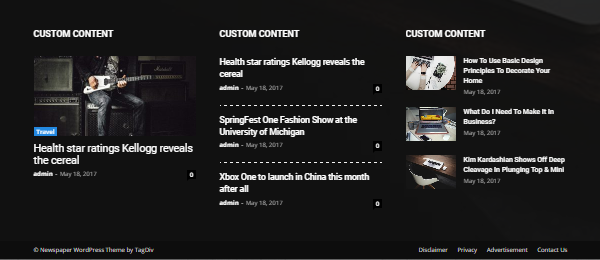
Try to use style 2 or 3 for example.
 skparenting
 I have deleted and reinstalled the theme.
I have deleted and reinstalled tagdiv composer & multipurpose plugin.
I have tried deactivating all the plugins but in vain.
System Status Parameters are also fine.
Still I am getting the same error.
Need your urgent response.
 MrKeerthan
Hello there,
I use tagDiv AMP plugin, should I create a separate Google analytics tracking code for AMP of shall I use the same code which I added in Theme Panel → Analytics



