- ApiPractical example – How to add a new Block and Module
- Apitd_api_top_bar_template::delete
- Apitd_api_top_bar_template::update_key
- Apitd_api_top_bar_template::update
- Apitd_api_top_bar_template::add
- Apitd_api_single_template::delete
- Apitd_api_single_template::update_key
- Apitd_api_single_template::update
- Apitd_api_single_template::add
- Apitd_api_footer_template::delete
- Apitd_api_footer_template::update_key
- Apitd_api_footer_template::update
- Apitd_api_footer_template::add
- Apitd_api_smart_list::delete
- Apitd_api_smart_list::update_key
- Apitd_api_smart_list::update
- Apitd_api_smart_list::add
- Apitd_api_thumb::delete
- Apitd_api_thumb::update_key
- Apitd_api_thumb::update
 Camy
CamyHi – I FTP the ‘Newspaper’ folder up onto the server and it over writes the files etc. as anticipated – hovever the site & admin then goes to a white page… restoring the backup restores the site. Is 4.2 to the latest version too big a jump?
 Catalin
 Hello kdannay,
If you want to make these changes, notice that you should edit the theme core files and make move the function which displays the tags in the place you want. For example, if you are using the post template style 1, you should edit the loop-single-1.php and move the following function, like this -> https://www.screencast.com/t/LjPnecET
Also, I have inspected your website and I saw that you are using such a plugin for your Related Articles for posts -> https://www.screencast.com/t/RFiWa9KAKsVF The hint was done and you have to make later changes yourself because we cannot provide custom services at the moment, sorry!
Thanks for your understanding!
 jmark4455
Currently the big-grid and block sections only display the title of the posts. How do I make it so the sub-title or short excerpt of the post is displayed as well? An example of this is Pfizer.com
Thank you
 steve83
 It’s mostly working now but still having problems
Some images are still rendering wrong. For example this page:
http://www.cancuncare.com/tours/xcaret-tours/
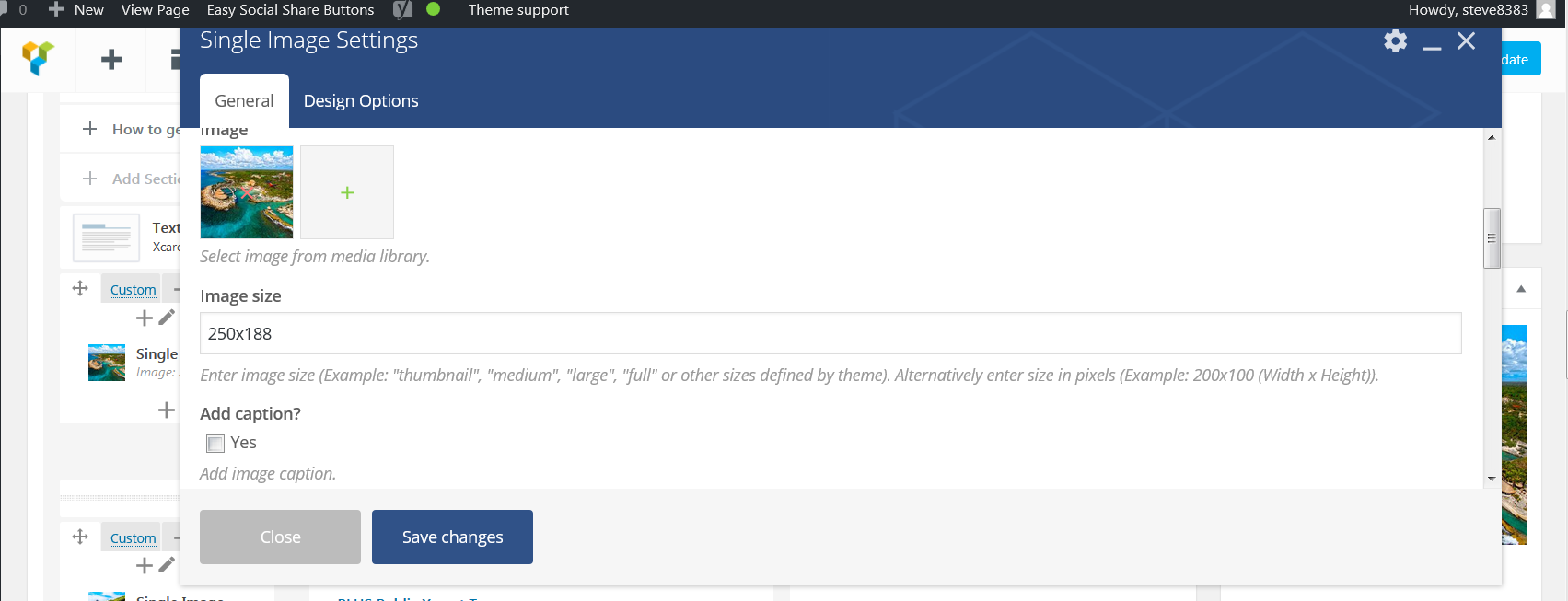
The images are supposed to be thumbnail size 250×188 and this is what is set in the single image setting (see screenshot http://www.cancuncare.com/screenshot.png). Yet the image displayed is a skyscraper shape.
Doesn’t matter how I change the single image setting, specifying size as above or defining it as ‘thumbnail’ or ‘medium’ the image always stays as this skyscraper shape.
A different issue on this page (and similar)
http://www.cancuncare.com/cancun-weather/cancun-weather-march/
The page width seem to have changed and now the sidebar appears below the main content at the bottom of the page, as if it is too wide to fit in the allocated space or there is a closing div missing.
-
This reply was modified 9 years by
steve83.
 Ken0929
Hi,
Now I am using Newspaper 8.1. And I got something problem on my wordpress.
For example, I can’t set the eye-catching images on my post page and I can’t add images to my media library.
If I press the button to add img, it said “The uploaded file could not be moved to wp-content/uploads/2017/08.”
Regarding some images I used to add in my library, it just can’t set the images.
And also, When I update some plugins, it said “Could not create output directory “.
I really don’t know what is going on my wordpress and a cause of these problems.
I’m sorry for my poor explanation.
 j0suedaniel
I feel like a Dumb asking this but i can’t see where to Setup the Block 8 title color to be different from the others, since that one is supone to be White rather than Black or whatever obscura color i have configuren on the other blocks or site…
Any clue?
See the examples:
How is suposse to look: 
how it actaully looks: 
 tradenet
I’ve been using Newsmag for awhile. But I am unable to upgrade to Visual Composer 5.2. Anyone have suggestions?
 kdannay
My client would like to to move the location of the “Tags” to appear above the “Share this” social options on their post template.
For example page: https://reachinghighernh.org/2017/08/01/community-engagement-student-voice-transformed-pittsfield-school/
See image on how they would like this page changed:https://reachinghighernh.org/wp-content/uploads/2017/08/TagChange.pdf
How would I go about making this change? (I can’t seem to locate where this occurs in the template)
 yvrmark
 Hi Simion, for some of us it is not an issue of theme system status. It is is an issue of browser compatibility. Chrome & IE are not working (I can confirm Chrome and from the thread it appears IE is also not working). Firefox and Opera are.
 Simion C.
 Hi,
1. The theme is based on a three column layout, that is how the all the blocks are designed as well. Here you can see how all the blocks look in different layouts
– https://demo.tagdiv.com/newspaper/block-1/
There are blocks that can display more modules per columns for example
– https://demo.tagdiv.com/newspaper/block-15/
2. It could be possible, but I cannot say for sure. On pages using the tagDiv composer you can achieve full width results, but not a user defined width. That could only be done with theme modifications or custom code.
We try to implement more and more options and features with each update, and the list of suggestions and user recommendations is increasing daily. It is hard for the developer team to decide what gets introduced as soon as possible and what gets delayed.
Thank you!
 junaiddar
 Yes, you can also edit the AMP template and get the required formatting you need. However, with not much experience in web development, using a plugin for me is way easier.
Simion C. Hi,
Change the code that applies to the post sharing in the demo stylesheet. Comment or remove it like this for example
– https://www.screencast.com/t/VHYOaPXSIA
– https://www.screencast.com/t/00VXGoFZ
The result is this one after making the changes
– https://www.screencast.com/t/76kTwdYX6IE
– https://www.screencast.com/t/usetJhgY
Thanks
 simchris
 On several of our sites we use Yoast SEO, so we add their ‘glue for AMP’ which solves couple of things. Also, one can simply edit the AMP template, or add functions to it (like, in our case we add a function shortcode for ‘related posts’ at bottom of the AMP endpoint). Not too tough to work with, but obviously many choices. 🙂
junaiddar hmm, I guess the plug in I mentioned above can be used as an additional plugin. it adds extra features for styling and stuff. AMP is just bare minimum, don’t have much control. So I think I’ll give this plugin a try. It works with AMP installed.
 34ML
34ML Hello, I’m having the exact same problem and to make sure it’s not caused by other plugins or custom code I created a fresh WordPress installation on https://update.rahetbally.com/ and installed ONLY Newsmag & the attached version of Visual Composer (I even deleted Jetpack and other default plugins) and yet it doesn’t work.
The page at https://update.rahetbally.com/test/ is supposed to have two columns “Desktop”: should be visible on lg,md,sm and “Mobile”: should be visible on “xs” only. But you can see clearly that none of the classes (vc_hidden-lg vc_hidden-md vc_hidden-sm vc_hidden-xs) are added to the columns.
Here’s the backend code for /test:
[vc_row][vc_column width="1/3"][/vc_column][vc_column width="1/3" offset="vc_hidden-xs"][vc_custom_heading text="Desktop"][/vc_column][vc_column width="1/3"][/vc_column][/vc_row][vc_row][vc_column width="1/3"][/vc_column][vc_column width="1/3" offset="vc_hidden-lg vc_hidden-md vc_hidden-sm"][vc_custom_heading text="Mobile"][/vc_column][vc_column width="1/3"][/vc_column][/vc_row]
You can see that the ‘vc_hidden’ classes are ignored in the generated HTML:
<div class=”vc_row td_uid_2_59889dbb6feb4_rand wpb_row td-pb-row”><div class=”vc_column td_uid_3_59889dbb6ffe4_rand wpb_column vc_column_container td-pb-span4″><div class=”wpb_wrapper”></div></div><div class=”vc_column td_uid_4_59889dbb7009e_rand wpb_column vc_column_container td-pb-span4″><div class=”wpb_wrapper”><h2 style=”text-align: left;font-family:Abril Fatface;font-weight:400;font-style:normal” class=”vc_custom_heading”>Desktop</h2></div></div><div class=”vc_column td_uid_5_59889dbb705e4_rand wpb_column vc_column_container td-pb-span4″><div class=”wpb_wrapper”></div></div></div>
Thank you,
 micheal221
Hi just a question
I bhougt a newsmag theme, I would like to know if I can replace the sample notice and video from the theme with mine?
regards Simone Mommarelli
 nfranc01
The images on my homepage at http://www.bramptonist.com are not loading. They load fine in individual posts and even in my sidebar, but for some reason not in the blocks on my homepage. I have tried turning off lazyload to fix the issue but this has not worked. Any suggestions?
simchris We’ve been using the Automattic AMP official WP plugin since it was in beta back end of 2015; and works perfectly. And it’s fully compatible with WP, since it’s made by same people who make WordPress. Worth a try 🙂
junaiddarIs there any theme support for either of these two? and are you guys planning to implement it in your theme? As a newspaper theme, it will be a huge advantage if we can have these features native in the theme.
 Bogdan B.
 And where is a post with style 6 or 7 on your end? It works properly for us. Please provide an example where it does not work so we can inspect it.
Thanks.
 unnanego
Hello!
If you google Antilatency and show the results for the last week (click), you see the link to our site to a tag page from 2015 with a snippet from one of the latest posts. How is this possible and how can it be fixed?
Simion C. Hi,
On pages you could set a background color for each of the columns for example
– https://www.screencast.com/t/wOiEWv1l
On category pages you can sue some CSS code to customize the category page
– https://www.screencast.com/t/PBl8yUaelW
This is a guide about using the browser inspector to identify the elements on the page and their classes, and create custom code
– https://forum.tagdiv.com/create-custom-code-using-the-browsers-inspector/
This is the code I used in the example for the category
.category .td-main-content-wrap,

.category .td-category-header,

.category .td-scrumb-holder {

background-color: grey!important;

}
Thanks
Simion C. Hi,
@nostalgi If you want to center the page title, try a code like this for example
– https://www.screencast.com/t/VxK6atcIT5yS
Enter the code in Theme panel->Custom CSS
.td-page-title {

text-align:center;

}
If this is not what you meant, please provide more details and a link to your website if possible for a more accurate solution.
Thanks
Bogdan B. Please make sure you have a featured image set in the featured image spot: https://forum.tagdiv.com/featured-image-or-video/
Are you maybe using a plugin that will not use the main featured image spot of WP?
Please provide an example post with a featured iamge that does not work. I cannot find any on your site.
Thanks.
Bogdan B. Hello,
Sorry but the theme has no option in this regard. Please check a few online tutorials on how to make your site downloadable through android.
Here is an example but it has not been tested: https://wordpress.org/plugins/wordapp-mobile-app/
Thank you!