
- NewspaperWP Rocket and Newspaper Theme: Optimization Guide
- TutorialsFrom WPBakery to tagDiv Composer
- TutorialsOffset Feature
- TutorialsWhat is Ajax preloading?
 zindagi
Hi,
I want to edit homepage sections. for example I want to remove this one from HomePage, but I could not find how/where I can edit all these widgets at home page.
 sanny
sannyHi,
We are using different languages in a single article like Bengali & English. For both we need different fonts and for that we found a solution “LANG” attribute works well when defined as ‘bn’ or ‘en’.
But in the page builder I can not see to assign a statement or words with the LANG attribute and not even in WordPress default editor.
Please suggest me the best way to do this.
Thanks Sanny
 aro_007
Breadcrumbs aren’t appearing on the posts in one of my categories.
Here’s an example post:
http://www.elginreview.com/featured/two-vehicle-accident-north-elgin-claims-life-south-dakota-man
 MGitkos
Good evening team,
I installed your theme last night, but I’m having a few constant issues. Tried modifying wp-config files, removing old caching files, re-installing the theme about 5 times, deactivating all plugins, but I can’t figure out the fix. So that’s why I’m here, and looking forward to your response.
Thank you.
Website: DeadicatedFans.com
Warning: Invalid argument supplied for foreach() in /home/deadic6/public_html/wp-content/themes/Newspaper/includes/wp_booster/td_wp_booster_functions.php on line 2203
Warning: session_start(): Cannot send session cache limiter – headers already sent (output started at /home/deadic6/public_html/wp-content/themes/Newspaper/includes/wp_booster/td_wp_booster_functions.php:2203) in /home/deadic6/public_html/wp-content/plugins/um-social-login/core/um-social-login-init.php on line 135
 Torgut
Hello!
I use a Google Maps plugin – Google Maps Easy – and there is an issue: anytime the user zooms in or zooms out, the google map turns into grey. I troubleshooted the issue with the tech help of the plugin developer and it turns out it’s a problem with the theme.
This is the latest e-mail I got from them:
“We found that map doesn’t zoom correctly because the new data for map is loading but is not applying to the map. All Google maps refreshed automatically after any action which changes its appearance. It is base action of Google Maps API. But in your case it is not happens.
The reason of problem can be in the conflict of our plugin and theme of your site or conflict with another plugin which can influence to loading of data.
To check it please switch your site to any standart WP theme and check is problem still exists? If yes – please turn off all your plugins except Google Maps Easy plugin – and check the map again. If problem is gone away – you just can turn on plugins one by one and finally find the conflicted plugin.”
Well, yes, it works OK with the default WP theme. It doesn’t work well with your theme even if all plugins are deactivated.
Any ideas for fixing this?
Sample where the issue occurs: http://www.visitar-praga.com.pt/o-palacio-de-pruhonice/
 simchris
 Always good to use the Google tools to *look* at the 404s, and see WHERE the links originate. For example, if some dumb bot site created ad links in social using your page content, and link to you for social spam — it’s not your site causing the errors, but 404s generated because bad links are being built pointing at your site. That situation has nothing to do with theme.
Suggest looking at the source of the inbound links causing the errors. With some back tracing and such you can block the IPs, you can also check to ensure your site content doesn’t load in iframes (redirect to top window, which we do on our main business site; this stops social spam from click-jacking our content with ad iframe above our content frame, etc).
 insomniac79
 Hi Bogdan,
thanks for your reply. But: I simply used one of the example sites that comes with your theme. I did not manually add some ads somewhere. Therefore I don’t think you can claim that your theme is 100% compliant, because I simply plugged in my adsense code (all which is the responsive kind) and got this email from Google, which is quite disturbing.
Probably you should check all of your example setups within the theme for compliance! I am wondering now what actions I should take, since I do like your theme and the example setup I used.
Thanks!
 hafizrahim
Hi there,
For the past few months, I am using AMP plugin called Accelerated Mobile Pages for my site. But recently after I activated the Newspaper theme together with the Speed Booster plugin, I received below error.
Speed Booster v4.5 – Disabled – incompatible plugin detected: accelerated-mobile-pages/accelerated-moblie-pages.php (yellow indicator).
Could anyone help me how to fix this?
Thank you,
Hafiz Rahim
 mirandap
 Hi there, a further question to this topic (thanks Nancy for starting it): If I want to paste in a link to an image file, how/where do I put the link that I want the image to link to?
For example, if I link to an image file that is advertising a local retailer, where do I put the link to that retailer’s website?
Thanks, Miranda
 Viachaslau1974
Hello! Sorry for my bad English.
Can I do that the name category in the site menu and the header category H1 headings differ.
Example: the name of the menu headings “Cities”, and want to make a category header in the H1 tag – “Cities of Spain”?
Screenshot for an example:
Online now: http://joxi.ru/L21dqYoUkbz7mX;
Can I do so?: http://joxi.ru/Dr8OpLMSqOKpA6
Site: https://pvmgid.ru/
Thank you!
 rossacalla
Hi
My blog archive under widget in sidebar is not functioning. When i click the old post example March 2016 with 4 posts, instead blog will show the latest posts. Kindly help. my url is http://www.mysemakan.com/.
One more thing, my FB social counter is shows 0 instead of 1500 like
 crika1
 hi,
yes i know how to change to a different string but what i want is the latest article to be sorted by last update.
so for example if i have written an article 2 years ago, and i update the article with a few little extra information, that article will still not be shown under latest articles.
how can i change the sorting to include articles on last update?
 dodi
dodi How to make trending topic like this :
-
This reply was modified 9 years by
dodi.
 kobzeci
Hi,
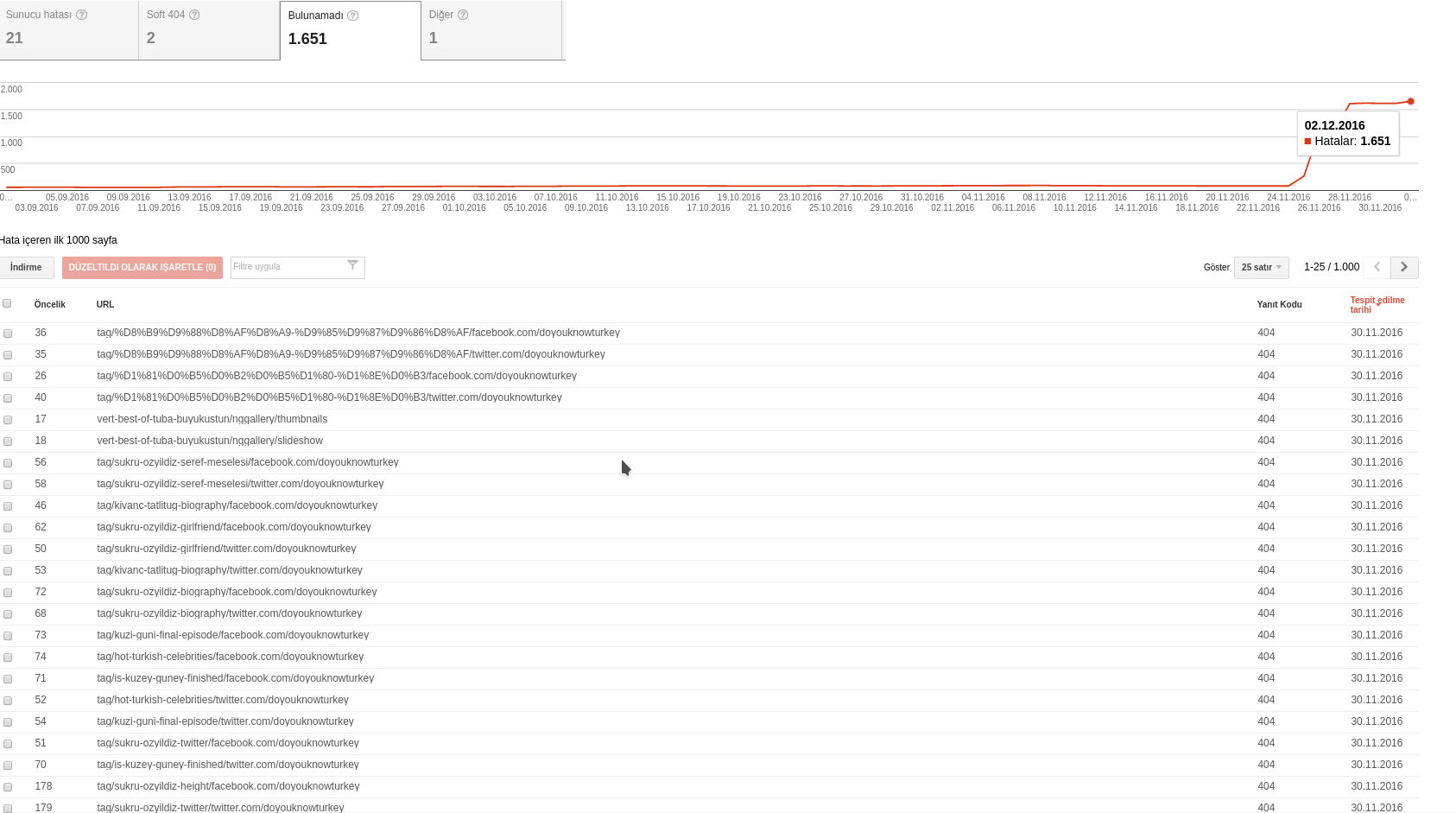
Last week i’ve installed Newsmag but i have lots of 404 error with some strance /facebook.com/sitename or twitter/sitename urls.
For example, the 404 given url is:
72
tag/sukru-ozyildiz-biography/facebook.com/doyouknowturkey which google search console says it has a 404 error upon crawling. I have not such urls in my site… The detail section says the following two pages linked to the url:
http://www.doyouknowturkey.com/tag/sukru-ozyildiz-biography
http://www.doyouknowturkey.com/tag/sukru-ozyildiz-biography/
no such urls in source code….
I’ve update the permalinks but i’m not sure it will restore the broken url&social structure. I had optimized the db after installation probably 25.11.2016
 recons
 Chris, thank you!
I appreciate you trying to help, regardless.
Thanks for the link too. It seems you have that problem, you just don’t see it as a problem )
For categories that don’t have sub, it just lists the remaining categories for you just below the menu.
Interestingly, Tagdiv does not have this bug with Newspaper. It just seem like they treat Newsmag as an orphan compared to Newspaper and I will do the switch (( Money wasted for the first one though 🙁
They even don’t bother numbering versions of Newsmag for changes, while Newspaper you know it is 7.3, for example. For Newsmag I have to refer “October version”.
And here is the screenshot from the navigation from your site to illustrate my point. Entertainment reviews and Political opinion should not show under Tech.

 d20games
 Ok…forget about The Event Calendar. Do you have any means of displaying the built in Events within wordpress by event date order? If I can see that, I’ll know how to go and fix this.
I went looking through the samples, and coudn’t find any examples of Events treated in this way.
I’m frankly utterly shocked. If the nature of the theme is newspapers, being able to promote/list events is one of the most basic functions. And doing so would always be by soonest to latest.
Ben
simchris Hi, note
I am building the “main” menu items by hand, and not using any automation in WP …
so, for example here:
https://californianewswire.com/CA/articles-political-opinion/
you will see in the “politics” menu item, the current category is “highlighted” …
so probably I was comparing apples to oranges, vs apples to apples …
sorry … man, I sounded like a bozo in my comments earlier. Sorry about that. I notice I seem to be a dork when using my iPad vs my desktop machine. Not my usual sunny disposition and more snarky. Weird.
Anyway; TagDiv is back, but getting through comments and queries.
Note, they go ‘old to new,’ so we need to stop posting on this thread so they will actually reply.
Chris
-
This reply was modified 9 years by
simchris.
simchris We had an ad banner full width below the banner across top of all our sites for almost 10 years in Adsense, above the two content columns, with no issues. Even switching to Newspaper then NEwsmag 1.0.
Archive Org; Jan 2015:
https://web.archive.org/web/20160117145517/http://californianewswire.com/calif-assemblyman-gatto-reminds-on-new-laws-for-californians-jan-1-2016/
then we “hid” that above the content banner on mobile devices (phones), per the options in the ad panel (*show desktop, tablet; hide mobile).
So, desktop and tablet got above the fold ads, mobile got bottom of content ads or the sidebar.
Bow with Newsmag 3.1 I’ve just been lazy on the final optimization, due to the Aug 5 server crash, and just loading one ad in the sidebar on all devices; which tucks below on mobile.
So, you just need to “plan” how your ads appear on devices and go TEST them — obviously — .
The theme is compliant; it’s up to you to “engineer” your ad placements to fit your needs.
For example for some folks, not using Adsense, having an ad unit for a movie opening, above the fold on a movie website, might not be crazy.
But obviously, for good UX, you should not have the top half of your iphone view of an article be an ad box; but should show the story title and/or story photo/image.
Food for thought, anyway.
 xGnux
xGnux I asked the same question in the comments of the theme and they dont have this function which is pretty bad because for example on pure video posts you are not allowed to insert adsense it could get you banned without content. 🙁
 Bogdan B.
 It is possible. Each menu item has it;s own class you can use to change the css. Here is an example. On our demo I want to make the gadgets menu a different color and maybe have it look like a button:
http://screencast.com/t/EGjyCtBD
You can also add an icon if you want: https://forum.tagdiv.com/how-to-add-icons-in-menu/
I hope this helps.
Thanks.
Bogdan B. Hello,
Visual composer will not help you in that I;m afraid. It can only be done by editing the post template files and using a do_shortcode function.
Here is an example of a block 1 added after the comments on posts:
For this I add this code:
echo do_shortcode('[td_block_1]');
In the post template files like so: http://screencast.com/t/Oa0NYEEGb
Thank you!
Bogdan B. Hello,
Adsense has strict rules on how to use ads. The theme is 100% compliant but it;s how you use the ads that matters. for example the sticky sidebar used to be a big problem as people placed their ad codes in the sidebar and adsense did not allow a sticky ads. You seem to have 2 ads one on top of the other. I’m not sure exactly but i would ask google for help rather than here as they are the ones that make the rules, not us. We try to provide options for users to place the ad wherever they want to. You can select different sizes for your ads from the theme panel ads section, you can select the number of paragraphs for the inline ad, There are header ads, article top ads, bottom article bottom ads, footer ads., …etc.It is only so much we can do in this regard.
Here is a simple test. Try to use “adrotate” and that way the theme ad system will no longer be used so the theme will no longer interfere. What I can say is that our theme is compliant with the adsense TOS but this is very personal and each individual can use the theme settings to their advantage or the opposite.
The theme simply renders the ads. How you set them and where, it’s up to you.
Thank you!
Bogdan B. Here is an example:
.sf-menu > .menu-item-12117 > a{

color:red!important;

}
each menu item has it;s own menu item number that you can use in the code. If you want to target anotjher one you would add it like so:
.sf-menu > menu-item-12211 > a{

color:blue!important;

}
Add the code in the theme panel-> custom css box
Thank you!
Bogdan B. Hello,
Unfortunately our thee was built to ignore sticky posts. If you want to add a post on all category pages and the main page, you will have to edit the theme files and use a wordpress function like this example https://forum.tagdiv.com/topic/add-a-button-to-header-menu/
Thanks
 kasirga
 So is there a way to edit post page without page builder? For example, I wanna put constant elements after comments in all posts. How is it possible? Thank you very much.
