
- ApiPractical example – How to add a new Block and Module
- Apitd_api_top_bar_template::delete
- Apitd_api_top_bar_template::update_key
- Apitd_api_top_bar_template::update
- Apitd_api_top_bar_template::add
- Apitd_api_single_template::delete
- Apitd_api_single_template::update_key
- Apitd_api_single_template::update
- Apitd_api_single_template::add
- Apitd_api_footer_template::delete
- Apitd_api_footer_template::update_key
- Apitd_api_footer_template::update
- Apitd_api_footer_template::add
- Apitd_api_smart_list::delete
- Apitd_api_smart_list::update_key
- Apitd_api_smart_list::update
- Apitd_api_smart_list::add
- Apitd_api_thumb::delete
- Apitd_api_thumb::update_key
- Apitd_api_thumb::update
 Anamaria
 Hi,
Our theme uses the WordPress search function, and we made a few changes only for the live search. By default, those will display all posts and pages that contain the word/words you are looking for in the title or post content, but if those words are not in the content, then will not display content about that category, for example.
Thank you!
 Calin
Calin Hi thalesbrandao, for this you’ll need to edit the single post template file that you are using for posts. For example if you are using style 1 the file path is – wp-content/plugins/td-composer/legacy/Newsmag/parts/single/loop-single-1.php set your code under the get_title() – https://i.imgur.com/OBvFW8O.png
Also, you can set the edited files in a child theme – https://forum.tagdiv.com/the-child-theme-support-tutorial/
I hope this will help you!
 Tech Lifestyle
Dear All,
I have a question about Smart List Style (Design) Option because it’s very poor.
I can’t make button (next, previous) design as I wish for example rounded, move other elements
Can’t move image above txt (first image, then txt)
etc
I was looking on forum, but nothing
 Bettina
 Hello @xenia.arg !
Everything can be fixed. I can see the mobile theme displaying on the desktop and mobile versions too. This situation appears when you are using the mobile theme plugin and the cache plugin that you have does not feature options for a separate mobile theme plugin therefore do not know when to deliver the mobile version and when to deliver the desktop version. We have 3 options for mobile versions that you can use:
1. Responsive version: A responsive version of your website looks similar to the desktop version. TagDiv Composer is used to edit the page.Click on the mobile viewport: https://www.screencast.com/t/XDQJedlggSB. There, you can see your mobile version and edit or adjust the elements to look better.
2. Mobile pages: https://tagdiv.com/newspaper-10-3-7-update-brings-customizable-and-fast-mobile-pages
3. Mobile theme plugin: The Mobile Theme is a performance-optimized theme included in the main Newspaper theme that only loads on mobile devices. It comes with its own templates and designs for pages, posts, categories, etc., so your current templates from the desktop theme will get converted to the mobile theme layout. Please see https://forum.tagdiv.com/the-mobile-theme/ and https://forum.tagdiv.com/mobile-theme-introduction/ for more information.
A full explanation is here: https://www.youtube.com/watch?v=SpGkOnJeNZY
If you need to use the mobile version 1 or 2, then you need to uninstall the Mobile Theme plugin and AMP.
Make sure that all the settings are like in our requirements, please follow the guide carefully: https://forum.tagdiv.com/requirements-for-newspaper/
and please increase all requirements that are lower, and follow all steps.
Thank you!
Bettina Hello @hmader !
We have 3 options for mobile versions that you can use:
1. Responsive version: A responsive version of your website looks similar to the desktop version. TagDiv Composer is used to edit the page.Click on the mobile viewport: https://www.screencast.com/t/XDQJedlggSB. There, you can see your mobile version and edit or adjust the elements to look better.
2. Mobile pages: https://tagdiv.com/newspaper-10-3-7-update-brings-customizable-and-fast-mobile-pages
3. Mobile theme plugin: The Mobile Theme is a performance-optimized theme included in the main Newspaper theme that only loads on mobile devices. It comes with its own templates and designs for pages, posts, categories, etc., so your current templates from the desktop theme will get converted to the mobile theme layout. Please see https://forum.tagdiv.com/the-mobile-theme/ and https://forum.tagdiv.com/mobile-theme-introduction/ for more information.
A full explanation is here: https://www.youtube.com/watch?v=SpGkOnJeNZY
If you need to use the mobile version 1 or 2, then you need to uninstall the Mobile Theme plugin and AMP.
Sometimes, the issue can be from a plugin conflict or a cache issue. That’s why we recommend first deactivating ALL plugins except tagDiv ones; if you are using a cache plugin, deactivate it, clear all cache (also from your browser), and see the results.
Thank you!
 Edragon
 Hi Anamaria
What do you mean by “Did you check if you don’t have a plugin conflict?” I do not understand that question here.
—–
Is there a way to show images from Media Library in search results?
Example:
1. I log in with the admin user and upload cat images to Media Library
2. Add the title ‘Black cat’ and the description ‘Black cat jumps through a hoop’
3. Now I log off with admin users and go to my webpage as regular users and open the search
4. Type cat in the search box and the search will show me all images where I used the word ‘cat’ either in the title or description
——
Bettina Hello @MatHuk !
We have 3 options for mobile versions that you can use:
1. Responsive version: A responsive version of your website looks similar to the desktop version. TagDiv Composer is used to edit the page.Click on the mobile viewport: https://www.screencast.com/t/XDQJedlggSB. There, you can see your mobile version and edit or adjust the elements to look better.
2. Mobile pages: https://tagdiv.com/newspaper-10-3-7-update-brings-customizable-and-fast-mobile-pages
3. Mobile theme plugin: The Mobile Theme is a performance-optimized theme included in the main Newspaper theme that only loads on mobile devices. It comes with its own templates and designs for pages, posts, categories, etc., so your current templates from the desktop theme will get converted to the mobile theme layout. Please see https://forum.tagdiv.com/the-mobile-theme/ and https://forum.tagdiv.com/mobile-theme-introduction/ for more information.
A full explanation is here: https://www.youtube.com/watch?v=SpGkOnJeNZY
If you need to use the mobile version 1 or 2, then you need to uninstall the Mobile Theme plugin and AMP.
Thank you!
 jrmerfol
Hi,
A couple of years ago I’ve set a logo for this website.
Suddenly a few weeks ago the logo image is replaced with the title of the website.
I have replaced this on a few pages, but I can’t replace this on the pages with posts…and I think it should not be the solution to replace it on every page by hand.
Does anyone have a solution for this issue?
Thanks in advance!
Regards,
Jeremy
Example post page with issue: https://goirlenet.nl/2023/09/19/reuzenoptocht-en-dans-op-goirles-kloosterplein/
 theheritagelab
 I also noticed that when I edit a page with TagDiv — the previously added shortcode is not appearing. For example, you can see this page with all events – created using an EventOn shortcode. If I edit column text > “edit content” where the shortcode had been added, it is blank.
Bettina theheritagelabHello,
I am trying to create a page where users can submit their own writing & I am using the Tag Div form-elements.
I want to divide this form into different pages — like first have the user write, then hit next, then choose categories before submitting.
How can I achieve this? Any ideas?
Also, I noticed you are flooded with inquiries, but please do respond to my other question about the Mega menu not working after the 12.6 update.
 dennisjpitocco
 Hi Anamaria,
Noticed that since this new CSS was put in place, the Biographies presented (left side) on the Published Archives of each of our Contributors are aligned to the Center. These have always been fully-justified (straight edges on both sides of the paragraph)
Here’s an example:
Bettina Hello @maribilerm !
We have 3 options for mobile versions that you can use:
1. Responsive version: A responsive version of your website looks similar to the desktop version. TagDiv Composer is used to edit the page.Click on the mobile viewport: https://www.screencast.com/t/XDQJedlggSB. There, you can see your mobile version and edit or adjust the elements to look better.
2. Mobile pages: https://tagdiv.com/newspaper-10-3-7-update-brings-customizable-and-fast-mobile-pages
3. Mobile theme plugin: The Mobile Theme is a performance-optimized theme included in the main Newspaper theme that only loads on mobile devices. It comes with its own templates and designs for pages, posts, categories, etc., so your current templates from the desktop theme will get converted to the mobile theme layout. Please see https://forum.tagdiv.com/the-mobile-theme/ and https://forum.tagdiv.com/mobile-theme-introduction/ for more information.
A full explanation is here: https://www.youtube.com/watch?v=SpGkOnJeNZY
If you need to use the mobile version 1 or 2, then you need to uninstall the Mobile Theme plugin and AMP.
Thank you!
Bettina Hello @nrgweb !
If those option from our theme are not working, then please use one of 2 methods:
– https://stackoverflow.com/questions/43748634/add-javascript-in-amp-pages
– https://kinsta.com/knowledgebase/add-code-wordpress-header-footer/
I hope that helps you!
Thank you!
 Billinter
The WP Limit shows as only 40 MB but I have set WordPress to 256MB and php.ini also shows 256M. I am not having any problems with the site or the Theme – just this message.
 justweb
Hi! I’m using “Single Post Template – School PRO” for my posts and my “single post content” is getting duplicated before the footer with this template. I’ve tested with “Single Post Template – Default PRO” and it is ok. I also checked for duplicated elements and there is none. This was working fine until today and nothing was changed.
You can check it here
Can you help?
Best regards!
 shahjada
 Callin,
Tried those as well! No luck. It seems load initially and then breaks up.
FYI, current config
Newspaper v12.5.1
Moblie theme plugin disabled.
Amp enable as transitional mode.
{tried reader mode as your tip, but changed it as theme is not available}
Requirements here:
Same theme and AMP for both working properly.
 EDtimes1234
 Hello Team,
There are lots of issues we are facing –
1) The inbuild Visual Composer – WP BAKERY – is not filtering posts properly – Example – If you check the homepage – There is a Category ED ORIGINALS – it should show post just from this category – but its showing post from Politics, Technology etc – https://snipboard.io/HqIp8j.jpg
2) I tried to create a page from TAG DIV COMPOSER – but unable to import any prebuilt templates – when I click on Import Template – it does nothing.
3) The Most Used Hide Post Plugin – https://wordpress.org/plugins/whp-hide-posts/ – is not working on your theme
4) The slowness on the website still continues randomly
5) We cannot share staging server because I have to create a new clone server which will cost us 300 DOLLARS which we cannot afford now – if you want we can share you a one time ZIP BACKUP of the complete website with database and you can try to solve the issue on your side – once you solve it – you can guide us the steps on live
Please help us on this and solve it – its creating lots of issues
justweb Hi! I’m having the same issue on my website posts https://radiocampanario.com/2023/09/20/mercadona-abre-em-evora-em-2024-e-esta-a-recrutar-com-salario-minimo-acima-dos-1000-euros/
Please help!
Best regards!
Calin Hi, if you are using the mobile theme plugin and you have Newspaper v12.6 please check the inline css option from the theme panel to be off – https://i.imgur.com/6QIAL32.png (this can interfere if you are using other plugins for cache or css optimize).
Also if the amp is used without the mobile theme plugin make sure that this is set on “reader” -https://i.imgur.com/VoeQ4Dn.png
Thank you!
shahjada Thanks Calin for the quick response.
As per your suggestion,
1. Disabled mobile theme: It loads super slow, and images are misshaped.
2. Enabled mobile theme and configured AMP only: Loading is good; Images are misshaped and The pages break down.
Could you please point what needs to be done??
Current config: Mobile theme enabled with AMP.
Thanks!
 taketwo10
 Hi Calin, thanks for your quick response. The representations of the footer, for example, are device-dependent. I use Newspaper’s mobile theme, which also works very well. The translations in Newspaper’s theme panel settings also apply to Newspaper’s mobile theme. Everything works perfectly on devices like the iPad because the mobile theme doesn’t yet work here. With a viewport <768 pixels, the mobile display takes effect and the translations in the footer are only partially adopted. I have attached a link you can find a screenshot where the differences become clear.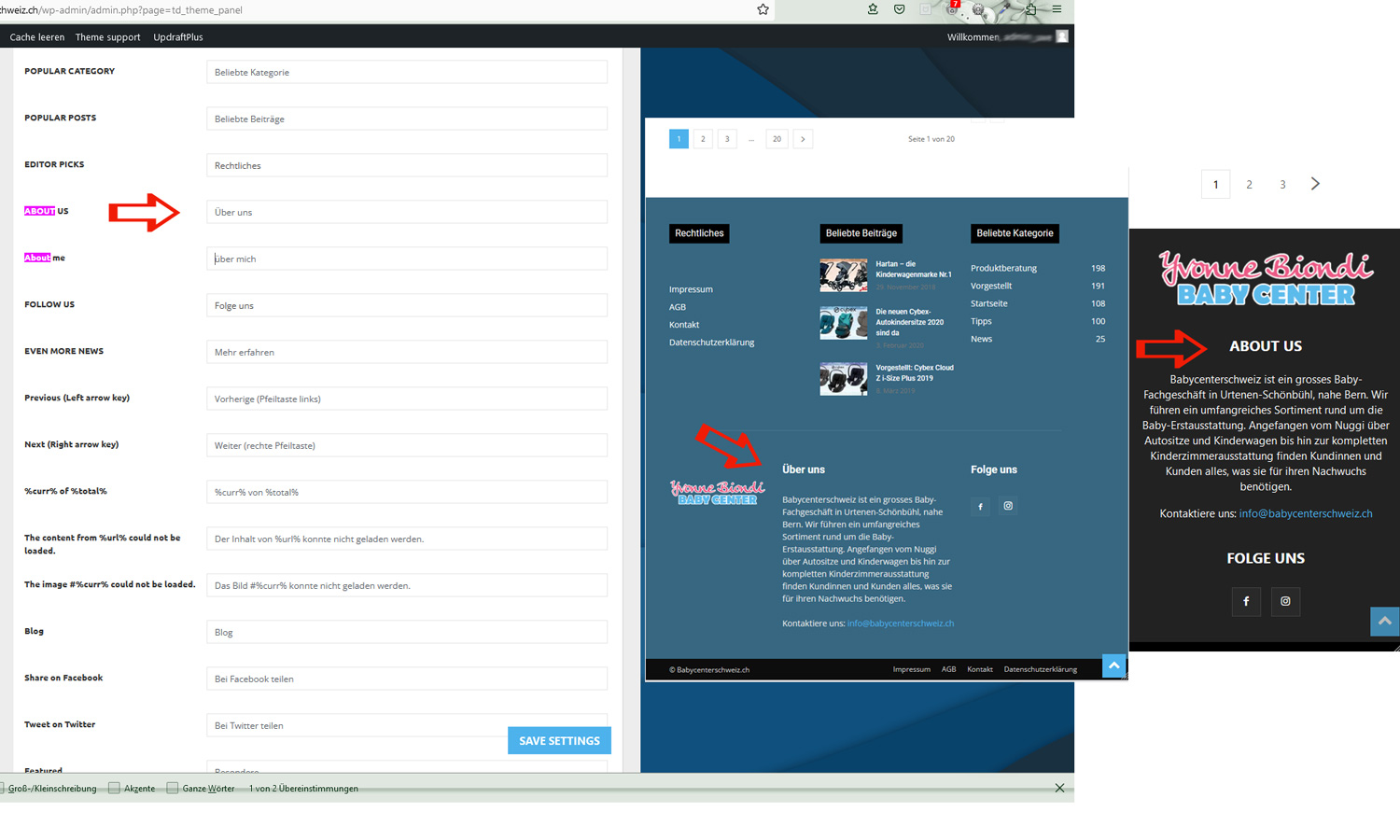 The domain is https://blog.babycenterschweiz.ch Best regards Uwe
-
This reply was modified 3 years by
taketwo10.
Calin Hi aashishlowanshi,
Yes, you can utilized the directory with all pro demos, as long as those can be edited using tagDiv Composer the directory can be used – https://forum.tagdiv.com/introduction-cpt-acf-newspaper-theme/
The problem that you faced I think that it was related to the type that needed to be filtered in the flex block, by default the theme blocks are filtering the posts, but you can set the type you need, for example, posts, pages, books ….
Also, you can import from cloud the template, blocks, modules you need. If you want we can take a look together to this situation.
Using the App Find Pro plugin will need to do change to the plugin to change the url and other structures, in my opinion it will be better to use the CPT Ui to can make the cpt and taxonomies like you need.
Thank you!
Calin Hi shahjada, I see that you are using the mobile theme plugin, so the mobile layout will be different. If you want the same layout as on desktop, then please disable the mobile theme plugin or if needs use it only for amp.
Hi mudassar120859, I checked your website and I do not see the mobile theme, but I see a litespeed cache and maybe you are using the mobile page template, in this case you’ll needed to be sure that your cache plugin cam deliver cache for mobile separately then desktop.
Is this problem persisting when you are logged in? If no, then the problem is related to the cache plugin.
Tank you!
 fishinfool
 Hello
This link does not help my problem.
I already have the slug of the custom post created as directed from the link you sent (4. If You Have Already Created a Custom Post Type (CPT) Using register_post_type Function – https://www.scratchcode.io/how-to-change-custom-post-type-slug-in-wordpress/)
My problem is i am using the cloud template for the custom taxonomy in one case (https://theledger.whatchacatchin.com/tdb_templates/custom-taxonomy-doctors-pro-3/) and the cloud template for the custom post type in another (https://theledger.whatchacatchin.com/tdb_templates/blank-custom-post-type/) but I cannot edit the bold italic part of the these links,
example: i used a regular template for https://theledger.whatchacatchin.com/podcasts-directory/ and I was able to edit the the page title from what the original title was to podcast directory from the tagdiv composer at the top of the composer above where it says Welcome to tagdiv composer. When i try to do the same using the cloud template for /tdb_templates/blank-custom-post-type/ and /custom-taxonomy-doctors-pro-3/ it does not let me. it gives this message: Invalid template type! Please make sure your are editing a supported template type title.
How can I edit this?



