- ApiPractical example – How to add a new Block and Module
- Apitd_api_top_bar_template::delete
- Apitd_api_top_bar_template::update_key
- Apitd_api_top_bar_template::update
- Apitd_api_top_bar_template::add
- Apitd_api_single_template::delete
- Apitd_api_single_template::update_key
- Apitd_api_single_template::update
- Apitd_api_single_template::add
- Apitd_api_footer_template::delete
- Apitd_api_footer_template::update_key
- Apitd_api_footer_template::update
- Apitd_api_footer_template::add
- Apitd_api_smart_list::delete
- Apitd_api_smart_list::update_key
- Apitd_api_smart_list::update
- Apitd_api_smart_list::add
- Apitd_api_thumb::delete
- Apitd_api_thumb::update_key
- Apitd_api_thumb::update
 Simion C.
 Hi,
It that happening only when the Newspaper theme is active? You could make a quick test with a default wordpress theme to see if it works correctly.
Such issues can be caused by insufficient resources for the website. We provide this requirements guide https://forum.tagdiv.com/requirements-for-newspaper/
Specifically for that error, which is quite common, there are guides like this one for example https://www.wpbeginner.com/wp-tutorials/how-to-fix-the-link-you-followed-has-expired-error-in-wordpress/
If you are unsure of how to increase the limits on the website, I can take a look. You can send us an email at contact@tagdiv.com and provide a link to the website and admin login, and also access to cPanel or FTP or something similar.
Thanks.
Simion C. That’s a very unusual issue. I see no conflict or something that could create such a problem.
Eventually I created a cloud header template with the composer, I made it to look like the one you were using. This one uses the fonts correctly. Please check it as well. This type of header can be customized with the composer, you can edit it from the homepage for example. You could continue using this header, and if you want to customize it and you need help, please let me know.
Thanks.
 Delicatu
 Hello. Today my site is “Briefly unavailable for scheduled maintenance. Check back in a minute.”
In error log I have:
Date: Wed, 01 Oct 2025 06:19:24 GMT
Content-Type: text/html; charset=UTF-8
Transfer-Encoding: chunked
Connection: close
Content-Encoding: br
X-Powered-By: PHP/8.0.20
Access-Control-Allow-Origin: *
Access-Control-Allow-Methods: POST,GET,OPTIONS
Access-Control-Allow-Headers: Origin, X-Requested-With, Content-Type, Accept
cf-cache-status: DYNAMIC
Report-To: {“endpoints”:[{“url”:”https:\/\/a.nel.cloudflare.com\/report\/v4?s=JUDOWwoNEqE9jB6as43O3yqW6RNSPJBjUvL1D2dNFQG4yOm2pNl9BOX9ch4hoU%2B3ivhiwyTR9kqOA2HguObN%2BxX8f%2Fj%2FElk6HpNvvg0szh4CnT4wwCmn8EY3bihJLwEzk9U%3D”}],”group”:”cf-nel”,”max_age”:604800}
NEL: {“success_fraction”:0,”report_to”:”cf-nel”,”max_age”:604800}
Server: cloudflare
CF-RAY: 9879d924ec180533-OTP
server-timing: cfL4;desc=”?proto=TCP&rtt=1275&min_rtt=1272&rtt_var=483&sent=4&recv=6&lost=0&retrans=0&sent_bytes=2836&recv_bytes=989&delivery_rate=2229407&cwnd=252&unsent_bytes=0&cid=8c11637ce6c3dd9d&ts=532&x=0″
{
“api_reply”: {
“key_is_valid”: true,
“key_status”: “active_key”
},
“debug”: {
“sql”: [
{
“query”: “SELECT * FROM ip_tagdiv WHERE IP = ‘86.107.43.36’ LIMIT 1”,
“run_time”: 5.888938903808594e-5
},
………….
[status_code] => 200
[protocol_version] => 1.1
[success] => 1
[redirects] => 0
[url] => https://cloud.tagdiv.com/api/templates/check
[history] => Array
(
)
[cookies] => WpOrg\Requests\Cookie\Jar Object
(
[cookies:protected] => Array
(
)
)
)
[filename:protected] =>
)
Why does this error occur, and how can I fix it? Thanks!
 newspatron
My goal is to ensure that each custom video post dynamically displays the video relevant to that individual post. However, I am unable to find the correct method to achieve this with the imported Compass template.
I have attached an additional screenshot for reference:
Compass Template Issue Screenshot
https://drive.google.com/file/d/1UKPv9nBejw4pXS27Vo0uouXSLrK3Ad1o/view?usp=drive_link
https://drive.google.com/file/d/1ds7ILnrN4GNXZgMk8zE0e6lHnZJNlmaA/view?usp=drive_link
Currently, this functionality works seamlessly when I use the default template—removing the imported template allows the video to display as intended for each post.
Here’s an example of the current video post display:
Video Post Example
https://newspatron.com/video/bangalore-schoolgirls-exposed-school-bus-video/
Can i use the customized compass template?
Please guide on how to get the custom video to load on each post as required.
Amit Kumar
 mikeshecky
I have a CSV file with new titles and subtitles for my posts, and I’d like to replace the existing subtitles for multiple posts at once.
I noticed the theme has a subtitle field for each post, but I’m not sure how to map my CSV column to it in WP All Import. It looks like I can easily map/update the post titles, but the subtitles don’t seem to appear in the field dropdown.
Could someone guide me on the correct way to update the subtitles in bulk? Any beginner friendly tips or examples would be greatly appreciated!
Thanks in advance for your help!
 Dom
DomShould i set noindex to the mobile page? For example: home index, home-mobile page noindex.
 GangaIndoage
Our website https://theshillongtimes.com/
keeps going down frequently. We often get 504 Gateway Timeout errors (https://prnt.sc/dttBhTeuAlky). This mostly happens when using tagDiv Composer/Page Builder—the site hangs, and then the whole site goes offline.
Please advise how to fix this issue urgently.
Thanks,
Ganga Ram Das
 newzSupport
Hi,
Can anyone suggest a simple way of editing the Mobile Menu element. After selecting the menu, it shows
well enough. Now I want to format the text and background of that simple menu. I would rather not use the Modal popup element instead because it’s too complex and presents some challenges that I wish to avoid altogether. The Mobile Menu element gives me what I need but I cant find a way to make simple edits to make the colours and text harmonize with the rest of the site.
As an example, I’d like to get from the blue gradient background of the default to something that looks like these:
https://demo.tagdiv.com/newspaper/mobile-menu/mobile-menu-2/
Help, please…
Simion C. Hi,
The things that can change the order of the posts displayed by a block are the offset feature https://forum.tagdiv.com/offset-feature/ and the unique articles https://forum.tagdiv.com/unique-articles/
If these are not used however, then its very unusual. I will take a closer look at it, please send us an email at contact@tagdiv.com and provide a link to the website and admin login. Also please provide an example of the issue.
Thanks.
 duck1970
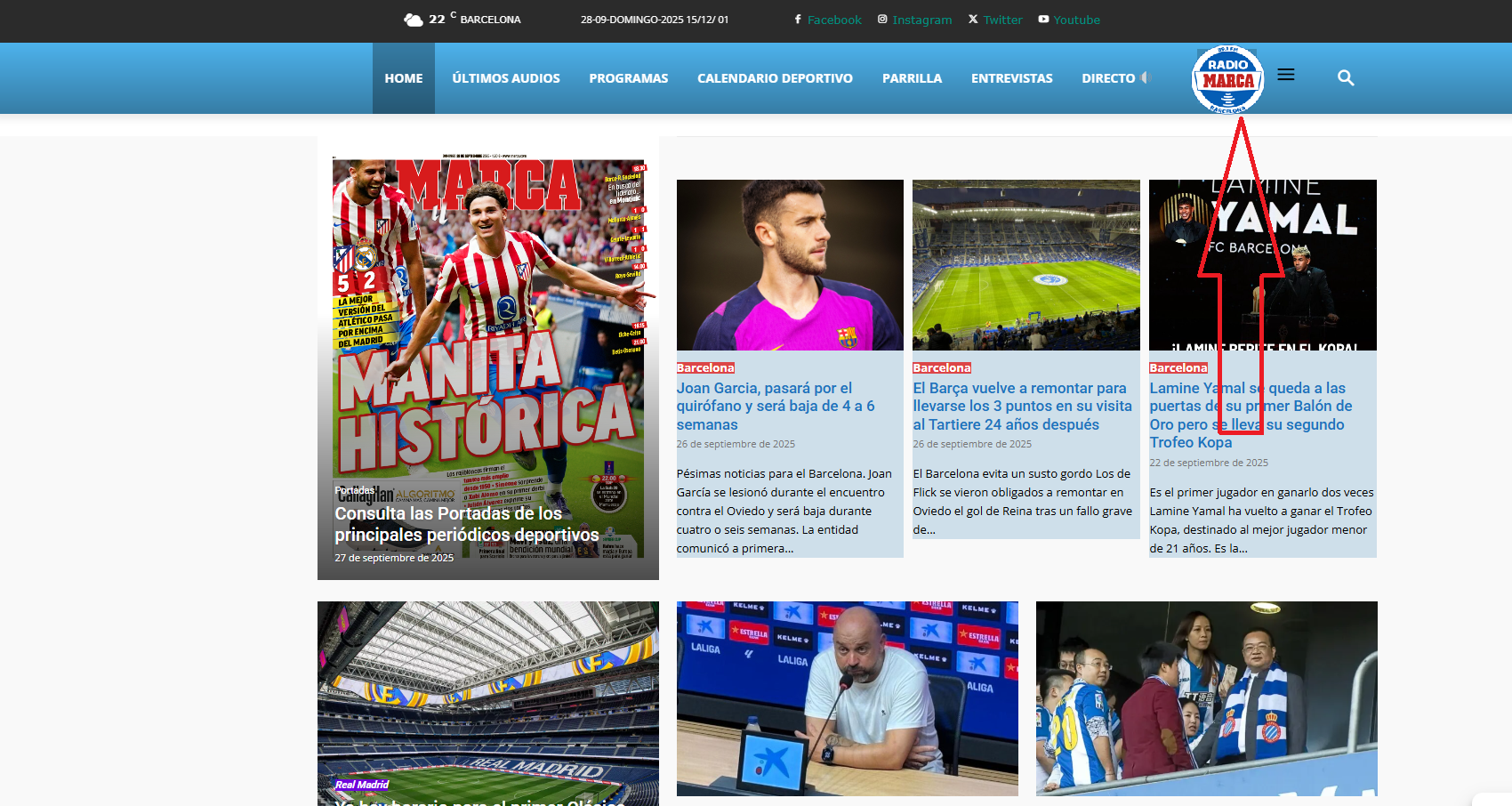
Hello, I’d like to know if it’s possible to insert a logo into my header menu, as shown in the attached example photo?
If possible, I’d like your guidance on how to do this.
Thank you very much.
https://www.radiomarcabarcelona.com/newspaper/LOGO.png
Simion C. Hi,
Those look like different cloud templates. These ones:
https://forcenews.pl/tdb_templates/blank-custom-post-type/
https://forcenews.pl/tdb_templates/blank-custom-post-type-2/
The posts you mentioned as examples are each using their own template.
If you have one template set as global, then the only option that can override it is is you manually set the other template per event https://prnt.sc/tjKfuf8zqcF2 Because if it’s on the “From Panel” setting then it should use the global template.
Are there many events that use that old template? If not, they could be edited and set to the from panel setting.
Thanks.
Simion C. Hi,
Could you please provide an example of this issue? I don’t think there were any modifications made in this matter, if you want to disable the theme breadcrumbs the same workaround can be used.
Please note that even if you disabled the setting in the theme panel, if the page or template contains the breadcrumbs element from the composer https://prnt.sc/KhCN2Lp8EB2y then the breadcrumb schema is loaded.
Thanks.
 forcenews
Hello,
I’m using a Custom Post Type “Blank – Custom Post Type” for event calendar entries. I created a new layout/template for this CPT where I changed:
Layout and styling of inner row using Custom Fields
Color scheme and font styles
Overall template appearance
I set the new template as global for all posts of this CPT. Unfortunately, there’s an inconsistency issue – some posts use the new template, while others still use the old one.
Examples:
✅ New layout (correct): https://forcenews.pl/wydarzenia/hotel-meeting/
❌ Old layout (problem): https://forcenews.pl/wydarzenia/miedzynarodowe-targi-wynalazkow-i-innowacji-intarg/
What I’ve already tried:
Cleared WordPress and browser cache
Verified all posts are the same CPT
Confirmed the template is set as global
The issue affects existing posts created before the template change. New posts correctly use the new layout.
Question: How can I force the global CPT template to apply to all existing posts? Is there a way to bulk update template metadata without manually editing each post?
 Ans
AnsHi Support,
Please allow us to add “&post_type=post” to Search of Mobile Theme, thank you.
Now it searches all pages and homepage, which will give unexpected results.
Simion C. Hi,
There is a setting that could have this effect in some cases, it depends on the caching configuration.
In the composer if you click on the header menu on desktop, is this option active? https://prnt.sc/G7wrnliJdZt7 If it is, please disable it and clear the cache.
Normally that should not cause a problem. But for example if the cache is not created separately for desktop and mobile, and the mobile version is cached first, the visitors will see the desktop header without the menu. It can be random, depending on which version is accessed first after the cache is cleared. What caching are you using for the website?
Let me know.
Thanks.
 idiriasl
Hi,have a menu that is quite wide. As I reduce the size of the browser, menu goes into a second row and makes the web look awful. I am trying to use the MORE option where menu items fall into that new menu item and it maintains its width:

A video of the effect (the items start falling into the “More…” item but they end up there like a black hole:
Any hints?
Thanks in advance
 Calin
Calin Hi,
This situation can appear in multiples situations, for example using object cache – https://forum.tagdiv.com/topic/the-password-reset-key-is-invalid-2/ – https://i.imgur.com/iNzZgFY.png
Calin Hello,
These settings refer to the duration of a subscription, for example if 3 is set for the count interval and Week for the interval the subscription will be for 3 weeks.
Thank you!
 Madcrumbs
 Hello,
we have finally managed to translate the content of the email. Unfortunately, the password change does not work. When clicking on the reset link in the email, a message appears saying that the key is invalid. This also happens when clicking on the link for the first time.
The login page is: https://www.attoricasting.it/accedi/
Here is a screenshot of the error: https://imgur.com/a/1ydBBhv
This is the URL that is generated when clicking on the link: https://www.attoricasting.it/accedi/?password_reset_fail&invalid_key
Are there any other configurations that we need to correct?
Thank you
Calin Hi,
I don’t know if using only the functions in the theme will get you exactly those functions, but here are some examples similar to our theme:
– https://demo.tagdiv.com/newspaper_real_estate_pro/properties/
– https://demo.tagdiv.com/newspaper_job_hunt_pro/tdtax_job_skills/back-end-development/
– https://demo.tagdiv.com/newspaper_pc_forge_pro/completed-builds/
It comes with an option for flex filter and sort filter and can be used with flex block builder and flex loop builder blocks.
Thank you!
 simchris
 Be sure to install the IndexNow plugin also.
And, be aware Google has started “whacking” a lot of news sites in search, when you don’t have “first origin” stories, such as sites with too many cloned press releases, or follow on content from major sources like AP, NYTimes, etc.
We have run into this issue recently after updating our version of Newsmag theme earlier this year, and several sites dropped out of Google News as well, but it’s not just us. Just weird timing.
We’re also suddenly, recently, started getting a lot of the “not indexed as not found in any sitemaps” even though in the Yoast sitemap. 20 year old website!
We have been doing some house cleaning on old content, also optimizing and retiring images, and also doing some “manually request indexing” on some pages which should be in results, and are not since the revamp.
I can only chaulk this up to Google trying to roll out AI snippets vs actual links to news sites — providing AI summary of your content vs your actual content, which some publishers have now sued Google over.
It’s a Google thing, as one site having “trouble” with Google since revamp, is still showing up top of all *other* search engines, so it’s a unique thing with Google.
Pardon the epic poem — just thought I’d give you a supportive “it’s not just you” support note.
(I don’t work here.)
 Antonis
Hello,
I have a question regarding Subscription plans.
What is the difference between “Interval count” and “Interval” (Day, Week, Month, Year) and how these two are connected?
For example, if i have a Monthly and a Yearly plan, what should i put in “Interval count”?
Regards
 projectya
 I uninstalled the AMP plugin and the TagDiv Mobile theme, but I’m still seeing a banner on my phone that I don’t have on my desktop version. How do I edit it?
https://www.szybkiplik.pl/GXB3wwktPb
I also have a question: is the https://wordpress.org/plugins/the-events-calendar plugin compatible with your template? After adding an event, I get a message that a critical error has occurred on the website. How can I get around this so the plugin works?
And how can I add a wishlist page?
Calin Hi,
Please try to use the responsive version of the theme, not the tagDiv Mobile theme plugin and amp
The issue with AMP and WooCommerce likely stems from AMP’s limitations, especially in 2025. While AMP was initially used to speed up mobile pages, it can hurt user experience by stripping down important features and design elements, making the mobile version feel disconnected from the desktop version.
Instead of AMP, it’s better to focus on optimizing your site for mobile directly. This includes using responsive design, optimizing page speed, lazy loading, image compression, and improving Core Web Vitals (CWV). These strategies provide a more consistent, high-quality experience across devices and ensure you’re not penalized by search engines.
In short, ditch AMP and focus on modern mobile optimization techniques to improve both performance and user experience.
Thank you!
Calin Hi,
I see, if it is a CPT and the title of the post will change based on the CPT you are then it will be ok to use a custom field to collect the posts you want to display, for example, you can use a text field and it will be in the post IDs only, for example: the custom field must be displayed in each CPT so you can set for each one the post ID you want to display. After that on template use a flex block or create your own module and use a flex builder to display that post or posts, what you need to do is to set in the filter tab some parameters to get the values from your custom field – https://i.imgur.com/7tRPctY.png
Thank you!