- ApiPractical example – How to add a new Block and Module
- Apitd_api_top_bar_template::delete
- Apitd_api_top_bar_template::update_key
- Apitd_api_top_bar_template::update
- Apitd_api_top_bar_template::add
- Apitd_api_single_template::delete
- Apitd_api_single_template::update_key
- Apitd_api_single_template::update
- Apitd_api_single_template::add
- Apitd_api_footer_template::delete
- Apitd_api_footer_template::update_key
- Apitd_api_footer_template::update
- Apitd_api_footer_template::add
- Apitd_api_smart_list::delete
- Apitd_api_smart_list::update_key
- Apitd_api_smart_list::update
- Apitd_api_smart_list::add
- Apitd_api_thumb::delete
- Apitd_api_thumb::update_key
- Apitd_api_thumb::update
 nomadjunkies
 Hello,
I’ve already tried that but I am not able to edit all of them. For example in the following link: https://dev.nomadjunkies.com/vanlife-en-couple-comment-on-a-vecu-cette-premiere-experience/, I can not edit title of the form, name of the submit button etc. Can you please help me with that?
Thank you!
 Path87
On my website I am detecting abnormal behavior in the featured image.
If I choose the “Default” or “Style 2” template in the theme settings panel, the featured image is resized to 50% height and 50% width when the page is loaded in frontend. However, this does not always happen: if you reload the page, it goes back to the 696×495 size (the correct dimension), if you reload again it becomes 348×247.5, if I reload again it remains 348×247.5, then it goes back to 696×495 and so on. Of course I’m talking about the website’s desktop mode. AMP and mobile view are perfect.
I’ve tried disabling all plugins, but the problem is still there. I have cleared the cache, but the problem is still there. If I choose another template for posts (“Style 3”, “Style 4” and so on) the featured image does not show any anomalies.
I also disabled the cache plugin (LiteSpeed) which uses the lazy load feature on both the featured image and all other images published, but the problem is still there. Also, this problem is only on the featured image, while all other images are loaded in the correct size.
I also checked the html code with browser console and the image is called to its original size (696×495) and the width and height tags in are set correctly as well. But however the image is displayed at 50% of the actual size.
I know that it is possible to use a template from the Cloud Library for set properly featured image size, but I cannot enable this feature, because in the past the website has crashed due to Cloud Library enabled and now I need to stay with the standard mode.
In the past everything worked fine. Maybe a bug?
 Piotrk87
Hi Team,
The text block below the header/page title is causing big LCP (couple of seconds on mobile). I am not sure what the cause can be, since it’s just a text block. Could you advise on that?
This relates for example to such a page: https://jakaoferta.pl/gdzie-przeniesc-numer-przeglad-bonusow-za-przeniesienie-numeru
Piotr
 parashjh72
there is a problem with search console indexing while enabling AMP.
 reihyun
Hello, Newspaper.
I use tagdiv post tamplate, now, only have a-z or parent sort.
https://www.screencast.com/t/hDBlWxQW
can i order another type? i wanna order categories by slug ID.
(wanna handle order condition)
https://www.screencast.com/t/chejj2srpjjB
plz reply.
thank you.
Lee.
 Bettina
 Hello!
If you use Mobile + AMP, then all the configuration can be done from our Theme Panel.
We have 3 options there, so could be easy to switch between them and it should cause no trouble.
Thank you!
 xxxLesy
 Thank you Bettina,
Site: https://www.student.si/
PS: https://developers.google.com/speed/pagespeed/insights/?url=https%3A%2F%2Fwww.student.si%2F
Notice on mobile PS it mostly pulls desktop view (big grid: 1 large article + 3 in row bellow) instead of mobile theme (1 banner + grid: 3 articles in a colum) resulting in huge LCP as it renders desktop size images.
Relevant settings screenshots:
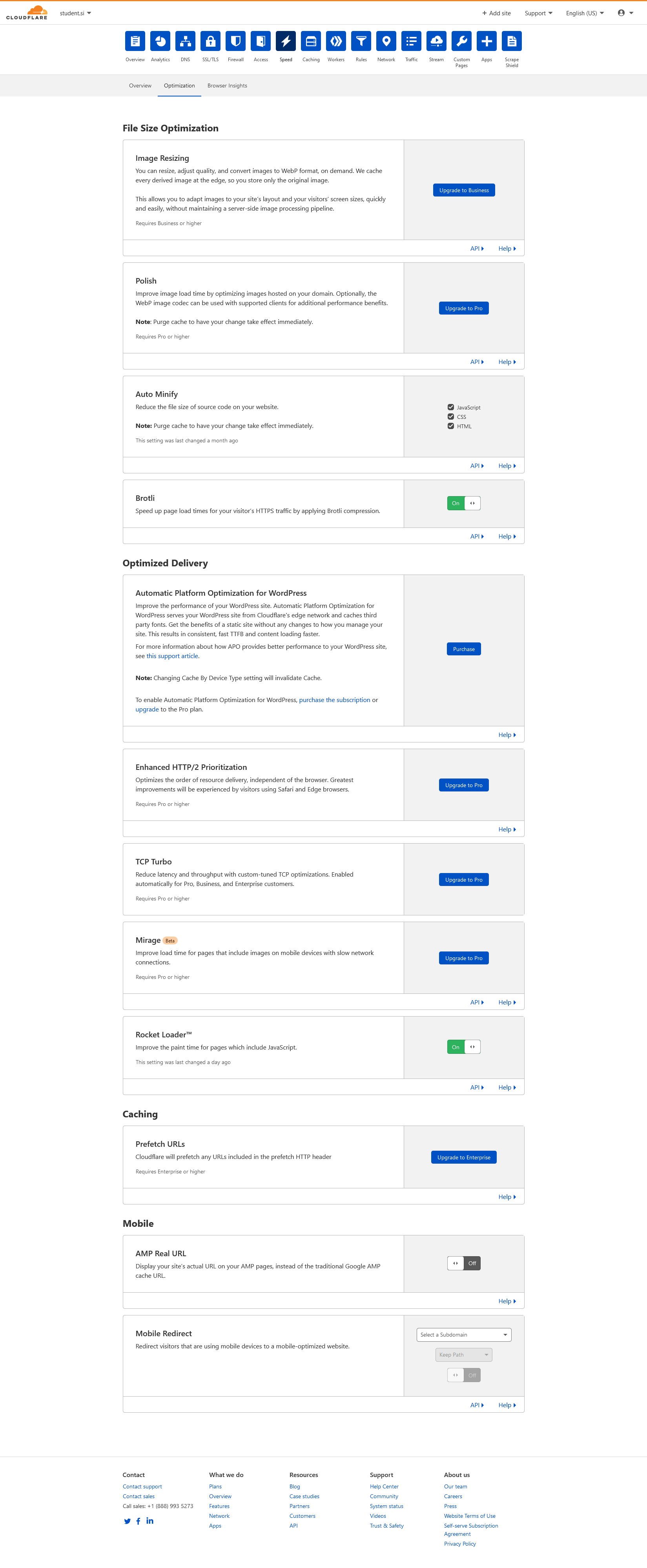
Cloudflare: https://student.si/wp-content/uploads/cloudflare-st.png
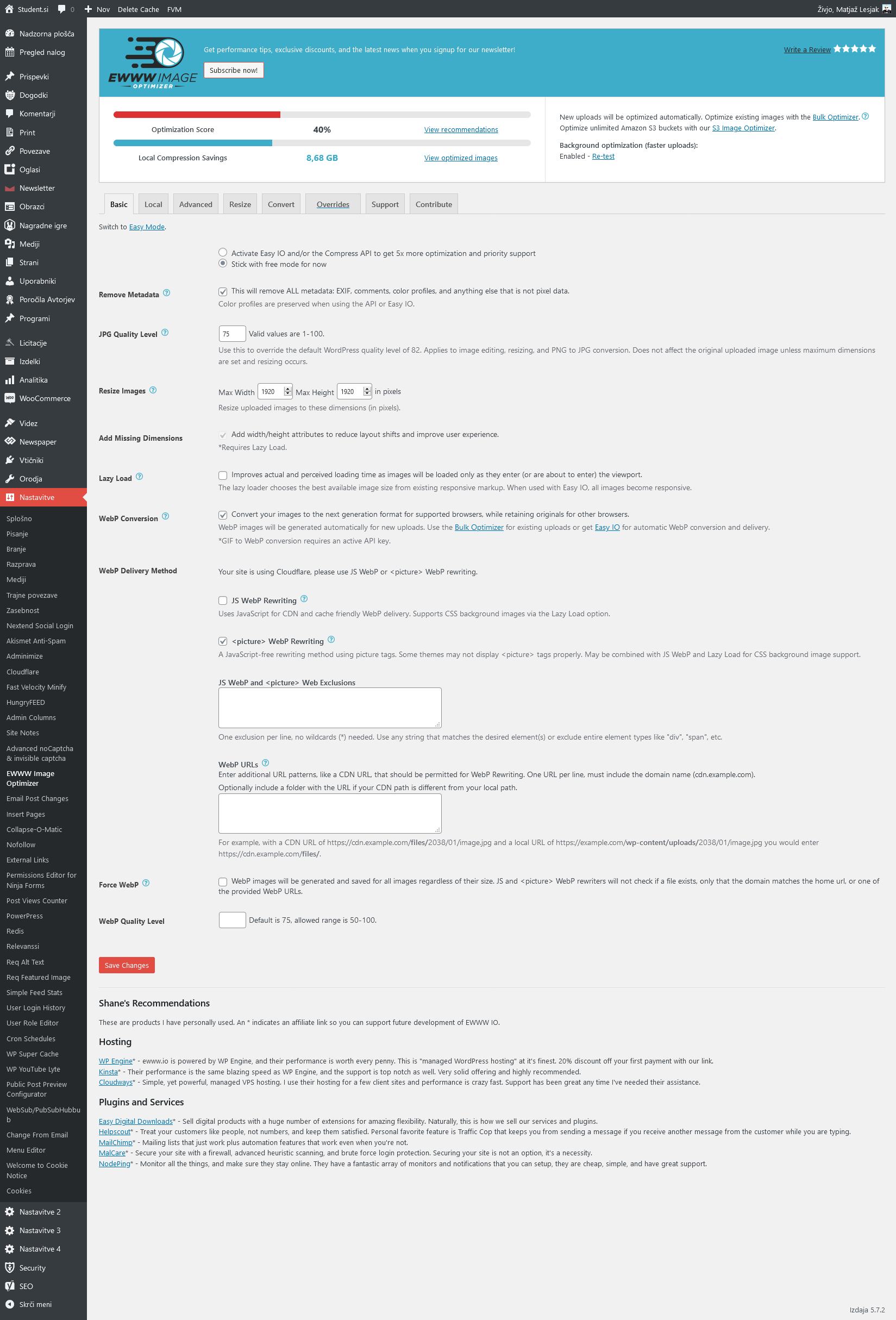
Ewww: https://student.si/wp-content/uploads/ewww-st.png
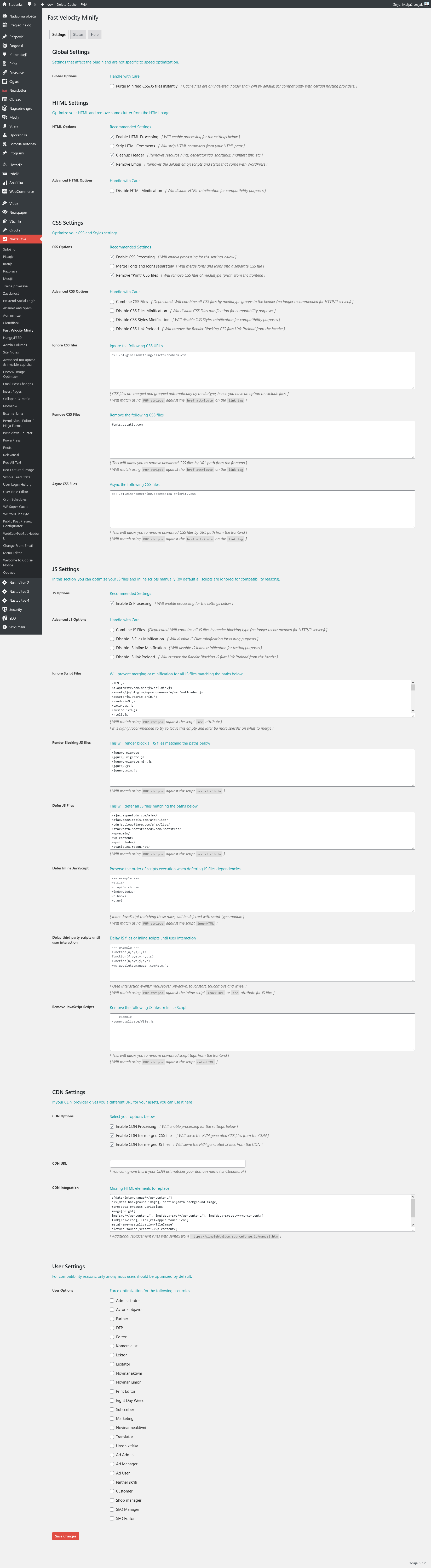
FVM: https://student.si/wp-content/uploads/fvm-st.png
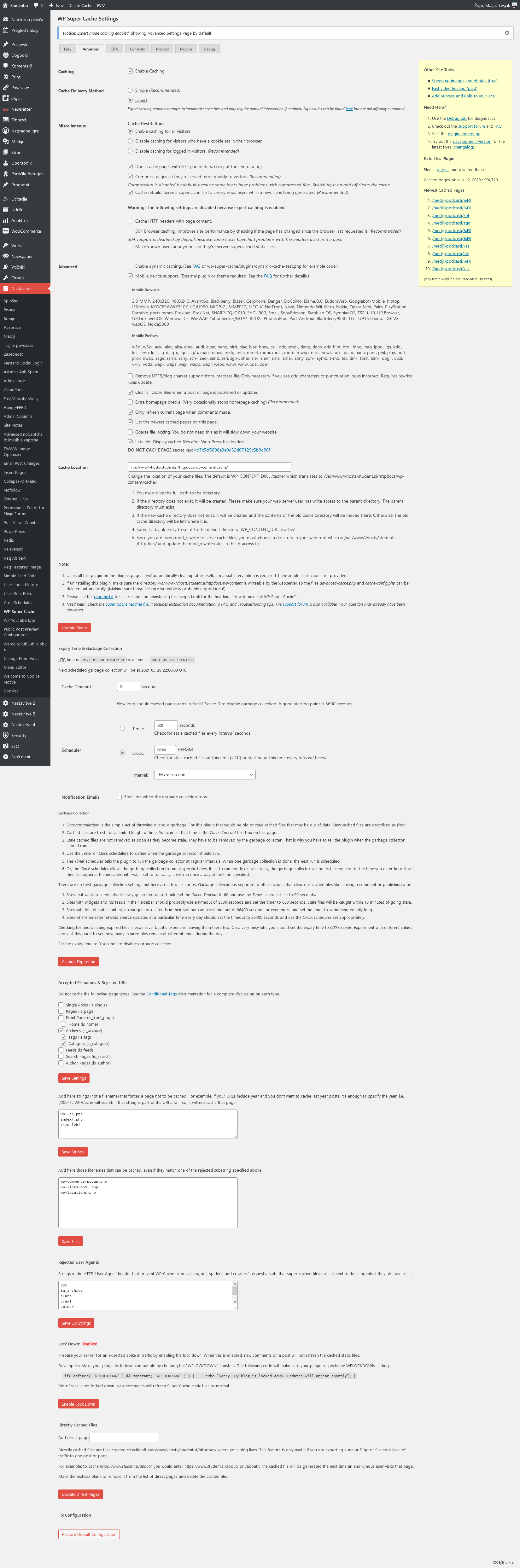
Supercache: https://student.si/wp-content/uploads/supercache-st.png
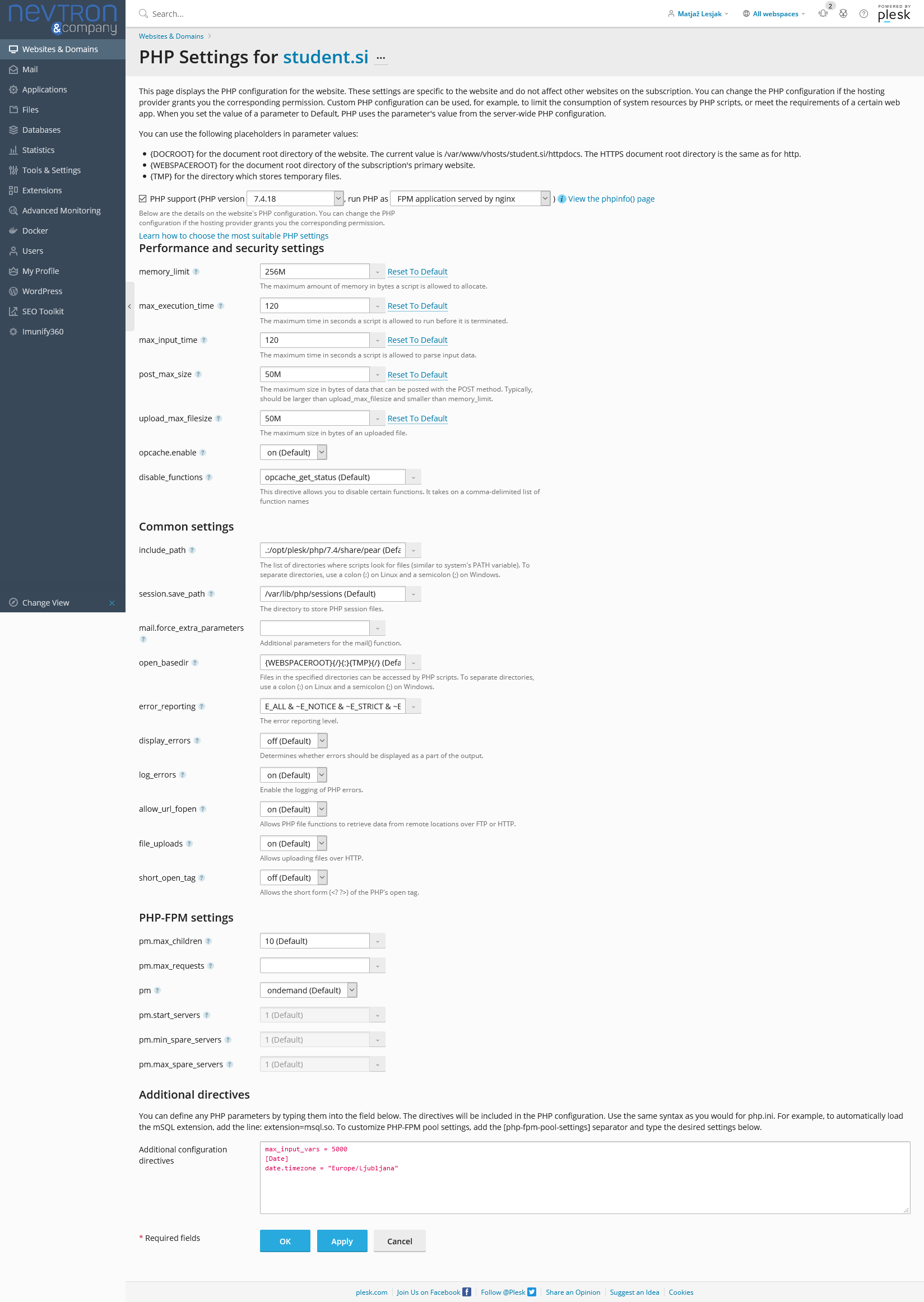
Php: https://student.si/wp-content/uploads/php-settings.png
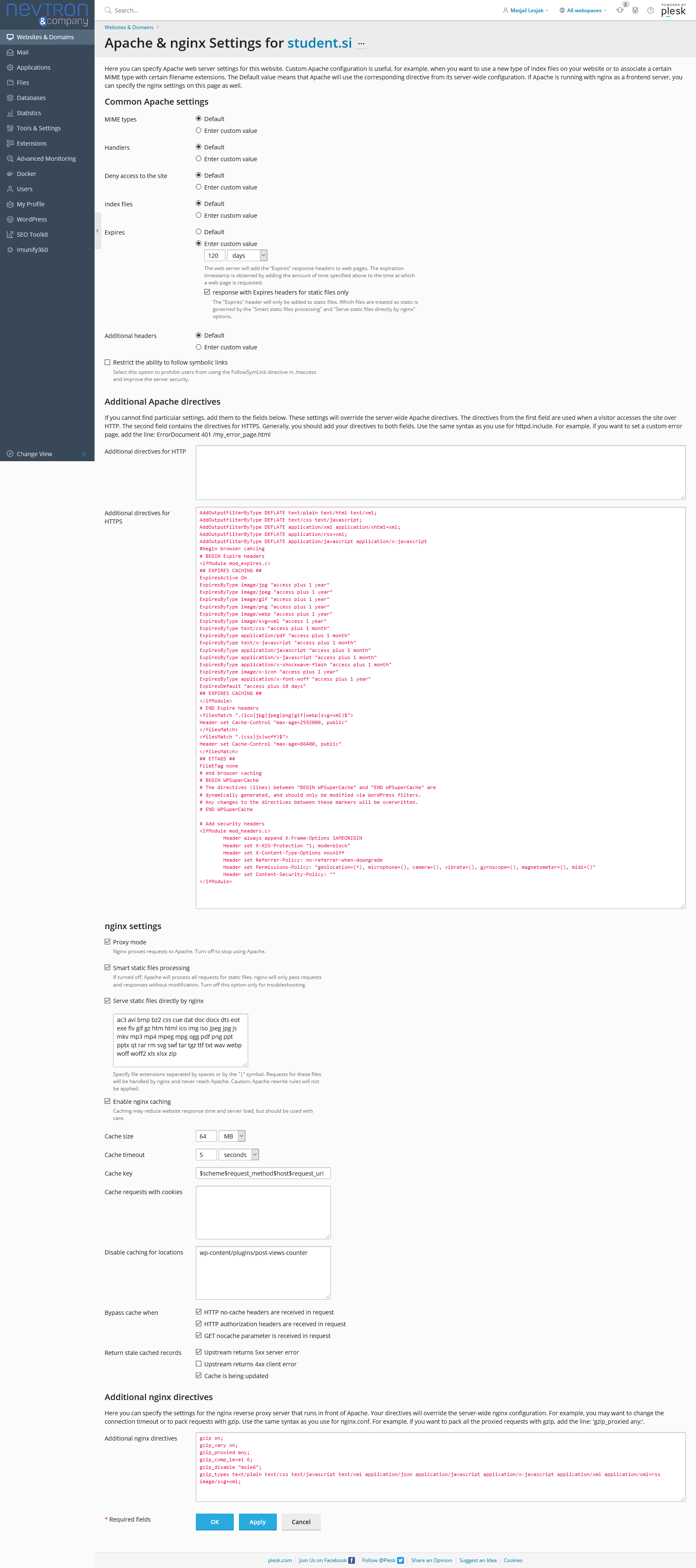
Apace & Nginx: https://student.si/wp-content/uploads/apache-nginx.png
-
This reply was modified 5 years by
xxxLesy.
 danna
danna Hello,
i get this Error, maybe that helps:
“load-scripts.php?c=0&load[chunk_0]=jquery-core,jquery-migrate,utils&ver=5.7.2:2 GET https://www.isa-academy.eu/wp-content/plugins/td-composer/includes/wpeditor.php?wp_path=/home/isaacebv/www.isa-academy.eu/ 403”
All the best,
Daniel
Bettina  aneeshtheone
Hourly Malayalam is a news portal using newspaper theme. Newspaper theme AMP not working, in some categories shows amp symbols on goolge search, but after enter to category page single post shows “There has been a critical error on this website”. The same error happening on full website when I activate Mobile+AMP option. Web link: https://hourlyindia.com/
 Anamaria
 Hello,
If you want to use AMP only for posts, then you need to select from Theme Panel -> Mobile theme for AMP => https://www.screencast.com/t/rCGNDodtOi and from the AMP settings select for “Posts” => https://www.screencast.com/t/Q0Za3jqlHIX
Thank you!
 Atithya
 Is it necessary to configure AMP plugin to (Redirect mobile users to AMP), If I am using Newspaper Mobile theme with AMP?
If in future, AMP shuts, will it be easy to switch between amp and mobile? Will it affect the search console?
 Calin
Calin Hi,
Most of Newsmag pre build demos have assigned a custom class on the body -> https://i.imgur.com/tpUkMHd.png and using that class are assigned some extra css, for example -> https://i.imgur.com/LkP5a5u.png -> https://i.imgur.com/BcNKHE3.png so if you want to keep the design you need to use a css to change the colors, for example -> https://i.imgur.com/F8j0JPr.png
.td-scandal .td-grid-style-2 .td-big-grid-meta {

background: green!important;

}

.td-scandal .td-scandal-big-grid .td-grid-style-2 .td-big-grid-meta a{

color: white;

}
Or you can remove the extra class and the settings from theme panel and tagDiv Composer
will apply.
Thank you!
Calin Hi Christoph,
Our theme do not have an option for this, usually it can be archived using some plugins for GDPR, for example you can try some of theme from this guide https://www.wpbeginner.com/plugins/best-gdpr-plugins-for-wordpress-simple-reliable/
I hope this will help you!
 GGiugliano
 Hi, my website is http://www.mondonapoli.it and from mobile there aren’t AMP page also if they are enable and we are in Google news.
 ene.news
http://www.elacento.news
Hello i want to have only AMP in posts with the mobile theme
it’s that possible?
Or only deactivating mobile theme and leaving on AMP plugin it’s possible?
thanks!
Bettina Hello!
One thing that you need to know before is that mobile pages which you use is not compatible with AMP at the moment.
Unfortunately, AMP is faster and works better only with Mobile Theme, because it is not compatible with cloud templates.
From my point of view, if you don’t use the Mobile Theme plugin, then there is no reason or benefit from AMP.
Check our documentation about this plugin here:
https://forum.tagdiv.com/tagdiv-amp-plugin-tutorial/
Thank you!
GGiugliano Demir
DemirHello!
We are using the latest version of the theme Newspaper. The images we uploaded in the Gutenberg block editor fit exactly the width of the text area, as seen here.
However, as seen here, although the width of the images is large enough, it does not fit the page properly in the page display.
PS: You can see a live example here.
What could be the reason for this, what should we do to fix this problem?
Thank you in advance for your interest and help.
 homeworlddesign
Hello,
1. I have many categories in the website. An article is for example in several categories: Contemporary House, “Architecture Studio Name”, “Photographer’s name”. Although I tick as the main category one of them in the Home Page (at meta data) shows me the first category in alphabetical order. I want the article to appear in the Home Page in the primary category I have chosen
2. I have so many categories that in any block used it doesn’t show me all of them, from A to Z, in Category filter.
1. Am foarte multe categorii in website. Un articol este de ex in mai multe categorii: Case Contemporane, Studioul de arhitectura, Numele Fotografului. Desi bifez, atunci cand il public, ca categorie principala una din ele, in Home Page (la meta date) imi arata prima categorie in ordine alfabetica. Daca numele photografului incepe cu A imi arata postul ca fiind in aceasta categorie desi eu vreau sa imi arate sub fotografie categoria Case Contemporane. Cum fac să-mi arate articolul in Home Page ca fiind in categoria principala pe care am ales-o eu?
2. Am atat de multe categorii astfel incat in orice block folosit nu mi le arata pe toate, de la A la Z, in Category filter. Nu pot sa folosesc filtrul pentru a crea blocuri cu unele categorii. Se poate ca in acel filtru sa nu mai apara unele din categoriile secundare care nu ma intereseaza?
Va multumesc!
 ukdev
ukdev Yes! there is a tool that helps you pass Google Core Web Vitals!
And your competitors already developed one.
Please Note! I’m not promoting your competition, I want you to beat your competition!
SOLEDAD theme by pencidesign on Envato, have developed a Tool that helps you PASS Google Core Web Vitals.
Have a look at it, and make one as well.
The tool generates CSS for POSTS CATEGORIES PAGES ARCHIVES and HOME.
You download their theme, install the SPEED Plugin + the TOOL on your PC.
And in 5 minutes you PASS Google Core Web Vitals with 96 on MOBILE and 99 on DESKTOP. It’s so simple!
So Instead of writing one million outdated instructions and suggesting 10 year old technology, like the non-responsive Mobile only themes, that I used 10 years ago…
Why can’t you develop a tool like that? Your tagdiv CSS Analyzer is useless!
Again! I’m not promoting their theme, I prefer the Newspaper design over SOLEDAD theme, but sure they know how to optimise for speed.
Don’t believe me ? Go try it yourself.
Why can’t you develop a tool like that?
AtithyaHi Team, If I am using only Amp pages, activating AMP settings (Redirecting mobile pages to amp settings in AMP plugin). And, In the future If I am switching off the AMP in future and going back to mobile pages, will it affect my posts?
 hmirza88
Hi Guys!
This is the 10th time my site crashes in the span of a month and half!
I’m really tired of this website crashing all the time and I’m told the structure is perfectly fine so now I’m wondering why is the website design constantly crashing? I don’t get it, I did absolutely nothing new, the only thing happening are plugin updates and with that is some issue with Newspaper not handling some new plug in or just deciding today it wants to crash. Mind you, I don’t have many plugins set up anyway.
The last issue was the AMP plugin was outdated and caused the website to crash for few days. I understand there can be some conflict But does this excuse a whole website crashing and burning every time for a small glitch in plugin!? I’m so sick of paying to fix it or spending hours and days trying to figure out what happened this time. I tried to use JQuery migrate as suggested last time but that didn’t even work.
Is this a theme issue? Is it my fault ? The site was working and suddenly this happens –> mindfulpump.com
I deactivated all plugins, reactivated tagdiv plugins. Nothing
I tried to restore from a backup, couldn’t restore.
Updated PHP and all plugins. Tried to check with PHP checker, nothing comes out clear either
First question: What happened this time, how can I fix this?
Second question: Is there a way to find a place that list errors occuring in site so I can identify the issue? .. I can’t find the debug file.
Third question: How do I set up a back up template so when it does crash yet again it doesn’t look this bad?
Thanks in Advance
 deryan12
Hi, i need to show the video duration, but i can’t see in the frontend… on tagdiv composer i select “Show video duration” – “show” but nothing happens…
you can see the example url here: https://col.marketdosnueve.com/todo-tiene-que-ver-con-el-agua/
thank you
 flyingfinn
Hello and thank you for your support.
I would like to know if there is a way to present in a block only the latest article from all categories.
For example a block with the latest article from food, the latest from recipes, the latest from interviews etc.