
- ApiPractical example – How to add a new Block and Module
- Apitd_api_top_bar_template::delete
- Apitd_api_top_bar_template::update_key
- Apitd_api_top_bar_template::update
- Apitd_api_top_bar_template::add
- Apitd_api_single_template::delete
- Apitd_api_single_template::update_key
- Apitd_api_single_template::update
- Apitd_api_single_template::add
- Apitd_api_footer_template::delete
- Apitd_api_footer_template::update_key
- Apitd_api_footer_template::update
- Apitd_api_footer_template::add
- Apitd_api_smart_list::delete
- Apitd_api_smart_list::update_key
- Apitd_api_smart_list::update
- Apitd_api_smart_list::add
- Apitd_api_thumb::delete
- Apitd_api_thumb::update_key
- Apitd_api_thumb::update
 imtasci
 Calin, i dont have any problems with my theme.
i have problem with google search console amp section.
here is i attached the link of errors screenshot of GoogleSearch console
https://i.ibb.co/K0BC20s/Ekran-Resmi-2019-05-20-18-55-07.png
please look this link.
and i translated the first entry.
 Whaletb
I updated my theme to use mobile theme weeks ago and after activating AMP, I got a bunch of links returning the errors AMP component ‘script’ tag is present, but unused. How do i fix this please
 Simion C.
 Hi,
Only WPBakery has such options, using single images for example. Our composer doesn’t have effects for images such as the ones you mention, at the moment.
Thanks
 llubbo
 Hi Vlad S
It is problem of the template. Every plugin which is inserting something to the page has problem with template. I already solved problem with for example problim with facebook comments and adInserter on my page.
Please see this: https://forum.tagdiv.com/topic/facebook-fancy-comments-plugin-unreasonable-issue/
So I was hoping that somebody can help me with css for AddToAny…
Thanks for reply 🙂
Simion C. Hi,
By a theme setting that is not possible, the thumbnail sizes and cropping method are predefined.
If it is a block you are referring to, then you could use a flex block, these have width and height settings for the thumbnail
– http://prntscr.com/nqww0f
Maybe you can get the result you want with a flex block.
Be sure to check out some block examples made by us using flex blocks
– https://cloud.tagdiv.com/#/load/Blocks
These can be imported with the cloud library plugin – https://forum.tagdiv.com/tagdiv-cloud-library-plugin/
Let me know if you have more questions.
Thanks
 andreabarbieri
 this is actually important.
IT LOOK AS WP BAKERY DO NOT WORK WITH THE AMP PLUGIN
I use Newspaper theme version 9.7.2.
The theme has installed some plugins from TagDiv such as: 1. “tagDiv Composer”, 2.”tagDiv Mobile Theme”, 3. “tagDiv Speed Booster”, 4. “WPBakery Page Builder”. The last one I think is the one that create that strange sytle, so I deactivated it.
Consider that Google says it will take several days to check. So if you think this could be the problem I can ask google to validate.
Here you can find exact Google error:
for the page
https://petadvisor.it/cucce-cani-interno/?amp
1) “The tag ‘noscript enclosure for boilerplate’ appears more than once in the document”
and the error highlighted by the google search console is:
><noscript><style amp-boilerplate>body{-webkit-animation:none;-moz-animation:none;-ms-animation:none;animation:none}</style></noscript></head><body class=”post-template-default single single-post postid-402 single-format-standard wpb-js-composer js-comp-ver-5.7 vc_responsive” itemscope=”itemscope” itemtype=”https://schema.org/WebPage”>
2) “Only amp-boilerplate and amp-custom ‘style’ tags are allowed, and only in the document head.”
and the error in the search console is
><style type=”text/css”> .wpb_animate_when_almost_visible { opacity: 1; }</style></noscript><style amp-boilerplate>body{-webkit-animation:-amp-start 8s steps(1,end) 0s 1 normal both;-moz-animation:-amp-start 8s steps(1,end) 0s 1 normal both;-ms-animation:-amp-start 8s steps(1,end) 0s 1 normal both;animation:-amp-start 8s steps(1,end) 0s 1 normal both}@-webkit-keyframes -amp-start{from{visibility:hidden}to{visibility:visible}}@-moz-keyframes -amp-start{from{visibility:hidden}to{visibility:visible}}@-ms-keyframes -amp-start{from{visibility:hidden}to{visibility:visible}}@-o-keyframes -amp-start{from{visibility:hidden}to{visibility:visible}}@keyframes -amp-start{from{visibility:hidden}to{visibility:visible}}</style><noscript><style amp-boilerplate>body{-webkit-animation:none;-moz-animation:none;-ms-animation:none;animation:none}</style></noscript></head><body class=”post-template-default single single-post postid-402 single-format-standard wpb-js-composer js-comp-ver-5.7 vc_responsive” itemscope=”itemscope” itemtype=”https://schema.org/WebPage”>
Please give me any advice. I have 5 website with this error!
Simion C. Hi,
A lightbox effect is possible for images inside the post content
– https://forum.tagdiv.com/modal-window/
You can check it out in this demo post for example
– https://demo.tagdiv.com/newspaper/wordpress-news-magazine-charts-the-most-fashionable-new-york-couples-in-2016/
If you have more questions let me know.
Thanks
Simion C. Hi,
Does that happen if you choose a different sidebar? For example one with some simple elements in it, like a theme block. In some cases such issues are caused by content entered in the sidebar, like invalid custom code or ad codes, with HTML tags not closed.
If the problem remains, we could take a look at it. Please send us an email at contact@tagdiv.com and provide a link to the website and admin login. Mention the category page where this is happening so we can investigate why this happens.
Let us know.
Thanks
Simion C. Hi,
That would be possible. If you use cloud templates you can choose what is displayed in them. So for example if you have a few posts in which you don’t want ads, use a cloud post template for them – https://cloud.tagdiv.com/#/load/Single
– https://forum.tagdiv.com/tagdiv-cloud-library-plugin/
Cloud post templates won’t display the article ads entered in the theme panel, they will display ads entered in the template itself – http://prntscr.com/nqtr50 so if no ads are entered there, the post content will have no ads.
Cloud templates can be used for almost if not everything: header, posts, categories, author pages, archives etc.
Or you could use the Adrotate plugin, I believe with it you can control where the ads are displayed. Some info about the plugin here
– http://www.wpbeginner.com/plugins/how-to-manage-ads-in-wordpress-with-adrotate-plugin/
Thanks
Simion C. Hi,
Some examples of what you would like to do would be very helpful. Please let me know.
Thanks
 Calin
Calin Hi,
If you want to set the category template of Fast News you need to set it like this -> https://www.screencast.com/t/fhyk8r4DAC the results will be those -> https://www.screencast.com/t/AuE8QwliFX80 also will be show all post that contain the selected category for example -> https://www.screencast.com/t/Ou7wUlOV the post contain those categories -> https://www.screencast.com/t/CF3HAUsO
Thank you!
Simion C. Hi,
An example would be helpful if possible, or even better a link to where it is happening, so I can see what is happening exactly. Let me know.
Thanks
Simion C. Hi,
Seems the link is not pointing in the proper place for some reason. It should lead to this page I believe – https://support.google.com/adsense/answer/1346295?hl=en&ref_topic=1271508
The mention is here – http://prntscr.com/nqsgwb
I will make a note of it and it will be fixed as soon as possible.
Thanks
andreabarbieri For example, for this website https://petadvisor.it/
I have 5 affected pages
https://petadvisor.it/cucce-cani-interno/?amp
https://petadvisor.it/gatti-senza-pelo/?amp
https://petadvisor.it/cani-piccola-taglia/?amp
https://petadvisor.it/gabbia-per-cani/?amp
https://petadvisor.it/guinzaglio-per-cani/?amp
Simion C. Hi,
It is always best to try and update the theme, plugins and WordPress as soon as possible, when updates are available.
You can update to the latest version normally, the best way would be by FTP
– https://tagdiv.com/update-newspaper-theme/
The changelog for each version can be seen at the bottom of this page
– https://themeforest.net/item/newspaper/5489609
The 9.7 update consists of some changes to the theme files location, an article about the modifications here – https://tagdiv.com/updating-the-core-of-tagdiv-themes/
If the website is stable and working, maybe consider for example to create a testing install on a sub-domain if possible, or locally, with a copy of the current website. There are plugins that can duplicate the website, or clone it (like the duplicator plugin). Then update there first, to see the results.
This would be better than trying it on the live website, I believe it is worth considering
– https://www.wpbeginner.com/wp-tutorials/how-to-clone-a-wordpress-site-in-7-easy-steps/
Thanks
 Schnitte
 murray
We are looking for a member of the tagDiv development team or an independent freelance coder to help us modify/reshape the Newspaper 9 WordPress theme. We need someone who has deep experience of working with the current theme and who can adapt the theme to do what we need it to do over the next 10 weeks. Can interested parties please contact murray@koparacreative.co.nz with a brief summary/examples of your relevant experience.
 evolvepolitics
A large number of submenus on the theme panel are refusing to load, simply rotating the lazy load symbol for eternity.
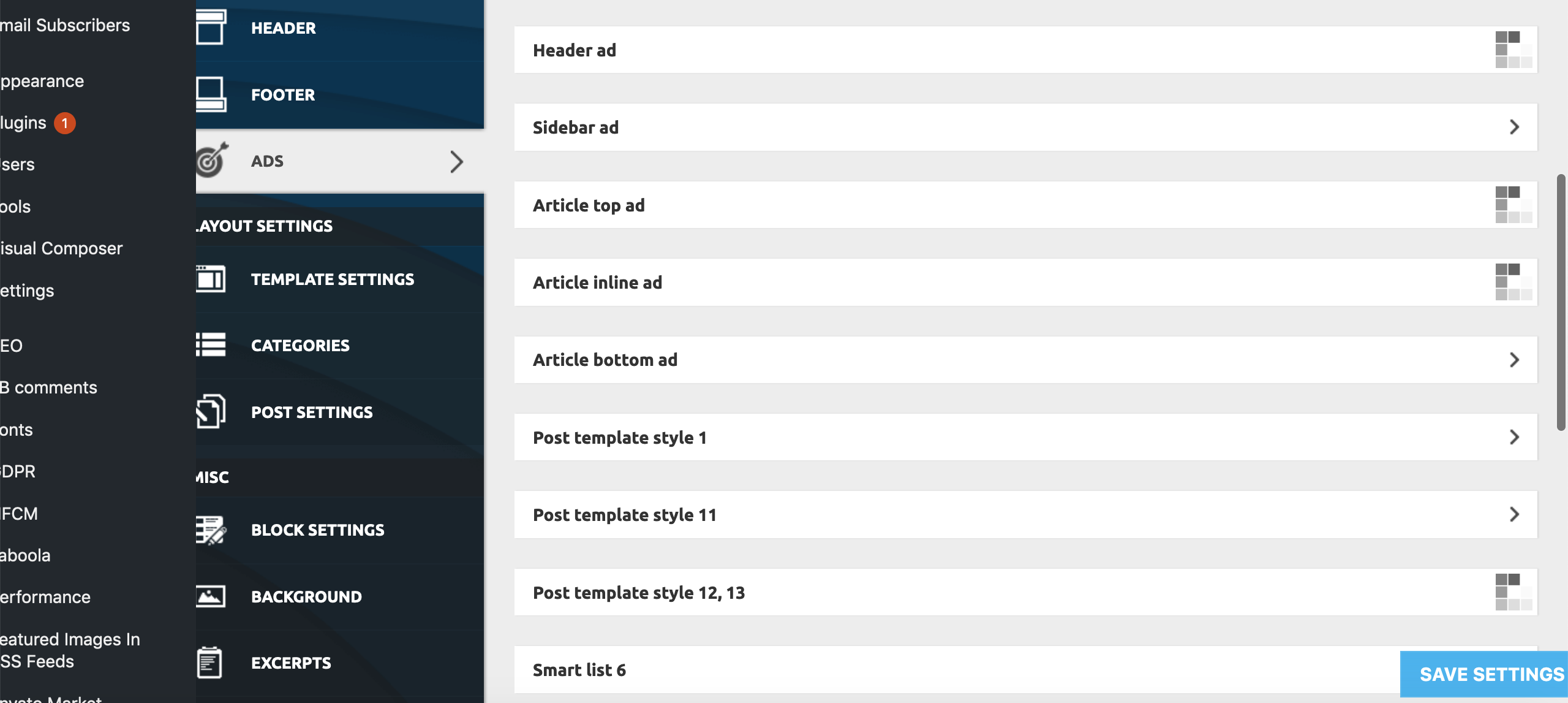
This only appears to be happening on:
Theme Panel > Ads > All submenus bar ‘Background click Ad’
Theme Panel > Theme Colors > All submenus bar Header>Header, Footer>Footer, Footer>Sub-Footer
Theme Panel > Theme Fonts > All ‘Font Settings’ Submenus
Theme Panel > Translations > Translations
Theme Panel > CPT & Taxonomy > All submenus
All other Theme Panel menus and submenus appear to be working correctly.
To try and resolve the issue I have already unsuccessfully tried:
– individually deactivating all Plugins
– deactivating all the essential theme plugins and reactivated the theme
– Reinstalling WP
– Replacing Core Files
– Deactivating all Lazy Load settings (as per a previous thread on a similar problem)
None of these measures has had any effect on the problem as yet.
Furthermore, we are encountering the problem on all browsers we’ve tested (Firefox, Chrome, Opera, Safari), and on all Windows, Mac, Android and iPhone devices we’ve tested, as well as on different IP addresses from a number of locations throughout the country.
Both myself and our tech guy are completely stumped. We now need help! Pleeeasee!
 nervusvagus
I need to use Geo Mashup plugin with the theme so I’m trying to place the following code into single page template:
<?php echo GeoMashup::map( 'map_content=single&auto_info_open=false&static=true&map_type=G_NORMAL_MAP&width=690&height=260&zoom=18&add_map_type_control=true&add_overview_control=true&open_object_id=' .
get_the_ID() ); ?>
https://github.com/cyberhobo/wordpress-geo-mashup/wiki/Tag-Reference
I imported a cloud template. Edited and renamed it to My Template. Using TagDiv Composer tried adding the code via “Raw HTML” box. Then went to Newspaper > Theme Panel > Post Settings > Default Post Template (site wide) and activated My Template there, but naturally the php code for raw html box didn’t work.
Any way I can edit my single-post template to include this GeoMashup code?
 Sanjay Kumar Monu
 This is not with the case of litespeed plugin or litespeed cache, I have tested and get the same result on W3 Total Cache too. The problem occur when you have enabled object cache with the Mobile+AMP configuration turned ON. If you choose AMP instead of Mobile+AMP configuration this problem will not occur. Do note that you have to wait till your cache removed from your server.
 dennisjpitocco
Using the tagdiv Ad Box widget on our Site to display Google Ads. Works just fine in the Header of all Pages. Although we’ve got the same Ad Box placed in our Sidebar for Individual Posts Settings/Pages, no ads showing. Two Ad box widgets are placed directly below DON’T MISS on for all Posts Pages yet the ads don’t appear.
Example here: https://www.bizcatalyst360.com/a-testimony-how-i-refused-to-die/
See blank spaces on right where Ads should appear.
 aliety
the default post image Thumbnail Size is 218*150px
Can i customize the size, for example, set as 250*150px
 Andrei_Ka
Hello, sorry for my english ..
I develop websites and I want to make several demos with switching different designs for my clients .. or different turnkey solutions with different designs with Newspaper..
Ideally, it might look like yur Live Demo at https://demo.tagdiv.com/newspaper_nomad/
Can you help me? How do you organize it on https://demo.tagdiv.com/select_demo/select_demo_newspaper ?
This is multisiting? child themes? or other?
Can you recommend a beautiful plugin to switch these design?
These will be sample sites, or turnkey solutions for my clients. They will choose the design and order their website. I guess the license will be included in the price.
Thank you in Advance!
Andrei
 MRanki
I will like to set a different “search template” when there’s no search results on my website.
Example:
Search “apple” and theres 20 apple’s articles, so the user can get the 10 articles in the search result template.
But when there’s no results for “apple” the website use a different template or for example the error 404.
Is that possible?
 DeanoAus
 I also just stumbled on something else. The WP AMP plugin offers lightbox and carousel options for pages.
So if you enable AMP, you can actually force lightbox effects on images, along with dynamic sizes.
This can be marked as solved. For anyone else with the same issue:
– Install WP Embed Facebook plugin. It will fix any legacy posts when you enable the mobile theme.
– Install and activate the AMP plugin, where you can select lightbox options inside the post.
I’m now running the mobile theme AND AMP without issue.

