Simion C.
 Elements from the cloud library are only available with the tagDiv composer
– https://forum.tagdiv.com/tagdiv-cloud-library-plugin/
If the tagDiv composer is deactivated the cloud plugin will have no use.
You can use WPBakery for the website and deactivate the tagDiv composer, there will be no problem. But in this case none of the cloud features will be unavailable.
 bakamann
Hi, I noticed that the WPBakery Page Builder has updated their theme to Version 5.7 just after tagdiv has released the Newspaper theme Version 9.5.
May I ask if we could have a copy of the Visual Composer update?
Thank you.
 bleachedmagazine
 Hello – how do I update WPBakery to get it to work again? When I go onto my page and try to edit with it, only a mess of code appears. Please help. 🙁
 mmeida
Hi. I’m, still working with WPBakery Page Builder (I cannot stop my web to investigate and upgrade to TD Composer). In previous versions I solved the problem of different headers per page with the code in ‘/Newspaper-child/header.php’ file you can see in the attached image. Now it seems that something has changed. What must I change in the code to keep it working?

Thanks in advance.
 Calin
Calin Hi,
If I understand correctly you want to use the Visual Composer ( WP Bakery ) for post, if is so then you’ll need to go in WP Bakery > Role manager and set the post type to Custom and check the post ->https://www.screencast.com/t/1hhSdCKqq -> https://www.screencast.com/t/5bdevYHqTC
Hope this will help you!
Thanks.
Calin Hi,
If I understand correctly you want to use the Visual Composer ( WP Bakery ) for post, if is so then you’ll need to go in WP Bakery > Role manager and set the post type to Custom and check the post ->https://www.screencast.com/t/1hhSdCKqq -> https://www.screencast.com/t/5bdevYHqTC
Hope this will help you!
Thanks.
Simion C. Hi,
So you cleared all caches (autoptimize) and also purged the data in the CDN you are using. I suggest that you try and deactivate the autoptimize plugin temporarily, see if that has any effect. There are indeed some layout issues also the images do not load.
I see some CSS classes that do not belong to the theme, tagDiv composer or WPBakery, removing what they add seem to solve the issue in the homepage
– http://prntscr.com/mideil
How exactly was that page built? let me know.
Thanks
 Morre27
Hi,
I’ve upgraded to Newspaper 9.5 but since then tagdiv composer is not working properly.
Each time when I make a change in a page (row, element, etc.), the change will not become visible in real time, tagdiv composer seams to be “hanging” (element stays in shadow mode) and I have to save the page first and refresh the tab before changes become visible…
Secondly, I tried to use WP Bakery Composer as an alternative on a new page BUT the Frontend composer is not visible/active.
I already deactivated and re-installed both plugins but no luck so far…
Please help.
Thanks!
Morre27Hi,
I’ve upgraded to Newspaper 9.5 but since then tagdiv composer is not working properly.
Each time when I make a change in a page (row, element, etc.), the change will not become visible in real time, tagdiv composer seams to be “hanging” (element stays in shadow mode) and I have to save the page first and refresh the tab before changes become visible…
Secondly, I tried to use WP Bakery Composer as an alternative on a new page BUT the Frontend composer is not visible/active.
I already deactivated and re-installed both plugins but no luck so far…
Please help.
Thanks!
Calin Hi,
If you made those page with visual composer please make sure that you get from themeforest the theme with all files and install the Wp Bakery -> https://forum.tagdiv.com/how-to-update-visual-composer-plugin/
Hope this will help you!
Thanks.
Calin Hi,
I do not quite understand were you try to set that border,
Please deactivate tagDiv Composer and try again, if is still not working you can try to do this with tagDiv Composer ( tagDiv Composer is a builder special made for our theme by our developers team) deactivate the WP Bakery and let active only TagDiv Composer.
Important Note: Do not use both page builders on the same page!
If there is still a problem please provide me some more details and some screenshots would be very helpful.
Thank you for your understanding!
 Ideenkarussell
Hi,
when I try to change e.g. the size or the border, I can´t see the chances after saving.
Deleted the plugin and installed it again, but it´s still not working.
Please help!
Best regards,
Roman
 audev14
Hello, I have a need to make a page using WPbakery visual editor.. i’m adding 4 boxes with images.. and i say i want image to be centered med etc.. and then i want some styling like shadow.. etc.. all of those parameters are being ignored.. The Template of the page is just a “Default Template”
 NexusFred
Hello,
as the saying goes ‘If You Don’t Ask, You Won’t Get It’ so here is some suggestions for the next update 🙂
Full Layout control
– Simple Option Boxed/Full (not add a background to enable boxed layout…)
– Content/Sidebar ratio (right now fixed at 66%/33%) 33% for a sidebar it’s too much.
– Container width control.
– Gutter width control | left and right content gutter, left and right sidebar gutter.
Add padding and margin control for H1..H6 Post Title etc…
Add templates for Reviews.
When you have a thematic website you will used most of the time the same Reviews criterias for your posts
ex: Mobile reviews
– 1) Design
– 2) OS
– 3) Camera Quality
– 4) Average battery life
– 5) Performance
etc
ex: Restaurant reviews
– 1) Food quality
– 2) Service quality
– 3) Price
– 4) Accessibility
etc
So it’s will be great to not have to rebuild each time the same review for each post.
Be able to add custom image size.
Have a better control of some post templates
– Custom Featured Image size (if the Content/Sidebar ratio is changed the Featured Image width need to be changed too)
or build a formula to detect the good Featured Image size | (Container width) – ( (all gutter) + sidebar width) = content size so Featured Image size = XXXpx
or select the full image size as Featured Image if the Content/Sidebar ratio is changed.
It’s not the best solution but at least a CSS reduction will provide a better result than an increase.
Switch Theme support and Theme panel menu in the admin bar
The “theme support” is more easily accessible than the “theme panel”, which means that the user will need more support than customize the theme ? :*) Too complicate to use ? lol
A Favicon who replace all WordPress favicon setting. Right now the “Theme Panel” favicon replace only the Front End favicon not the Admin one
Or Better provide 2 favicons entries Front End / Admin 🙂
Add a Header and Footer builder. This really missing in Newspaper, most of the premium theme have one now.
Enable tagDiv composer for Post or build also all new blocks for WPBakery, even the custom possibilities are less.
A post need some custom blocks as well, not only the pages.
Add a vertical slider to tagDiv “Add element” left bar.
I using a Wacom tablet and I do not have a mouse wheel so I can navigate into the “Add element” left bar, or at least enable the arrows.
(PS the search box is cool but useless when you have no idea of what you’re looking for.)
Rebuild the Ads section, the way of working is to old and not effective.
Take a look at Better Ads from BetterStudio who is include in Publisher.
It’s not perfect but far more advanced than what provide Newspaper.
Better Ads > Normal Ad/ AMP Ads, AdSense Ads, DoubleClick for Publishers, Image Ad, HTML Ad, Campaign manager, Ad Blockers Fallback
Default Ads by categories/ sub categories, all default Ads can be overridden in each post/page.
Woocommerce is totally forgotten. Win money with some Ads it’s cool but sell products or goodies it’s a good income way too.
Some Product and Category templates will be welcome.
Best Regards
Nexus
Calin Hi,
Please do not use tow builders/composers on the same page -> https://www.screencast.com/t/dXPaBjmDcwx
If you build the page with WP bakery set the shortcode with WP bakery.
Please try with other shortcode and see if this is still happen.
Thank you for your understanding!
 ktchicago
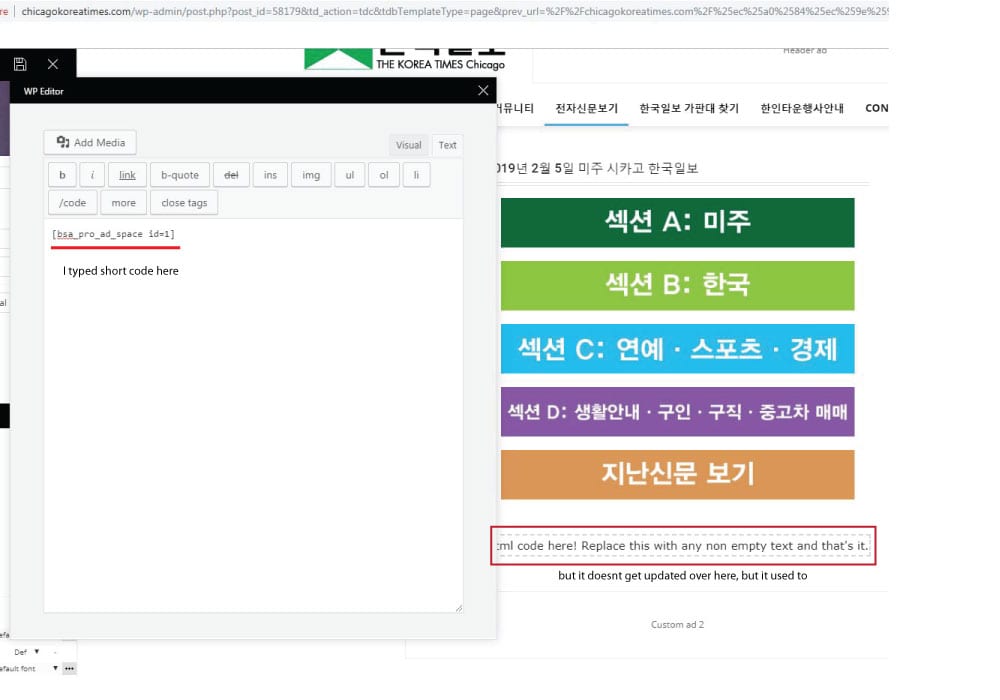
 the short code worked when I edit the page with WP bakery, but the error message appears when I tried to edit the page with TD composer after editing page with wp bakery.
It used to work fine, but the contents I wrote on column text box doesnt get updated as I write on it. I tried it again after disabling all plugins I installed recently, but it still was same :/
http://chicagokoreatimes.com/wp-content/uploads/2019/02/columntext1.jpg
 guischarf
 Hi.
I can see we are in 5.4.7 and 5.6 is already out. However, I don’t find the way to upgrade. Se downloaded again the theme, but it seems to have that 5.4.7 version:
“Hay una nueva versión de WPBakery Page Builder disponible. Ver detalles de la versión 5.6. La actualización automática no está disponible para este plugin. To receive automatic updates license activation is required. Please visit settings to activate your WPBakery Page Builder. Got WPBakery Page Builder in theme?”
Translation: “There is a new version of WPBakery Page Builder available. You can see 5.6 details. Automatic update is not available for this plugin. To receive automatic updates license activation is required. Please visit settings to activate your WPBakery Page Builder. Got WPBakery Page Builder in theme?”
It takes me to this link https://kb.wpbakery.com/docs/faq/can-i-update-wpbakery-page-builder-if-i-have-purchased-it-in-a-theme/ which basically says that the theme developer will provide the new, updated version.
Are you providing it? How can I get it?
Thanks.
 Paradoxer
I just purchased the Newspaper theme and I’m trying to build a basic homepage using the “Pagebuilder + latest articles + pagination” template. According to this guide, I should be seeing extra options for “Homepage Latest Articles” and “Homepage Loop Filter” which will let me customize the latest posts element, however I am not seeing them. I do not see an option to “Enable Visual Composer,” either.
Both the provided “tagDiv Composer” and “WPBakery Page Builder” plugins are installed and activated.
 ORBGaming
1. Not sure how this happened, but the sidebar only shows up on categories – not sure how to make my home page (landing) have a sidebar as well? Fixed this.
2. If I am running the tagdiv compose & bakery composer, does that cause an issue?
 Inma
InmaHi! I see on themeforest Newsmag theme that tagDiv Composer y more fast and stunning that other WP composer.
I have installed and active both tagDiv Composer and WPBakery Page Builder but, is it necesary?
I can use only tagDiv Composer?
Thanks for the support, regards.
Simion C. Hi,
I test various things with it periodically, found no problems with it and WordPress 5 until now. The latest 5.6 version of WPBakery is compatible with WordPress 5, this is mentioned in the plugin changelog
– https://kb.wpbakery.com/docs/preface/release-notes/
They even added an option to disable the Gutenberg editor if needed
– http://prntscr.com/mdlar2
Thanks
Simion C. Hi,
If you don’t use you can deactivate it and use WPBakery instead, there will be no problem. No point having two page builders active and loading at the same time.
As a note, when you will update the theme in the future, the tagDiv composer will automatically be installed and activated, so if that happens you will have to deactivate it again.
Thanks
 paulberrow
 It’s not my case because i didn’t use WPBakery and this problem is on posts, i use default site post template.
But like i said before i changed width of rows, now it’s like this:
.td-pb-span8 {
width: 70.17%;
}
.td-pb-span4 {
width: 29.83%;
}
But when sidebar gets sticky td-pb-span4 width becomes 324px which is 33.3%, not 29.83 as i was before.
I tried to use !important, but i didn’t help.
Could you check it please _https://davlenienorm.com/gipertoniya/fizicheskie-uprazhneniya.html
 menneskedyr
So, recently I switched from WPBakery composer to TD Composer. All was fine on a test installation, but now that it’s active on the main site TD Composer doesn’t confirm that changes are saved. It does save changes, but does not confirm it, just keeps spinning. Now that’s not a life-or-death issue, just thought that I would mention it. Memory allocations are well over the requirements so I don’t think that’s a problem.
Also, I transferred the new homepage by copy-pasting shortcodes from the test installation to the live one. The first time I brought up TD Composer it told me that “current page was not created by TD Composer”, but only then – there were no warnings later on.
I noticed that the page has two custom fields added. The first one is “tdc_content” and it appears to be a copy of the content. The second one is “tdc_dirty_content” and that says 0. Is that normal behavior?
 Bogdan B.
 Hello,
Sorry but we have not tested elementor. it is a third party plugin which does not recognize our theme specific elements. You cannot expect to be able to add theme specific elements in a third party plugin. Our theme blocks and grids were created for our own tagdiv composer or wpbakery page builder. Any other page builder will not be able to use the theme blocks and grids as there is no implementation added by us that can do this.
Thank you!