
- TutorialsDefault Block Settings Guide
- NewspaperWP Rocket and Newspaper Theme: Optimization Guide
- TutorialsFrom WPBakery to tagDiv Composer
- TutorialsOffset Feature
- TutorialsWhat is Ajax preloading?
 mikeaft
Hello,
Great theme. Thanks for all the work. Can someone please help me edit the thumb height on the blocks below. I want to trim the height from 220 px to 205 px or so and keep it clean. Thanks!

 superchampionkid
 duh! FIXED. realized I was not utilizing Block 23. der.
superchampionkidI need to be able to remove the read more links from the entire site along with knowing how to remove it from specific modules/blocks.
I utilized this code with no success:
.td_block_23 .td-read-more{
display:none;
}
Thank you for your assistance!
 saucemonsters
I want to remove the dates from the Trending Now widget in my right rail and from the Big Grid 1. But I want to keep the dates below post blocks on my front page and on the posts themselves. How can I do this?
saucemonsters Thank you Providence Business! That answers the issue. I agree it would be a great feature to add limitations on how far back most viewed blocks go. I believe in the Newspaper theme it works that way. Surprised it wouldn’t be the same for Newsmag.
 providencebusiness
 Hi saucemonsters. If you have a block set to sort by most popular, it will pick out the most viewed posts from the past 7 days of traffic … regardless if the actual date of the post is within the last 7 days or is 7 years old. That’s why you can sometimes see posts in those widgets that could be months or even years old. I hope that makes sense. 🙂
I have the Trending Now (News Ticker) block in the header of my home page (https://pbn.com) and a block in the footer of my site that shows popular posts as well. Both are set to sort using Popular (Jetpack + Stats) because we use caching and a CDN.
We also see old stories popping up from time-to-time in both of these blocks. We’re trying to figure out how to limit the Popular sorting option to only display popular posts that have been published in the last 90 days. Haven’t figured that out yet, however.
Catalin, if you have any ideas how we could limit these two block to only show popular posts that have been published in the last 90 day, that would be awesome!
 Catalin
 Hello Fitaddictnl,
Unfortunately, our theme does not have any such an option that allows you to sort your articles by date (you can sort them by latest), sorry! All the available sorting for our blocks can be found here -> https://www.screencast.com/t/ECodO0Lm4v For more information about Block Settings, please check here -> https://forum.tagdiv.com/block-settings-guide/
Thanks for your understanding!
 krisztinabenedek
 Hi Simion!
Thanks for the useful information! I’ve been able to install Visual Composer, but I can’t create a copy of it. This error message is displayed, no changes are made to the update.

There are missing options in the theme panel. For example, they do not open:

I can’t activate Slider revolution plugin, I enter the purchase code and send this error message:

If I install the demo slider, the content of my site can’t be lost?
And another question, Visual Composer works only on pages, can’t be used for entries? My site is blog, there are only writings in the posts. How can I put these into blocks?
Thanks
 Edward
 Try this:
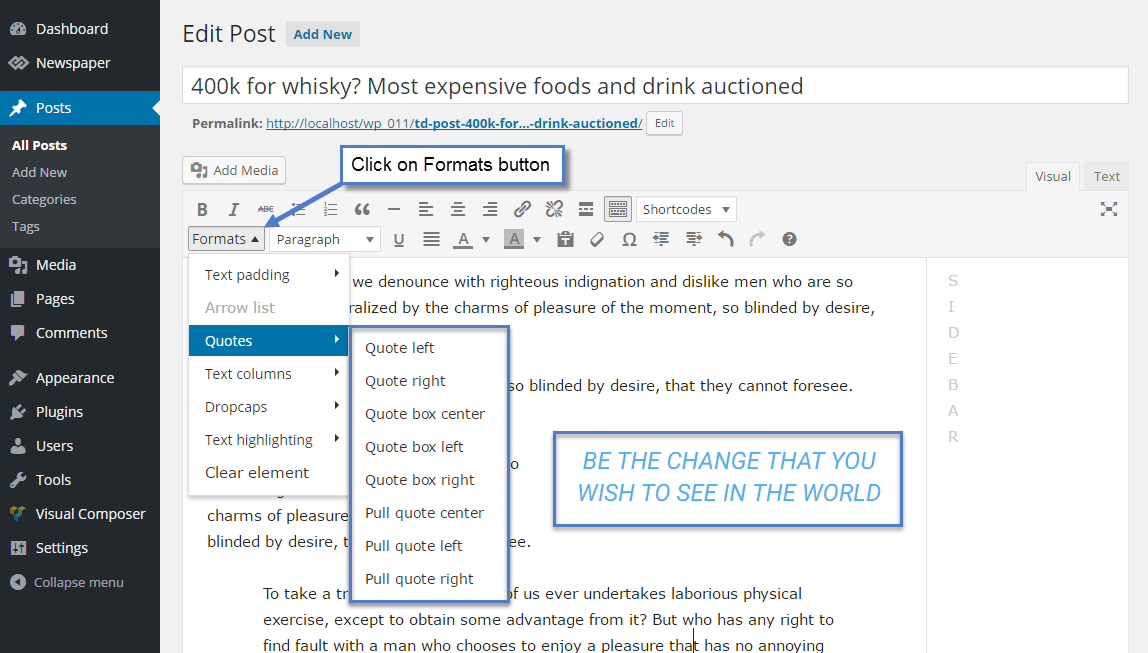
Result: https://demo.tagdiv.com/newspaper/blockquotes-pullquotes/
Also you can change font options for quotes here:

 afserban
Hello!
I just got Newspaper 7 theme a few weeks ago and now I want to change the blockquote style. It is blue and aligned to center but I want it to be black and aligned to the left with a bit of increased indent. How can I do that?
Thank you!
 Simion C.
 Hi,
Please explain in more details the problem you are having. From what I understand there are missing options in the theme panel or missing entirely. Some screenshots would be very useful to describe the issue, if it is possible.
After finishing installing the theme, you need to install the Visual composer editor to be able to use the page building elements available.
Here you can find some useful information about installing the plugin and how to use it
– https://forum.tagdiv.com/how-to-update-visual-composer-plugin/
– https://forum.tagdiv.com/how-to-use-visual-composer/
Then you can use all the available blocks and create the layout you want for your website
– https://www.screencast.com/t/4HM9yXE23
The Revolution slider is provided in the theme package and can be installed like this
– https://forum.tagdiv.com/how-to-install-revolution-slider-v5/
It would be best to import a predefined demo slider, provided in the theme package as well
– https://forum.tagdiv.com/import-revolution-sliders-on-demos/
The Revolution slider is a very complex plugin with a huge amount of options, and can be difficult to master entirely. Here you can find all the official documentation regarding the slider
– https://www.themepunch.com/revslider-doc/slider-revolution-documentation/
And here you can find all the available theme documentation
– https://forum.tagdiv.com/newspaper-theme-documentation/
Please let us know if you have any more questions or need further clarifications.
Thanks
 dkumar
 Resolved.. I noticed that grid and block is set together to show up the posts. so if there is less than 3 posts, it will show up in the grid alone (depending upon your grid selection)… as additional posts are added, it will show up in the block.
dkumarI’m not seeing any post lists displayed for a particular category. It shows ups in the TOp grid but it is empty in the block, even though there are many posts for that category. Is there any setting I’ve look into it. Ive checked all the category setting but didn’t work… Any one had this issue.
krisztinabenedekI’ve installed the program and there are no more options available on the theme panel.
Also, in the editor, entry writing does not show the blocks as shown in the tutorial. I have activated the Revolution slider plugin as described, but at newspaper plugins it does not look like it. What can I do?
 mrdebolt
Greetings from Canada,
Enjoying the Theme
I’m attempting to figure out on newspaper 7.7.1 how to switch off specific
categories from block header menus. Added categories show up fine but
I need them to disappear on specific blocks, i.e. politics, fashion or
whatever need individualized menus. Not sure where to turn from here.
Simion C. Hi,
I have tested this and it is working properly for me. Also if you plan to use a specific post Id there is no need to limit the posts, the only one that will be displayed in the block will be the post with that Id. Try adding the block you want on the page, and make sure you enter a valid post Id in the required field
– https://www.screencast.com/t/xwnSFdIZC
– https://www.screencast.com/t/rT2YmuFk
The result should be the block displaying the post according to the Id entered
– https://www.screencast.com/t/Foi9i61SjCH
Thanks
Simion C. Hi,
You could modify the font color for the post titles on the blocks, for each block if you want to. For example this block on your page
– https://www.screencast.com/t/x4HNQhKs0F7l
This is the code used
.td_block_18 .td_module_10 .td-module-title a {

color: red;

}
Here is a tutorial about using the browser inspector to identify the elements on the page and their classes, in order to create custom code – https://forum.tagdiv.com/create-custom-code-using-the-browsers-inspector/
This explains how to make minor modifications to the page elements, that would not be possible through the theme options at the moment.
Also I could mention that each block can have a class assigned to it, this can be useful when you have multiple blocks of the same type, to differentiate them – https://www.screencast.com/t/YaboS0Emf
Rows can accept a class as well – https://www.screencast.com/t/70Efz1rEyzc
Thanks
 Brieg
Brieg Thx for answer me Simion.
Im trying to implement first solution(with that screenshot) what did u give.
What i did:
Put “Block 1”
In “General” tab in “Limit post number” input: 1
In “Filter” tab in “Post ID filter:” input: valid id number coming from “Post”
Then block do not even apear…
Also i cannot faind any block that will be display only one post(just many posts in blocks)
 Bogdan B.
 Hello,
1) The sidebar on the page template will not affect the pages. On pages sidebars are created in the visual composer editor. Edit your page and press the back-end editor button: https://www.screencast.com/t/n6e0FZlt Then you can edit your page in the page builder. You wuill have to play around with it a bit to see how you can add and remove element, how to set them to show posts…etc.
This guide should help with the block settings: https://forum.tagdiv.com/block-settings-guide/
2) You can disable it from here: https://www.screencast.com/t/ejgaDlIRIz
3) Please read this guide: https://forum.tagdiv.com/more-articles-box/
Thanks.
 youngartists
Hi! I’ve followed the guide to add our facebook account on Social Counter, but I have some problems with Facebook Developers: I take the App ID, the secret key and everything, but for Facebook my website is not safe, so they block the procedure to create the app for website. Maybe i have to add the Sdk code to my website to let my website figure as safe? Where I could add this sdk code? Thank you!
 JA
JA By the way, is it possible to do the same for block colors?
Simion C. Hi,
Most of the page building block elements have the option to limit the post number displayed, If you would like to display a single post in a block, you will just have to set a limit like this
– https://www.screencast.com/t/gt1txIMw7m1a
It all depends on the layout and block style that you choose to use for this, there are many elements that you can choose from in the Visual composer editor.
You can find all the settings and options available for the blocks in this guide
– https://forum.tagdiv.com/block-settings-guide/
Also all the blocks currently available can be previewed in the live theme demo
– https://demo.tagdiv.com/newspaper/block-1/
Thanks
Catalin Hello Ken0929,
If you want to remove the date for a specific block you should use a bit of CSS code and target the exact block you want to remove this information. For example, if you want to remove the date for block 2, you should try the code below and place it in Theme panel->Custom CSS area.
The code is ->
.td_block_2 .td-post-date {

display:none;

}
Hope this helps!
Thanks.
 rlucian90
Hello,
I have a problem with the Social Counter on Facebook count.
I have installed the latest social plugin version, the one that successfully gets the Access Token from Facebook, but i still get 0 fans .
[IMG]http://i64.tinypic.com/2d7ugck.png[/IMG]
I have also checked in /wp-content/plugins/td-social-counter/shortcode/td_block_social_counter.php for $atts variable and it doesn’t come up with the access_token parameter.
Thank you!
Have a nice day.
Catalin Hello vlambert,
Please ensure that you have right selected the sorter from Block settings, like this -> https://www.screencast.com/t/I8sf3UsxAj All of the available options for Grid are placed in Panel, Block Settings area. So, if you need to have any other options you should implement it yourself through the code. For more information about these settings, please check the useful guide here -> https://forum.tagdiv.com/block-settings-guide/
Thanks for the message!
