
- NewspaperFlex Block Builder and Flex Loop Builder
- NewspaperHow to use the Flex Blocks cache option
- NewspaperHow to edit modules for Flex Block X
- NewspaperHow to insert a block inside the content of a post
- NewspaperFlex Block Settings Guide
- NewspaperMeta Info on Modules and Blocks
- NewspaperTheme modules and blocks
- TutorialsDefault Block Settings Guide
- NewsmagBlock settings tutorial
- NewsmagCategory tag on modules/blocks
- NewspaperThumbnails – Fix strange looking images on blocks
- NewspaperBlock settings tutorial
- NewspaperCategory Tag on Modules/blocks
- ApiPractical example – How to add a new Block and Module
- Apitd_api_block::delete
- Apitd_api_block::update_key
- Apitd_api_block::update
- Apitd_api_block::add
- ApiAPI – Blocks – Introduction
- NewspaperWP Rocket and Newspaper Theme: Optimization Guide
 Simion C.
 Hi,
The code may not work properly for all block header styles, since this is just a workaround solution. For Block Header style 8 you have to use it like this – https://www.screencast.com/t/1epnoMnPFWi
This is the code, just remember to use your own custom class and icon code
.mycustomclass .td-block-title span:after{

content: "\F050";

font-family: FontAwesome;

margin-left:15px;

position:absolute;

color:black

}
Thanks
 derega
Hello!
I have specific layout in my site that cannot get with any of your blocks. So, I need to change it.
My question is: Is it possible to override blocks layout without losing it when theme is updated?
This is layout I need.
Layout with 3/4 + 1/4
 Bogdan B.
 Hello,
The style comes from the demo you have installed. Please compare your theme with the demo you use. Do not compare it to the default theme demo. This is the demo you have installed on your site: https://demo.tagdiv.com/newspaper_magazine/
That is where the uppercase titles come from. It is a demo specific style. You need to compare apples to apples 🙂
If you do not like the uppercase titles you can always use a css code to make them regular again:
.block-title > span, .block-title > a, .widgettitle, .td-trending-now-title, .wpb_tabs li a, .vc_tta-container .vc_tta-color-grey.vc_tta-tabs-position-top.vc_tta-style-classic .vc_tta-tabs-container .vc_tta-tab > a, .td-theme-wrap .td-related-title a, .woocommerce div.product .woocommerce-tabs ul.tabs li a, .woocommerce .product .products h2, .td-theme-wrap .td-block-title{

text-transform:initial;

}
Thanks.
Bogdan B. Hello,
You need to have related articles on for me to see them and inspect the code. If it’s set to off, I cannot inspect the code so the site does not help.
Try to use this general code to change the related articles font:
.td_block_related_posts .td-related-title{

font-size:20px!important;

}
Thank you!
 leapdsc
 Hey there,
Thank you for the prompt reply. I do have to specify my question as I seem to have not explained it properly. Based on the previous image : https://1drv.ms/i/s!Ai3uwVtbSehutoUmKwibSQ9C6007Fg.
Is there a way where I can specify the post’s title, even with lesser words, to have equal spacing that is consistent across?
For example: Such that when the Post Title for Block A has 3 words (1 line), while Block B has 9 words (3 lines), the spacing can be fixed to be 3 lines for all Post Title. My ideal situation is for the Posts excerpts are to be aligned.
Bogdan B. Yes we just released an update including the latest one from VC but I;m not sure they made any implementation regarding the post grid. It is a security fix as the changelog suggests: https://www.screencast.com/t/bktyUbPZ6O
You can try to use our own blocks and grids in order to have better control over the content. Our page builder still has the same shortcodes and the same sorting options and filters only it’s moved to the front-end.
The custom page builder is included in our side-project named ionmag and can be downloaded from here: https://www.wpion.com/free-news-theme/ then you can install the page builder from the free theme. However we do not recommend using both visual composer and our own page builder for the moment. It is still experimental on neswpaper and newsmag.
Thank you!
 anoopcnair
I have been working with Godaddy hosting (the linux virtual server provider) because of the issues of very slow loading time of the site.
I tested the loading time with different tools but it’s seems loading time is very high. Rather in the flow I could see that it’s wait for 5S/7s before loading the website. This is really slow
(see the attached pic 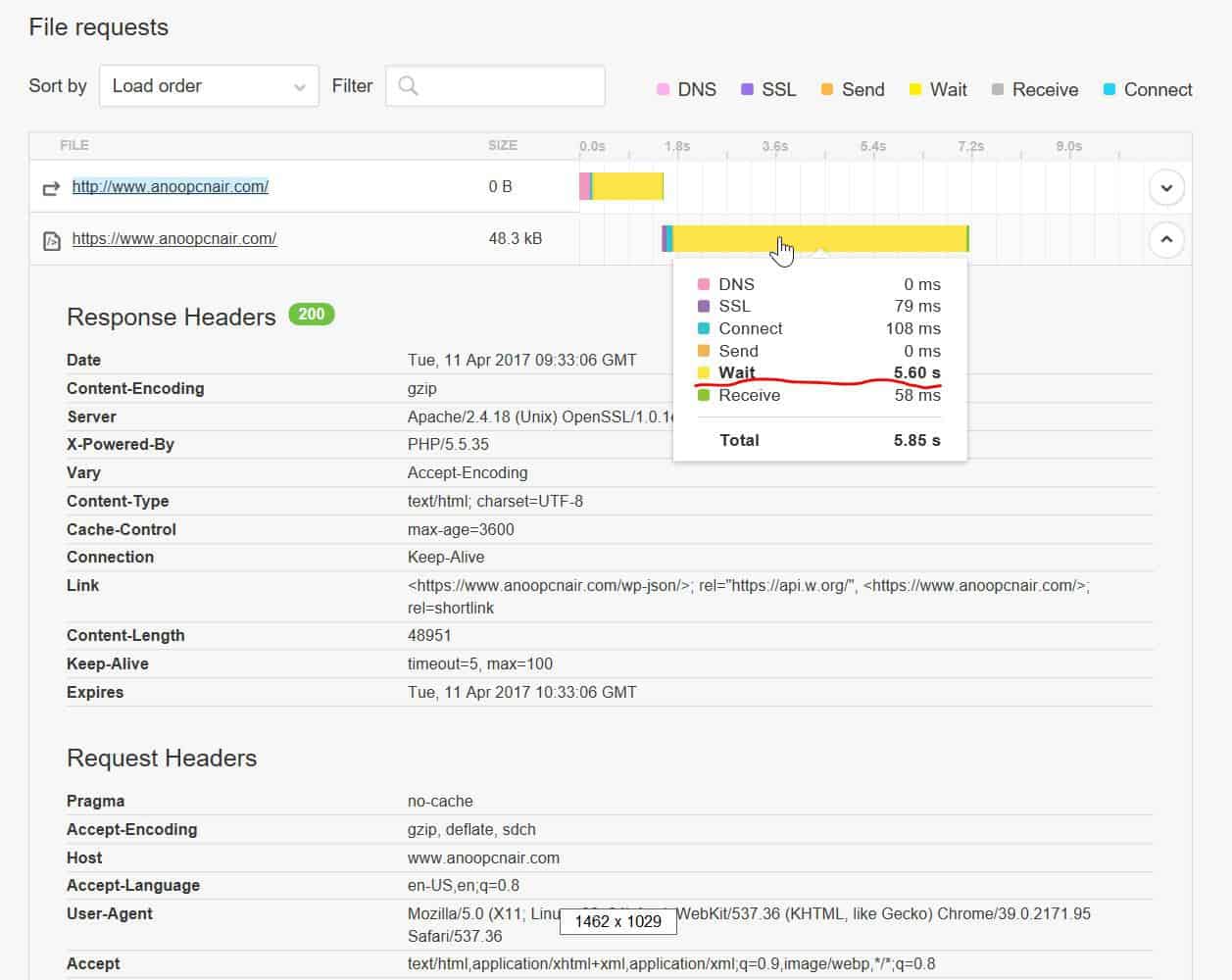 )
)
https://gtmetrix.com/reports/www.anoopcnair.com/3pyMLT7K (result is copied below)
https://tools.pingdom.com/#!/dtR5oa/www.anoopcnair.com
Godaddy says this is coding issue and the web developer says this is server issue but I’m stuck now . Any pointers would be really helpful !!
200 OK
anoopcnair.com
47.8 KB
7.52s
HeadersResponse
Response Headers
Date
Tue, 11 Apr 2017 09:34:23 GMT
Server
Apache/2.4.18 (Unix) OpenSSL/1.0.1e-fips mod_bwlimited/1.4
X-Powered-By
PHP/5.5.35
Link
<https://www.anoopcnair.com/wp-json/>; rel=”https://api.w.org/”, <https://www.anoopcnair.com/>; rel=
shortlink
Vary
Accept-Encoding
Content-Encoding
gzip
Cache-Control
max-age=3600
Expires
Tue, 11 Apr 2017 10:34:23 GMT
Content-Length
48957
Keep-Alive
timeout=5, max=100
Connection
Keep-Alive
Content-Type
text/html; charset=UTF-8
Request Headers
Host
http://www.anoopcnair.com
User-Agent
Mozilla/5.0 (X11; Linux x86_64; rv:49.0) Gecko/20100101 Firefox/49.0
Accept
text/html,application/xhtml+xml,application/xml;q=0.9,*/*;q=0.8
Accept-Language
en-US,en;q=0.5
Accept-Encoding
gzip, deflate, br
Connection
keep-alive
Upgrade-Insecure-Requests
Simion C. Hi,
If you would like to create and use a custom block, you can follow these tutorials explaining the steps needed to achieve such a task
– https://forum.tagdiv.com/api-blocks-introduction/
– https://forum.tagdiv.com/practical-example-how-to-add-a-new-block-and-module/
Thanks
Simion C. Hi,
1. If you would like to change the category base you can do it in WordPress permalinks settings
– https://www.screencast.com/t/ILOmjL95PC
For the author however there is no setting, but you could try a plugin with this capability. Like the one suggested in this topic for example – http://www.wpbeginner.com/plugins/how-to-change-author-url-slug-and-base-in-wordpress/ and see if it is what you are looking for.
2. You can filter the posts displayed on that block using an author Id or multiple Id’s
– https://www.screencast.com/t/rJJk9f4RW1pw
There you can enter the Id of the author that you want to use, so the posts displayed will be just the ones that have that respective author. You can find the author Id like this for example – https://www.screencast.com/t/e1LcWVeZrN1
Thanks
 aheskar
 Hi, Slmlon C.
There’s style 1 also -> http://i.hizliresim.com/br95Wb.png but style 8 also no -> http://i.hizliresim.com/r3yQr3.png
Block setting is such -> http://i.hizliresim.com/GBGYVr.png
Custom CSS setting is such -> http://i.hizliresim.com/4P9gBA.png
Thanks.
-
This reply was modified 9 years by
aheskar.
Simion C. Hi,
Everything is working properly on my end, and if you are using the respective block on a full row it should display as intended as well. Maybe you have set custom class to that row, or you have some custom code affecting this. Also you should try as a test to disable all your plugins except Visual composer, clear any caching installed then create a new test page and add this block on a full row, to see if it displays as it is meant to. Please let us know how it goes.
Thanks
Simion C. Hi,
Please check the settings in the Visual composer plugin
– https://www.screencast.com/t/YZ9cbH8Y – https://www.screencast.com/t/k0RJjssLuvY5
maybe this is an access issue if no block settings are available. If everything is in order and reinstalling the plugin does not fix this, please send us an email at contact@tagdiv.com so we can take a look. Also paste a link to this topic so we can identify you.
Thanks
 juliajune
 I want do this in Child Theme:
I created the structure of folders and files, as I wrote above and added the code in td_config.php in Child Theme. But nothing happened.
I did not find the answer to my question https://forum.tagdiv.com/td_api_blockadd/
Simion C. Hi,
What you need to do is add a custom class of your choosing, in each of the block settings that you want to have an icon in the title – https://www.screencast.com/t/U69AtrhLNDQr
Then using this unique class you can insert an icon from this list – http://fontawesome.io/cheatsheet/ like this – https://www.screencast.com/t/io5XjqVUo and further style it if wish.
When selecting an icon from the list use it like this – https://www.screencast.com/t/JO4biXxoS
Also make sure you have the Font awesome plugin activated in order for this to work.
Please let me know if you need further help or clarifications.
Thanks
 Catalin
 Hello nothereatm,
-This image which you gave above is used for logo section and there you cannot add featured post slider. If you want to have a slider, you simply use the Visual Composer and add from there. Read all our documentation and there you will find what you can do or not with our theme elements. -> https://forum.tagdiv.com/newspaper-theme-documentation/
-You should use a simple block sorted by your latest posts and inside this, you should add your recipes.
-Unfortunately, our theme does not have any such an option that allows your to show newsletter. If you want to do this, you should use a plugin with this functionality.
If you need more additional customization, notice that we cannot provide something like that and please consider hiring a freelancer/developer to help you in this case.
Thanks for the message!
Catalin Hello Alvino,
Please keep in mind that our theme is only tested with Google Insights tool but only for Homepage and not for others post pages, sorry! Also, notice that our demo does not use the Speed Booster plugin and that’s why appears some render blocking when you test it on this tool. Try to use our useful guide information from here -> https://forum.tagdiv.com/how-to-make-the-site-faster/ to make your site to load more faster.
Thanks for your understanding!
Simion C. Hi,
You can make modifications to the page structure and additional customization, by opening your page in the Visual composer editor. Here you can find all the information about the block settings – https://forum.tagdiv.com/block-settings-guide/
Thanks
Simion C. Hi,
You can control the title excerpt for each module. Block 4 uses module 2 so you can do it here
– https://www.screencast.com/t/RtDzo8WeV and set a fixed excerpt for the title displayed on that block, by words or by letters.
Thanks
 awoodhams
 Yes, I know that my blog titles are not in caps. I am not talking about post titles. I am referring to the Block Title. I know how to use the block settings. When I put in “Latest Posts” it always displays “LATEST POSTS” on my webpage.
Again, I notice at your page (https://demo.tagdiv.com/newspaper/block-13/) that your block headlines (ie. Block 13 – on 2 columns) is not in all caps. However, on my page (http://e50.4da.myftpupload.com/) my Block Titles are always in all caps (to see this, scroll to the middle and see “LATEST POSTS”). Can you direct me to a way that I can correct this?
 simchris
 e.g.,
[ Version 7.8.1 ]
– improvement: we updated Visual Composer to the latest version.
– improvement: tagDiv Social Counter was updated to the latest version, this fixes the issue with Facebook
[ Version 7.8 ]
– new: Huge improvement with the spacing of elements and the grid. We compleatly rewrote the grid system to allow easier full width rows and headers. Expect more full width options soon 🙂
– new: clear cache debug button for video playlists
– new: speed booster plugin version. Please update it if you use it.
– new: pinterest block and widget. Show your pinterest boards in style with this new block. Please note that this block is in testing phase.
– new: the main menu of the theme was redesigned from scratch
– new: Added a lot of options for colors on menu
– header and footer full width support
– improvement: better plugin descriptions and help text
– improvement: all big grids now show a nice error message when they don’t fit in the layout of the site. (when used on one column or two)
– fix: added various missing translations to the translation panel
– fix: some block templates where not able to change color on firefox due to a scoped style
– fix: we removed the offset from ajax requests, this provides a better user experience with the theme and the filters
– fix: the global modal window now ignores pictures with external links. Before this update, the modal windows was trying to open the external link
– fix: the jetpack sorting method on blocks now works as expected again
– fix: block header 17 on social counter now works as expected
– fix: instagram images aligment issues
– fix: post template 1 featured image sizing bug
– fix: all embeds that overflow content on small screens are now fixed
– fix: repaint in Chrome browser on blocks that use Load More
– fix: mobile theme now works with revolution slider as expected
 truth
truthHello,
I need to add the Facebook comments system to the theme. Currently I am using a child theme.
I uploaded the comments.php (Newspaper/includes/wp_booster), with the Facebook comments code, file in my child theme’s root but the theme keeps loading the default comments code. Here is the code I was forced to put in the Newspaper/comments.php file:
<div class="comments" id="comments">

      <h4 class="block-title" style="margin-top: 0px;"><span>LASCIA UN COMMENTO</span></h4>

      <div class="fb-comments" data-width="100%" data-order-by="social" data-href="<?php the_permalink(); ?>" data-numposts="5" data-colorscheme="light"></div>

</div>
P.S.: I hope this topic is not somehow related to https://forum.tagdiv.com/topic/mobile-theme-stopped-working/
Thanks.
truth Hello,
after investigating a bit more here is what I found:
the file which broke the mobile theme is mobile/comments.php. I had to edit it in order to set-up the Facebook comments system.
The content of the comments.php file is below:
<div class="comments" id="comments”>
<h4 class="block-title" style="margin-top: 0px;"><span>Leave a comment</span></h4>
<div class="fb-comments" data-width="100%" data-order-by="social" data-href="<?php the_permalink(); ?>" data-numposts="5" data-colorscheme="light"></div>
</div>
The code above started creating problem on mobile devices since the 7.8 version of the main theme:
– if caching plugin is enabled the mobile theme loads also the sidebar of the main theme (desktop mode) at the bottom of the homepage and sometimes also at the bottom of the posts.
– if caching plugin is disabled the mobile version works correctly with the code above.
Since it is difficult to debug the theme with the caching plugin enabled, would you please tell me how can I structure the comment.php in order to use the Facebook comments system.
Thanks.
 okgo87
Hello,
I want to duplicate a block (block_4) into a new one, namely block_2017.
That’s because I want to customize this new block without affecting the original one.
Can you please show me a way to do it?
Thank you!
 feriendorf
Hi,
since the last update I get the following Note in the footer on zinsenvergleich.at
Warning: A non-numeric value encountered in /www/htdocs/w0074ebb/zinsenvergleich-neu/wp-content/themes/Newspaper/includes/wp_booster/td_block.php on line 1020
Also if I use the post template style 2, I get the following error code. With the default template it works.
Warning: Illegal string offset ‘td_post_template’ in /www/htdocs/w0074ebb/zinsenvergleich-neu/wp-content/themes/Newspaper/includes/wp_booster/td_single_template_vars.php on line 75
What’s going on here and how can I fix it? I got an email, there is a theme-update available on themeforest, but in my envato plugin it doesn’t show yet, still only the 8.1. version.
Bogdan B. Hello,
In order to create a new block you can use the theme api system: https://forum.tagdiv.com/td_api_blockadd/
Please note this is not covered by the theme support though as it represents customization.
Thank you!



