
- ApiPractical example – How to add a new Block and Module
- Apitd_api_block::delete
- Apitd_api_block::update_key
- Apitd_api_block::update
- Apitd_api_block::add
- ApiAPI – Blocks – Introduction
- Apitd_api_thumb::update_key
- Apitd_api_thumb::update
- Apitd_api_thumb::add
- ApiAPI – Thumbnail – Introduction
- Apitd_api_category_top_posts_style::update_key
- Apitd_api_category_top_posts_style::update
- Apitd_api_category_top_posts_style::add
- ApiAPI – Category top section style – Introduction
- Apitd_api_module::update_key
- Apitd_api_module::update
- Apitd_api_module::add
- ApiAPI – Modules – Introduction
- ApiUsing the Theme API in plugins
- ApiThe Theme API
 Bogdan B.
 Hello,
Unfortunately our theme block elements will ignore sticky posts. The featured posts can only be used with the featured category in our theme. The sticky featured posts that will remain on top always is not possible using our theme content blocks and modules. Using visual composer is not possible on category pages as well.
Thank you!
 Simion C.
 Hi,
Use this code for the slide leaving the rest unmodified, enter it in Theme panel->Custom Css
.td_block_slide .td-module-meta-info .td-post-author-name a {

color: white!important;

}
Thanks
 Catalin
 Hello Lewis,
If you want to increase the width of specific widget you should use the specific class for this widget. Below I gave you a simple example for this.
The code is ->
.td-ss-main-sidebar .td_block_9{

width:400px;

}
The result is here -> https://www.screencast.com/t/2d61PzEgAr
You should adjust your code as you wish.
Thanks for the message!
Bogdan B. Hello,
Our theme does not alter the way wordpress handles posts and categories. If the post is shown in all of the blocks on the homepage, then that is a totally different matter. Pleas provide more explicit details to your request with screenshots so we can reference. Where is the post appearing in the ‘other categories’
Thank you!
 dinn
dinn Hello there,
Many thanks for the quick reply.
The problem is that we have thousands of tags and we want to include them all except one. We tried to do the same we did on categories add minus before the id but it seems not working on tags.
Now we were trying to change the query on those block phps to add tag__not_in but no luck.
We really appreciate all the help you can give, thanks!
Bogdan B. Hi,
If you are referring to the top slider, our theme has a big grid slide you can set to autoplay using the block settings: https://www.screencast.com/t/gmCOnwjSLV
Thank you!
Simion C. Hi,
You can filter the tags in each of the block setings – https://www.screencast.com/t/MAWzf7Z8VatB by entering only the tags allowed
Thanks
 josflachs
Yesterday someone (the gnomes, likely) screwed up my theme. I repaired the damage, but got stuck at the featured posts. Until the gnomes messed up my theme, I marked posts as Featured, Cat 1, Cat 2. It would show up only on Featured, until replaced by fresher Featured posts. Then it would appear in Cat 1 and Cat 2.
Now that post is showing in Featured, Cat 1 and Cat 2 at the same time. How can I fix this? My client (who denies he was that gnome) also noticed that one post now appears 3 times: One in Featured Posts, Second in it’s proper category and Third in ‘For you selected’ at the bottom of the page. All at the same time. It should be one after another. First in Featured, then in the category and finally in the ‘For you selected’ block.
Simion C. Hi,
Try this code, enter it in Theme panel->Custom Css
.td_block_image_box .td-custom-image a:after {

border: none;

}

.td_block_image_box .td-custom-title .entry-title {

display: none;

}
The first part will remove the inside border – https://www.screencast.com/t/LOpAdHxQ
The second one will remove the custom title – https://www.screencast.com/t/sljelDQHylOk
Thanks
 redtrain
 Thank you for your response Luclan, and Happy Unification day.
Ads Configuration:

Ad.php Code:
<div class="td-header-rec-wrap">

    <?php

    $tds_header_ad_title = td_util::get_option('tds_header_ad_title');
// show the header ad spot
if (is_category('Food')){
echo do_shortcode('[td_block_ad_box spot_id="custom_ad_1"]');
}
echo td_global_blocks::get_instance('td_block_ad_box')->render(array('spot_id' => 'header', 'spot_title' => $tds_header_ad_title)); ?>
</div>
Thank you in advance.
 mayaguez
I added a Block 9 Titled “Must Read” to my Home Page under Block titled “Most Popular”.
Q1. How do I edit this block to “display” exactly as the Block titled Most Popular?
 mmeida
Hi, I jus want to know how can I remove the titles of the widgets in the sidebars and in blocks like ‘More articles’.
Thanls in advance!
 fabinhoalmeida
Hello friends. We’re having a problem with publishing vertical videos. In this example case (https://www.screencast.com/t/yrbQkjKRxQM) we upload the video by the WordPress post editor, and in the wordpress editor it appears normally embedded. However, in the public posting, the video overlaps/overlays all that is below, be it text or blocks of the theme, hiding part of the layout and hindering the visualization of the video itself.
We usually embed videos and vertical images directly from the instagram and the same does not occur. The incorporation is published normally.
What could be happening?
 krewblink
Hey,
I installed 7.6 manually through wordpress… Theme is Active Everything is Great.
I downloaded the Toolkit and wanted to update to the latest newspaper them.
Only Option is to install through the Plugin NO UPDATE. I cant Install because its already exist.
Searching through some forums i found out that the themes names have changed or something.
This is likely because the theme author or file name has changed and does not match anymore so the plugin only thinks you can install. But when it tries to install it fails since it does already exist. I would need to know if there is an obvious reason that it’s not matching and account for that in the matching check. I just need more info on what’s changed.
Please fix.
 emirza
 If can not explain, how about to change the block title style like this demo http://demo.tagdiv.com/newspaper_magazine/.
And what font that used at block title. And also the font of title in “Most Popular” block?
thank you

 pvergados
 Can you please point me to the PHP files location for the blocks?
 Ladiesabroad
Hi
On my startpage I show the last seven articles using block 13 (1 post) and block 11 (six posts). I am happy with the look of these seven posts and do not want to add more post as the default solution, but it is hard for my readers to find more recent posts. Can i somehow add an “expand” button after block 11 which extends the block with further 10 or 15 post if clicked? Or do you have a similar solution to recommend?
Thanks from Lena.
dinnHello there,
we’re trying to exclude posts from a specific tag from showing up on block5.
We’re trying to use tag__not_in parameter on the query but no success.
How can we exclude posts from certain tags from showing up on certain blocks?
many thanks!
 Jessie
 Thanks Catalin, it is in the main content area that I am asking about… Every few seconds on the example page new posts display in the big blocks.
P.S. NSFW
 Edward
 How do i change my website to box version of the theme
https://forum.tagdiv.com/background-introduction/
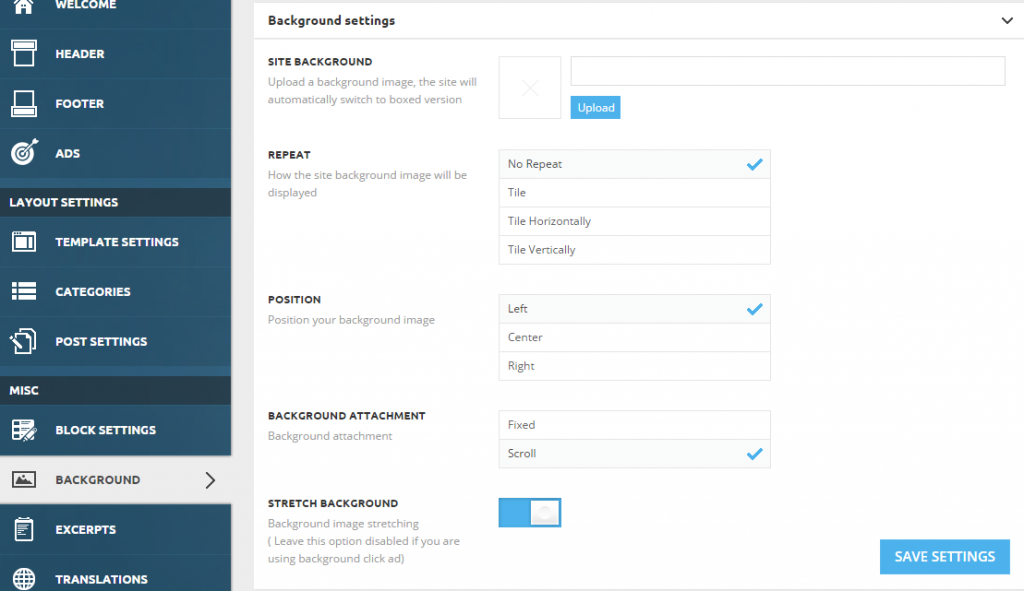
Site background – The theme will automatically transform the site into a boxed version.
or Use a Color
You can set it from Theme Panel > Theme Colors > General Theme Colors

Note: When you set a color or an image as a background, your website will automatically change to the boxed version.
 boos11
I have:
– td-mobile-plugin
– Visual Composer 5 (VC5)
– Post with shortcode’s VC5
I use 1 shortcose VC5 with posts (not article):
[vc_row][vc_column][td_block_13 post_ids=”IDPOST” sort=”featured” limit=”1″ tdc_css=””][/vc_column][/vc_row]
shortcode not workink in mobile plugin
Is there any possibility of throwing shortcode visual composer to the article so as to display it properly on mobile plugin?
for example, plugin WP Polls have 2 ways of placing the link:
[poll id=”ID”] or <?php get_poll(ID); ?>
Simion C. Hi,
1. You can change the font for the Big grid big image here – https://www.screencast.com/t/nsdKEJLdq – https://www.screencast.com/t/NoblIeCIbB and Big grid small image here – https://www.screencast.com/t/AhmiE94N
1.1 To remove the author name and date on block and modules go to Theme panel->Block settings and disable them like this – https://www.screencast.com/t/X9TnFk5P
2. Please follow this tutorial regarding icons in menu – https://forum.tagdiv.com/how-to-add-icons-in-menu/
3. The article title font on blocks and modules can be changed in Theme panel->Theme fonts – https://www.screencast.com/t/U8GKqeEVK1O5 with a general font or ny module. The meta will be removed by the setting from 1.1
4. Block titles can be changed here – https://www.screencast.com/t/ozW44Mpkbg
All the theme’s fonts can be customized in Theme fonts in the theme panel, more info here – https://forum.tagdiv.com/font-customization/
Thanks
Simion C. Hi,
For the white color around the blocks enter this code in Theme panel->Custom Css
.td-main-page-wrap {

background-color: #efefef;

}
Result – https://www.screencast.com/t/Tb9Xjnawi325
The top menu inherits the width of the container when the site is boxed and it would be dificult to make it full width.
Thanks
 juliusuk
 Hi!
I have the same issue, regenerating thumbnails will not however remove the wrong sizing of pictures in big grid blocks. It seems like the container fits the image by its width, but if the aspect ratio in the image is of lesser height than that of the grid container, there is a grey area in the bottom of the grid box.
Is there a way to set the fitting so that it in these cases would fill the height and crop (centered) the picture on left and right instead? The images on my site are of enough pixel widths for this to be possible.
– Julius
Catalin Hello Bloggeravisen,
Obviously yes! If you want to display only the most rated posts you should have enabled on each post you want to appear in this block the Reviews feature. For more information about this, please consult our guide here -> https://forum.tagdiv.com/reviews-2/
Thanks for your understanding!
