
- TutorialsDefault Block Settings Guide
- NewspaperWP Rocket and Newspaper Theme: Optimization Guide
- TutorialsFrom WPBakery to tagDiv Composer
- TutorialsOffset Feature
- TutorialsWhat is Ajax preloading?
 Bettina
 Hello @shuddhatm9 !
A great start for you is to try to have fewer elements in that container or row, as such, on that page. Check out this guide and try to use different settings on your blocks: https://forum.tagdiv.com/what-is-ajax-preloading/
Thank you!
 VeriArtem
Hello
I would like to rearrange how the images / elements are displayed on Small screen.
I have four Flex block 4 columns divided with rows for ads.
On large screen is fine but on small screen show the images/ elements 1,4,7,10, 2,5,8,11,3,6,9 12
Screenshot https://veriartem.com/hello-world/
Can be reordered with TagDiv for small screen to go 1,2,3,4,5,6,7,8,9,10,11,12
Screenshot On big screen this is how I want to have, however on smart phone the images/ elements showing 1,4,7,10, 2,5,8,11,3,6,9 12
Regards
Alex
 dscom
dscomHallo,
we have notice that the div class .tdi_110.td-a-rec:not(.td-a-rec-no-translate) has the property transform: translateZ(0). This creates a conflict not only with the sticky.js library we use but also and with plain css. We have also notice that this property also exists and in other blocks like when we try to add a raw html. If you want you can check the problem in our home page: https://www.travelstyle.gr/ when you inspect the page as smartphone. the complete class of the div that has the property transform is: td-block td-a-rec td-a-rec-id-custom-spot tdi_110 td_block_template_4
 Roman
RomanHello,
Please help me, remove meta information in categories – https://monosnap.com/file/tawMsQIj2gcZto76cLRWdXf7hAqjaj
Because these switches in the settings don’t work – https://monosnap.com/file/99fgdn2vm0MS2QTnT6ytRYUXHoDvJL
Plus I can’t find where to disable breadcrumbs.
Thank you.
 Anamaria
 Hello,
Please let me know what version of the theme you have, WordPress and PHP. Also, I recommend using flex blocks and big grid flex instead of blocks 1-25 or big grid blocks.
Thank you!
Anamaria Hello,
You need to change the color where you have added the block in the widgets -> https://imgur.com/EVSZObi
Thank you!
 pricelesspassport
This is the problem I am having:
It started a few days ago. Whenever I try to make a post and hit enter it deletes several blocks above it. If I copy and past an entire article from Word and try to avoid hitting enter in WordPress, the same thing happens when I click on a word to change it to a header, and random blocks disappear/delete themselves. I’ve tried reaching out to my webhost for help, clear caches, deactivating plugins, restoring backups, different browsers, etc. Nothing helps. I can’t do the one thing I need my site to do and that is to write posts. What is causing this and how do I fix it?
 juniordiscart
Hi
I frequently run into the issue that our Single Post template can’t be loaded in the TagDiv Composer tool due to the ‘Single Post Content’ block. When trying to load the template, it keeps on loading indefinitely.
I showcase the issue in a video here: https://www.youtube.com/watch?v=sXIOKpp2a8Q
Newspaper version: 12.6.5
Wordpress version: 6.5
Let me know if I can provide any more information to help resolve this issue.
Kind regards,
Jan.
 sotirow96
 Edit: I removed the block and added it again and, it was still not working so I switched off “Multi” then saved and now its working. I guess multi does not work.
-
This reply was modified 2 years by
sotirow96.
Bettina Hello @Wriper!
Sure. This is the path: td-composer\mobile\includes\shortcodes\td_block_big_grid_mob_1.php
Thank you!
Anamaria Hi,
Unfortunately, those can not be displayed on the posts loop block.
Thank you!
Bettina Hello Joachim!
Do you mean these thumbs?: https://forum.tagdiv.com/thumbs-on-modules-and-blocks/
If you deactivate a dimension from there, next time when you will upload an image, it will not be resized to that dimension.
After changing the thumbnail sizes you need to regenerate your thumbnails using a plugin. Check this: https://forum.tagdiv.com/using-the-theme-with-existing-content/
NOTE: If the thumb specific for that block is not enabled, then the image won’t be displayed.
NOTE: The Mobile theme layout is not customizable as the responsive version or mobile pages. Please see https://forum.tagdiv.com/the-mobile-theme/ and https://forum.tagdiv.com/mobile-theme-introduction/ for more information.
Please provide an example of the issue you have now, and it wasn’t when you installed the theme, so we can check if there is a bug or not. You have the option to hide the featured images from Flex Block, for example.
Thank you!
Bettina Hello @kosmity!
Choose to have no effect from the block settings: https://app.screencast.com/jtlaQsOGmeCaG
Thank you!
Anamaria Hello,
Please provide a video of what you want to show using the block and how you have added the reviews.
Also, you can create module builder -> https://forum.tagdiv.com/modules-builder-newspaper-theme/
Thank you!
Bettina Hello @Fontaine!
Sure. Edit your cloud single post template with the tagdiv Composer and delete the featured image element, save and view the results.
In the blocks, you can hide the featured image or create a custom module: https://forum.tagdiv.com/modules-builder-newspaper-theme/
Thank you!
Anamaria Hello,
Unfortunately, this tool has caused more problems than it has helped. I’m glad it was useful for you, but for the majority of users, it wasn’t, and there have been requests for it to be removed. The code has been optimized; please go to the theme panel -> block settings -> inline css https://i.imgur.com/cwwmOPu.png and disable the option to minify the css.
Thank you!
 kosmity
 omarfilip
After an update to Version: 12.6.5, the website is only showing text where blocks are, i.e. [td_block_11 category_id=”57″]
I deleted and reinstalled the tagDiv Composer and tagDiv Cloud Library, but no change. They are both active in the tagDiv theme plugins.
What am I missing?
 Wriper
Hello,
We have tried activating the “post grid” on newspaper mobile theme.
Suddenly, there is 300×250 blank space called. When inspecting it tell us it is an AD.
I have checked all places for codes in theme, deactivated ad inserter (it is not called by ad inserter plugin). Deactivated our AD tag scripts. I dont know what this is or what i am missing
Do you know which part of theme is activating this place? I tought this is our homepage ad from desktop but it is not i have tried to deactivate that block and nothing happens.
Screenshot 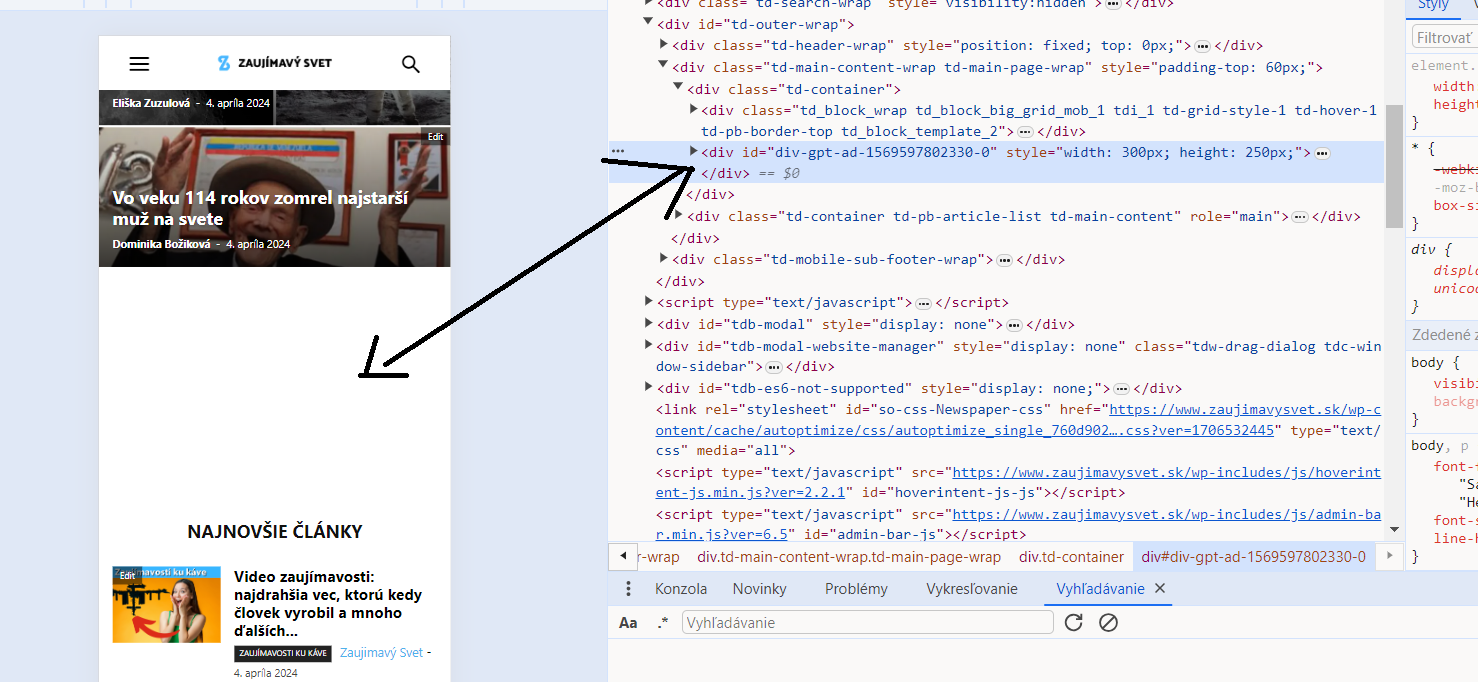
Thank you
Bettina Hello!
Check this guide: https://forum.tagdiv.com/thumbs-on-modules-and-blocks/
If you deactivate a dimension from there, next time when you will upload an image, it will not be resized to that dimension.
After changing the thumbnail sizes you need to regenerate your thumbnails using a plugin. Check this: https://forum.tagdiv.com/using-the-theme-with-existing-content/
NOTE: If the thumb specific for that block is not enabled, then the image won’t be displayed.
NOTE: The Mobile theme layout is not customizable as the responsive version or mobile pages. Please see https://forum.tagdiv.com/the-mobile-theme/ and https://forum.tagdiv.com/mobile-theme-introduction/ for more information.
Thank you!
Anamaria Hello,
For the category template, please use a posts loop; if you have set a posts loop, it will display all posts in this category. Alternatively, you can use Flex Block/Big Grid Flex and set the filter to “Category -Current category” => https://i.imgur.com/7P99qx0.png. This is why the block will display posts for each category.
Thank you!
 JhonnySan
how to avoid duplicate posts on the home page and other parts of the page
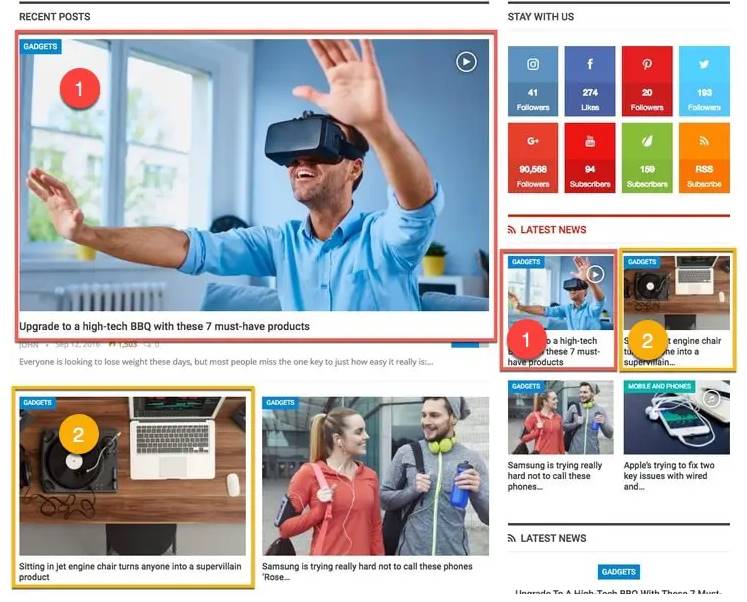
On the front page of my site I have several grid blocks, I selected them by tags, but I have seen that the publications are being duplicated in another block.
In the individual entries, they are also duplicated in the related content and latest entries section,
The Newspaper theme will have some function to avoid duplicate content throughout the site.
What are “duplicate posts”?
Sometimes it happens that you have multiple blocks and widgets and they display the same content (due to a common category, tags or taxonomy). We call it “duplicate posts.” As an example of duplicate content, see the image below.
Anamaria Hello,
You can copy and paste the block from a template to another template with right-click.
Thank you!
 Owebdesigned
Hello
First of all I am using your BlockChain Tagdiv theme.
I would like to use the Blog Category Post (that is on the demo) as homepage.
I couldn’t select it because it is not a static page.
And also, when I try to recreate a new page using the Flex Bloc, I couldn’t obtain the same style (I don’t know why)
Could you please propose to me a solution ?
 nadruaapps
Below error occured and afterwords by entire site went down. I had to restore an old backup.
Howdy!
WordPress has a built-in feature that detects when a plugin or theme causes a fatal error on your site, and notifies you with this automated email.
In this case, WordPress caught an error with one of your plugins, tagDiv Composer.
First, visit your website (https://website.com/) and check for any visible issues. Next, visit the page where the error was caught (https://website.com/wp-login.php) and check for any visible issues.
Please contact your host for assistance with investigating this issue further.
If your site appears broken and you can’t access your dashboard normally, WordPress now has a special “recovery mode”. This lets you safely login to your dashboard and investigate further.
To keep your site safe, this link will expire in 1 day. Don’t worry about that, though: a new link will be emailed to you if the error occurs again after it expires.
When seeking help with this issue, you may be asked for some of the following information:
WordPress version 6.5
Active theme: Newspaper (version 12.6.5)
Current plugin: tagDiv Composer (version 4.8 | built on 11.03.2024 11:04)
PHP version 8.1.27
Error Details
=============
An error of type E_ERROR was caused in line 49 of the file /home/u238372/domains/website.com/public_html/wp-content/plugins/td-composer/legacy/common/wp_booster/td_wp_booster_functions.php. Error message: Uncaught Error: Failed opening required ‘td_block.php’ (include_path=’.:/opt/alt/php81/usr/share/pear:/opt/alt/php81/usr/share/php:/usr/share/pear:/usr/share/php’) in /home/u238372/domains/website.com/public_html/wp-content/plugins/td-composer/legacy/common/wp_booster/td_wp_booster_functions.php:49
Stack trace:
#0 /home/u238372/domains/website.com/public_html/wp-content/plugins/td-composer/legacy/Newspaper/functions.php(21): require_once()
#1 /home/u238372/domains/website.com/public_html/wp-content/plugins/td-composer/td-composer.php(191): require_once(‘/home/u238372…’)
#2 /home/u238372/domains/website.com/public_html/wp-includes/class-wp-hook.php(324): {closure}()
#3 /home/u238372/domains/website.com/public_html/wp-includes/class-wp-hook.php(348): WP_Hook->apply_filters()
#4 /home/u238372/domains/website.com/public_html/wp-includes/plugin.php(517): WP_Hook->do_action()
#5 /home/u238372/domains/website.com/public_html/wp-content/themes/Newspaper/includes/wp-booster/tagdiv-wp-booster-functions.php(3): do_action()
#6 /home/u238372/domains/website.com/public_html/wp-content/themes/Newspaper/functions.php(19): require_once(‘/home/u238372…’)
#7 /home/u238372/domains/website.com/public_html/wp-settings.php(663): include(‘/home/u238372…’)
#8 /home/u238372/domains/website.com/public_html/wp-config.php(104): require_once(‘/home/u238372…’)
#9 /home/u238372/domains/website.com/public_html/wp-load.php(50): require_once(‘/home/u238372…’)
#10 /home/u238372/domains/website.com/public_html/wp-login.php(12): require(‘/home/u238372…’)
#11 {main}
thrown


