- NewsmagBlock settings tutorial
- NewsmagCategory tag on modules/blocks
- NewsmagtagDiv Composer Tutorial
- NewsmagWeather Widget
- NewsmagExchange widget
- NewsmagInstagram widget
- NewsmagHow to use the Visual Composer plugin
- NewsmagIntroduction
- NewsmagFooter templates
- NewsmagCustom ad spots
- NewsmagLoading image effects
- NewsmagSmart sidebar
- NewsmagFeatured images
- NewsmagGeneral settings
- Newsmag7 days post sorting
- NewsmagTheme thumbs
- NewsmagExcerpts introduction
- NewsmagTheme colors introduction
- NewsmagtagDiv slider gallery
- NewsmagVideo playlist
 joeyfatstat
bangor.today
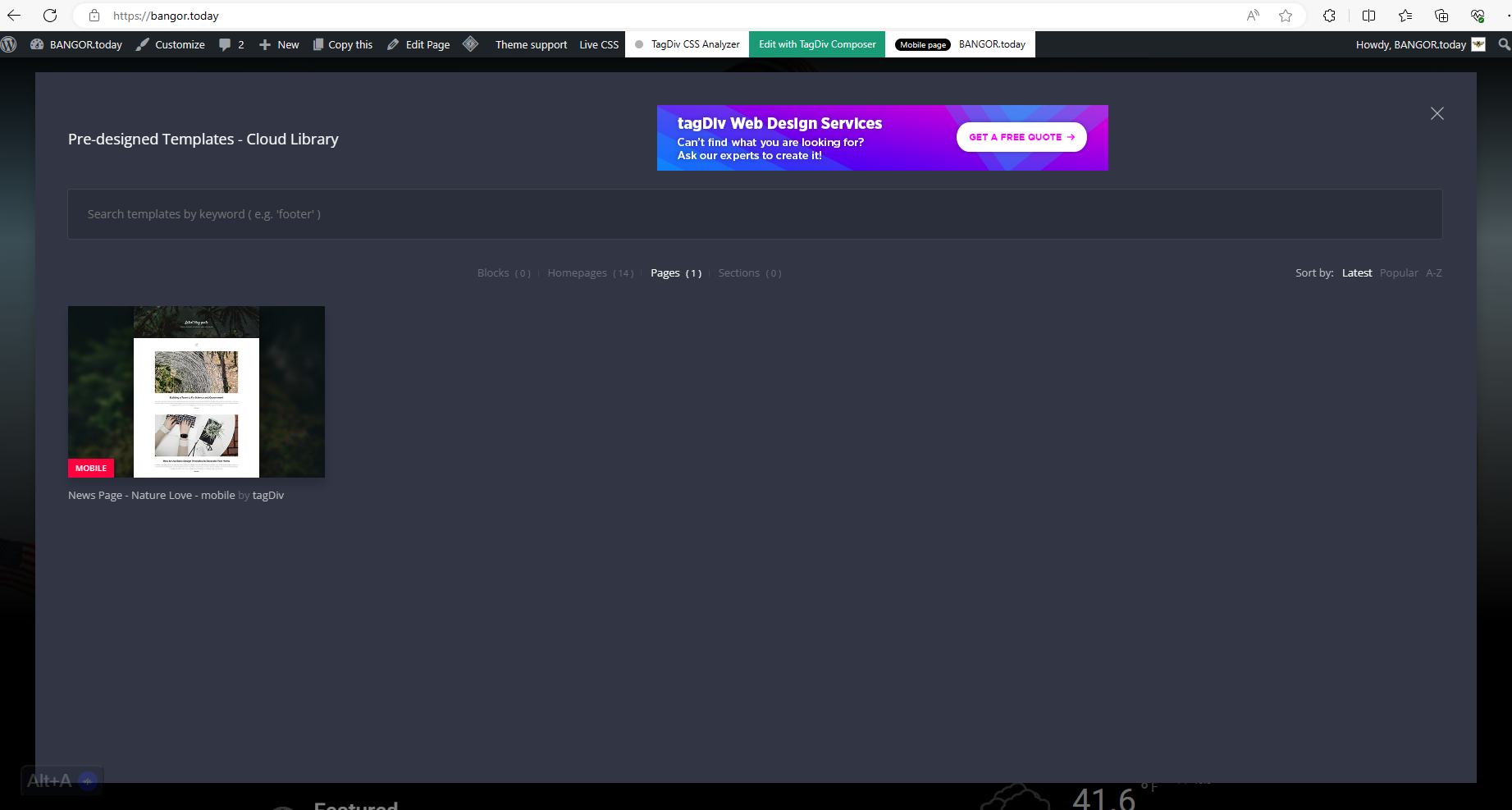
I have these cloud templates Blocks ( 0 )Homepages ( 14 )Pages ( 1 )Sections ( 0 ) I cannot find out where sections or blocks are because they are not showing up in my pop up. see here: https://bangor.today/wp-content/uploads/2023/12/aa33.png
I also cannot seem to get the Logo to display. It will display for a second and then disappear. as seen here https://bangor.today/wp-content/uploads/2023/12/Screenshot_20231226_124908_Chrome.jpg
And I have to initiate Amp in order to use TagDiv mobile?!?! As you see here 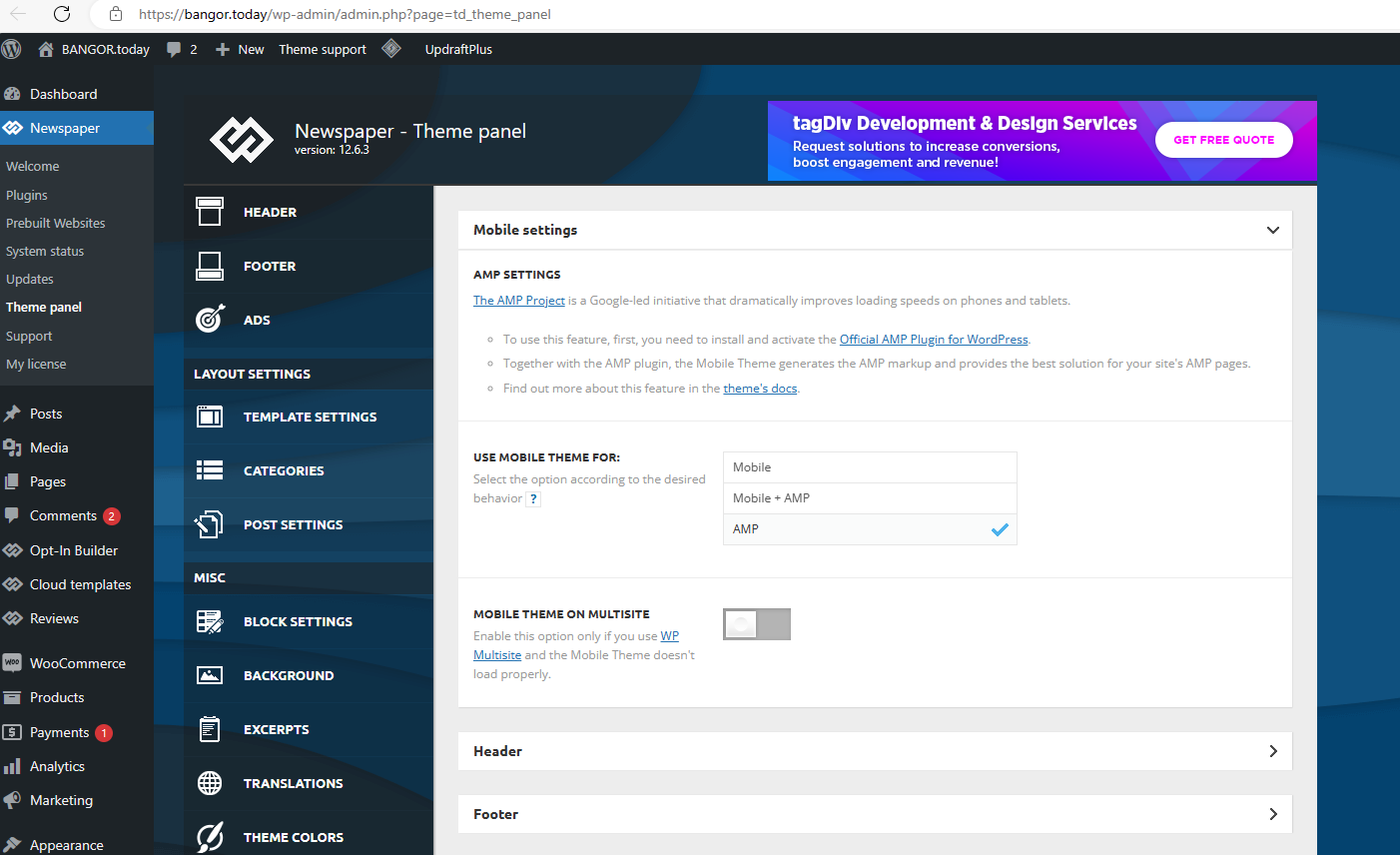
 Gonzales
Hello, I want to use the block on a site that uses newspaper. What is this block name? How can I add it to my site?
I placed the blog I wanted to add to my website in a green box. But I couldn’t see a block like this. Can I know his full name?
We are using the same theme as this site, which block should I use exactly?
 khnalsaroj083
Fatal error: Uncaught TypeError: Unsupported operand types: int – string in /home3/jalbayukhabar/public_html/wp-content/plugins/td-cloud-library/state/single/tdb_state_single.php:1124 Stack trace: #0 /home3/jalbayukhabar/public_html/wp-content/plugins/td-cloud-library/shortcodes/single/tdb_single_date.php(189): tdb_state_single->{closure}() #1 /home3/jalbayukhabar/public_html/wp-content/plugins/td-cloud-library/shortcodes/single/tdb_single_date.php(189): Closure->__invoke() #2 /home3/jalbayukhabar/public_html/wp-content/plugins/td-composer/legacy/common/wp_booster/td_global_blocks.php(27): tdb_single_date->render() #3 /home3/jalbayukhabar/public_html/wp-includes/shortcodes.php(433): td_global_blocks::proxy_function() #4 [internal function]: do_shortcode_tag() #5 /home3/jalbayukhabar/public_html/wp-includes/shortcodes.php(273): preg_replace_callback() #6 /home3/jalbayukhabar/public_html/wp-content/plugins/td-composer/includes/tdc_composer_block.php(281): do_shortcode() #7 /home3/jalbayukhabar/public_html/wp-content/plugins/td-composer/includes/shortcodes/vc_column_inner.php(344): tdc_composer_block->do_shortcode() #8 /home3/jalbayukhabar/public_html/wp-content/plugins/td-composer/legacy/common/wp_booster/td_global_blocks.php(27): vc_column_inner->render() #9 /home3/jalbayukhabar/public_html/wp-includes/shortcodes.php(433): td_global_blocks::proxy_function() #10 [internal function]: do_shortcode_tag() #11 /home3/jalbayukhabar/public_html/wp-includes/shortcodes.php(273): preg_replace_callback() #12 /home3/jalbayukhabar/public_html/wp-content/plugins/td-composer/includes/tdc_composer_block.php(281): do_shortcode() #13 /home3/jalbayukhabar/public_html/wp-content/plugins/td-composer/includes/shortcodes/vc_row_inner.php(376): tdc_composer_block->do_shortcode() #14 /home3/jalbayukhabar/public_html/wp-content/plugins/td-composer/legacy/common/wp_booster/td_global_blocks.php(27): vc_row_inner->render() #15 /home3/jalbayukhabar/public_html/wp-includes/shortcodes.php(433): td_global_blocks::proxy_function() #16 [internal function]: do_shortcode_tag() #17 /home3/jalbayukhabar/public_html/wp-includes/shortcodes.php(273): preg_replace_callback() #18 /home3/jalbayukhabar/public_html/wp-content/plugins/td-composer/includes/tdc_composer_block.php(281): do_shortcode() #19 /home3/jalbayukhabar/public_html/wp-content/plugins/td-composer/includes/shortcodes/vc_column.php(349): tdc_composer_block->do_shortcode() #20 /home3/jalbayukhabar/public_html/wp-content/plugins/td-composer/legacy/common/wp_booster/td_global_blocks.php(27): vc_column->render() #21 /home3/jalbayukhabar/public_html/wp-includes/shortcodes.php(433): td_global_blocks::proxy_function() #22 [internal function]: do_shortcode_tag() #23 /home3/jalbayukhabar/public_html/wp-includes/shortcodes.php(273): preg_replace_callback() #24 /home3/jalbayukhabar/public_html/wp-content/plugins/td-composer/includes/tdc_composer_block.php(281): do_shortcode() #25 /home3/jalbayukhabar/public_html/wp-content/plugins/td-composer/includes/shortcodes/vc_row.php(1173): tdc_composer_block->do_shortcode() #26 /home3/jalbayukhabar/public_html/wp-content/plugins/td-composer/legacy/common/wp_booster/td_global_blocks.php(27): vc_row->render() #27 /home3/jalbayukhabar/public_html/wp-includes/shortcodes.php(433): td_global_blocks::proxy_function() #28 [internal function]: do_shortcode_tag() #29 /home3/jalbayukhabar/public_html/wp-includes/shortcodes.php(273): preg_replace_callback() #30 /home3/jalbayukhabar/public_html/wp-content/plugins/td-composer/includes/tdc_composer_block.php(281): do_shortcode() #31 /home3/jalbayukhabar/public_html/wp-content/plugins/td-composer/includes/shortcodes/tdc_zone.php(591): tdc_composer_block->do_shortcode() #32 /home3/jalbayukhabar/public_html/wp-content/plugins/td-composer/legacy/common/wp_booster/td_global_blocks.php(27): tdc_zone->render() #33 /home3/jalbayukhabar/public_html/wp-includes/shortcodes.php(433): td_global_blocks::proxy_function() #34 [internal function]: do_shortcode_tag() #35 /home3/jalbayukhabar/public_html/wp-includes/shortcodes.php(273): preg_replace_callback() #36 /home3/jalbayukhabar/public_html/wp-includes/class-wp-hook.php(324): do_shortcode() #37 /home3/jalbayukhabar/public_html/wp-includes/plugin.php(205): WP_Hook->apply_filters() #38 /home3/jalbayukhabar/public_html/wp-content/plugins/td-cloud-library/wp_templates/tdb_view_single.php(139): apply_filters() #39 /home3/jalbayukhabar/public_html/wp-includes/template-loader.php(106): include(‘/home3/jalbayuk…’) #40 /home3/jalbayukhabar/public_html/wp-blog-header.php(19): require_once(‘/home3/jalbayuk…’) #41 /home3/jalbayukhabar/public_html/index.php(17): require(‘/home3/jalbayuk…’) #42 {main} thrown in /home3/jalbayukhabar/public_html/wp-content/plugins/td-cloud-library/state/single/tdb_state_single.php on line 1124
There has been a critical error on this website.
Learn more about troubleshooting WordPress.
you can check link https://jalbayukhabar.com/?p=1
but defalt post-template is working
 CarlG
CarlGSomewhere in one of the updates, I lost the edit with the tag div composer option when creating a new post. I have disabled all my other plugins, 1 by 1 to try and figure out what is blocking/stopping it. To no avail, the option is still missing. I am at a loss as to what to try next to figure it out.
 Sergio_59
Hi, the page editor (not articles) with gutember is very slow.
I have done many tests, disabling the blocks: spectra, kadence, jetpak, but the result does not change. I increased the autosave time, but when I try to save if the page has many blocks everything freezes. I use this theme on two websites with hundreds of pages and thousands of visitors and in both I have the same problem. Any suggestions?
 SV_SOLUTIONS
Hello. This is my first time working with your template, so I have some questions. Unfortunately, I cannot find how to edit the text in articles in the template installed. As for the pages, there I can find a block in which I can edit the text. But in the articles I don’t see such an opportunity. I’m already slowly going crazy.
When I open an article via /Edit with TagDiv Composer/ I only see how you can edit the design as well as a plan for placing pictures of the article template, but I don’t see how you can edit the text itself. Could you tell me where I can see the instructions.
I read the instructions but for some reason I still don’t understand how to change the text in articles correctly. I really need your help.
Thank you for your help.
 chaywood0896
The Jetpack subscription shortcode works. I have found CSS to modify the button appearance. However, how can the header appearance (color, etc.) be modified? It appears now with an ugly line that slashes across the website. Thanks.
 nolandolce
 Thanks, Anamarie – The theme I use within Newspaper has the featured image set as Single Post Featured Image. It doesn’t include an option for height, as you show. I’ve therefore removed that block and replaced it with the Single Post Bg Featured Image, so it works now. Perhaps you may want to replace that block across your theme options.
Thanks!
nolandolce Hi Bettina,
Just to follow up, I found the below code and added it to the functions.php file, and captions now work, for future reference for anyone else! 🙂
To find the functions.php file:
Go to Appearance -> Theme file editor -> functions.php appears on the right.
Instructions:
Copy and past the below at the bottom of the code.
//filter Media & Text block output to add image caption
function media_block_caption( $block_content, $block ) {
if ( $block[‘blockName’] === ‘core/media-text’ ) {
$mediaId = $block[‘attrs’][‘mediaId’];
if($mediaId){
$image = get_post($mediaId);
$image_caption = $image->post_excerpt;
if($image_caption){
$content = str_replace(‘</figure>’, ‘<figcaption>’ . $image_caption . ‘</figcaption></figure>’, $block_content);
return $content;
}
}
}
return $block_content;
}
add_filter( ‘render_block’, ‘media_block_caption’, 10, 2 );
nolandolce Hi Bettina,
It’s not possible to display a simple image with text to its side. Let me know if you know something I don’t?
As far as I know, that is the very purpose of Gutenberg blocks, to provide this possibility.
Newspaper should work with Gutenberg.. it’s pretty standard?
Having an image appear next to text is crucial. Otherwise you’re suggesting all images live in their own row, always.
Please let me know?
Thank you!
 Bettina
 Hello!
I’ve already replied to you here: https://forum.tagdiv.com/topic/category-section-post-issue/
On your homepage, there are a lot of blocks with filters, limit and could be some offsets as well: https://forum.tagdiv.com/flex-block-settings-guide/
Thank you!
Bettina Hello!
Please check the block’s settings and make sure you have no offset: https://forum.tagdiv.com/offset-feature/
Make a test and deactivate ALL plugins except tagDiv ones, also if you are using a cache plugin, deactivate it, clear all cache and try again.
Thank you!
 tghidotti
 Good morning, you don’t understand me…. the example I posted above shows that it doesn’t let me edit the region where the author data is appearing
I’ve already tried editing the footer, editing the single post but it won’t let me edit the region where the author’s data is displayed, which is sometimes above the last block of the single post and the time on the page’s footer.
I’m sending two examples, it won’t let me change the region
the third print is an example of where the code would be
1 – 
2 – 
3 – 
nolandolce Hi bettina,
In the video you can see I created captions for both the featured image and the image & text block. Only the featured image caption displays. The image & text block does not show captions, across the whole website.
https://www.loom.com/share/e39a500da26a401f894b8ec8b774d4b4?sid=d4f54530-97f8-4234-8b0c-73becd46bb28
Thanks,
Megan
 LNN
LNNHi. Customized fonts. disabled google, all disabled, uploaded their own, in the settings of all modules, blocks, pages, karoche everywhere set your font, but on the site it is still not displayed, in the frontend editor every page / record, blocks to edit it is not an option. Who can help? Sorry for the English, I write with a translator.
https://cnrs.org.ua/
nolandolce Hi Bettina,
Yes I know that. The captions work fine on all images across the site (images in posts as well as featured images), EXCEPT for the media & text blocks. Captions have been inserted, correctly, on some of those images in the link I included in this post, yet they do not display. Please let me know.
Thanks.
 Anamaria
 Hello,
Hi,
You can disable the more stories block here in Theme Panel -> Post Settings -> More Article Box https://i.imgur.com/CR10pDV.png
Thank you!
Thank you!
tghidotti Good evening, as you can see in the print, when editing the single post cloud example, it doesn’t let me select the block right in the footer
I believe it is an error, as it is between the end of the single post blocks and the footer

 dailynewsng
Hello,
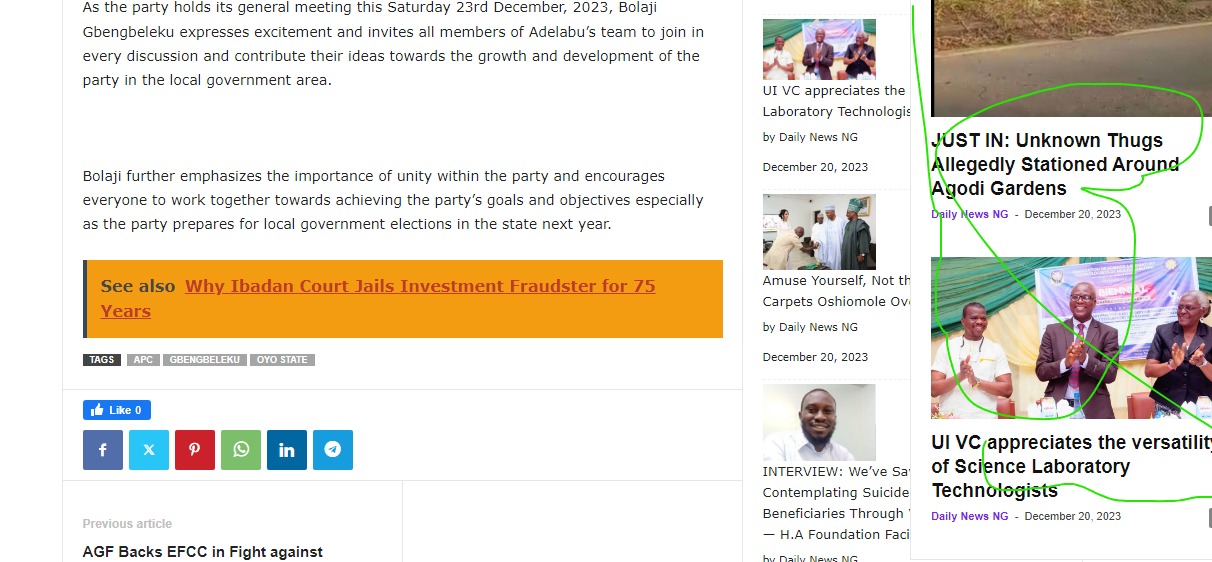
Please, how can i disable this slider or pop-up post obstructing the readability of the post content.
It is not too good and highly displeasing on mobile view. Blocking content totally.
The website is dailynewsng.com.ng
Regards
nolandolce Hi Bettina,
I referred to the media & text blocks, not the featured image. I have captions for some of the images in the post, and they aren’t displaying.
Thanks!
Anamaria Hi,
Indeed there is a space, you need to use custom code css :where(.wp-block-columns.is-layout-flex)
{
gap:1px;
}
Set the code in Theme Panel > Custom code -> Custom css also, change the value for gap
Thank you!
Anamaria Hi,
You need to apply filters on the blocks to display the posts from your categories. https://forum.tagdiv.com/flex-block-settings-guide/
Thank you!
nolandolceHi All,
Captions work fine when I’m using an image block. But if I insert a “Media & Text” block (image and text), the captions don’t show. Please let me know?
Example post of media & text blocks, without captions showing: https://rareparenting.com/gift-guide-for-kids-with-disabilities-holiday-2023/
Thanks!
 JustOneForTheRoad
 Hi Anamaria
Thank you for the reply.
I have ensured both of those items are ticked but still the page is not showing comments.
I feel the problem may be related to the comment that shows in the “Comments Section” as follows:
Comments Pagination Block: paging comments is disabled in the discussion settings”
I dont understand this comment when I have done the previous actions that you suggest ?? What else could the problem be ?
Rupert
 JonasFrey
 please make sure to accept all cookies. also the marketing cookies. And then check the wheater block on mobile