- NewspaperFlex Block Builder and Flex Loop Builder
- NewspaperHow to use the Flex Blocks cache option
- NewspaperHow to edit modules for Flex Block X
- NewspaperHow to insert a block inside the content of a post
- NewspaperFlex Block Settings Guide
- NewspaperMeta Info on Modules and Blocks
- NewspaperTheme modules and blocks
- TutorialsDefault Block Settings Guide
- NewsmagBlock settings tutorial
- NewsmagCategory tag on modules/blocks
- NewspaperThumbnails – Fix strange looking images on blocks
- NewspaperBlock settings tutorial
- NewspaperCategory Tag on Modules/blocks
- ApiPractical example – How to add a new Block and Module
- Apitd_api_block::delete
- Apitd_api_block::update_key
- Apitd_api_block::update
- Apitd_api_block::add
- ApiAPI – Blocks – Introduction
- NewspaperWP Rocket and Newspaper Theme: Optimization Guide
 JapanGeeck
Hi,
I’m using NFTnews from Newspaper.
For this page :
https://demo.tagdiv.com/newspaper_nft_pro/2022/01/20/td-post-digital-animals-project-plans-to-turn-sentimental-users-into-nft-souls/
I have hidden the block :
<div style=”display: inline-block”><span class=”nt “>- Advertisement -</span> </div>
The page looks great. But on my webpage code I still see :
I try to refind the block with TagDivComposer but I can’t reach because this block is hidden.
How can I reach this block with TagDivComposer.
or to change https://themeforest.net/item/newspaper/5489609 to #
Do you know where is written this url ?
Thank you for your help.
 loslunes
 Same here, this ips from Russia, Romania and Netherlands are trying to inject malware. They had the same problems months ago. Many of us were injected with a redirection code that you can see in theme options> custom code> javascript (or something similar). At least it’s seems they solved the problem blocking these petitions.
But yes, since a month ago we have had a continuous and non-stop traffic from this ips. Look at my server visit log https://ibb.co/Y7TWgxy
 Bettina
 Hello Khalid!
It seems that you have somewhere a class that hides it, so I’ve solved it with this code:
html body .tdc-restr-display-none{display:block!important;}
Thank you!
 Anamaria
 Hi,
The cache block option is used to reduce the requests to database, you can find more details here -> https://forum.tagdiv.com/use-flex-blocks-cache-option/
Thank you!
 Ericky
I decided to change the design of my news site and I liked your Town Talk demo so I adapted this design but I encountered a strange problem that I never expected.
As you can see in the image I added above (Ops I can’t add photos but you can see yourself from links at above), it is necessary to enter a page id for the block covering the “LATEST” and “RECOMMENDED” content on the main page of the Town Talk demo. Otherwise it doesn’t work.
Our site -> https://www.atarita.com/
Demo -> https://demo.tagdiv.com/newspaper_towntalk_pro/
I couldn’t design a page where I can capture the exact same design here. I didn’t see this added to the demo. Can you forward a page with the same design? I am adding it but it looks very bad. Please help me.
Bettina Hello @pavel_t !
You can choose to use a filter from this block: https://forum.tagdiv.com/flex-block-settings-guide/ and specify the category ID.
Check these guides: https://forum.tagdiv.com/filters-sorting-taxonomies/ ; https://forum.tagdiv.com/flex-block-builder-flex-loop-builder/
I hope that helps you!
Thank you!
Bettina Hello @pavel_t !
You can choose to use a filter from this block: https://forum.tagdiv.com/flex-block-settings-guide/ and specify the category ID.
Check these guides: https://forum.tagdiv.com/filters-sorting-taxonomies/ ; https://forum.tagdiv.com/flex-block-builder-flex-loop-builder/
I hope that helps you!
Thank you!
 pavel@earnware.com
 If we will block access to /wp-json/tdw/save_css would it affect the websites in any way?
Bettina Hello @Beldar!
Did you regenerate the thumbs? https://forum.tagdiv.com/thumbnails-fix-strange-looking-images-on-blocks/
Thank you!
Bettina Hello @Santi420987 !
If you use a cloud template, then you can edit the page and delete or change the title of the blocks, or change the filter: https://www.screencast.com/t/SEmxo13Fo2X
Thank you!
 tesosoft
I chose “Big grid slide”, but my it says this
Deprecated: Creation of dynamic property td_block_big_grid_2::$in_big_grid_slide is deprecated
wp-content/plugins/td-standard-pack/Newspaper/includes/shortcodes/td_block_big_grid_slide.php on line 19
How can I fix this?
 _Adam_
Hi,
I’m in the process of configuring the blocks on my theme but the articles are not displayed on homepage.
However, each article is in the right category but the flex block 2 cannot call up the last articles written. I deleted all the demo articles to be sure but again, the category articles are still not called up on the home page.
Screenshot:
https://postimg.cc/9R7rJjLw
https://postimg.cc/Ff1fkScZ
could you tell me if there is any additional action to take?
 platamun47
Dear Support,
Please if you can to help me.
I try implement Instagram block on page https://nook.rs/najnovije/
We checked all more times, business account is connected, but data from instagram not display.
You have admin parameters to connect our site https://nook.rs
Thank in advance.
ErickyWhat does the Cache Block Results option stand for? I mean, what exactly does it do? As a news site owner, how should I set its duration?
 jtoney
 That still doesn’t explain why a tab is missing from your editor so I can’t change the layout. ALL of those blocks are like that. This needs to be addressed.
ErickyI decided to change the design of my news site and I liked your Town Talk demo so I adapted this design but I encountered a strange problem that I never expected.
As you can see in the image I added above (Ops I can’t add photos but you can see yourself from links at above), it is necessary to enter a page id for the block covering the “LATEST” and “RECOMMENDED” content on the main page of the Town Talk demo. Otherwise it doesn’t work.
Our site -> https://www.atarita.com/
Demo -> https://demo.tagdiv.com/newspaper_towntalk_pro/
I couldn’t design a page where I can capture the exact same design here. I didn’t see this added to the demo. Can you forward a page with the same design? I am adding it but it looks very bad. Please help me.
Anamaria Hi,
The issue is caused by the inline css option, not the delayed load. I will add this issue to our list. Please go to the theme panel -> block settings -> inline css and disable the option to minify the css and clear the cache.
Thank you!
 Calin
Calin Hello,
The css for image align center is this one:
.aligncenter {

    text-align: center;

    clear: both;

    display: block;

    margin: 6px auto;

}
For extend image the code is similar to this one:
.aligncenter img {

    margin-left: -30px;

    width: calc(100% + (2 * 30px));

    max-width: none!important;

}
Thank you!
 Alex
AlexHi,
In VERSION: 12.6.3
Header block text color overwritten by default color
To replicate issue:
1. Add Header logo block in both – header and footer
2. Go to Style > Text color > make it #fff or any other color on both – header and footer
3. Enable Footer delayed load in theme panel
4. Go on front end – the header logo will initially load in #fff color, but will then change to #222.
This happens because Header block placed in footer first loads default #222, which overwrites #fff specified in Header logo placed in header.
This is likely happening to any element when it is used in header or body plus in delayed footer.
Bettina Hello Daniel!
Please edit the search template with the TagDiv Composer, click on that block, and check if you have any offset values in the settings: https://forum.tagdiv.com/offset-feature/
Thank you!
Bettina Hello @wordpressive!
Copy and rename the file for Flex Block 4 into the custom plugin. The error is saying that it is unable to find the class td_flex_block_4_custom.
Thank you!
Bettina Hello @cborgers!
Unfortunately, no. The other blocks will come one after another on mobile.
Thank you!
Bettina Hello @eman!
We have the Module Views element that can be added to the Module template and used for your custom block on the homepage, for example, with the help of the Flex Block Builder element. Documentation here:
– https://forum.tagdiv.com/modules-builder-newspaper-theme/
– https://forum.tagdiv.com/flex-block-builder-flex-loop-builder/
Thank you!
Calin Hi,
If the provided blocks do not display the featured image like you need, then please create your own module and use that one on flex block builder and flex loop builder. Make sure that this option is enabled on the featured image on your builder module – https://i.imgur.com/ANr3qIf.jpg this will make the image to be display in full size.
Thank you!
 Trent Ernst
Hey:
This one’s a bit out of my league.
Basically, when I try and enter my location into the weather widget, it pops up with the name of a hole-in-the-wall town 150 km away.
This is really irksome, and it’s not just OWM. Google had the same bad data until I complained to them.
However, OWM has changed how they’re doing things, so when I asked them if they could fix it at their end, they sent me this note.
1) Our data is based not only on weather stations; our data is a whole chain, and the basis is based on our model, so in your case, it’s not just a weather station that stands in Groundbirch.
2) This moment will be more complicated, and this is geocoding. In our products, for example, in current weather or, on our website, or in hourly forecast, there is a database with all cities – embedded geocoding. Previously, it was supported, supplemented and updated. However, for more than a year, we have completely removed the support and production of embedded geocoding, and because of this, new locations or the repair of old ones are not supported. Of course, in general, the performance still remains for users, but we do not recommend and do not guarantee quality when using.
As an alternative to the old embedded geocoding, we have introduced our new separate Geocoding API product; this product dynamically updates a database filled with recent locations and supported. And, of course, in our geocoding, your location is there, and this is a separate city; examples will be shown below.
Documentation – https://openweathermap.org/api/geocoding-api#description
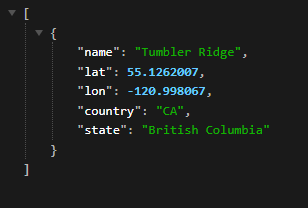
Requests syntaxes – https://api.openweathermap.org/geo/1.0/direct?q=Tumbler Ridge&limit=5&appid=yourapikey
Requests syntaxes – https://api.openweathermap.org/geo/1.0/reverse?lat=55.1262007&lon=-120.998067&limit=5&appid=yourapikey
Screenshot or response – https://i.gyazo.com/3db694f93e406ff4069dba4440c68ef7.png
3) The main point you will have to pass to the technical team is that they will need to use another plugin or write a separate script. In this script, the main point is that you will need to use the coordinates for the request you will receive from the Geocoding API, after which you will substitute the exact coordinates in the Gecodoing API, which will return the correct location.
I, of course, understand this only enough to know that it’s over my head. Is this something that is currently able to be done with the weather widget? I’ve tried, but it doesn’t seem to work, but it could just be operator error, and I might have tried to fix it one too many times and introduced an error. Or it could be at their end, because as of right now, I’m not able to get any data to load, even if I type in London, which is where they are HQed out of. Are you able to see weather data for where you are?