
- NewspaperFlex Block Builder and Flex Loop Builder
- NewspaperHow to use the Flex Blocks cache option
- NewspaperHow to edit modules for Flex Block X
- NewspaperHow to insert a block inside the content of a post
- NewspaperFlex Block Settings Guide
- NewspaperMeta Info on Modules and Blocks
- NewspaperTheme modules and blocks
- TutorialsDefault Block Settings Guide
- NewsmagBlock settings tutorial
- NewsmagCategory tag on modules/blocks
- NewspaperThumbnails – Fix strange looking images on blocks
- NewspaperBlock settings tutorial
- NewspaperCategory Tag on Modules/blocks
- ApiPractical example – How to add a new Block and Module
- Apitd_api_block::delete
- Apitd_api_block::update_key
- Apitd_api_block::update
- Apitd_api_block::add
- ApiAPI – Blocks – Introduction
- NewspaperWP Rocket and Newspaper Theme: Optimization Guide
 rk
rk so luckily I don’t work here nor speak for them.
Well, I think tagdiv might be lucky ones, ‘course you don’t work there nor speak for them. 😉 Because I don’t like to be SHOUTED at in forums. And likewise most of the people I know don’t like that.
By the way: Most of the trouble might result out of the misleading “upgrade from 4 to 6” naming of the update script. The script works nicely, but you have to run it also when upgrading from 5 to 6. But for example the problem with the outdated VC-Data was very annoying. Maybe the script addressed that too. The best thing would have been to place the “run the update script!” message prominently on every admin page header. Maybe the guys an tagdiv can add that for people updating in the future…
Regards,
Rolf
 eyee12
Hi Team –
I updated the Newspaper to Newspaper 6, yet once I did so, everything completely changed. My header was completely changed, my home page which used Visual Composer, was now just a block of text or shortcodes. I am now trying to revert to previous version, but it fails to load now. Any ideas on what may have happened?
Thanks
 costrela
Update from Newspaper 4 to 6 script dont convert shortcode
Update script run ok, but shortcode for dropcap and blockquote&pullquote are not converted
 CtrlP Press
Howdy Gents,
On my customized home page, now that I have started to add articles they are displaying in a single 1X4 column as opposed to a 2×2 block.
That row is broken into 2/3 (module 4) + 1/3 (sidebar) columns. Here is the page:
http://ctrlp.press/front-page/
Module displays fine with sidebar on default home page. (http://ctrlp.press/)
I have no custom width settings in CSS.
Please advise.
Thx,
Paul
 barakji
Hi
The unique articles option is not working on my homepage. There is no ajax or pagination options in my blocks. Can I please have a solution?
Thank you! 🙂
 lighterside
 Thanks a ton Alin. It worked like a charm.
There’s one problem tho. I’m noticing that inserting the ad right there creates a gap between the nav menu and the main article block. The blue part (in the screenshot) is actually our background image showing through.
Is there a different place I can insert the “echo do_shortcode(‘[td_ad_box spot_id=”custom_ad_1″]’);” code so that it shows up in the (top) of the main body section?
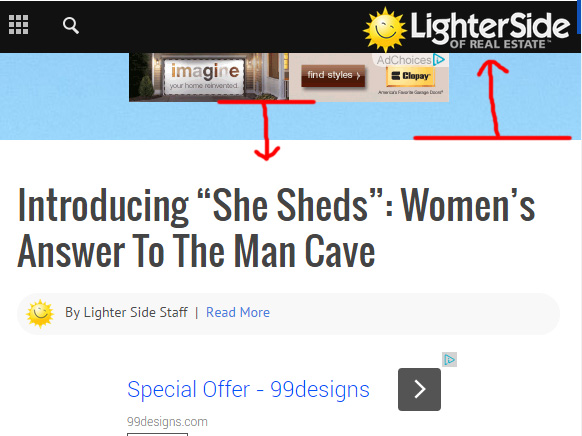
Thanks again Alin.
-
This reply was modified 11 years by
lighterside.
-
This reply was modified 11 years by
 Mark
Mark Solved my own issue. — I used the Adblock SideBar but I had the Adsense code in a Text Widget from previous theme. So I just had to remove it from the Text Widget.
 careongo
Hi team,
I am setting up Newspaper 6 for my new blog http://www.careongo.com/riseup.
Following are some queries I have for which your response will be highly appreciated:
1. How to insert icon in place of Home button?
2. How to move next previous ajax on the top of the block as in the earlier theme, I don’t want it to be at the bottom of the block
3. How can I change size of the social sharing button on the post at the top and bottom, I want to do something like what this website has done http://www.scoopwhoop.com/news/auto-driver-becomes-pilot/ (basically similar size buttons)
4. How to insert Sign up and email id (for subscribing) space below the post page
Thanks in anticipation. Looking for a speedy response.
 pedropapito
 Error in the translation of my question.
asking again with the corrected translation:
I found a bug. I was setting the title block 15 as “ESPORTE”, but did not appear. I decided to test another string. Set the title as “SPORT” and appeared.
Indeed, there is some problem in using the “ESPORTE” string. What can this be? How to fix?
 yakir105
 Hi,
It usually happens when loading the font file (which contains those icons) from another host/url. Check your browser’s console if you have an error like this – http://screencast.com/t/fKy2k43k9kc
The solution would be to load them from the same url as the site or try this solution – http://webmasters.stackexchange.com/questions/71630/font-blocked-from-loading-by-cross-origin-resource-sharing-policy-no-access-co
how i change the fonts url?
Thank’s
 simchris
 @rk
not nonsense. When you change major themes where image sizes changes, old modules are deprecated, new modules added to FIT NEW LAYOUT, etc. — then guess what, you need to ADJUST things to new site layout.
I think you have VERY unrealistic expectations on how WordPress works, and how themes work.
If you move to a new theme, the NEW theme cannot make your new site work exactly like the old site — show me a video of a theme doing that for you, otherwise your comment is more nonsense than mine. Not to be argumentative, but perhaps when you get more experienced with WordPress you’ll know better.
Cheers. When you change to NEW THEME, which NP6 is, you will have to make adjustments.
They have done great job of helping make this as painless as technically possible.
A theme cannot regen all your images, a theme cannot create new modules on your homepage and change your layouts in VC automatically – not everybody is using 100% identical layout — that is why you can customize it. Custom means unique. When things change in the foundation of the code — with good programming — this means block/modules and custom layouts need to be adjusted as widths, grids, image sizes have changed.
Sorry that isn’t clear.
I’ll try not to provide you any help or assistance in future; as TagDiv is much more patient with insults than I am … so luckily I don’t work here nor speak for them.
Have a wonderful day!
 Alin [tagDiv]
 Hi,
Not sure what you mean, you can add blocks to the page exactly like on version 4 of the theme – http://screencast.com/t/DokgaDytT Or widgets to your sidebar from Widgets section – http://screencast.com/t/31BO6zjFwAE Also you can remove it – http://screencast.com/t/VOVjYaWJ69H
Please make sure that you have update the theme properly using this guide – https://forum.tagdiv.com/how-to-update-the-theme-2/ and also you have updated the plugins that come with the theme files. You can check this without any plugins active, leave just Visual Composer active, clear cache and see if you still have this issue. Let me know how it goes!
Thanks!
 Radu
Radu Hi,
you can use the theme api to load a custom block to the theme: https://forum.tagdiv.com/the-theme-api/
The blocks from Newspaper are not compatible with Newsmag.
Hope this helps and sorry for the inconvenience
Alin [tagDiv] Hi,
For example the megamenu use ajax, live search and also if you use pagination for blocks.
Thanks!
Mark @Alin [tagDiv] thanks for the help. That seemed to work well. With the original Blockquotes they were just to big. Especially if I was using a larger quote.
I’m not sure what you are referring to with the 2nd part of your answer. I believe everything is good with my theme width.
Alin [tagDiv] Hi,
You can change blockquote to look like qoute box center using custom css – http://screencast.com/t/cx6cxzv6Y9JC
.td-post-content blockquote {

background-color: #FCFCFC;

border-left: 2px solid #4db2ec;

padding: 15px 23px 0 23px;

position: relative;

top: 6px;

clear: both;

margin: 0 0 29px 0;

}

.td-post-content blockquote p {

color: #777777;

font-size: 13px;

line-height: 21px;

padding-bottom: 16px;

margin: 0;

text-transform: none;

}
Do you refer to the theme width?
Unfortunately the theme was initially designed at this width – http://screencast.com/t/JKpaAQXuu with an fixed grid layout and changing it would not be easy as it needs changing the width value for all elements on pages and for this you would need custom work.
Hope this helps!
 michal
 Alin said:
Please try this custom css in Theme Panel > Custom Css and it should work what you choose from block setting:
.wpb_single_image .vc_single_image-wrapper {

display: inline-block !important;

}
And it’s working!
Thanks! 🙂
 Cosmin
 Hello TagDiv,
I would like to know as well if this will be an option in the next update. Black block title backrounds should be the same with theme’s accent color or even better, have a separate setting in theme color options. Also, if there is an option to set the color in the widget, please make sure a color picker is available.
Thanks
Alin [tagDiv] Hi,
1. Please try this custom css in Theme Panel > Custom Css and it should work what you choose from block setting:
.wpb_single_image .vc_single_image-wrapper {
display: inline-block !important;
}
I also added this on our list and it will be fixed as soon as possible. Thanks for reporting!
2. Please provide a link so I can take a look and also provide you an accurate solution.
Thanks!
 fkpress
hi there,
where can i change the black to blue – for the background of blocks and widgets title?
frank
http://www.puffbohne.de
Radu Hi,
we have the theme api available https://forum.tagdiv.com/the-theme-api/ but it’s not yet fully documented. We have a tutorial about how to add new modules and blocks here: https://forum.tagdiv.com/practical-example-how-to-add-a-new-block-and-module/
Alin [tagDiv] Hi,
I’m not sure what you mean. The News Ticker block display articles titles and it has option to “filter post by” like the other tagdiv blocks – http://screencast.com/t/UBOS5qqW4S4
You can change the News Ticker block title background using custom css in Theme Panel > Custom Css – http://screencast.com/t/NZhkx1fhu8
.td-trending-now-title {

background-color: red;

}
Thanks!
Alin [tagDiv] Hi,
@wpfan3751
“Do I need to upload the script in the welcome page?”
Please follow the steps from documentation and make sure that you have updated the theme properly – https://forum.tagdiv.com/how-to-update-the-theme-2/ and run the script(you can read also there what it will do). Let me know how it goes.
@papeldeperiodico Unfortunately theme doesn’t have an option to set a background color for all blocks widgets, but I have added this on our list and it will be added an option in a future update.
Also I have checked and you can change the background/color for block 7 from widgets section – http://screencast.com/t/Ix8i1pHU – http://screencast.com/t/uh4r1Ysna1
For newsletter you will need to change it via custom css, please provide a link.
Thanks!
Alin [tagDiv] Hi,
The Editor’s Picks block from predefined footer display featured articles, you can change this if you edit footer template 1 – http://screencast.com/t/GRa7aun2
Thanks!
Alin [tagDiv] Hi,
After you activate the Visual Composer plugin please set to display all blocks from plugin settings – http://screencast.com/t/8VPm2fYwL and save. Let me know how it goes!
Thanks!
