
- NewspaperFlex Block Builder and Flex Loop Builder
- NewspaperHow to use the Flex Blocks cache option
- NewspaperHow to edit modules for Flex Block X
- NewspaperHow to insert a block inside the content of a post
- NewspaperFlex Block Settings Guide
- NewspaperMeta Info on Modules and Blocks
- NewspaperTheme modules and blocks
- TutorialsDefault Block Settings Guide
- NewsmagBlock settings tutorial
- NewsmagCategory tag on modules/blocks
- NewspaperThumbnails – Fix strange looking images on blocks
- NewspaperBlock settings tutorial
- NewspaperCategory Tag on Modules/blocks
- ApiPractical example – How to add a new Block and Module
- Apitd_api_block::delete
- Apitd_api_block::update_key
- Apitd_api_block::update
- Apitd_api_block::add
- ApiAPI – Blocks – Introduction
- NewspaperWP Rocket and Newspaper Theme: Optimization Guide
 Calin
Calin Hi,
If I understand correctly, when you use the mobile theme plugin, the thumbs are empty, without featured images, if is so then you must have those thumbs enable, go to theme panel > block settings > thumbs the “265×198” and the “741×486” thumbnail sizes.
Hope this will help you!
 Pukacza
Hi,
I have some questions regarding below topics
1. Why inner column isin’t works for “Sticky Option” ?
2. Why I cannot see inline Article ads? In Mobile and AMP versions it works. 3. How can I adjust number of mobile inline ads?
4. How to add ADS to category layouts? Not custom ones.
5. How can I turn ReCaptcha in Comment Form?
6. How to add search block tagdiv to footer?
Thank you
 Muhammad Faizan
Hello,
How can I remove the render blocking resources from my first page. Please suggest me the right plugin which support Newspaper X Theme
 nmanikrishnan
Hi when i add the video playlist blog it says “Channel ID field is empty. Configure this block/widget and enter a youtube channel id”
please need help.
 socialtomatoes
 Hi VLAD!
I am experiencing the same issue. native Ads in HTML block are not showing on my website. Please fix it. It is severely effecting my page.
Thanks
 pepperandplatinum
I want to get a similar block/shop the post on my blog page!
I currently am using a Tagdiv block to get something similar to this on my homepage, but I would like something a little closer to hers. The shop tab, the background color, view the post link.. I love all of it.
I know her website is custom made but is there any plugin for Newspaper or for Tagdiv that can create something similar?
Her blog page:
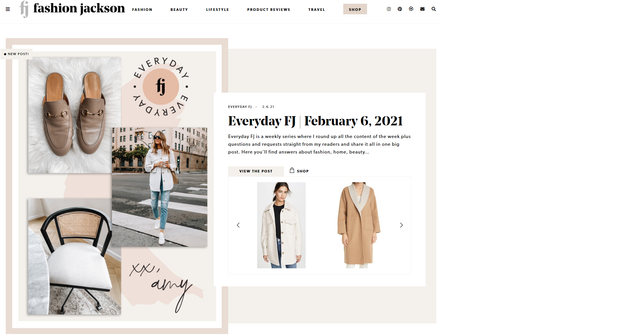
My blog: pepperandplatinum.com
 tkanel
 Hi,
nothing seems to be blocked from the host company.
Errors 404 remain at console.
I’m really confused.
 esadd93
Hello there i have some issues with my website.
1.So when i post a new article on my website i realized that everytime i post a new article website page load time takes longer than normal on both mobile/desktop. I have WP Cache plugin activated. Normally when i reload page it loads under 5 seconds or click on a post it takes less than 5 seconds.
2.So i understand that theme has different image size(thumbnails) for each blocks. When i upload a thumbnail it automaticlly crop from some point. So im asking if theres a way to automaticly crop thumbnails correctly (a code or something) like for example when u wanna show your thumbnail smoothly on desktop and on mobile.
This is my website: neneden.co
Thank you
 Bettina
 Hello!
The correct way is to set up in theme panel. Please make sure you write the correct code there in the block. Also, please search about which settings you need for Google Analytics in order to show a full report.
Thank you!
Bettina Hello!
Unfortunately, no Flex block has this option at the moment in our theme.
This will require custom work which is not covered by the support team.
Thank you for your understanding!
 blubbering
 How can I add the “Single Post Tags” to the category overview “Flex Block 5” like i use here on the homepage:
test.modulor.ch
For Single Post I found it, but not for flex block 5 Elements
-
This reply was modified 5 years by
blubbering.
 Anamaria
 Hello,
You can remove those elements with tagDiv Composer => https://www.screencast.com/t/n2WawtIcd0K select the block and with a right-click you can delete => https://www.screencast.com/t/8Wz0Ecfm7 , or selecting the element and with drag & drop place into the deleting red zone from the bottom right of the page => https://www.screencast.com/t/grW4otFlL7j.
Hope this helps you!
Thank you!
 doft
doftSo currently I managed to modify the super menu to only contain global, lifestyle and fashhion.
The only problem I have now is if I post in whatever of the above category, the below ‘gadgets’ or ‘recipes’ sections of the main page still update themselves with the wrong information ( since I only update the categories lifestyle or global).
By using the inspect element in-browser I can see the gadgets is part of this div class:
<td-block-title-wrap>
I’ve tried to look for something resembling this name within the theme panel options however I came up empty.
How can I completely remove this functionality or prevent it from display?
Bettina Hello!
In your screenshot is an element called “Flex Block” which has a lot of settings, so you can customize it easily by editing this element with TagDiv Composer plugin on your page.
Please note that you need to use a cloud template in order to edit with this plugin.
Check our guides from here:
https://forum.tagdiv.com/flex-block-settings-guide/
https://forum.tagdiv.com/tagdiv-composer-tutorial/
Hope that helps you!
Thank you!
 Topfgartenwelt
 The problem is a Gutenberg-Bug. If you use a classic block for uploading the picture instead an image block the problem is gone and there is no problem in with the browser anymore.
Greetings Kathrin
Topfgartenwelt Dear Vlad, the problem with the wrong image-sizes is a Gutenberg Bug. I solved it yesterday. If I use a classic block for uploading, the picture has the right size in the browser and there is a placeholder for the image.
I have deleted Ezoic and so the webpage is fast as it was before and also the weird cache problems are gone.
Greetings Kathrin
Anamaria Hello,
You can apply a filter on the block, edit with tagDiv Composer select the block and is a tab called “Filter” => https://www.screencast.com/t/oRB2byAb6b8
You can find more information about Filter tab here => https://forum.tagdiv.com/big-grid-flex-settings/
Hope this helps you!
Thank you!
 V3N0M
V3N0M Hello,
Sorry but this makes absolutely no sense. Your own documentation says
https://forum.tagdiv.com/td_api_blockadd/
category which best suites to describe functionality of this shortcode. Default category: Blocks. You can add your own category, simply enter new category title here
What is wrong now? The documentation or the code that does not take it correctly? This parameter has worked in the past. Maybe someone from the developers can take a look at what is not working here.
Calin Hi,
Yes, each block/grid is using a different thumb (image size), these are created by our theme when you upload an image -> https://forum.tagdiv.com/newsmag-theme-thumbs/ it will be indicate to choose only few and disable the rest of them.
Thank you!
 LPresse
Hello,
Can we change the color and size of category blocks when using tagDiv Mobile Theme?
Thanks !
 Richardrady
 I know now. You have to go to Theme Panel -> Block settings -> Thumbs on Modelues Blocks And uploade here your default thumbnail. ( THUMB PLACEHOLDER )
After that scroll down and activate 265 x 198 and 741 x 486 (must be both activated). And save settings.
Then install this plugin: https://wordpress.org/plugins/regenerate-thumbnails/ and in Tools -> regenerate tumbnails regenerate all pictures.
And this is all. It should be work. But do not forget to delete cache and cookies from your mobile device.
-
This reply was modified 5 years by
Richardrady.
-
This reply was modified 5 years by
-
This reply was modified 5 years by
Bettina Hello!
Please clear the value from “Offset posts” option.
Also, set a filter in the Filter tab from the “Flex Block 1” element.
Let me know about your results!
Thank you!
RichardradyHello,
I have baby demo theme without contnent and I want to add to this block my recent posts. But i do not know how to add.
Thanks for your answer
 terzogiornale
Hi, I’m using a flex block 1 on the homepage with an excerpt and the button read more. I would like the button to lead to the point where the excerpt stops and not to the beginning of the article. Is possible? how you do it? The tag “read more” doesn’t works, maybe because I use the excerpt hand crafted?
Calin Hi CharityToday,
I think that this is a misunderstanding, those tips are if you use a slow host, then avoid using features that request admin-ajax (in our theme each block can have a pagination, but if you have a low host it will be recommended to use only for blocks you need, for example on post loop).
Do you have some problems using our theme? If yes, please let us know, this will help us to understand what can be the problems.
Also we have an article here https://forum.tagdiv.com/requirements-for-newspaper/ with the theme requirements and with references for host.
For some users is enough to make the steps from this guide https://www.wpbeginner.com/plugins/how-to-clean-up-your-wordpress-database-for-improved-performance/
“What kind of host/server are you using? please note that using our theme, you need to have a good host with very good resources.”
Also you can not use a premium theme in a host with 1GB CPU and RAM, it will work slow, but once that you get visitors on your website it will work harder and harder.
For example here is an article with some decent hosting services https://tagdiv.com/bluehost-review-hosting-solutions/
Thank you for your understating!
