
- TutorialsDefault Block Settings Guide
- NewspaperWP Rocket and Newspaper Theme: Optimization Guide
- TutorialsFrom WPBakery to tagDiv Composer
- TutorialsOffset Feature
- TutorialsWhat is Ajax preloading?
 Vlad S
 Hello !
On flex blocks CSS is not needed since you can edit all the options as you can see here: https://www.screencast.com/t/ch4TJER7pVTM
Thank you !
Vlad S Hello !
This option is available in Flex Blocks by using tagDiv Composer as you can see here: https://www.screencast.com/t/A0OHS4ySVgD
Thank you !
 Calin
Calin Hi,
1. Please let me know how you do it and provide a screen and a link to your sidebar to see how this is look.
2. If the ads are displaying on incognito is possible to have an extension for adblocker, please try with other browsers and see if on those is working.
Thank you!
 george-k
i want to change the thumbnails on a flex block 1 , vertical like shown bellow:
https://imgur.com/a/GB21q4N
for example i want even thumbnails to have top left border radius and odd thumbnails to have top right border radius
can i put a custom static ID on the block and do some styling like :
#custom-block-id  > span:nth-child(odd) {

    border-top-left-radius :20px;

}

#custom-block-id  > span:nth-child(even) {

    border-top-right-radius :20px;

}
or can u advice on how i can achieve it?
 Frydenborg
I need social share block in tagdiv composer to also show Linkedin. Pinterest I do not need.
Where can I fix this. Thanks in advance.
http://www.indeksinvest.dk/skatteoverblik/ (menu top left).
 Riki
RikiHi,
Has anyone managed to change the default H4-tags in the Block Headers to H2’s (or to any other, say H3’s or H1’s) ?
Sadly enough headings are as most people know very important for SEO. And as my Block Headers are named after my sub-categories I really need these to be H2’s as they are acting as my supporting keywords… Having them as H4’s is not much use to me.
Does anyone have any idea of how to go about this? 🙂
Calin Hi,
Is possible to be from be from firewall or security module which blocks admin-ajax.php request. Please verify the console for error while saving the settings on the Theme Panel, usually it displays a 403 or 404 error.
If you don’t use a security plugin, please ask your host about this, maybe you have a security module which blocks this.
If you use a plugin like Wordfence please set it in learning mode.
Also make sure that you do not have a plugin conflict, please deactivate ALL plugins except tagDiv plugins, also if you are using child theme or cache plugin, deactivate them, clear all cache and try again.
Hope this will help you!
Calin Hi,
Please try the general option from theme panel -> https://i.imgur.com/D6RCmUU.png this will remove the author and date from all blocks.
Hope it will help you!
 Shadician
Hi there,
I have added a script from ‘SurveyMonkey’ for embedding a form to a page on my site, but for some reason it shows up under the footer instead of in the body. This happens for all visitors except, oddly, for those who are logged in, in which case it displays correctly. It’s very strange.
This is the page if you want to see it for yourself: https://irishgolfer.ie/top-100/
I have confirmed the script is correct wit SurveyMoneky support, they said it must be a theme or website issue. It’s placed in a HTML block just under the paragraph of text at the top of the page, but as you can see the form shows up under the website footer.
How can we fix this?
Thank you
Calin Hi, the Architecture demo use standard templates, therefore the LATEST ARTICLE are from page template -> https://forum.tagdiv.com/page-templates-2/
If you want to delete the Latest Articles change from Page Builder + Latest Articles + Pagination (also the pagination is set only on this block)
-> https://www.screencast.com/t/VKzM6R82Ue
-> https://www.screencast.com/t/poIgrGDC
Also you can translate the “LATEST ARTICLES” from theme panel> translate -> https://i.imgur.com/6adabRJ.png -> https://i.imgur.com/gKmEyAd.png -> https://i.imgur.com/XDGAzC8.png
Thank you!
george-khow can i show the exact date and time with the single post date block?
Calin Hi, the blocks and grids as big grid 5 can display only posts and are displaying the featured images from those posts, therefore you can not set the images manual per block, sorry!
Just set the “image boxes” in a row and set the images -> https://i.imgur.com/HCvcxSf.png then in general tab you can set the gap between images -> https://i.imgur.com/5uvTTIo.png
Hope this will help you!
Calin Hi,
Please check t see if you our your host have some security module or a firewall to block the theme plugins to use the wp editor.
Please make sure that you do not have any conflict plugins, please deactivate ALL plugins except tagDiv plugins (theme plugins), also if you are using child theme or cache plugin, deactivate them, clear all cache and try again.
Please make sure that all theme requirements were set as in our guide https://forum.tagdiv.com/requirements-for-newspaper/ -> https://i.imgur.com/sgRIp4L.png
If the problem persists send us an email at contact@tagdiv.com and provide admin login, as well as cPanel. We will take a look. Include a link to this topic in the email.
Thank you for your understanding!
 Rex
RexHow do I change my font size, and appeared that If I changed the style of a single post by using composer, like adding blocks or any elements, how come also affect every other post as well?
Calin Hi NIVEKii, I just checked our list with api blocked and until now we have the Instagram and now is look that the api for Twitter is blocked too, that is way is no longer working. Right now the problem is only with those two socials. I hope that our developers will find a way to get those data as before.
Thank you!
Calin Hi,
If this https://www.screencast.com/users/GiaHongIT/folders/Default/media/cfdfb44e-3161-470f-bfb1-72aa8b0ac63f is a page, then you can achieve this using tagDiv Composer, I think that your elements are set in side the row columns -> https://i.imgur.com/P671244.jpg those can be adjusted by setting a class on that row and use a custom css -> https://i.imgur.com/sfLOa7y.jpg -> https://i.imgur.com/AKhRyKP.png
.my-class.td-pb-row .td-pb-span4 {

width:50%!important;

display: inline-block

}
This code need to be set in theme panel> custom code> advance css> phone.
Hope this will help you!
 swamidass
I get this error:
Unpacking the package…
Installing the theme…
The package could not be installed. The theme is missing the style.css stylesheet.
Theme installation failed.
 headline
 The primary factor in page speed is load-efficiency. For example, you could be using relatively few mods and still get a bad page speed score if you aren’t implementing proper pre-load rules, modifications, etc. Alternatively, you could make hundreds of mods and get a 99% page speed score if you optimize it to oblivion. But as a rule of thumb, try not to use more than a few flex-blocks. Also, in TD Composer, hard-coded style mods you make will load slower than the external custom css sheet. So try to make site-wide css changes in the external style sheet so you can optimize it with your caching plugin. If you want to add plugin-based blocks, I’d recommend Genesis and to a lesser degree Advanced Gutenberg.
 Isotypo
Hi,
is there any functionality to hide thumbnails just in those posts where there is no featured image?. I don’t want to “hide image” in Tag Divi Composer block layout, and I don’t like to have the standard gray image displayed for non featured-image-posts.
Any hint or code to play with?
Thanks in advance
 sirsly
Hi all,
when I try to add a new block in a page, it go in a loop and do not work.
In console I see:
tdcJobManager.addJob js_files_for_wp_admin.min.js:33:41
tdcJobManager.addJob – Error callback – textStatus: error errorThrown: Not Found js_files_for_wp_admin.min.js:31:117
tdcJobManager.addJob – ERROR: 404 not found js_files_for_wrapper.min.js:68:106
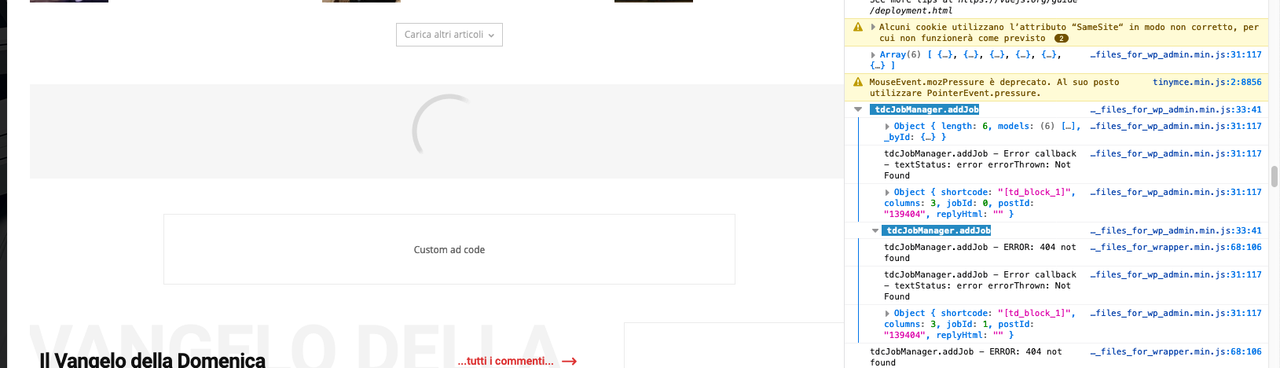
I’m using Newspaper 10.3.8
 V3N0M
V3N0MHi,
Today I noticed that there are problems with the processing of blocks. When I insert a block and want to edit the content of it, the modal loads but the editor does not appear.
In the console you can see that there is an error with jQuery. I have already tested the plugin “jQuery Migrate”, unfortunately there is no improvement.
Br
 MrElectrician
 I got an email from GoDaddy tech support about the problem that I have been having with saving from my theme panel. I gave them the information that you passed on to me.
“I’ve pulled the firewall logs, requests are getting blocked:
Our firewall blocks any requests with malicious/suspicious behavior.
Such requests can be generated working on the website and admin panel.
So we whitelist the IP/URL of admin/user that conveys the firewall requests generated by this IP/URL is legit and no further blocks”.
They also provided specific details for me to whitelist my IP Address.
I did what they told me to do and IT WORKED! I whitelisted the IP Address of my home computer by accessing the firewall dashboard and entered my IP Address for whitelisting.
I got my IP address from here: https://www.whatsmyip.org/
Signatures: https://labs.sucuri.net/signatures/waf/
Sucuri Firewall whitelisting info link: https://docs.sucuri.net/website-firewall/whitelist-and-blacklist/whitelist-an-ip-address/
Additional information: “If whitelisting is not accepted at your end we have another workaround for this will be bypassing the firewall while working on it connecting directly to the hosting server this will escape firewall filtering.”
Here is how to configure this:
https://kb.sucuri.net/firewall/Troubleshooting/bypassing-the-proxy-for-testing-and-development
I can now save changes in my theme panel.
Thank you for the information that you provided.
Calin Hi,
In the most of the cases this problem can be fixed by adding an extra code, please set this code in functions.php -> wp-content/plugins/td-composer/legacy/Newspaper/functions.php
add_action('admin_head',function() { echo '<style>.td-gutenberg-editor .editor-styles-wrapper .wp-block {max-width:726px!important;}</style>'; });
Let me know the results!
Thank you!
Vlad S Hello !
That depends on how the filters are set up. Also please note that there are 2 blocks with 2 different filtering options. Please check your filtering option from block 1 and block 2: https://www.screencast.com/t/0LYFLvmQ3PD
Check the filtering and let us know !
Thank you !
Vlad S Hello !
That depends on how the filters are set up. Also please note that there are 2 blocks with 2 different filtering options. Please check your filtering option from block 1 and block 2: https://www.screencast.com/t/0LYFLvmQ3PD
Check the filtering and let us know !
Thank you !



