
- NewspaperFlex Block Builder and Flex Loop Builder
- NewspaperHow to use the Flex Blocks cache option
- NewspaperHow to edit modules for Flex Block X
- NewspaperHow to insert a block inside the content of a post
- NewspaperFlex Block Settings Guide
- NewspaperMeta Info on Modules and Blocks
- NewspaperTheme modules and blocks
- TutorialsDefault Block Settings Guide
- NewsmagBlock settings tutorial
- NewsmagCategory tag on modules/blocks
- NewspaperThumbnails – Fix strange looking images on blocks
- NewspaperBlock settings tutorial
- NewspaperCategory Tag on Modules/blocks
- ApiPractical example – How to add a new Block and Module
- Apitd_api_block::delete
- Apitd_api_block::update_key
- Apitd_api_block::update
- Apitd_api_block::add
- ApiAPI – Blocks – Introduction
- NewspaperWP Rocket and Newspaper Theme: Optimization Guide
 Amari
AmariMessage
Errors at columns: 2(models) : 6(dom). The model does not match the content Current state has involved an issue. You could try an UNDO operation (CTRL+Z / CTRL+SHIFT+Z)
From what I see, the only issue this causes is what should be a sidebar now appears at the end of the row. And, strangely, in edit template the block shows where it should but once I exit, it doesn’t.
I fiddled with plugins I can disable and that didn’t do anything so, are there any solutions? I see I’m not alone in this problem.
Also, I should note I can’t edit if I try to go straight from the post and have to go in through the back end.
 Calin
Calin Hi Godwana2020, you can use the option indicate by AliAhmadi on flex blocks, also you can use the general option from theme panel -> https://i.imgur.com/ERDI8j6.png
Hope this will help you!
 Vlad S
 Hello !
Please make sure that your images are having a close aspect ratio the block one. I personally recommend using 800×600 image size or full hd 1920x1080px.
Thank you !
 Satwik
 Add this code to functions.php
Add_action('admin_head',function() {

echo '<style>.td-gutenberg-editor .editor-styles-wrapper .wp-block {max-width:726px;}</style>';});
 Toma Romica
 Problema este cam de când am instalat această temă. Setările Yoast SEO sunt OK. Site-ul persoanla îl poți verifica dacă dorești aici. Am verificat de multe ori si pluginurile instalate (cele tagDiv, Ad Inserter Pro, Akismet, Cookie Notice, DeBlocker, Menu Icons, Really Simple SSL, Smush, TinyMCE Advanced, Wordfence Security, WP Fastest Cache, WPForms Lite și Yoast SEO), dar nu cred că ar fi din cauza lor. Chiar nu știu ce altceva ar mai putea fi.
Cam acesta este traficul de astăzi (până la ora 15:00): https://imgur.com/IKWYxSm
-
This reply was modified 6 years by
Toma Romica.
 slivertorp
 The answer was very SIMPLE:
1- Copy the Script into : theme panel > custom code > Custom Javascript
2- Copy <div id=”tw-calc-widget”><!– tw calculator will be rendered here –></div> into a column text block.
That’s it.. I don’t understand why you wasn’t keen to help me. That wasn’t professional.
I am hesitating to extend support now.
Please be more helpful next time, especially if you work as a support team member.
Customers need real answers.
Kind regards.
Calin Hi,
You can use tagDiv Composer and edit the blocks/modules, these can be filter or you can use the unique article option -> https://forum.tagdiv.com/unique-articles/
Hope this will help you!
 Mark Gilbert
 Hi Vlad – I didn’t realise different code for each circumstance. It is the Flex Block 1 at the top of https://jazzjournal.co.uk, with custom title “Three items from the last seven days at Jazz Journal”
[tdc_zone type="tdc_content"][vc_row][vc_column][td_flex_block_1 modules_on_row="eyJhbGwiOiIzMy4zMzMzMzMzMyUiLCJwaG9uZSI6IjEwMCUifQ==" limit="3" hide_audio="yes" show_btn="none" show_cat="none" image_floated="" f_title_font_family="fs_3" f_title_font_size="21" f_ex_font_family="fs_7" f_ex_font_size="14" f_title_font_weight="600" f_ex_font_weight="500" tdc_css="eyJhbGwiOnsiYmFja2dyb3VuZC1jb2xvciI6IiNmOWY5ZjkiLCJkaXNwbGF5Ijoibm9uZSJ9LCJsYW5kc2NhcGUiOnsiZGlzcGxheSI6Im5vbmUifSwibGFuZHNjYXBlX21heF93aWR0aCI6MTE0MCwibGFuZHNjYXBlX21pbl93aWR0aCI6MTAxOSwicG9ydHJhaXQiOnsiZGlzcGxheSI6Im5vbmUifSwicG9ydHJhaXRfbWF4X3dpZHRoIjoxMDE4LCJwb3J0cmFpdF9taW5fd2lkdGgiOjc2OCwicGhvbmUiOnsiZGlzcGxheSI6Im5vbmUifSwicGhvbmVfbWF4X3dpZHRoIjo3Njd9" category_id="" sort="random_7_day" image_alignment="4" mc1_el="20" custom_title="Three items from the last seven days at Jazz Journal" header_text_color="#000000" block_template_id="td_block_template_7" modules_gap="25" f_header_font_family="fs_3" f_header_font_size="18" modules_divider="" modules_divider_color="" image_height="100" show_excerpt="" author_txt_hover="#000000" author_txt="#595959" show_review="none" meta_padding="10px 0px 0px 0px" art_title="0px 0px 6px 0px" art_excerpt="10px 0px 0px 0px"][/vc_column][/vc_row][vc_row gap="10" tdc_css="eyJhbGwiOnsibWFyZ2luLXRvcCI6Ii0yMCIsImRpc3BsYXkiOiIifX0="][vc_column width="2/3" tdc_css="eyJhbGwiOnsibWFyZ2luLWJvdHRvbSI6Ii0yMCIsImRpc3BsYXkiOiIifX0="][vc_row_inner tdc_css="eyJhbGwiOnsiZGlzcGxheSI6IiJ9fQ=="][vc_column_inner tdc_css="eyJhbGwiOnsibWFyZ2luLWJvdHRvbSI6Ii0yMCIsImRpc3BsYXkiOiIifX0="]
Thanks
 xochipelli
I have custom css I only want applied to the blog page that’s been set
.blog {} isn’t working for me, ie as a test:
.blog h3 {
display: none !important;
}
And where I’m expecting to see a page-id in the body class, doesn’t exist:
<body class=”td-standard-pack global-block-template-13 tdc-header-template tdc-footer-template td-animation-stack-type0 td-boxed-layout td-js-loaded” itemscope=”itemscope” itemtype=”https://schema.org/WebPage”>
Using the class provided (see above) in combination with desired elements produces similar results on other pages, which is unwanted. For example:
.td-standard-pack.global-block-template-13.tdc-header-template.tdc-footer-template.td-animation-stack-type0.td-boxed-layout.td-js-loaded .entry-thumb.td-animation-stack-type0-2 {
width: 200px;
display: inline-block;
float: left;
margin-right: 20px;
border: 1px solid #F9BF00;
}
Also, td composer is disabled for the page in question with the comment “TD Composer is disabled on Posts Page”, so I can’t seem to create a custom class for it, either:
https://www.screencast.com/t/G1ivIjj1d
Can’t help but feel kinda stuck.
Suggestions?
xochipelliThis is a snippet from my home page:
https://www.screencast.com/t/PvE4SRFJkZ
And the settings and content length for the Flex Block 4 containers:
https://www.screencast.com/t/3mooo2lWaVtU
Excerpt length is currently set to 50 words (the short column in the screenshot is 54 words)
This has happened on a few different occasions, in other locations as well.
Excerpts were working on the homepage earlier, until I mass disabled and selectively enabled plugins, to help document and log issues for separate issues to a 3rd party plugin vender.
No caching in is present wordpress, and varnish is disabled on the server until until after I’ve done testing and modding setup.
I’ve killed off posts and recreated with no change.
As a test, I’ve also attempted utilizing a 3rd party plugin WPKUBE – Advanced Excerpt where is excerpt length is set to 10 words. Any other options offered by the plugin are not being recognized (ie custom “read more” link).
 Etoimos
The Big Grid Flex 5 block shows four article images, all pulled from the same category. Is it possible to have the large 50% segment on the left pull the latest article from category A, the larger top element from the right half to pull from category B, and have the two smallest elements on the bottom right pull from categories C and D?
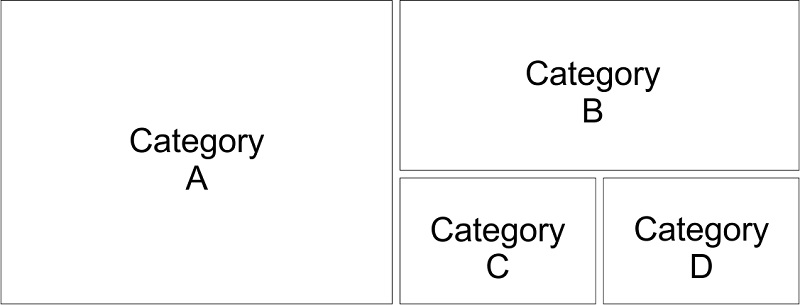
If this is not possible in the Big Grid Flex 5 block, is there a way to do this within the Newspaper theme?
 marclaude
Dear TagDiv Team,
I’m working on a brand new layout for my movie magazine, based on Style Pro cloud templates. Results are amazing, I hope to launch the new version soon and working on cloud templates allowed me to leave the website online without importing a full new Demo Style overwriting the News Magazine style.
But I found some color issues, I hope you can help me with these:
1) CATEGORY GRID 1 doesn’t allow me to choose Review Stars Color in Style Tab, so in Layout Tab I can choose to show Review Stars, but then I cannot change colors in Style Tab, and actually they are black so they are invisible. That is quite annoying.
2) FLEX BLOCK 2: The same – no possibility to choose Review Stars color after you select to show them – happens in FLEX BLOCK 2. They are actually white, so at least I can see them, anyway I want them blue for the whole website so it represents an issue.
Please find enclosed some screenshots about the missing Review Star color option in CATEGORY GRID 1 and FLEX BLOCK 2:
https://ibb.co/ccT0b2g
https://ibb.co/JzkSdcJ
Waiting your courteous reply,
Best Regards,
Marco
 Vikramsinghrao
Sir,
I have a creating a same widget on my website but not a showing of this block on my Tagdiv Composer…
please help me
slivertorp Hi Vlad,
Just to make sure, when the tutorial says:
Place the following JavaScript initialization code before the closing </body> tag.
Are you sure it should be inside the column text?
Shouldn’t it be under : theme panel > custom code > Custom Javascript ?
It doesn’t really make sense to copy the script inside the column text block, no?
Could you please double check with your colleagues?
Thank you
Best regards,
-
This reply was modified 6 years by
slivertorp.
-
This reply was modified 6 years by
slivertorp Hello Vlad,
I am not using : “Flex Block”
Let me explain you with the following drawing I did for you, it will help you to answer properly:
https://imgur.com/rq7NidW
– I have 3 inner rows
– Each of them contains 1 “Single Image” and “1 Image info box”
– Underneath each inner rows, there is quite a big space / gap.
The question is : How to reduce the the gap between each inner row?
Link if you want to check the source code: https://tinyurl.com/yatyq43k
Thank you in advance, it is really important to me.
Kind regards,
-
This reply was modified 6 years by
 digitalmanojar
Hi, I have also posted some other request for support yesterday but no answer yet. (https://gp24.ro)
Meanwhile, I ran into other problems that may be (or not) be related.
The speed of TD Composer is like very slow, to not say ridiculously slow.
When we make changes to the main page with TD Composer in many occasions when we go to see the result and come back we get all sorts of errors that seem only to be resolved if we delete cache on the page as well as in the browser. I am sure that this is not the normal way…
At this very moment I am trying to resolve a banner placement (this I have been trying ALL WEEKEND, just so you can imagine my mood after all this wasted time) But it seems that whatever I do is not working. (this apart from the time it takes for TD Composer to actually place a block I usually refresh the page if it takes more than 10 (!!!!!) minutes let alone to save in case I get to make an actual change) We have similar positions on the main page, the first one is the Flex Block 1 called Video-Popular with a banner underneath. A bit further down we have a similar situation 9or at least we want it to be the same) with a Flex Block 1 called Moto-Popular and also a banner underneath. But no matter what settings we try we can not get it to work in a way that it shows this banner, On the live website it keeps showing the Flex Block and it kinda scrolls with the website instead of staying put.
In regard to banners we noticed that the theme came with Slider Revolution, but also this works so slow that we (temporarily) installed Soliloquy-Lite (which works fine in terms of requirements) What is the best option for the theme?
To avoid questions about my internet speed and o the server speed:
Internet Digi Romania Gigabit, with actual speed never below 800Mbps Down and 500Mbps Up.
Contabo VPS L-SSD Package (8 core, 30GB Ram, 800GB SSD, 600Mbit Uplink)
Bitcatcha server score slightly better than Tagdiv.com 🙂
Other Issues I want to resolve are related to site caching, Image Optimization and Multi Language.
What are the theme compatible best performing plugins for this?
For Caching and Image Optimization we have premium versions of WP_Rocket and Imagify but maybe this is not working well.
(Our Google Pagespeed Insights scores have never been so low, not even when we were using Magbook on shared hosting!)
The change from Magbook to Newspaper mixed up a lot of the multi language things such as menus etc. Currently we are on a free version of Polylang, but we are thinking of going back to premium version of WPML, but prefer to be sure to know what is the best option for the Newspaper theme.
Quite a few questions and the way things are going now there might be more 🙁
I hope you guys can help us out as we did have very high expectation of the best News Theme, but so far it has been a bumpy ride.
 Amit
Amit Hi,
Goto theme panel >> Block settings >> Meta info on Modules/Blocks
Disable show author name and show date.
Thats it.
Purge cache.
Hope you will find this helpful.
Stay home, stay safe.
 Topfgartenwelt
Is there a way to deactivate images on Flex Blocks? Could you ad the option none for Flex Blocks?
Greetings Kathrin
 pporg
pporgIs there any way to filter the posts by category on Author Archive page. Just like ‘Filter by categories’ in Block settings.
 Twolle
Hi support,
How can I remove italic text-decoration on description on td_block_auhor?
Not just on one, but on all td_block_author boxes.
Url: https://servicenews.dk/servicevirksomheder/
Scroll a little bit down and you will see the italic descriptions below the icons/images – marked with A.
See this images as well: 
And how can I remove or change the tooltip when hovering the icon/image – marked with B.
Thanks 🙂
/Twolle
 steveroberts
On the home page of my Newsmag site, about half way down and right below the video block, there is a section called “Latest Articles,” which is a blog archive.
I’d like to move that section closer to the top of the page and put other information in that spot. But, I can’t figure out how.
How can I edit that section?
Thanks,
SR
Mark GilbertI have the same problem as discussed here – https://forum.tagdiv.com/topic/how-to-show-hidden-row-in-td-composer/ and have tried both
.td-pb-row.vc_row { display:block!important; }
and
.vc_row.td-pb-row{ display: block!important; }
but see no access to missing element in any viewport.
I should say I hid Element, not Row…
This is surely a design bug – if one can hide, there should be a button to unhide…
Mark Gilbert I have the same problem and have tried both
.td-pb-row.vc_row { display:block!important; }
and
.vc_row.td-pb-row{ display: block!important; }
but see no access to missing element in any viewport.
I should say I hid Element, not Row…
This is bug – if one can hide, there should be a button to unhide…
 almostrealthings
 Thanks Calin. It would be helpful to make a note on your website that the Newspaper theme is not compatible with Jetpack’s image processing CDN. Other users will have this same issue. Also a note that TDComposer is not compatible with Namecheap’s EasyWP dedicated WordPress hosting.
Two more issues:
1. In the element “text with title” it seems like if the title includes quotation marks (“), it will eventually delete the title and revert back to the default BLOCK TITLE text. We use quotations often in naming our magazines. Has this issue been solved before?
2. I have built out two duplicate pages: https://almostrealthings.com/spotlight is an actual WordPress page, and https://almostrealthings.com/category/spotlight is a cloud category template. The /spotlight WordPress page looks perfect but the duplicate /category/spotlight template does not follow the column formatting that I specify in TDComposer.
How it should look: https://i.imgur.com/tjIMi6c.png
How it looks currently: https://i.imgur.com/uFnOsuv.png
Why does the template lack the same formatting? How can I fix it?
Thank you for all of your help.
 Micha
MichaWhy does the theme load the www-widgetapi.js from YouTube? YouTube sets cookies and this is definitely coming from the theme. (I turned off the video popup).
That doesn’t work, because I am subject to the DSGVO in Germany and therefore also use a cookie blocker, but of course it doesn’t work here, which has now brought me a warning from the data protection authorities.
So to the question, how do I get rid of it? I haven’t found a function that loads this yet.
Because it is indicated to me that the website of Youtube sets cookies, although I have not integrated a video on the site. I have already searched through everything and also see that the www-widgetapi.js from Yt seems to be loading.
How can I remove this from the theme? Since I am subject to the DSGVO in Germany, I am not allowed to use it without a cookie-blocker and run the risk of being warned.



