
- TutorialsDefault Block Settings Guide
- NewspaperWP Rocket and Newspaper Theme: Optimization Guide
- TutorialsFrom WPBakery to tagDiv Composer
- TutorialsOffset Feature
- TutorialsWhat is Ajax preloading?
 zaptv
zaptv Hi Vlad,
This only shows the documentation for formatting, and we have already set that up.
The issue is getting your block template to actually show the formatted time and not just a date.
I’m guessing that if the template only uses the date formatting I need to change the implementation?
You can see on the link below the kind of block I want to add time to.
https://www.dropbox.com/s/wq64g07ivynw357/tagdiv.png?dl=0
I hope this clears up the issue I’m having.
 Nagarig
 So this is the correct view of blocks on Chrome browser: https://snipboard.io/XFzfGU.jpg
But as I visited with Microsoft Edge Browser the same blocks and sidebar blocks have some problems. The images and texts are not in correct line: https://snipboard.io/ELVpsW.jpg
 Calin
Calin Hi,
You could try some solutions that worked for other users, and some similar topics
– https://forum.tagdiv.com/topic/strange-chinese-symbols-replaced-icons-and-arrows/
– https://forum.tagdiv.com/topic/font-blocked-from-loading-by-cross-origin-resource-sharing-policy-no-access-co/
– https://stackoverflow.com/questions/25577981/font-from-origin-has-been-blocked-from-loading-by-cross-origin-resource-sharing
– https://webmasters.stackexchange.com/questions/71630/font-blocked-from-loading-by-cross-origin-resource-sharing-policy-no-access-co
– https://w3guy.com/solution-font-origin-http-cdn-domain-blocked-loading-cors-policy/
Thanks
Calin Hi,
Our theme have a spacial place for custom code in theme panel -> https://i.imgur.com/U44gNlZ.png also the pages and cloud templates can be edited with tagDiv Composer and you can adjust the style elements https://i.imgur.com/tJhWuw2.png
For Unordered list you can use the element from Gutenberg -> https://i.imgur.com/4BJGkcV.png also the words can be highlighted can be done on words like this https://i.imgur.com/z956M7Z.png -> https://i.imgur.com/QMxOPUz.png
Hope this will help you!
Thank you!
Calin Hi,
The margin can be change only with custom css -> https://i.imgur.com/Ro8u5Bj.png this code will apply only on these images that are aligned left and are set in a text with title element ->
.td_block_text_with_title .alignleft {

    margin-right: 12px !important;

}
The code need to be set in theme panel> custom code > custom css.
The only elements that can display text around the image are text with title and column text.
Thank you!
Calin Hi,
The posts should be display automatic on homepage, if there is no block that display it, then it should be displayed in “LATEST ARTICLES” -> https://i.imgur.com/xxR8GbE.png
If this is not what you mean, please provide some more details and some screenshots!
Thank you!
Calin Hi,
If you are referring for example to block 9, you can edit it with tagDiv Composer -> https://i.imgur.com/jHgVcQz.png
If this is not what you mean, please provide some more details and some screenshots.
Thank you!
 DaveKinetic
Hello,
I want to change the default styling of the pull quote block on AMP. It seems excessively large and is set to 60% width. I have tried editing the pull quote section in Mobile Theme > Font Settings > Pull Quote, but that doesn’t seem to make any difference to font style.
Any idea where to change the font styling and the max-width, please?
 daveslc
The Very Large ALL CAPS blockquotes in Newspaper (using the Default PRO Demo) that are centered, blue in color, and a larger font, don’t look good.
How can I adjust them so that they use:
a. A smaller font
b. Have a gray background
c. Are justified (as opposed to centered)
d. Use black or other basic color for the font
?
Thanks
Dave
 Natasha Dobson
Hi, I’ve followed the tutorials on adding blocks to the sub-menu pages, homepage and related articles in posts, but they never appear. Not the homepage, the titles and colours of blocks sometimes do, but no posts. Other times, nothing appears at all. Can you tell me why this is happening please? and how to fix it?
Thank you!
 Kkozee
Hi – I’d like to customize the post template to add either a list of the most recent posts or maybe the most popular posts in addition to the related posts at the bottom of each post – not in the sidebar. Is that possible? I tried editing a custom template, but it didn’t let me add additional elements.
 TimRHL
Hello!
Im new to the theme and I just started editing wildly through my pages. I have one question: How can I change the text of a specific module? I know the text is the headline, but on my front page I sometimes have to add dates to the headline, as can be seen on my current website http://www.rheinerlei.de.
Is there any way of editing those?
And another question:
Is there a way to expand a block space with more (or to reduce it to less) modules than given and to change the modules manually without them being driven by a category assignment?
Thanks and best regards! I guess I will post here more often from now on 🙂
Tim
 edmondcroes
 Can you provide me the file name from which rest of the meta details are coming and where I can find the code for this post block? please provide me file names.
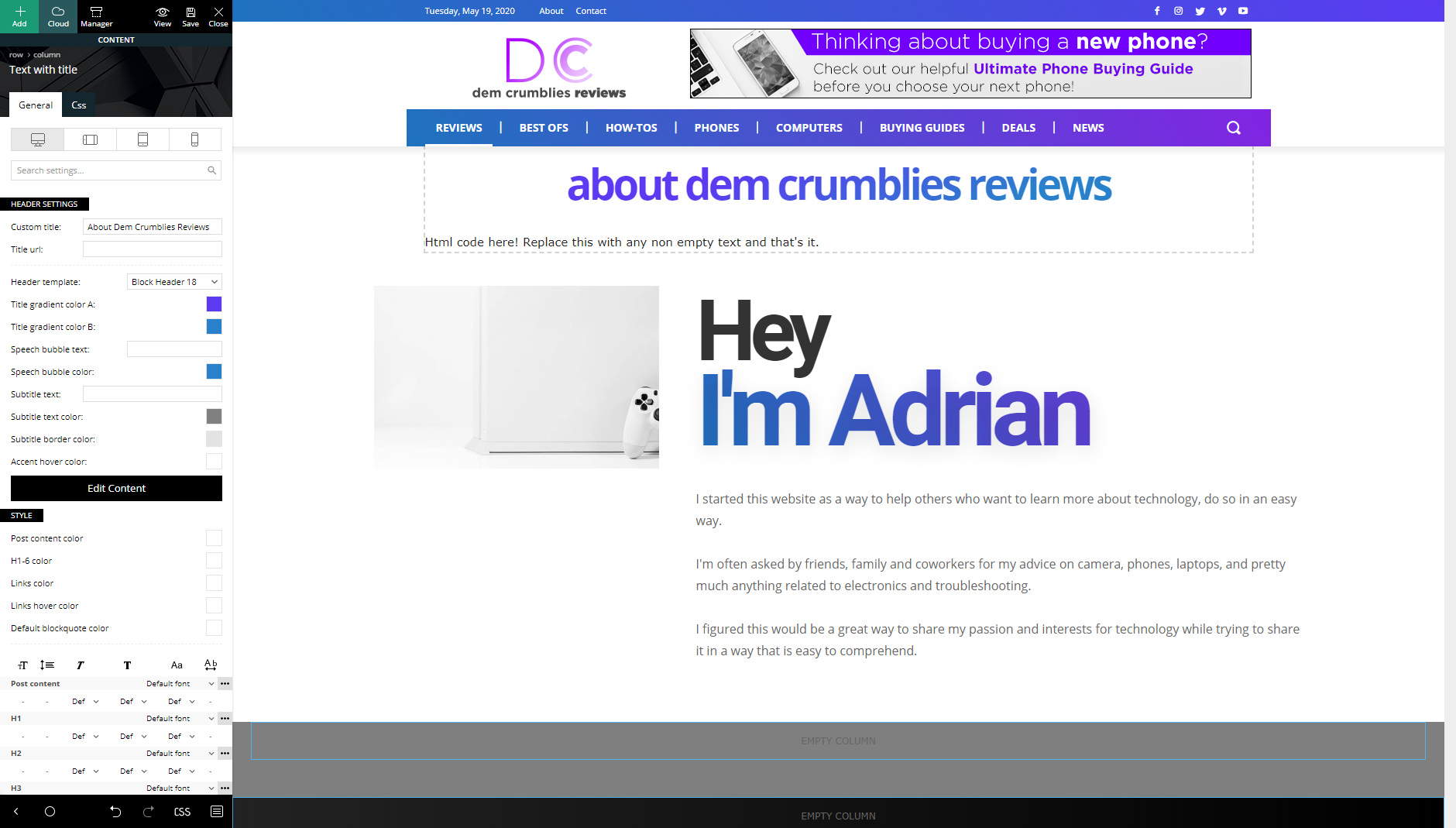
 demcrumblies
 Hi Calin,
I looked, but I did not see that option because I used the “Text with title” block. What should I use instead of that block, or is there another way to edit it?
-
This reply was modified 6 years by
demcrumblies.
 Pixel Cities
 Ok Calin,
So to clarify …. when optimising my images the below ratio will fit all blocks /modules in general?
My photoshop template.. size of 1200 x 630px for feature images OK ??
My photoshop template …size of 1068 x 712 for in post images OK ??
Kind Regards
Mark
zaptvI can only find an option for hiding/showing dates on a block, but not one for showing the time.
Is there a filter I can reach or do I need to overwrite a specific file to add this?
 bjames1000
 Great stuff, thanks.
Next, Regarding the modules/blocks of headlines where there are no thumbnail photos, the space between each headline is quite large. How might I change that? I want the lit to be tighter.
 peterninchich1
I updated my site to Version 10.3.3 and am now unable to edit one of my posts. I am using a large amount of Visualizer (plugin) charts in one of my blog posts and never had issues editing the post. Yesterday, I tried editing my post and the page would not load. I received the error “There has been a critical error on your website. Please check your site admin email inbox for instructions.” The post still appears on my live website (https://501pm-news.com/newspaper-headline-analysis/). However, I am no longer able to edit the post. I tried debugging the issue by deactivating this plugin and it looks like I am able to edit the post (if I disable this plugin). Where the charts previously were, I now see “Your site doesn’t include support for the “visualizer/chart” block. You can leave this block intact or remove it entirely.”
When I reactive the plugin, I am no longer able to edit the post. At first I thought it may be a compatibility issue between my theme and Visualizer. To test this, I added a single Visualizer chart to a different one of my blog posts. I was able to edit the blog post and the Visualizer chart appeared. Now I’m not sure why I am unable to edit the post.
Calin Hi,
Unfortunately for the moment there is no option to display the view count on blocks/modules, for the moment this element can set set only inside of posts/articles.
Thank you for your understand.
Calin Hi,
Our theme will not use the images/thumbs made by WordPress -> https://i.imgur.com/B4ylCJx.png it will use the thumbs that are made using the settings from theme panel -> https://i.imgur.com/Mhrf674.png thse thumbs will be use only for featured images, these will be display in blocks/modules and at the top of articles.
Also we recommend to enable in theme panel only the thumb sizes you are using, in this way you’ll prevent to create thumbs with a dimension that will not be use.
All the thumbs size from theme panel are good and you can use them.
Thank you!
 smile099
 It’s not working.
For some reason, I can see ads created for desktop on mobile and desktop. And can’t see ads created for mobile anywhere.
Here’s an ad code that we are having right now:
<div class="td-visible-desktop doubleAds">

<script>
AdSense Code here
</script>
</div>
<div class="td-visible-desktop doubleAds">
<script>
AdSense Code here
</script>
</div>
<div class="td-visible-phone">
<script>
AdSense Code here
</script>
</div>
And here’s our css code:
.page-nav a[href$="/2/"] {

width: 80%!important;

margin-left: 10%;

box-shadow: 0px 4px 10px 0px #888888;

border-radius: 4px;

}

.page-nav a {

width: 45%!important;

font-size: 16px;

margin: 0 2.5%;

padding: 18px 48px;

color: #fff;

background-color: orange;

box-shadow: 0px 4px 10px 0px #888888;

border-radius: 4px;

}

.page-nav a, .page-nav .current{

display: none;

}

.page-nav a:first-child, .page-nav a:last-child {

display: block;

}

.page-nav a:first-child i:before {

content: "PREV";

}

.page-nav a:last-child i:before {

content: "NEXT";

}

.page-nav a:last-child i:before, .page-nav a:first-child i:before {

font-family: sans-serif;

font-size: 33px;

text-transform: uppercase;

font-weight: 600;

}
.doubleAds {

display: inline-block;

width: 300px;

}

@media (max-width: 767px){

.dads {

display: none;

}

}
 Calin
Calin Hi,
If found that the problem is because of the inline css, please try win an extra class, like this -> https://pastebin.com/4sdtxP5g and add this css in theme panel
.doubleAds {
display: inline-block;
width: 300px;
}
@media (max-width: 767px){
.dads {
display: none;
}
}
Hope this will work better!
smile099 Nothing changed, look: https://prnt.sc/sjmci0
And on /3/ page we get this error: https://prnt.sc/sjmakm (it’s not caused by new css code, it was before)
Here’s the code that we already have for all devices set:
.page-nav a[href$="/2/"] {

width: 80%!important;

margin-left: 10%;

box-shadow: 0px 4px 10px 0px #888888;

border-radius: 4px;

}

.page-nav a {

width: 45%!important;

font-size: 16px;

margin: 0 2.5%;

padding: 18px 48px;

color: #fff;

background-color: orange;

box-shadow: 0px 4px 10px 0px #888888;

border-radius: 4px;

}

.page-nav a, .page-nav .current{

display: none;

}

.page-nav a:first-child, .page-nav a:last-child {

display: block;

}

.page-nav a:first-child i:before {

content: "PREV";

}

.page-nav a:last-child i:before {

content: "NEXT";

}

.page-nav a:last-child i:before, .page-nav a:first-child i:before {

font-family: sans-serif;

font-size: 33px;

text-transform: uppercase;

font-weight: 600;

}
And here is what we’ve added for phones:
.page-nav a[href$="/2/"] {

width: 80%!important;

box-shadow: 0px 4px 10px 0px #888888;

border-radius: 4px;

}
.page-nav a {
margin: 0 8px 8px 0;
padding: 12px 24px;
}
.page-nav a:last-child i:before, .page-nav a:first-child i:before {
font-size: 16px;
}
.single .page-nav a[href$="/2/"] {
width: 100%!important;
margin-left: 0!important;
}
Nagarig I think you should test it yourself because for how many you’ll ask cpanel credits?
It is simple. Create flex blocks on the homepage with different styles and check it in different browsers like chrome, edge, firefox. Edge has that problem of misplaces boxes.
Calin Hi,
For the footer problem, please try this custom css -> https://i.imgur.com/ov8hnbZ.png
.td-footer-template-wrap .menu-navigation-container  .menu

{

display: block;

}
The code need to be set in theme panel> custom code> advance> css > phones.
You already have the copyright set in footer ->https://i.imgur.com/TDUBDug.png
Thank you!



