- ApiPractical example – How to add a new Block and Module
- Apitd_api_block::delete
- Apitd_api_block::update_key
- Apitd_api_block::update
- Apitd_api_block::add
- ApiAPI – Blocks – Introduction
- Apitd_api_thumb::update_key
- Apitd_api_thumb::update
- Apitd_api_thumb::add
- ApiAPI – Thumbnail – Introduction
- Apitd_api_category_top_posts_style::update_key
- Apitd_api_category_top_posts_style::update
- Apitd_api_category_top_posts_style::add
- ApiAPI – Category top section style – Introduction
- Apitd_api_module::update_key
- Apitd_api_module::update
- Apitd_api_module::add
- ApiAPI – Modules – Introduction
- ApiUsing the Theme API in plugins
- ApiThe Theme API
 IslandJim
 Hi thanks for your time, some additional data:
CPT Screen: https://snipboard.io/Up8MBa.jpg
Sidebar built in the widget area: https://snipboard.io/2STuJa.jpg
Sidebar custom html from the bottom box in the above screenshot:
[td_block_title title_tag=”h4″ custom_title=”Magazine” tdc_css=”eyJhbGwiOnsibWFyZ2luLWJvdHRvbSI6Ii0xNSIsImRpc3BsYXkiOiIifX0=”][td_flex_block_1 modules_on_row=”” limit=”1″ hide_audio=”yes” meta_info_align=”initial” category_id=”33″ image_height=”133″ show_author=”none” show_com=”none” show_excerpt=”none” show_audio=”none” show_btn=”none” hide_image=”” modules_category=”” meta_margin=”0 0 5px 0″ show_date=”none” show_review=”none” show_cat=”none”]
[td_block_ad_box spot_title="- Advertisement -" spot_id="sidebar" media_size_image_height="500" media_size_image_width="600" spot_img_horiz="content-horiz-center" tdc_css="eyJhbGwiOnsibWFyZ2luLWJvdHRvbSI6IjQ4IiwiZGlzcGxheSI6IiJ9fQ==" spot_img_width="eyJwaG9uZSI6IjMwMCJ9"]
[bellows config_id=”main” menu=”2302″]
The page template: https://snipboard.io/Z8DH2j.jpg
The Directory Plugin I’m using has an option to set the category page (which I’m choosing to do with the above page template) I have tried not using the page template as well and I get poor results as well.
Thanks.
 Satwik
 Yes. I had already sent a detailed report to the developer team. Few tips are:
1. Use the Heartbeat Control Plugin and reduce or disable post editor activity
2. Avoid using td-Composer blocks that use Admin-Ajax such as Load more pagination
3. Live search
4. Megamenu etc.
Use chrome dev. tools to identify which block is using the Admin-ajax.
 johnnyjamjam
Hello,
I am trying to remove widgets from the “Default Post Template” but I cannot find where to remove them. For instance, taking a look at the right hand section of this post HERE you’ll see Blog Stats, Archives, “Spam Blocked”, “Blog Roll” etc. I am trying to remove them away. I know I can do them with the “Customised” ones but those are hectic and chaotic as far as my web arrangement is concerned. Please I need them removed from the Default Post Template, thank you.
 connect5thgen
 tdb-block-inner td-fix-index
 vampireprincess
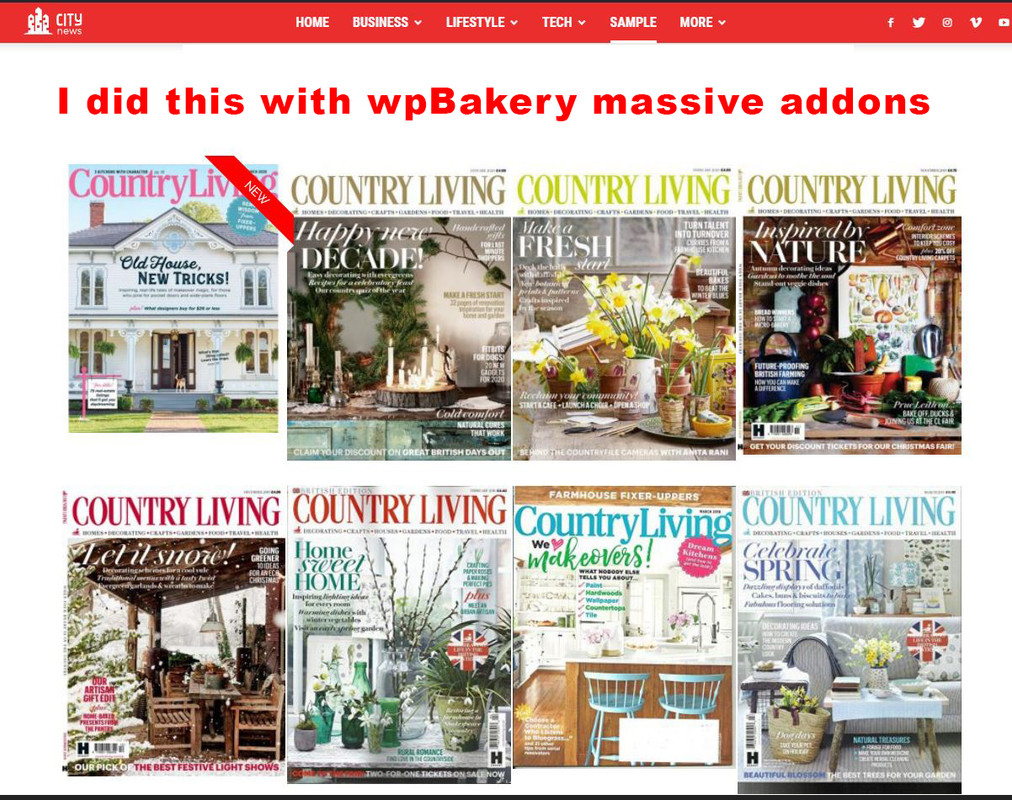
I wish to achieve the same effect for my magazine editions as you achieved on your demo page.
I want that each image direct me to a page or category where are located 30-35 articles only from that issue.
I wish to have on some editions a ribbon, a Title and some hover over effect.
Did you achieved all with the TdComposer, or it was done through wpBakery?
Because I cant get nothing similar with any of the Td codeblocks for images, for images I found a very limited options.
I installed a “massive addons” for wpBakery and I got similar effect but
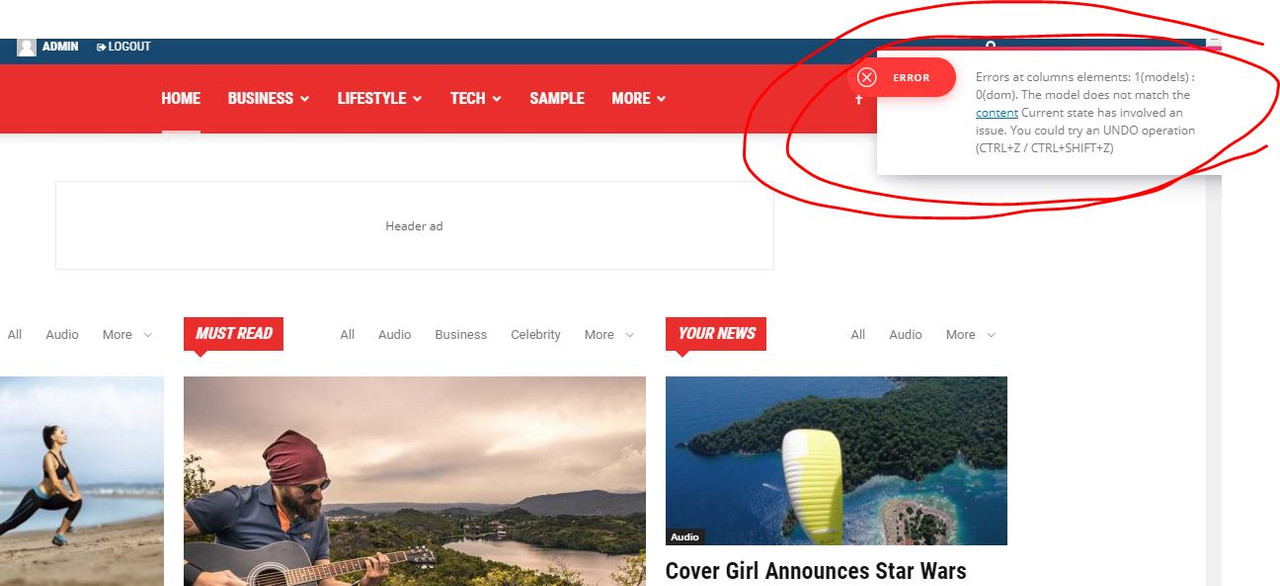
now I cant edit anyomore the pages which was done with TdComposer it gives me some error.
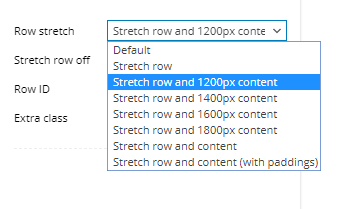
Finally in WpBakery how can I get the stretch row and 1200px content, that is exist in TD?
https://i.postimg.cc/zXVKfm5s/1.jpg
https://i.postimg.cc/SsSVTZ8m/2.jpg
https://i.postimg.cc/0QyFM5VG/3.jpg
https://i.postimg.cc/G23t4Y0M/5.png
 dmasony
 Thanks for the tip. Unfortunately that did not work. I am still seeing the same empty image box. The only feature that I can control is the block title and style. The custom image titles and images are unaffected by my input.
 Vlad S
 Hello !
The blocks were designed to diplay mostly square images or rectangular shaped ones like 800×600: Also if you’re using flex blocks you will be able to edit the images as you can see here: https://www.screencast.com/t/NwubnM3cg
For your second problem that is because of the issues above.
Thank you !
Vlad S Hello !
Depending the blocks you use you can find the codes in here: https://www.screencast.com/t/Gq5gkPMXSF7
Thank you !
 jfmombiela
Hi,
I have created an article under a category name, and added it to a specific page, where I am only adding article on that category (that works), but then I have created a Flex Block 3 and on the category filter I have selected the same one. However, the product is not appearing… I would be happy to share access to my account so you can have a look, please. The issue is happening on the home page.
My site is https://lahistoriaviva.com/ and as you will see an article from “historia moderna appears on “historia contemporanea”
 barbitania
 Hi Vlad!
Thank you for your answer.
Ive checked the photos of the below block (“M2” from the Category layouts) and the horizontal images are bigger than 800x600px so they should be enough… still they are cut weirdly to uneven sizes. How can we solve it?
Also if we use vertical images than they will not crop perfectly to the same size as other images?
(Or…am I understanding right?: to achieve a seamless look like on your demo pages ALL the featured images would need to have same width-and-height ratio because they are NOT being cropped to a specific block grid size?)
Also there is an other problem: if you check the upper block (which is “Big Grid 12”) our problem is that the images are showing up too big. (Only the top parts of the heads are visible even though the images have a lot more content than that)
You can find a screenshot here to be sure we are looking at the same view: https://www.dropbox.com/s/e5m8nseqkfcn2v8/Screen%20Shot%202020-02-26%20at%2022.31.27.png?dl=0
Can you tell me if these problems have solutions?
Thank you,
Anna
 rais29
Why I am having this error and my webpage get distorted.
Howdy!
Since WordPress 5.2 there is a built-in feature that detects when a plugin or theme causes a fatal error on your site, and notifies you with this automated email.
In this case, WordPress caught an error with one of your plugins, tagDiv Composer.
First, visit your website (http://www.kimpavitapress.no/) and check for any visible issues. Next, visit the page where the error was caught (http://www.kimpavitapress.no/wp-admin/post.php?post=5010&action=edit) and check for any visible issues.
Please contact your host for assistance with investigating this issue further.
If your site appears broken and you can’t access your dashboard normally, WordPress now has a special “recovery mode”. This lets you safely login to your dashboard and investigate further.
To keep your site safe, this link will expire in 1 day. Don’t worry about that, though: a new link will be emailed to you if the error occurs again after it expires.
When seeking help with this issue, you may be asked for some of the following information:
WordPress version 5.3.2
Current theme: Newspaper (version 10.2)
Current plugin: tagDiv Composer (version 2.5 | built on 11.11.2019 15:07)
PHP version 7.2.27-1+0~20200123.34+debian9~1.gbp63c0bc
Error Details
=============
An error of type E_ERROR was caused in line 181 of the file /home/4/k/kimpavitapress/www/wp-content/plugins/td-composer/legacy/common/wp_booster/td_block.php. Error message: Uncaught Error: Class ” not found in /home/4/k/kimpavitapress/www/wp-content/plugins/td-composer/legacy/common/wp_booster/td_block.php:181
Stack trace:
#0 /home/4/k/kimpavitapress/www/wp-content/plugins/td-composer/legacy/Newspaper/includes/shortcodes/td_block_slide.php(471): td_block->render(Array)
#1 /home/4/k/kimpavitapress/www/wp-content/plugins/td-composer/legacy/common/wp_booster/td_global_blocks.php(27): td_block_slide->render(Array, ”)
#2 /home/4/k/kimpavitapress/www/wp-includes/shortcodes.php(325): td_global_blocks::proxy_function(Array, ”, ‘td_block_slide’)
#3 [internal function]: do_shortcode_tag(Array)
#4 /home/4/k/kimpavitapress/www/wp-includes/shortcodes.php(199): preg_replace_callback(‘/\\[(\\[?)(td_blo…’, ‘do_shortcode_ta…’, ‘[td_block_slide…’)
#5 /home/4/k/kimpavitapress/www/wp-content/plugins/td-composer/includes/tdc_composer_block.php(198): do_shortcode(‘[td_block_slide…’)
#6 /home/4/k/kimpavitap
 Blo
Blo Hello Calin, I have the Newspaper theme, I am afraid to upgrade tagdiv composer so I just used another plugin for the youtube videos and added it using a “column text” block and a shortcode the plugin gives me.
Is the Newspaper theme and its components (composer, etc) going to try to upgrade themselves? Or should I do the upgrades manually?
 KVV101
Hey there,
It seems like the WP editor inside the TagDiv Composer is not working anymore on my website. I don’t see a button in the editor to save the content that I wrote. If I just click somewhere on the page or just exit the editor, it doesn’t change the content. If I click on a block with content inside, the editor is just blank (no text inside).
This happened when I edited a page that I imported from my Divi theme website, so maybe something went wrong there. Though the editor is also not working on other pages anymore.
What could be the problem?
 jkbs615tv
I tried to use js_composer by using YouTube Plugin – WordPress YouTube Gallery. Because in js_composer, the YouTube plug-in, the form of shortcode, could be called in block form.
However, just activating js_composer breaks the form of the post template.
I ask for your help.
 Calin
Calin Hi,
You can choose to display the primary category from here -> https://i.imgur.com/Xm0DcuE.png but this will be apply only on blocks/modules, inside the article the categories will be display in alphabetical order (if the post is set o a subcategory it will be display the parent category too) , using a single post template from tagDiv Cloud Library there are only two sorts -> https://i.imgur.com/IME8Wk7.png
Thank you!
Calin Hi,
Please verify the console for error while saving the settings on the Theme Panel, usually it displays a 403 or 404 error, if you have these errors, you will have to contact your host and let them know that your admin-ajax.php is blocked either by firewall or the security settings.
If you don’t use a security plugin, please ask your host about this, maybe you have a security module which blocks this.
If you use a plugin like Wordfence please set it in learning mode.
Let me know the results!
Thank you!
 tcstix
I followed the instructions but it didn’t go well and I had to downgrade, which took some time and frustration.
The instructions don’t really seem to explain using a child theme but I don’t think that was the issue. I think some blocks were old and didn’t convert or something. I noticed the theme header changed and it kind of looked like there wasn’t a compatible header in the new version…
Did I miss a step or is there a specific way to do this big of an upgrade?
Thank you.
 tvmix
tvmixAccording to your instructions, I added an YouTube API Key.
I got an error message: http://prntscr.com/r7jeam
But I was able to add some test videos.
For a few hours everything worked.
Now everything is not working again. I cannot add any video to the “Video Playlist” block.
I see errors appearing: http://prntscr.com/r7jqc3
How to fix it? What are the errors in the theme control panel and in https://console.cloud.google.com/?
 lucagrandicelli
I’ve set up my home page with different blocks and among those, i have used a slider component. Unfortunately, as soon as i insert a post id in order to show only one post, it just says: “no posts”.
Since when filtering for categories, it just works, i have created a new temp category and assigned that post to it, then filtered by this category. It always show “no posts”.
Is there some bug with this component or am i missing something?
 kaitlin
 If I look at the source code for this page for example: https://httpswwwfarmaterverantwoording.site/why/, you see it’s linking a background image that’s on http rather than https. That’s what I would need to fix? But I’m uploading those images from an https connection so not sure why that’s not reflected.
</style>
<div class=”tdi_47_a50_rand_style td-element-style” ><div class=”td-element-style-before”><style>
.tdi_47_a50_rand_style > .td-element-style-before {
content:” !important;
width:100% !important;
height:100% !important;
position:absolute !important;
top:0 !important;
left:0 !important;
display:block !important;
z-index:0 !important;
background-image:url(“http://httpswwwfarmaterverantwoording.site/wp-content/uploads/2020/02/national-cancer-institute-fTQHPb6r4wQ-unsplash-copy.jpg”) !important;
background-position:left top !important;
background-size:cover !important;
}
</style></div><style>
Blo WARNING: MAKE A BACKUP OF FILES AND DATABASE BEFORE UPGRADING TAGDIV COMPOSER.
===============================================
This is terrible, I deleted the tagdiv composer and then reinstalled it and then I got this error when trying to edit the homepage:
Errors at columns elements: 1(models) : 0(dom). The model does not match the content Current state has involved an issue. You could try an UNDO operation (CTRL+Z / CTRL+SHIFT+Z)
I couldn’t select any of my blocks to delete them and recreate them. I couldn’t add new blocks either.
Good thing I had made a backup of all files and the database, I switched it back.
But now I’m scared of the plugins auto updating themselves. Is the theme and their plugins auto-updating themselves?
Calin Hi,
1. Make sure that the thumb 648×320 is enable in theme panel -> https://i.imgur.com/1xEduLe.png, also you can regenerate the images, this should fix the problem -> https://forum.tagdiv.com/thumbnails-fix-strange-looking-images-on-blocks/
2. For this you can use a custom css like this one -> https://i.imgur.com/iomR2FA.png also you have assigned an empty tag.
The code need to be set in Theme panel> Custom code> Advance css> iPad -> https://i.imgur.com/5IbXg8Y.png
–
.tdb_single_tags .tdb-tags li{

    display: block;

}

.tdb_single_tags .tdb-tags li:last-child{

  margin-top: 8px;

}
3. Indeed there is an issue on Internet explorer + Flex Blocks.
Please try this code:
[class*="ie"] .td-module-container {

display: block;

}

[class*="ie"] .td-image-container {

height: auto;

flex: initial;

}
The code must be inserted here: https://www.screencast.com/t/J1Nxw5s5
4. For me your website look ok when I zoom it -> https://i.imgur.com/aL2Uy7E.png the website that you provide as example indeed seems to be boxed you can achieve similar by setting a background color.
If you want you can check some demos -> https://demo.tagdiv.com/newspaper_style_pro/ -> https://demo.tagdiv.com/select_demo/select_demo_newspaper?utm_source=live_preview&utm_medium=click&utm_campaign=demos&utm_content=demos_button#demos
5. Our theme can not force the users to open the Facebook app, but for the most users there should by a popup to choose the way you like to open the link (if the user do not have set one option by default).
6. For this you can use a custom css like this one -> https://i.imgur.com/OccJXEZ.png this code will be apply only on this page
.page-id-1089 .tdm_block_button .tds-button .tds-button1 {

pointer-events: none!important;

}
The code must be inserted here: https://www.screencast.com/t/J1Nxw5s5
Hope this will help you!
Thank you!
Calin Hi,
Please try this custom css -> https://i.imgur.com/F8xZo7V.png
#quiz .tagdiv-type ul li:not(.blocks-gallery-item):last-child, .tagdiv-type ol li:not(.blocks-gallery-item):last-child {

    margin-bottom: 10px;

}
This will fix the problem.
You need to set the code in theme panel> custom code> custom css.
Thank you!
Calin Hi,
1. So if you want to have a post/article that will have set a featured image just let the post how it is, but if you want to set a featured video on your post, then you need to specific this -> https://i.imgur.com/3x55EVm.png insede the post you can set images and video without problems.
Here is an example how it will look you posts on block if these has set a featured video -> https://i.imgur.com/XOCXAzf.jpg
2. If you want to set some youtube videos on your homepage or any page, you can use tagDiv Composer, edit the page add a column text and paste the link -> -> http://prntscr.com/pndcqw -> http://prntscr.com/pnddar
If you want to display all the videos that have set a feature video, then you can set on these a category and set a flex block and filter it after that category -> https://i.imgur.com/slHpHSq.png -> https://i.imgur.com/ay4C45g.jpg
Hope this will help you!
Thank you!
barbitaniaHi!
I have issues with the images of the blocks. The images don’t cover the block area, rather it seems like the image is placed at the block area as is (even if it is too big) and then the excess is being cut off. Or if the image is vertical, then there is an ugly empty space left at the side edges.
What i want to achieve is a kind of “background-size:cover, background-position:center” look. But it seems like the images are not applied as background, but as simple images so these rules cannot be applied.
Example: http://desarrollo.rondasomontano.com/revista/category/economia/
Here You see on the upper big blocks how little of the images can be seen, most of them are cut off. Also the below smaller block images have the problem that they don’t have an even shape (the vertical image is just being there small and thin!)
What is the solution for this?
Thank you in advance for your answer,
Bests,
Anna Balizs