
- NewspaperFlex Block Builder and Flex Loop Builder
- NewspaperHow to use the Flex Blocks cache option
- NewspaperHow to edit modules for Flex Block X
- NewspaperHow to insert a block inside the content of a post
- NewspaperFlex Block Settings Guide
- NewspaperMeta Info on Modules and Blocks
- NewspaperTheme modules and blocks
- TutorialsDefault Block Settings Guide
- NewsmagBlock settings tutorial
- NewsmagCategory tag on modules/blocks
- NewspaperThumbnails – Fix strange looking images on blocks
- NewspaperBlock settings tutorial
- NewspaperCategory Tag on Modules/blocks
- ApiPractical example – How to add a new Block and Module
- Apitd_api_block::delete
- Apitd_api_block::update_key
- Apitd_api_block::update
- Apitd_api_block::add
- ApiAPI – Blocks – Introduction
- NewspaperWP Rocket and Newspaper Theme: Optimization Guide
 Calin
Calin Hello,
If you want to display the line on all deceive all you need to do is to set this custom css in Theme panel > Custom code> Custom css
.td-social-line{

    display: inline-block;

}
But please notice that the button for share for line is showing only on mobile device because was made only for the mobile deceive, in order to work on desktop your visitor need to have an app install on there desktops.
Thank you!
 Vlad S
 Hello !
In order to display a slide you have 3 options:
– Big Grid Slide and the Slide are post slides. Simple sliders with posts in them.
– Revolution slider is a multipurpose slider. You can find more about it here: https://forum.tagdiv.com/how-to-install-revolution-slider-v5/
In order to show only some posts in the blocks you will have to edit their filters as you can see here: https://www.screencast.com/t/hOzESgmyB2j
Thank you !
 swbmxcrew
 You aren’t alone on that one. my website is doing exactly the same. everything works fine on the desktop but none of the blocks a add with TagDiv are working on my mobile. nightmare.
 manasek
 Hi,
for those interested, below is the code I have gone with. In my case, I created a shortcode and pasted it in the content area of the text block placed in an inner row inside the single featured background image block (by the way, why the pure HTML block doesn’t accept shortcodes?)
<?php global $wp_query, $post, $tdb_state_single;

$post_id = $tdb_state_single->get_wp_query()->post->ID;

$post_title = $tdb_state_single->get_wp_query()->post->post_title;

$td_post_video = get_post_meta($post_id, 'td_post_video', true); ?>

<div class="my_wrap_icon_style">

" data-mfp-src="<?php echo $td_post_video['td_video'];?>">

<span><i class="tds-icon tdc-font-tdmp tdc-font-tdmp-play-round1 my_icon_style"></i></span>

</div>

 bzeegers
 Hi Calin,
I have placed the code in the functions.php file, but it does not seem to work. There is also no element with the class “.block-editor-writing-flow” inside the DOM while editing.
 cantoute
That would be gr8 !!!
Continue the good workd 🙂
have a nice day.
 JKLFab
 Oh noooooo. That’s such a bummer. I have to use composer so I can have a couple of blocks in the left column next to the sidebar.
Is thee any way to get the pagination in a Child theme file override, or in a functions.php file override?
Thanks again.
Vlad S Hello !
As I can see on your blog it appears that you have multiple blocks. Each block can be individually edited using the tagDiv composer and you can set filters on it as you can see here: https://www.screencast.com/t/bhRLjNby3m9
In order to have 10 blocks on 3 rows having the latest posts you will have to modify the block and set the block posts to 10 as you can see here: https://www.screencast.com/t/WfvRoTK4
I hope this is helpfull !
Thank you !
Calin Hello,
1. This problem start to appear after the last Chrome update, please check on other browses too,
Also you can try this code to fix this problem, you’ll need to add in the theme functions.php
add_action(

'admin_head',

function() {

echo '<style>.block-editor-writing-flow { height: auto; }</style>'; // phpcs:ignore

}

);
Paste the code here: https://www.screencast.com/t/kMKPrLsg7Tk
Hope this will help you!
Thanks.
Vlad S Hello !
There are some issues since the latest Google Chrome updates. Our developers are working on fixing them. There is a quick fix for this by adding this code:
add_action(

    'admin_head',

    function() {

        echo '<style>.block-editor-writing-flow { height: auto; }</style>'; // phpcs:ignore

    }

);
at the end of functions.php as you can see here: https://www.screencast.com/t/MBcb4MbF8
Thank you !
Calin Hello,
1. This problem start to appear after the last Chrome update, please check on other browses too,
Also you can try this code to fix this problem, you’ll need to add in the theme functions.php
add_action(

'admin_head',

function() {

echo '<style>.block-editor-writing-flow { height: auto; }</style>'; // phpcs:ignore

}

);
Paste the code here: https://www.screencast.com/t/kMKPrLsg7Tk
Hope this will help you!
Thanks.
 theoutliar
 It still seems to persist, I disabled the plugins but I am still not able to modify any of the quote blocks, see the link:
https://imgur.com/zdB9miq
Is there anything else I can do to try and fix this, it is starting to drive me up a wall.
JKLFab Hi Calin,
I built the page in Composer using Block 11. At Block 11, I go to the Filter Tab, and at the bottom is Pagination. I don’t have a numbered pagination option. I have Load More Button, Next/Prev Ajax, and Infinate Load.
Also, my body class was already td-lifestyle as that is the theme I am using. However, don’t I need number bubbles, chosen at Composer > Block 11 before I can style them with border radius? I do not have a numbered pagination option in Composer.
I’d also love the “Page 1 of 9” shown in your screenshot.
Thank you,
Jennifer
cantoutehi,
I was trying to reproduce the “no template” single post template.
At bottom there was a block showing related posts by categories and a tab to view related by author.
How can I do the same thing in a cloud template ?
I tried loading a few templates but didn’t find one with this feature.
Thanks
 pattydavid
In TagDiv editor, when I try to edit a text block I added to my page, the WP Editor (visual) is blank and I can only see text in the html tab (text). The wysiwyg section just shows a long string of letters and numbers. However, when I save the page, it looks fine in a browser referencing my site (not in admin view). Could this have anything to do with the fact that I’m not using Gutenberg (I reverted to classic view)?
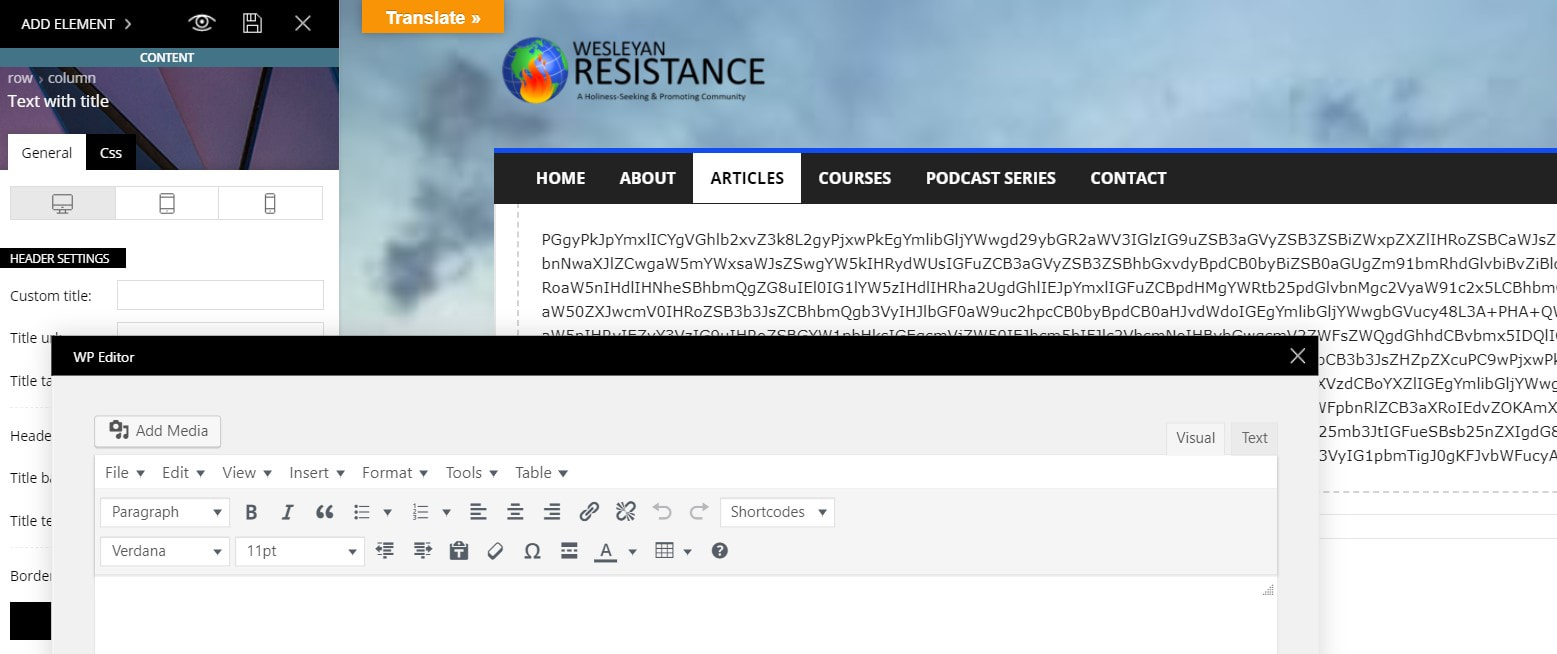
Overall, I love the typographic control of elements, but I’m just having a very hard time getting my existing WP site up and running in my new theme. I’ll keep working on it, but I may need to revert to a backup of my site if there are too many elements I can’t get to work (like the slider revolution, which still won’t work even though I’ve installed the plugin — there are two superimposed sets of headlines on the initial image, and the other images in the slider populate the entire page so that nothing else is readable).
Thanks for any help you can offer.
 acionista
I am experiencing an error with the blocks element in TD Composer. When selected the pagination in EXTRA settings the block shows all posts when logged out. After login the pagination runs perfectly.
 KC
KCHi,
I wish to change Module “Block 3” thumbnail size as Flex Block can’t suit my desired design. There are only 2 types i need to change:
324×160 –> 324×170
533×261 –> 533×280
I’ve found the source code in td_config.php (https://www.screencast.com/t/fX0vcc9Xl), can i just modify the values, then Regenerate Thumbnails? Or this is not the correct way, please advise.
Regards,
KC
 Sabrina44
Hello, I use the theme newspaper and on my site, when I click on the 3 bars in the top right on mobile, the menu is not displayed. It’s blocked. Can you tell me how to fix this problem? Thank you
Calin Hello,
1. This problem appear after the last Chrome update, in order to fix it you’ll need to add in theme functions.php this custom code
add_action(
'admin_head',
function() {
echo '<style>.block-editor-writing-flow { height: auto; }</style>'; // phpcs:ignore
}
);
Paste the code here: https://www.screencast.com/t/kMKPrLsg7Tk
2. Please delete the only/actual child and set the child from the last package of Newspaper theme.
Also this problem can appear if you do not set all the files that need in child theme, please check our documentation for child theme here .
3. This can be a plugin conflict, please deactivate ALL plugins except tagDiv Composer, also if you are using child theme or cache plugin, deactivate them, clear all cache and try again.
Thank you!
Vlad S Hello !
Unfortunately you can edit those only on Flex Block Elements. Any other blocks cannot be edited in this matter.
Thank you !
 MikeKhero
Hello community:
I am looking for some help: I need to put in my home page a block like a 14th, but I only need that block with two columms; On the default configuration there are 3 columms, but I can´t find the style configuration. I Attach screen prints:
the default configuration:

The configuration that I need:

PD: I need the same attributes like block 14, only I want to change the quantity of columms.
Thanks for your help!!
Vlad S Hello !
Here are the 2 css codes: .td_block_related_posts .entry-title {
font-size: 15px;
font-family: 'Days One', sans-serif;
}
.td_block_related_posts a {
color:#001f59;
}
The code must be inserted here: https://www.screencast.com/t/g0qQaTrga
I hope you will find this helpfull !
Thank you !
Vlad S Hello !
I cannot see the black flash. Does this happen on a certain page ?
Blocks are editable using the tagDiv Composer as you can see here: https://www.screencast.com/t/UIS5tCRxH
I hope this was helpfull !
Thank you !
Vlad S Hello !
That can be hidden by going into Theme Panel – Block Settings – Meta info on Modules/Blocks as you can see here :https://www.screencast.com/t/fIVVAora0
Thank you !
Vlad S Hello !
1. This option is available only with Flex Blocks.
2. No, usually regenerating the thumbnails is a process that has to be done when something does not work well.
3. The Slide element’s height can be changed by going into the Layout tab as you can see here: https://www.screencast.com/t/LndSB744EkQ
4. There is no option in order to remove those elements.
5. You can create your header using the Header Manager in order to add an Header Logo element and that will give you the ability to make the header logo as big as you want. Find out more about it here: https://forum.tagdiv.com/header-manager/
Thank you !
