- ApiPractical example – How to add a new Block and Module
- Apitd_api_block::delete
- Apitd_api_block::update_key
- Apitd_api_block::update
- Apitd_api_block::add
- ApiAPI – Blocks – Introduction
- Apitd_api_thumb::update_key
- Apitd_api_thumb::update
- Apitd_api_thumb::add
- ApiAPI – Thumbnail – Introduction
- Apitd_api_category_top_posts_style::update_key
- Apitd_api_category_top_posts_style::update
- Apitd_api_category_top_posts_style::add
- ApiAPI – Category top section style – Introduction
- Apitd_api_module::update_key
- Apitd_api_module::update
- Apitd_api_module::add
- ApiAPI – Modules – Introduction
- ApiUsing the Theme API in plugins
- ApiThe Theme API
 oyarseeduardo
Hello, good day
I have a post that has a shortcode at the end to promote other articles.
The shortcode is:
[td_block_16 custom_title=”RELATED” category_id=”” sort=”” limit=”3″ td_ajax_filter_type=”” td_ajax_filter_ids=”” no_pagination=”load_more” tag_slug=”vitamina” header_text_color=”#3b0e47″]
The problem is that I have not been able to apply a filter where the posts of only a specific author are shown, for example, the author of the article you are reading.
Could you help me modify the shortcode to achieve that?
Thanks!
Eduardo Oyarse
 Anamaria
 Hello,
Please make sure that you have assigned the modules on the blocks -> https://forum.tagdiv.com/modules-builder-newspaper-theme/
Thank you!
 Calin
Calin Hi thiru, depending of what you need:
You can create your own modules using the module builder – https://forum.tagdiv.com/modules-builder-newspaper-theme/
You can also save elements, sections … using the right click on the element and select the save as element – https://i.imgur.com/42qtEHk.png and you can use it latter from add elements from tagDiv Composer – https://i.imgur.com/R4E7A05.png
In case you want to display articles inside a post you can use a block shortcode (as the one above), this need first to be set in a page can configurate after your needs and after that copy in ads section of the theme (ad box element or ads tab for post content – https://forum.tagdiv.com/article-ads/)
Thank you!
 mixalisandrou
 Thank you Calin, I have already run into that problem with this last update, so I had to use the @media in the Custom CSS block anyway. It works almost exactly like I need, just with a little extra code, so it is a working solution after all.
Perhaps just consider for future updates making the breakpoints editable like in elementor or adding a “large-desktop” one as fifth option set at 1680 or 1920 (and really, the desktop one should be 1280.. I still can’t understand where the number 1140 came from..:))
Calin Hi Wriper,
There is no need to activate the tagDiv Standard Pack because this one will work the same.
Also, form the bigging the numbered pagination was only for post loop elements. Form what i know there was a conversation about this option to be add this option on flex blocks and I hope it will be add soon. 😀
The infinite loading is using ajax and the blocks are loading in the same page so will not add the link as numbered pagination (this element has an auto filter that is automatically filter the posts based on the template where it is used and on pages will display articles based on latest).
Thank you for your understanding!
Calin Hi,
I think that you are referring to this – https://i.imgur.com/sr9fIlu.png if so please edit the homepage using tagDiv Composer, scroll until you see the sticky blocks and select them, after that change the excerpt length for it – https://i.imgur.com/FB1Iy0q.jpeg
Thank you!
Anamaria Hello,
Please go to the Manager and import the header template from there. Here are only sections or blocks that you can import.
Thank you!
Anamaria Hello,
For each category, on the flex block there is a special filter for the current category, which dynamically displays the posts from that category within each category.
The Posts Loop automatically filters the posts depending on the cloud template you set (for example, on the category page, there will be posted posts from that category) https://forum.tagdiv.com/posts-loop/
If there is an offset set, please check the block with “No posts” and delete it. Leave it empty with no space or value: https://app.screencast.com/Gh9jDf6t0XtLS
You can find the documentation here: https://forum.tagdiv.com/offset-feature/
Thank you!
Anamaria Hello,
Please follow the next steps. Normally, you should not lose your settings.
Please update to the latest version 12.6.8
If you want to update the theme, you should download the latest version of it from the Theme Forest account and download it.
I recommend that you update the theme manually https://forum.tagdiv.com/how-to-update-the-theme-2/ via FTP/cPanel/File Manager, also if possible disable extra plugins during the theme update to avoid any problems that may arise and make sure that you have activated the tagDiv Standard pack plugin to keep the website’s look. You can try to update the theme on a staging website.
After you update the theme, you need to update the theme plugins too.
In the worst cases, the settings in the theme panel may be lost (there have been isolated cases), in these cases, after the theme plugins that were previously used are activated, you will have to use a backup for the theme panel -> https://forum.tagdiv.com/import-export-theme-settings/
You could consider reinstalling the WordPress version, and checking for this plugin wp-zexit.php. It might be wise to inspect via FTP if it doesn’t appear in the WordPress -> Plugins. Additionally, using Wordfence to scan the website and remove unknown users would be prudent.
Change admin passwords and delete admin accounts you are not familiar with;
– Delete any weird/unknown plugins;
– Delete the weird/unknown themes;
– Clean unfamiliar Theme Panel injected code (example – https://i.imgur.com/4q70kCv.png);
– Clean WordPress files (example – https://i.imgur.com/stJCqiK.png)
Please block /wp-json/tdw/save_css
If an attacker wants to target this URL /wp-json/tdw/save_css they can do so. Even if the website uses a different theme, the attacker can still try that URL. We could add an option to be able to enable/disable the Live CSS, it will be considered. But for now in order to remove it this can only be done with a modification to the composer plugin. I think that all that removing it requires is to comment this line of code – https://prnt.sc/RtwvL5Nc4ikR -> https://prnt.sc/ymZmhdUfp57U But as I mentioned, the attacker can still try to access the URL.
Thank you!
 thiru
thiru Thanks. First thing, I am not getting alerts when you guys respond to my queries even though I subscribe for alerts.
You can not use flex blocks without the plugin or theme
I dont understand this, I already have installed Newspaper theme and it has installed the required plugins.
The elements from the tagdiv Composer can not be used in the default templates.
Ok, I got this.
Check the settings of the flex blocks: https://forum.tagdiv.com/flex-block-settings-guide/
There are special filters as well and the block knows to filter by the current category for example. You can also copy-paste the block or save it as element and use it in another cloud page
I need more clarity on this, I have used tagdiv composer and used few blocks and created pages. Are you saying I can create a my own elements to be used on Tagdiv composer by using a block, change the settings and save as my own element template for further using on pages?
So you are confirming that there is no provision provided by Newspaper theme/plugins to embed the blocks or posts of specific category or filters on Posts by embedding short codes?
I saw reference to embedding blocks @ https://forum.tagdiv.com/set-block-inside-post-content/ ?
[td_flex_block_1 modules_on_row="" limit="1" hide_audio="yes" show_btn="none" show_excerpt="none" show_review="none" show_com="none" show_date="none" show_author="none" image_floated="float_left" sort="random_posts" image_width="200px" meta_padding="25px 0 0 25px" modules_category="above" modules_category_margin="0 0 10px 0" tdc_css="eyJhbGwiOnsiYm9yZGVyLXRvcC13aWR0aCI6IjEiLCJib3JkZXItYm90dG9tLXdpZHRoIjoiMSIsInBhZGRpbmctdG9wIjoiMTIiLCJwYWRkaW5nLWJvdHRvbSI6IjgiLCJib3JkZXItY29sb3IiOiIjZWFlYWVhIiwiZGlzcGxheSI6IiJ9fQ=="]
-
This reply was modified 2 years by
thiru.
 Wriper
Hello, i own 3 copies of your template but i am getting really upset how this theme is moving forward.
I wanted to create our new website with tagdiv composer but when i choose flex blocks i dont have numbers on pagination. Not even infinite scroll is count pages like /page3/ /page/4/ which is good practice for SEO.
When I choose post loop which has available option for numbered pagination on homepage i cant filter specific categories and it shows ALL homepage articles.
So here we go again and i have to activate standard pack plugin with latest articles and template option where i can filter? Which is not updated and according to your words slower? But how can i recreate website with good practices if your blocks have different functions. One dont have numbers on pagination and causing duplication for crawlers another cant filter.
I am really frustrated with this
 dita999
I’m using the Gourmet Pro header template that uses Flex Block 1 as a sticky menu showing recent posts (desktop). The sticky menu’s height varies by post title length, and long post titles make the menu oddly tall. I have successfully limited the number of posts to 8 per row, but nothing I have tried seems to affect the title length. I have tried these settings:
General > Content length > Title length > 25
General > Content length > Excerpt length > 25
I have also tried changing Theme Panel > Excerpts > Excerpts type from On Words to On Letters. It shortened the titles on the mega menu, but it didn’t affect the sticky menu.
CSS > Height 77px
You can see it on my site when you scroll down a bit on any page: https://www.hungrypinner.com/. Am I missing a setting, or does this need to be controlled with custom CSS?
 josemiguelsf
My site is rpnoticias.redpositiva.net and any change that I make from the theme panel is not taking place, for example, the logo nor favicon are displayed and even if I make changes on the block header template it is not working.
 ludyma
I would like to contribute ideas for the next improvements of the Newspaper 12.6.9 version that should be taken into account.
1.- Not everything should be in English, there are options which cannot be modified in the theme panel, for example the sign of the button above “Back to top”, if the page is configured in a language other than English, it looks bad.
2.- In the theme panel there is no necessary information or description of the configurations, even less the modifications made, such as a “NEW” notice.
3.- The Newspaper theme functions manual is obsolete, it should be updated as modifications and improvements are made in parallel, so that it does not become obsolete and the user can consult it in case of doubt.
4.- In the TagDiv constructor there is no display of the blocks used, for example: if you have several blocks and one is on top of another, you cannot mark the one that is at the bottom without deleting the previous one. If there is a block viewer, all the blocks you are using would be displayed and if you select it, it would be marked in the constructor.
I hope these points help you to improve the theme even more. If you have any questions, I would be happy to cooperate to improve it.
ludymawhere does it affect or how do I see the option mentioned in the improvements.
new: Featured Image & Bg Featured Image: Added default image option for posts without a featured image;
 gleloudas
Hello everyone, in latest newspaper is see you have support for image preload (low priority via fetchpriority tag) in flex blocks as seen here https://forum.tagdiv.com/topic/preload-image-of-flex-block/
I would also like to ask for such support for more image elements such as Big Grid Flex 1(x) that are used in our sites homepage: https://www.kynigesia.gr/ (Version: 12.6.7 )
Thank you very much.
Alexandros S.
Calin Hi dscom, the EWWW Image Optimizer – https://wordpress.org/plugins/ewww-image-optimizer/ is one of the plugins that should work with background images.
Also if you want to use image as tags you need to use classic blocks from tagDiv Standard Pack.
Thank you!
 JeffHi
bcworldview.org
In the footer of my website, I have a block “Popular Catagories” which has default page generations for each Category. How do I change those defaults to other prebuilt web pages?
 jtobler
I have three questions (two issues):
1. Where is Live CSS stored? Is it global or unique to that page? It doesn’t appear in the Newspaper Custom CSS section.
2. When I’m in mobile and go to checkout, it tries to load the AMP or mobile theme with grey blocks, but never loads. I don’t want the AMP/Mobile version to load. I want the responsive mobile version to load.
3. On Desktop, the cart and checkout page content extends several pixels outside of the white content container. Why is this?
Anamaria Hi,
I don’t understand what the problem is; that is the post’s image, and yes, the image on the block comes as a background.
Thank you!
Anamaria Hello,
I see that this is a post https://www.flimmerkiste.net/die-besten/actionfilme/ please try to filter the block on a page and check after if the issue persists.
Thank you!
Anamaria Hello,
You can import this header template https://cloud.tagdiv.com/#/single/header/Headers/1865 and after only copy the row with the block -> https://i.imgur.com/y8VPH5J.png after you can delete the header template.
Thank you!
 sanseijob
Dear support
I plan to use Flex block builder.
When I try to Module Template of Cloud template with TD, but I cannot edit it.
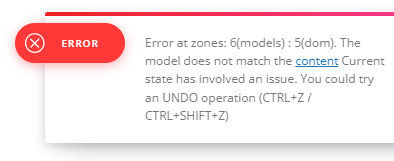
Error massage is as follows…
https://senkyojoho.com/img/20240925error.png
Please check it and tell me how to fix it.
Regards
Calin Hi,
This is because you are using cloud template that allow you to do almost everything you want, change layout, functionality ….
My recommendation is to check each category cloud template with tagDiv Composer, make sure that you have the blocks filtered after the current category, also elements as sibling will display multiple categories…
Calin Hi,
Sorry for late answer!
I checked the website performance and on desktop you have 97 – https://i.imgur.com/LjCV0di.png and on mobile 82 – https://i.imgur.com/XLMWWup.png those are good performance.
Now the most common way to reduce the DOM size is to reduce the number of elements from your page (less blocks).
For the elements that do not have enough size or space, those should have at lest 10px around the element and a proper font size to can be read.
(it can be resolve by changing the font size and space around the elements that are mentioned that have those problems).
Background and foreground colors do not have a sufficient contrast ratio – this is related to the text color and background for that text, those should have enough contrast so they can be easy read – https://university.webflow.com/lesson/typography-color-contrast?topics=layout-design
The question relate to js is a good one, but this is usually handle by cache plugins or optimization plugins. How to delay JavaScript until user interaction in WordPress
I hope this will help you!
Thank you!