
- NewspaperWP Rocket and Newspaper Theme: Optimization Guide
- TutorialsWhat is Ajax preloading?
 Calin
Calin Hi,
If is possible can you please provide some more details about the queries, maybe a list with theme if is possible. This will help us to investigate more. Also, a link to the website will help.
Using the “cache durations to our Flex Blocks (1 hour to 1 day)” will add transients, that cache from flex blocks is using transients and it will contribute to the transients situation you have
Calin Hi,
The weather widgets that comes from our theme can be exclude from cache by excluding the file tdWeather.js
I hope this will help you!
 Antonio Ungaro
 Hello Calin
Thank you for your reply. We would like to provide more context. Please see the attached screenshot https://imgur.com/a/MVy57MR : as you can see, our site currently has over 9,000 td_query_ transients, and all of them appear to be generated by tagDiv components — mainly the Flex Blocks.
If what you mentioned is correct (that this number of transients is a sign of too many unique, uncached queries), then we must be misconfiguring something in our setup.
✅ We have already:
Assigned long cache durations to our Flex Blocks (1 hour to 1 day).
Reduced unnecessary offsets and unique combinations.
Enabled LiteSpeed Cache page caching.
We kindly ask for your guidance:
👉 What exactly could we be doing wrong?
👉 Could there be a setting or a known issue causing Flex Blocks to create so many unique transients despite our efforts?
We appreciate your support to help us identify what needs to be adjusted.
 rafayhost
I’m using the Newspaper theme with LiteSpeed Cache and Cloudflare, and I have a question regarding the built-in weather block. I’m using the default weather block in the header, However, due to caching (LiteSpeed + Cloudflare), the weather info also gets cached along with the full page. As a result, it does not update in real-time for visitors. How to fix?
Calin Hi,
No, tagDiv modules shouldn’t generate thousands of td_query_ transients so quickly. This is a sign of too many unique, uncached queries.
This situation usually appears when the website has a large number of articles, pages, tags … also, those can be created by the flex cache option https://forum.tagdiv.com/use-flex-blocks-cache-option/
Use caching properly:
Enable a persistent object cache (Redis or Memcached).
Use a good page cache plugin (e.g., WP Rocket, LiteSpeed).
Calin Hi,
So the problem is persisting when you are using the classic editor plugin ?
This problem can be resolved using this guide – How to Fix the Invalid JSON Error in WordPress (Beginner’s Guide)
Also re-save the permalink, (sometimes needs to be saved again. Probably a htaccess or cache problem).
Calin Hi,
To create a thumb for a video you’ll need to use a cache plugin that provide this optimization, for example WP Rocket.
I think that you want to set a video as featured video, for this, please make sure that this is set as in our guide https://forum.tagdiv.com/featured-image-or-video/
Thank you!
Calin Hi,
This problem occur when you are logged in? Or is only when you are checking the website as a visitator? If is only when you are as a visitator then it can be related to the cache that is apply on the website. Also, make sure that in the theme panel > header > mobile header – https://i.imgur.com/FDGVzeP.png
Thankyou!
 forrestwebber
Hi TagDiv team,
I’m encountering a recurring error when trying to edit a page using TagDiv Composer on my staging site.
Error message:
Error at zones: 6(models): 0[dom]. The model does not match the content. Current state has involved an issue. You could try an UNDO operation (CTRL-Z / CTRL+SHIFT+Z).
Steps to reproduce:
I open a page with TagDiv Composer.
After making small changes or loading a draft, the canvas goes blank and the error message appears.
Undo doesn’t resolve it, and I’m unable to proceed with edits.
Site info:
Theme: Newspaper (latest version)
TagDiv Composer: (latest version)
Hosting: BigScoots staging server
WordPress: [insert version, e.g., 6.5.3]
Site URL: [insert staging URL if possible]
What I’ve already tried:
Clearing browser and site cache
Undoing changes (CTRL+Z)
Editing from different browsers
Checking plugin/theme version updates
Would love help resolving this—I’m in the middle of relaunching the site and can’t make front-end edits due to this issue.
Thanks in advance!
— Forrest
HookedToBooks.com
 vincentbdz
Hi,
I’ve a fresh install, wp + tagdiv newspapper + travel memories template
I try to remove the default sidebar for blog posts :
– Theme Panel / layout settings / template settings / blog & post templates – no sidebar
– from blog post : post settings / post template – from panel OR no sidebar
I refresh cache
And I still have this sidebar everywhere.
I haven’t installed anything else (except tagdiv composer)
How can I remove this sidebar?
Thanks
 Archerix
Hello, I’m optimizing my website with the theme to run as efficiently as possible and with ngnix + Redis + MariaDB + database indexes + WPsupercache it’s very fast despite a high number of visitors.
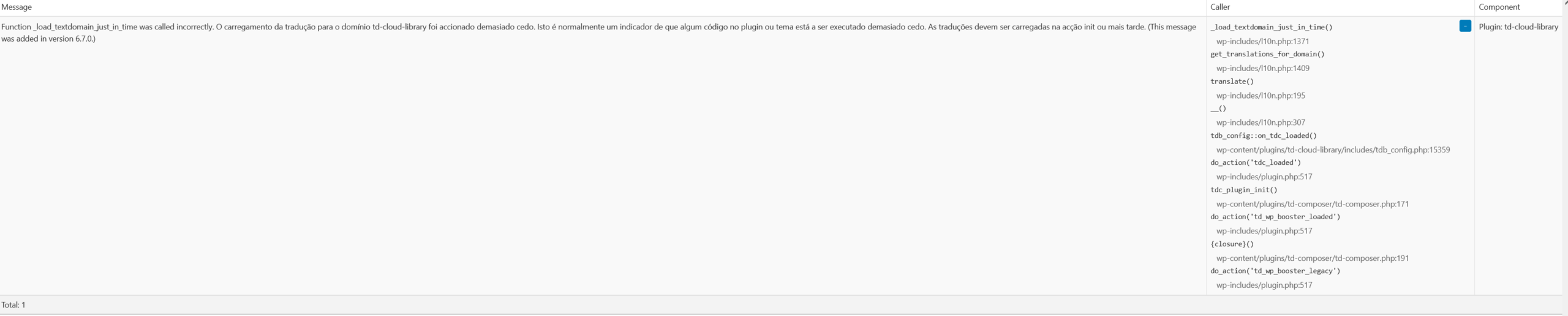
Although it’s not a problem, Query Monitor is giving a warning “Function _load_textdomain_just_in_time was called incorrectly. Loading the translation for the td-cloud-library domain was triggered too early. This is usually an indicator that some code in the plugin or theme is being executed too early. Translations should be loaded in the init action or later. (This message was added in version 6.7.0.)
_load_textdomain_just_in_time()
Plugin: td-cloud-library”
Is there anything I can do about it?
Calin Hi,
When a page comes out of the cloud it is similar to what you would do, but you don’t have to start from 0. As for reducing database queries, this depends a lot on what is set on that page and how big it is. For example, you can use redis and cache on flex block to reduce the number of database requests.
Thank you!
Calin Hi,
This is the first time when I hired about the AnWP Football Leagues plugin, but after your details and the screenshot it appears that this is place in the cloud header and also in the content. So this is seeing the header like a page. Just to be sure it’s like this, please set in Newspaper > theme pane > header set it on no template, save the settings, clear the cache and check if the problem is resolved. If is resolved, then you need to fined out how the plugin is working and restrict it to access the cloud header templates.
Thank you!
 regio-online
Hi,
We are using cloudtemplate blocks for our site https://regioonline.nl, but not cloud pagetemplates yet. I tried on one page (https://regioonline.nl/delfzijl/). I opened the page in Tagdiv Composer and imported the pagetemplate Fast News. Got a view what this did for that page, but was not satisfied. So I did not save the page, but after refreshing, deleting cache and browser history, login ou and loging in, the mentioned page still show the cloudtemplate for that page. (see https://regioonline.nl/breda/ for original page setup without page cloudtemplate).
If I go to edit page in WordPress editor I don’t see revisions (option missing completely) https://prnt.sc/Zmk-qcNkL7sx, so I can not set it back to an earlier state. In menu Cloud Templates, under page templates there are no cloud pagetemplates mentioned to remove (https://prnt.sc/zbCwOceSRjaA), so that also does not help. Any suggestions on how to undo the cloud page template and get back to previous setup, or is this not possible?
In addition to this question:
My newssite has about 62 regional pages. None of the pages are cloudtemplates, only the blocks. Is it wise to replace every page with a cloud template (all 62 of them have different categories to filter on), or does this not offload the database a lot?
Thanks for taking the time again for my questions. Much appreciated!
Calin Hi,
Please make sure that all cache is clear and also make sure that in the theme panel, footer tab is assigned the right template for each language.
If the problem persists please disable the option to delay the footer https://i.imgur.com/M590ALb.png
Thank you!
 beyondtechnology2023
Hi my site eng is http://beyondtechnology.net/ and I use WMPL to translate the site to spanish (https://beyondtechnology.net/es/).
When I login i can see the footer in spanish perfectly, but when i tried as guest mode, in te spanish website I only see the footer in inglish, I disabled my cache plugin (litespeed) but this not solve the problem as suppose, so I think is not a caché theme.
Also in the builder spanish home page, i see the footer in spanish, also I verified the ‘global footer template’ in spanish and english, but are different versions, so i don’t know whats happing, please help 🙁
Expected behavoir:
Different footer for languange.
Current behaviour:
Same footer for both languages.
 markyj2000
Hi, I asked this question a few weeks ago, but no one has resolved the issue.
a few weeks ago my website mediashotz.co.uk – which is a news site covering the media, marketing and creative sectors – started playing up with posts not displaying correctly at all. I hasn’t been dealt with and today the homepage also started not presenting correctly.
I called my ISP who confirmed that there is an issue with the theme I am using – ie Newspaper – which is causing this issue. They suggested there is some kind of bug in the latest release of it.
I had purge the cache in the WordPress area, but it’s not good enough. I need to know that the site is always working, before my clients call me and tell me, which is just embarrassing.
I would include photos here, but it doesn’t seem like this space allows for photo submissions. How do we talk to someone at TagDiv about having this issue fixed permanently?
I paid for this theme and I need it to work. Otherwise we just go elsewhere right?
Antonio Ungaro Hi Calin,
Thank you again for your help.
Even though the lazy load is disabled in the theme panel and no data-lazyloaded or data-src is present in the HTML source (as you confirmed), when I run a PageSpeed test on an article — like this one: https://www.sport24h.it/laura-rogora-a-campitello-vince-la-prima-prova-di-coppa-europa-lead
I see that the featured image is still reported as lazy loaded. It appears with:
(see https://ibb.co/RTBmB3k8)
This image is also marked as the Largest Contentful Paint (LCP) element, and the loading time is above 3.5 seconds.
Could you please help me understand:
– Why is the image still being marked as lazy-loaded?
– Is this due to some remaining control by the theme, or LiteSpeed Cache?
– What would you recommend to optimize LCP, specifically for the featured image in articles, while using your theme?
Thanks again for your time and support,
Antonio
Antonio UngaroHello,
I’m currently using the Newspaper theme (latest version), along with LiteSpeed Cache and Cloudflare, and I’m actively working to optimize page speed, especially improving LCP (Largest Contentful Paint) for better Core Web Vitals scores.
To do this, I need LiteSpeed Cache to handle all lazy loading, while the theme must stay completely passive. Therefore, I’ve disabled the lazy load option in the Newspaper theme settings.
However, even after disabling it, I still see the data-lazyloaded=”1″ attribute on the featured image, and it seems that the theme is still injecting some JavaScript (e.g., td-lazyload.js or inline behavior) responsible for lazy loading.
This is problematic because when the theme’s lazy load is active, Googlebot fails to detect and index images properly, causing a loss in visibility (especially in Google Discover).
My questions:
How can I completely disable any lazy loading script or HTML output from the Newspaper theme (including Composer elements)?
Is there a filter, hook, or function to prevent the theme from adding lazy load markup?
Which components (modules, blocks, featured image logic, etc.) enforce lazy loading regardless of the main theme settings?
I need full control over lazy loading via LiteSpeed Cache to ensure the images load fast and are visible to search engine bots.
Thank you very much for your support.
Best regards,
Antonio
http://www.sport24h.it
Calin Hello,
Before the update make sure you have a full backup, after the theme is updated please make sure that also the theme plugins are all updated. Make sure that the tagDiv Standard pack plugin will also be installed (this can be installed from Newspaper > plugins), when everything is updated, make sure that you clean all cache, object cache and purge CDN.
Thank you!
Calin Hi,
The iframe you’re embedding is still being modified at render time LiteSpeed (or another plugin or theme) is treating it like a lazy-load target. – https://i.imgur.com/nTvP1ZK.png https://i.imgur.com/oP6VoTW.png
Go to LiteSpeed Cache → Page Optimization → Tuning and in the “Lazy Load Excludes” field, add these rules each on its own line: iframe youtube.com
If the problem still persists and is possible to provide temporary access to the website please contact us via email at contact@tagdiv.com.
Thank you!
Calin Hi,
I think that the problem is that the lazyload is apply on modal, please exclude from lazyload those classes:
td-modal-image

wp-image-
After that clear al cache.
I hope this will help you!
 SnakeEater
 I thought I made it very clear that iframe lazyload and cache are disabled.
Do you exclude the cause could be something else?
 joseboto
Dear TagDiv Support Team,
I’m currently using the latest version of the Newspaper theme for my editorial website project, and I’ve encountered an issue regarding the Social Share functionality.
Under Theme Panel > Social Networks, only a limited selection of platforms is available — such as Koo, Naver, Kakao, Flipboard, Gettr, and Copy URL. However, major platforms like Facebook, X (Twitter), WhatsApp, LinkedIn, and Email are completely missing from the list, and I’m unable to activate or reorder them.
This issue appeared recently. These platforms were previously visible and functional. So far, I have tried the following steps:
Cleared all cache (browser, WordPress cache plugins, and CDN)
Deactivated all third-party plugins
Reinstalled the theme from the official ThemeForest package
Tested on different browsers and devices
Despite these actions, the issue persists. Could you please assist in restoring the full set of social networks in the Theme Panel or advise on how to resolve this limitation?
Best regards,
José Boto
 borgelastreet
Hello,
I purchased this theme on June 10, 2025, at 11:47 PM. After saving updates in the admin panel, the changes aren’t appearing on the live preview. I’ve already cleared all caches, but the issue persists.
Can you please assist with this?
Thank you.



