- NewspaperWP Rocket and Newspaper Theme: Optimization Guide
- TutorialsWhat is Ajax preloading?
 jihoon park
 ▲▲▲▲▲▲▲▲▲▲▲▲▲▲▲▲▲▲▲▲▲▲▲
==========================
You have successfully installed the wp super cache plug-in. It’s still the same. Will it be solved if I wait? And it’s an error that appears when checking Google speed. How can I solve these two problems? Helping
jihoon park You have successfully installed the wp super cache plug-in. It’s still the same. Will it be solved if I wait? And it’s an error that appears when checking Google speed. How can I solve these two problems? Please help me.
 Bettina
 Hello!
I can not see your video. Please try with this one to download, capture and send: https://www.techsmith.com/jing-tool.html
Please make sure that all the requirements are met as you can see here: https://forum.tagdiv.com/requirements-for-newspaper/ ; You will have to first start looking for a plugin conflict. please deactivate ALL plugins except tagDiv ones, also if you are using child theme or cache plugin, deactivate them, clear all cache and try again.
Also you can try and remove and re-install the tagDiv Composer plugin.
We have a guide for how to investigate this problem and fix it: https://forum.tagdiv.com/tagdiv-composer-not-working/
Let me know the results!
Thank you!
Bettina Hello!
Please check carefully if you have the WP Super Cache with the settings from our guide: https://forum.tagdiv.com/cache-plugin-install-and-configure/
Also, if you have Cloudflare, please make sure is set like in our guide https://forum.tagdiv.com/cloudflare-cdn/
If the problem is still there, then please start looking for a plugin conflict.
Thank you!
Bettina Hello!
Please check this topic: https://forum.tagdiv.com/topic/image-elements-do-not-have-explicit-width-and-height-2/
Also, do these steps:
1. disable TagDiv Composer
2. uninstall(delete) TagDiv Composer
3. clear cache (if cache plugin exists)
4. install TagDiv Composer
5. activate TagDiv Composer
6. clear cache (if cache plugin exists)
Hope that helps you!
Thank you!
 Anamaria
 Hello,
I just checked your website, and now you have the mobile responsive => https://www.screencast.com/t/J0OL9RI85 for the homepage, but for posts seems that the mobile theme is still enabled, but only disabled from the homepage.
So, if you don’t want to use the mobile theme, please deactivate it and clear all cache(also from your browser) and try again.
You can find more information in this video about the mobile versions => https://www.youtube.com/watch?v=SpGkOnJeNZY
Thank you!
Bettina Hello!
The issue can be from a plugin conflict, that’s why, please deactivate ALL plugins except tagDiv ones, also if you are using child theme or cache plugin, deactivate them, clear all cache(also from your browser) and try again.
If this problem is not solved after that, then we need to take a look and see what happened there.
Please contact us via email at contact@tagdiv.com and provide the following:
– admin url and credentials
– a link to this topic in order to identify you
Our team will take a look!
Thank you!
Anamaria Hello,
The issue can be from a plugin conflict, that’s why, please deactivate ALL plugins except tagDiv ones, also if you are using child theme or cache plugin, deactivate them, clear all cache(also from your browser) and try again.
Thank you!
 Calin
Calin Hi,
That it is the mobile theme version that it is display on desktop, normally, this situation appears when you are using a cache plugin that it is not recognizing that you are using a mobile theme too, and is not knowing what cache version to deliver (for mobile or cache, therefore it is deliver the latest one).
To avoid those problems we recommend to use the WP Super Cache plugin with those settings -> https://forum.tagdiv.com/cache-plugin-install-and-configure/
I hope this will help you!
 Vlad S
 Hello!
You will have to first start looking for a plugin conflict. please deactivate ALL plugins except tagDiv ones, also if you are using child theme or cache plugin, deactivate them, clear all cache and try again.
Also you can try and remove and re-install the tagDiv Composer plugin and please send us a link to your website in order to take a look.
Let us know the result!
Thank you!
Vlad S Hello!
You will have to first start looking for a plugin conflict. please deactivate ALL plugins except tagDiv ones, also if you are using child theme or cache plugin, deactivate them, clear all cache and try again.
Also you can try and remove and re-install the tagDiv Composer plugin and please send us a link to your website in order to take a look.
Let us know the result!
Thank you!
Calin Hi,
That it is the mobile theme version that it is display on desktop, normally, this situation appears when you are using a cache plugin that it is not recognizing that you are using a mobile theme too, and is not knowing what cache version to deliver (for mobile or cache, therefore it is deliver the latest one).
To avoid those problems we recommend to use the WP Super Cache plugin with those settings -> https://forum.tagdiv.com/cache-plugin-install-and-configure/
I hope this will help you!
Anamaria Hi,
Please clear your cache, and if the issue persists, please make a full backup to all files and the database and contact us via email at contact@tagdiv.com Provide
– wp-admin URL and credentials
– a link to this topic in order to identify you
Thank you!
 mihai_somanescu
Hello,
i ve created a mobile theme using your instructions. it works fine on mobiles, but the problem is that it is also displaying in the desktop version, instead of the desktop layout.
I ve cleared the cache a million times ( i m using the wp super cache), and nothing. I had to go back to „no mobile theme” so my desktop layout will not look like a mess.
Please help.
Thanks
 News Moto
Hi, Kindly assist to check if my website has been affected in any way by using WP Rocket instead of WP Super cache.
Below is my website NewsMoto
 Toma Romica
Hi,
tagDiv Composer slows down my site a lot. I also talked to the hosts (Hostico) and they told me that the theme is to blame and especially this plugin. We activated (from you) the plugins tagDiv Composer, tagDiv Social Counter, tagDiv Mobile Theme and Official AMP for WP. What can I do? I also installed WP Super Cache, with the settings recommended by you, but in vain.
My website is this: https://www.programegratuitepc.com
 Path87
On my website I am detecting abnormal behavior in the featured image.
If I choose the “Default” or “Style 2” template in the theme settings panel, the featured image is resized to 50% height and 50% width when the page is loaded in frontend. However, this does not always happen: if you reload the page, it goes back to the 696×495 size (the correct dimension), if you reload again it becomes 348×247.5, if I reload again it remains 348×247.5, then it goes back to 696×495 and so on. Of course I’m talking about the website’s desktop mode. AMP and mobile view are perfect.
I’ve tried disabling all plugins, but the problem is still there. I have cleared the cache, but the problem is still there. If I choose another template for posts (“Style 3”, “Style 4” and so on) the featured image does not show any anomalies.
I also disabled the cache plugin (LiteSpeed) which uses the lazy load feature on both the featured image and all other images published, but the problem is still there. Also, this problem is only on the featured image, while all other images are loaded in the correct size.
I also checked the html code with browser console and the image is called to its original size (696×495) and the width and height tags in are set correctly as well. But however the image is displayed at 50% of the actual size.
I know that it is possible to use a template from the Cloud Library for set properly featured image size, but I cannot enable this feature, because in the past the website has crashed due to Cloud Library enabled and now I need to stay with the standard mode.
In the past everything worked fine. Maybe a bug?
Bettina Hello!
Please check if you have active and you use the tagdiv CSS Analyzer, click on “Remove generated CSS” and see the results.
If the problem is not solved after that, please start looking for a plugin conflict.
Also, do these steps:
1. disable TagDiv Composer
2. uninstall(delete) TagDiv Composer
3. clear cache (if cache plugin exists)
4. install TagDiv Composer
5. activate TagDiv Composer
6. clear cache (if cache plugin exists)
Hope that helps you!
Thank you!
Bettina Hello!
For a full backup, I recommend you to contact your web hosting provider and ask them to do it safely for you.
Please make sure that all theme settings are like in our guide: https://forum.tagdiv.com/requirements-for-newspaper/
and please increase all requirements that are lower, and follow all steps.
The issue can be from a plugin conflict, that’s why, please deactivate ALL plugins except tagDiv ones, also if you are using child theme or cache plugin, deactivate them, clear all cache(also from your browser) and try again.
If this problem is not solved after that, then we need to take a look and see what happened there.
Please contact us via email at contact@tagdiv.com and provide the following:
– admin url and credentials
– a link to this topic in order to identify you
Our team will take a look!
Thank you!
Bettina Hello!
Please make sure that all theme settings are like in our guide: https://forum.tagdiv.com/requirements-for-newspaper/
and please increase all requirements that are lower, and follow all steps.
The issue can be from a plugin conflict, that’s why, please deactivate ALL plugins except tagDiv ones, also if you are using child theme or cache plugin, deactivate them, clear all cache(also from your browser) and try again.
If this problem is not solved after that, then we need to take a look and see what happened there.
Please contact us via email at contact@tagdiv.com and provide the following:
– admin url and credentials
– a link to this topic in order to identify you
Our team will take a look!
Thank you!
 xxxLesy
 Thank you Bettina,
Site: https://www.student.si/
PS: https://developers.google.com/speed/pagespeed/insights/?url=https%3A%2F%2Fwww.student.si%2F
Notice on mobile PS it mostly pulls desktop view (big grid: 1 large article + 3 in row bellow) instead of mobile theme (1 banner + grid: 3 articles in a colum) resulting in huge LCP as it renders desktop size images.
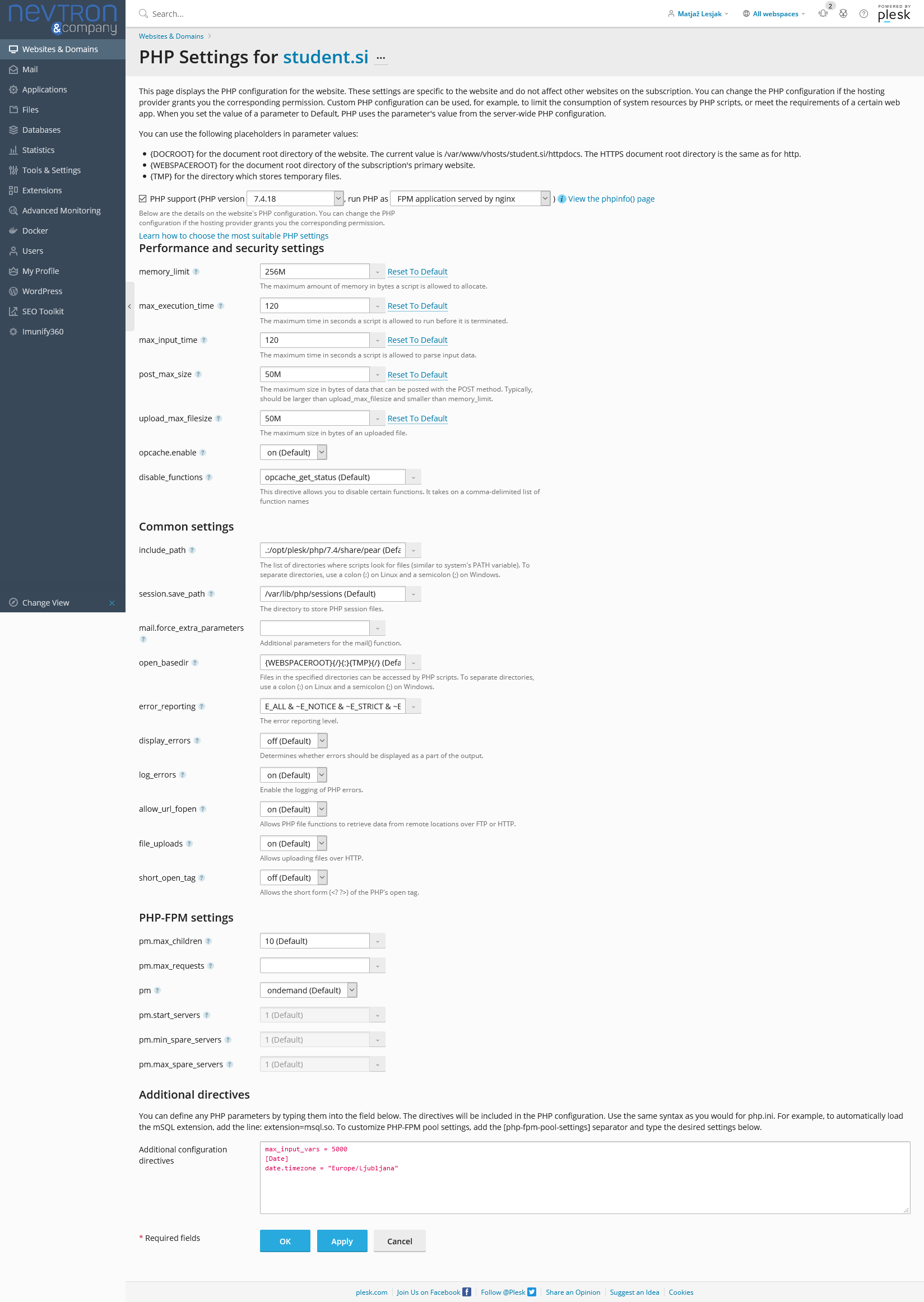
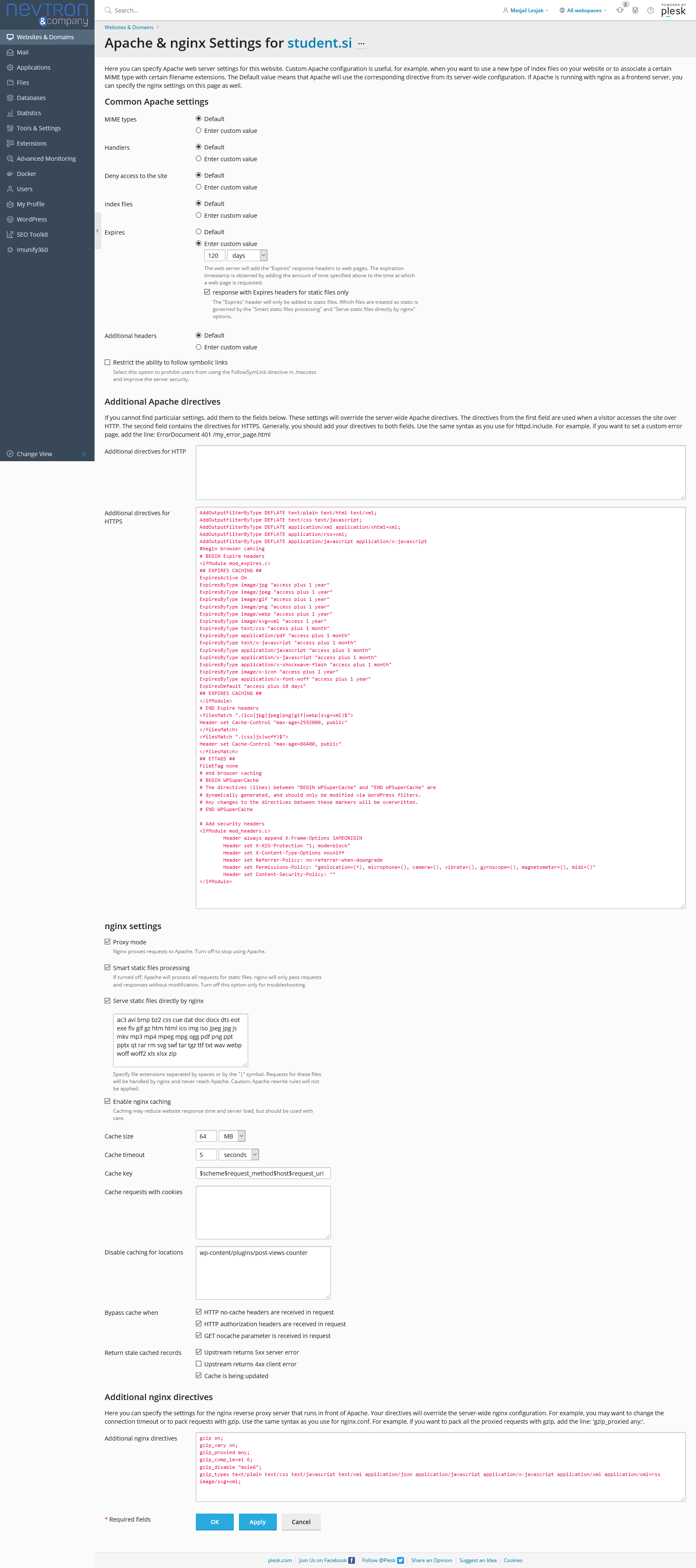
Relevant settings screenshots:
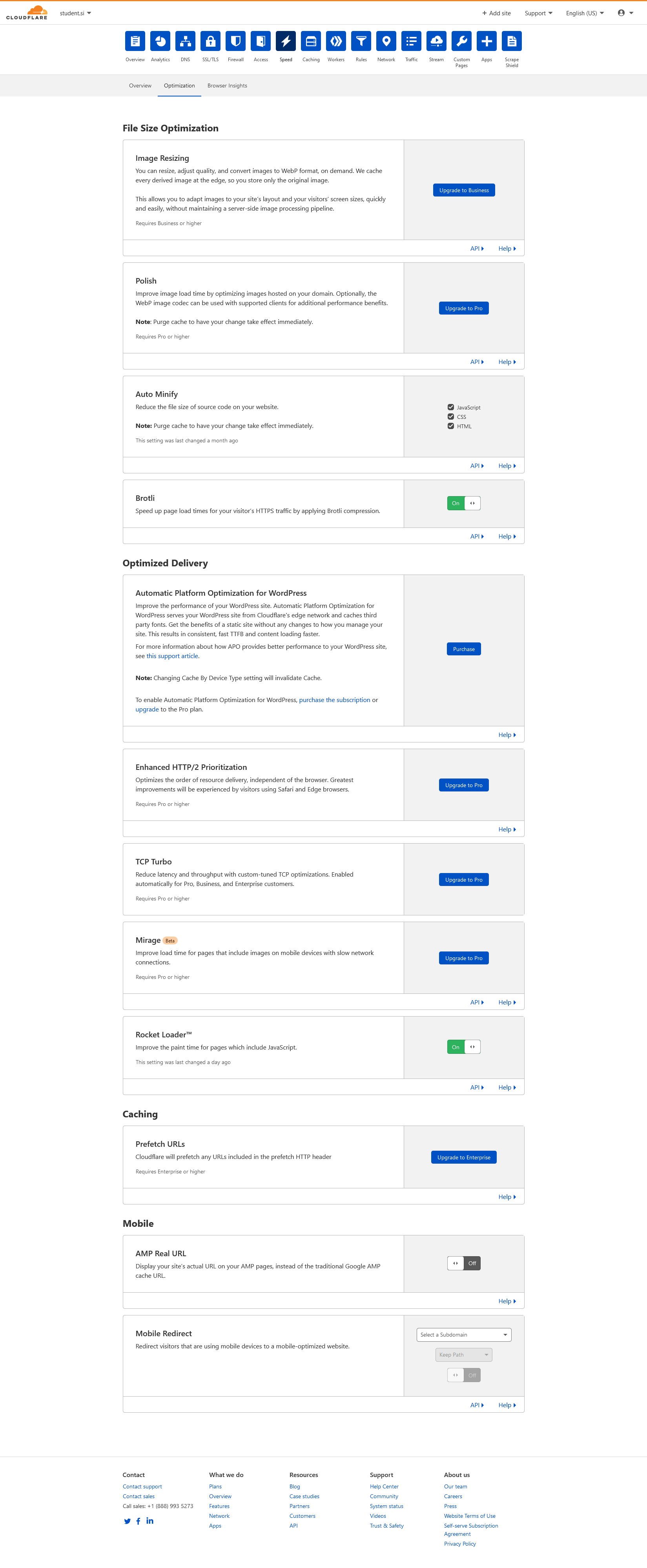
Cloudflare: https://student.si/wp-content/uploads/cloudflare-st.png
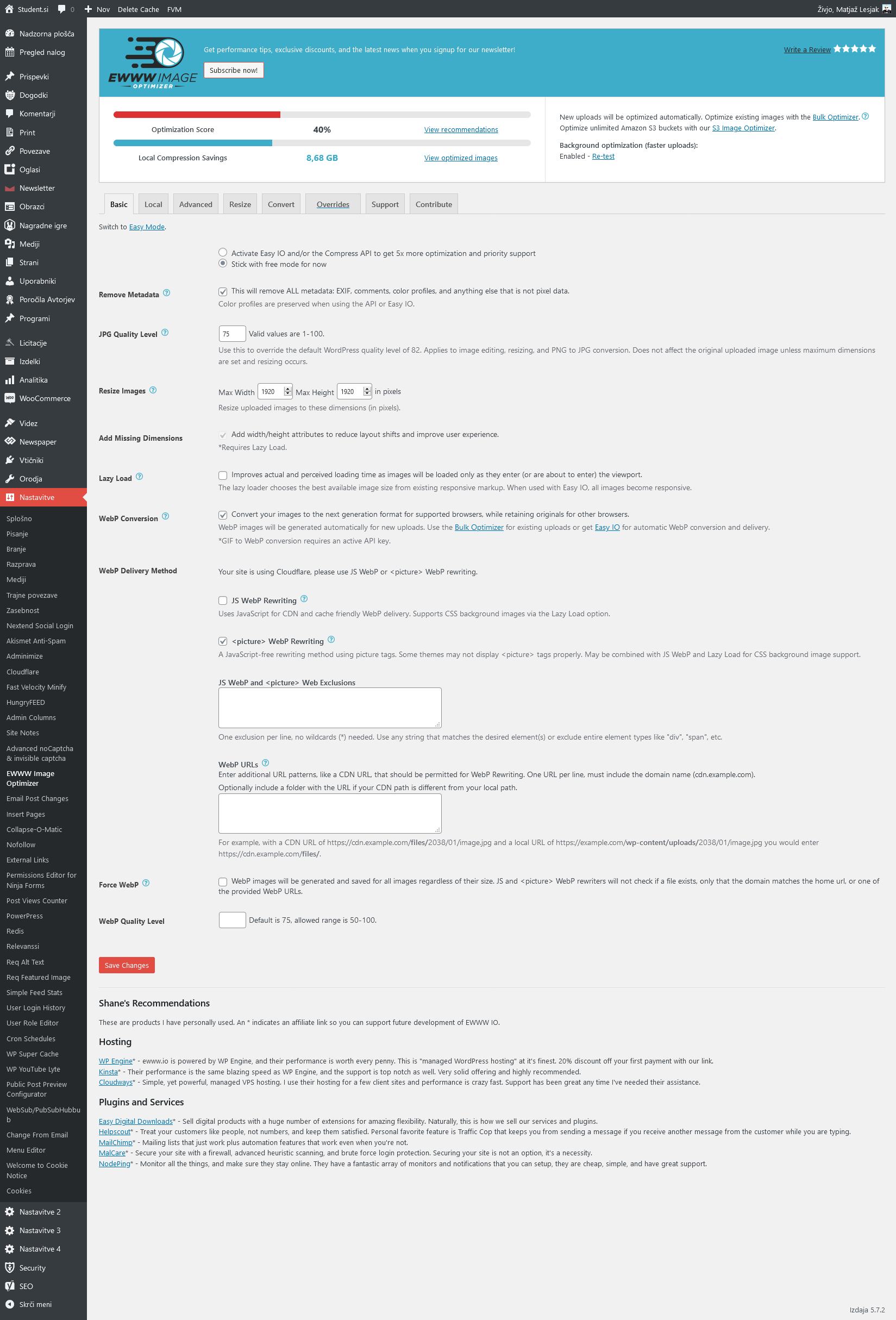
Ewww: https://student.si/wp-content/uploads/ewww-st.png
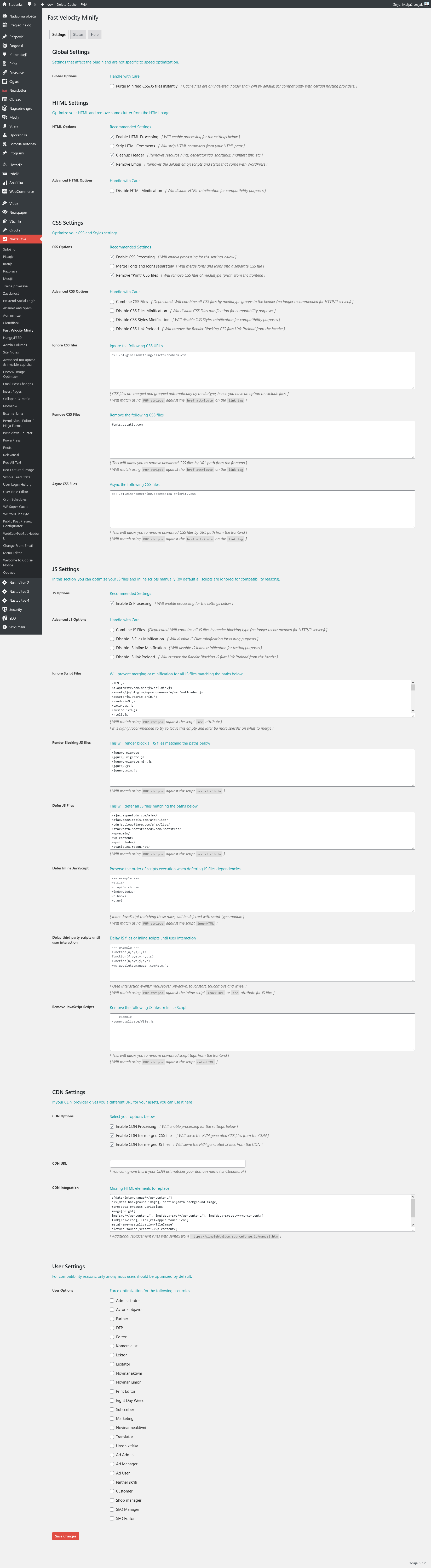
FVM: https://student.si/wp-content/uploads/fvm-st.png
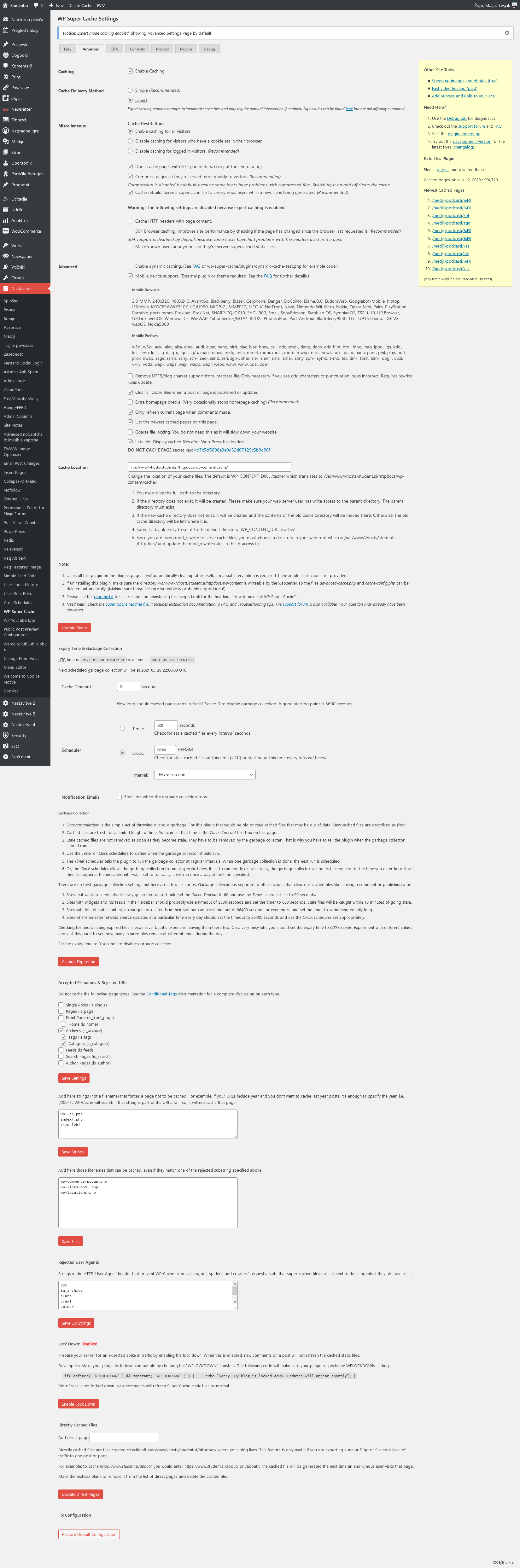
Supercache: https://student.si/wp-content/uploads/supercache-st.png
Php: https://student.si/wp-content/uploads/php-settings.png
Apace & Nginx: https://student.si/wp-content/uploads/apache-nginx.png
-
This reply was modified 5 years by
xxxLesy.
Anamaria Hello,
Our developers have fixed the issues reported after the update, so you can make the update.
Also, after you update the theme to the v10.4, please
1. disable all tagDiv plugins
2. uninstall all tagDiv plugins
3. clear cache (if cache plugin exists)
4. re-install all tagDiv plugins again from Newspaper plugins => https://www.screencast.com/t/WLy01lbc
5. activate all tagDiv plugins
6. clear cache (if cache plugin exists)
Hope this helps you!
Thank you!
 dott
dott G’day Anamaria,
Thank you for the response.
Yes as per the OP I have followed all those suggestions from the post linked.
All plugins were disabled. All cache cleared. I used Incognito. Still an issue.
I will send details to the email provided.
Anamaria Hello,
Have you checked for a plugin conflict? You will have to first start looking for a plugin conflict. please deactivate ALL plugins except tagDiv ones, also if you are using a child theme or cache plugin, deactivate them, clear all cache and try again.
Also, after the problem persists please make a full backup to all files and the database and contact us via email at contact@tagdiv.com.
Provide:
– wp-admin URL and cPanel URL and credentials
– a link to this topic in order to identify you
Thank you!
Bettina Hello!
Yes, your mobile version is looking like this: https://www.screencast.com/t/zYowBPo1y
Please clear your cache(also from your browser) and try again.
If you want to use a mobile page, then you need to assign it to your homepage. For more information about this mobile version please take a look in this article: https://tagdiv.com/newspaper-10-3-7-update-brings-customizable-and-fast-mobile-pages/
Thank you!