
- NewspaperWP Rocket and Newspaper Theme: Optimization Guide
- TutorialsWhat is Ajax preloading?
 marcorroma
Hi, is it possible to use the WordPress “sticky posts” instead of the “Featured” category?
Sticky post screenshot:
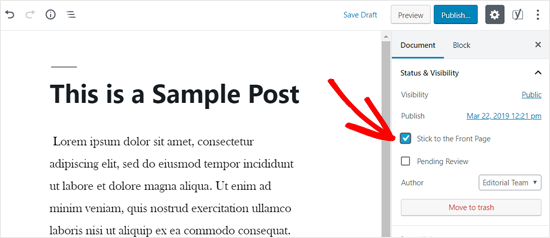
I would like to filter post blocks by “only sticky posts”.
On news sites I always set a post block at the top with “only sticky posts”. This facilitates the positioning of important posts/news. And all my editors use this method currently.
Thanks for support.
Sorry for the many support messages (these are questions already asked about the comments on themeforest site).
 Bettina
 Hello @mines2market!
If you mean you need a button called “Load More” for your pagination, then you can achieve this by editing that page with TagDiv Composer, and you will find in “Posts Loop” element settings like in this screenshot: https://www.screencast.com/t/E8rOlD4jHMp
I’m sorry that you are facing issues using Newspaper Theme. The page loading speed for both mobile and desktop depends on many factors and you can’t compare an empty theme like Twenty Twenty with a fully functional, features loaded theme like Newspaper that helps you create a website in a few hours.
We are building a long term collaboration with our customers. You can see on our demos what page loading speed score can a website loaded with content can have. However, page loading speed can depend on many factors, and each website is unique from this point of view.
Let me explain some of these factors and maybe they give you some starting points for optimizing your website.
External factors: server speed, if you are using CDN or not, the external resources loaded by your website like ads, fonts, tracking scripts like Facebook Pixel, Google Analytics, Twitter analytics, Hotjar and so on.
Internal factors: the number of elements on the page, image size, image formats, if you are using mobile optimized layouts, console errors, if you are using the Standard Pack plugin on not, if you are using PRO demo or a standard one.
We can’t not provide a solution for you here, right now as we do not know what are the conditions on your website. You can make the following tests:
1. Activate tagdiv Composer and Standard Pack, install a standard demo and check the page loading speed, then disable the Standard Pack and activate the cloud template and install a pro demo. You’ll see that the speed will improve significantly. Also, you should consider creating the mobile optimized pages for each of your pages to improve the speed on the small screen devices.
2. Test your website in a page speed test la GTMetrix or Google Pagespeed Insights and check the loading time on the ads, fonts and tracking scripts – if there is something there that slows your website down, take action.
Our developers are constantly working on improving Newspaper Theme performance. If you need our help, please send us an email at bogdan@tagdiv.com, we’ll evaluate your client’s website and see if there is something we can do to assist you.
Thank you for your understanding!
 burakcihan
I want to use Smush Pro cdn but it doesn’t work with your theme. I don’t want to change your theme. I shared with you the answer they gave me when I wrote to the Smush pro team.:
It seems that the way the theme you’re using is built, doesn’t allow Smush CDN to be used in most cases. This is happening because Smush CDN requires images to be added via img tag or inline CSS
 Jose
JoseHello team,
When I used the normal theme (with standarpack plugin + mobile plugin), I had to exclude these two paths from CDN loading in order for the website to work properly:
/wp-content/themes/Newspaper/style.css
/wp-content/themes/Newspaper/mobile/style.css
Now I use the cloud templates, and when using CDN some items do not load correctly:

The problem is more visible in mobile, because the menu or search icon are missing.
Could you tell me which route I should exclude from the cdn now so that everything works properly?
This is the test site where I am having the problems (I always use a test site before using it on my main site): https://cutt.ly/GjpgDNJ
Have a happy new year 🙂
 tingying.yen
 Solved!
Actually we solved this problem yesterday, because ssl certificate is lack one paramater (proxy_ssl_server_name) in our revery proxy, And CDN cannot get ture css file under ssl from revery proxy.
It just happen in Android’s FB and Line’s Webview (because ssl certificate).
 Calin
Calin Hi,
The code should work, -> https://i.imgur.com/yfuGnWa.png as I can see in the code source, the code provide by me is not there, therefore is possible to be set in the wrong place or the cache was not clear.
If you ware using the mobile theme plugin with amp, then the code need to be set in theme panel> mobile theme > custom code> css. After that clear all cache and purge the CDN.
Thank you!
Calin Hi,
I think that you are referring to this problem https://i.imgur.com/zk2zlYS.png this is form the extra plugins that you are using. Please make sure that you do not have a plugin conflict, please deactivate ALL plugins except tagDiv plugins (theme plugins), also if you are using child theme or cache plugin, deactivate them, clear all cache and try again.
Also if you are using Cloudflare, please make sure that is set as in our guide https://forum.tagdiv.com/cloudflare-cdn/
Let me know the results!
Thank you!
JoseHello team,
First of all… HAPPY CHRISTMAS for all the tagdiv team, I wish you a happy holiday season and a prosperous new year 🙂
I want to ask a question, about the optimization service you offer here: https://tagdiv.com/services/custom-services-page-speed-optimization/
I would like to hire you, but it is a major investment for me, and first I need to know if you can really improve the metrics of my website in Google Page Speed. As you know, a new Google update will be made soon, where these metrics will also be a key factor for positioning.
This is my website: https://cutt.ly/ph8y7n9
Can you please check it out a little bit? I just need to know, that if I hire this job, I will get good results.
This appears in the specifications:
-Analysis of the current page speed loading (GTmetrix, YSlow, etc.).
I need to orient myself on the speed of mobile loading with Google Page Speed. I’m not really interested in other tools, just google’s.
– Installing and configuring a cache plugin.
I have installed and configured LiteSpeed cache plugin, configured by litespeed support.
– Manual combining of the JavaScripts and CSS files (where possible).
– Minification of the JavaScripts and CSS files.
I think this is done by the cache plugin itself.
– GZip compression (if supported on a server).
GZip is enable
– Optimization of the Images.
All my images are Webp optimiced.
– Setting up CDN (optional).
For the moment, I do not need a cdn.
So, seeing that many of the things included are already done, can this optimization work be beneficial for my website?
Or maybe I just need an expert from your team to check my site for errors?
https://tagdiv.com/services/web-development-wordpress-services/
Thanks, Jose
 sandkingr414
Poor quality theme .
Taking more then 25+ seconds to load. And im using wpx hosting with cdn and w3t. One of the fastest host in the market.
I want refund.
 Anonymous
 Yes, I do like to fix these errors..
The site is: https://osaopaulo.org.br
The elements that show the errors are (the first 4 are the social icons in mobile menu, the last one is the image in the footer).
<i class=”td-icon-font td-icon-facebook”></i>
<i class=”td-icon-font td-icon-instagram”></i>
<i class=”td-icon-font td-icon-linkedin”></i>
<i class=”td-icon-font td-icon-twitter”></i>
a class=”td_single_image_bg” style=”background-image: url(‘https://cdn.statically.io/img/osaopaulo.org.br/f=auto%2Cq=70/wp-content/uploads/2020/05/brasao-transparente.png’); background-size: contain; background-repeat: no-repeat; background-position: center center;” href=”http://www.arquisp.org.br” target=”_blank” rel=”bookmark”></a
Calin Hi,
Normal, when you click on author name, you should be redirect to author page.
For the problem with the author links, maybe the author archives are disabled in the Yoast plugin, if they are author links will be redirected to the homepage. Check if that is the case – http://prntscr.com/mbwwuk after that clear all cache, purge CDN(if you are using) and check the results.
Let me know the results!
Thank you!
 Amit
Amit Hi @patrick93
1. Yes, you can add your customized CSS code in the child theme. You should always purge all cache including (browser, CDN, plugin cache) to see the change.
Sometimes you need to add !important tag to force overwrite the existing CSS code.
2. This happens when the original CSS loads before the customized CSS code you have added.
Hope you will find this helpful.
Calin Hi winipnews, I see that you have a mobile menu -> https://i.imgur.com/cQ5rz3e.png but the icons are not displaying -> https://i.imgur.com/ChaqUyH.png you need to fix the problem with CORS -> https://crunchify.com/how-to-fix-access-control-allow-origin-issue-for-your-https-enabled-wordpress-site-and-maxcdn/
Hope this will help!
Thank you!
 Fabio
Fabio Hi Pablof,
my problem was the reverse proxy that I use with CDN service. It is not a problem regarding the theme upgrade.
cheers,
fabio
Calin Hi, now I see that you no longer have enable the sticky header. Also I see that the social share is working correctly -> https://i.imgur.com/bp8xUcl.png
is possible the problem to be from CROS policy -> https://i.imgur.com/tsLFV6Z.png, you can fix this by follow the steeps from this article -> https://crunchify.com/how-to-fix-access-control-allow-origin-issue-for-your-https-enabled-wordpress-site-and-maxcdn/
For me the images are working -> https://i.imgur.com/oo1WWZp.png .Please make sure that the problem is not from the extra plugins that you are using, make a test only with tagDiv plugins.
Thank you!
Calin Hi,
Now that most of your theme layout was change, you need to do again the steps for page speed, or at list to check theme to make sure that are still set correctly and the cache and cdn were cleared.
Also is possible that your cache and cdn to be already adapted because now you have a very good score -> https://i.imgur.com/b3W14cj.png
If you still want to check the pages peed guide you can do it here -> https://tagdiv.com/how-to-increase-page-loading-speed/ and this is also a very good guide https://www.infophilic.com/get-almost-100-pagespeed-newspaper-theme/
Thank you!
Calin Hi sloope, so after the theme update you clear the cache and purge the CDN and the problem with the menu appear. Was this problem there when you were logged?
There were reported from some users some jquery problems, if is the same for you, then those can be fix for the moment using the Enable jQuery Migrate Helper plugin and try this option – https://www.screencast.com/t/WYlKJVLi Clear all the caches (also the browser cache).
If there are still some problems, please let me know!
Thank you!
 kinumedia
https://cdn.discordapp.com/attachments/735882916525244468/786639579938684988/m.PNG
The mobile website for the local news tab is behind / not updating correctly, shown in screenshots. https://indianapolisrecorder.com/
Calin Hi,
There were reported some problem like this one, but until now all were solved by cleaning the cache and purge the cdn and check the plugins to make sure that there is no plugin conflict.
An alternative is to install and activate Enable jQuery Migrate Helper plugin and try this option – https://www.screencast.com/t/WYlKJVLi Clear all the caches (also the browser cache).
If there is still a problem, let us know!
Thank you!
Calin Hi,
Make sure that you clear all ache and purge the CDN.
Please make sure that you do not have a plugin conflict, please deactivate ALL plugins except tagDiv plugins, also if you are using child theme or cache plugin, deactivate them, clear all cache and try again.
If the problem persists, please provide a link to your website.
Thank you!
 a_l
a_lI purchased the Newsletter theme on Monday hoping that it would speed up my website, https://www.immunofrontiers.com, relative to my other, more outdated theme. However, my pages are now loading more slowly, and this is having an impact on my Google rankings. I would appreciate any insight regarding how I could speed up my website with the Newsletter theme.
Google Page Speed Insights shows “reduce initial server response time” to be slowing the website considerably. I have tried to correct this using a number of methods but am still showing the problem. Thank you for your time and insight.
Current methods used:
-CDN (cloudflare)
-Autoptimize (JS aggregated, CSS aggregated, image lazy load)
-Async JavaScript (async javascript active)
-WP Super Cache (set up according to TagDiv specifications)
-Hummingbird (asset optimization)
-GZIP compression
-expires headers
-images compressed before uploading to between 10 and 80 kB each
The TagDiv mobile theme is currently active on my site. I am not able to use AMP for external reasons.
 Vlad S
 Hi,
Please ensure that the General Modal Image setting is enabled. Also, if you have installed some untested plugins, please remove all of them, clear all the caches, purge CDN file and check the results. Also, ensure that you have setup Link to Media File from here -> https://www.screencast.com/t/trp0Y8aaV
Thank you!
Vlad S Hi,
Please ensure that the General Modal Image setting is enabled. Also, if you have installed some untested plugins, please remove all of them, clear all the caches, purge CDN file and check the results. Also, ensure that you have setup Link to Media File from here -> https://www.screencast.com/t/trp0Y8aaV
Thank you!
Vlad S Hello !
I am sorry for misunderstanding !
Please make sure that your CDN is set up as in our guide here: https://forum.tagdiv.com/cloudflare-cdn/
Also litespeed with wp super cache is not something that we have tested unfortunately.
Thank you !
Calin Hi gmtimothy, please make sure that you are using the latest theme version, Newsmag v4.9.5 and you have set the Instagram key -> https://forum.tagdiv.com/instagram-widget/ after that clear all cache and purge the cdn and the image should work again.
Let me know the results!



