
 arabdebate
Hello ,
how i can add adsense auto ad code to AMP version,
1. First, place this code in between the <head> and </head> tags:
<script async custom-element=”amp-auto-ads” src=”https://cdn.ampproject.org/v0/amp-auto-ads-0.1.js”></script>
2. Then place this code right after after the <body> tag:
<amp-auto-ads type=”adsense” data-ad-client=”ca-pub-XXXXXXXXXXXXX”></amp-auto-ads>
Thanks
 pureglamtv
Hi everyone,
using latest version 7.8.2. and everything seems fine, except the featured image on blogposts with selected Style7 and Style8.
-> https://www.pureglam.tv/2016/08/17/griffith-observatory-griffith-park-los-angeles/
-> Missing image online and available at: https://cdn1.pureglam.tv/wp-content/uploads/2016/08/Los-Angeles-Griffith-Observatory-Griffith-Park-Sehenswuerdigkeit-LA-Luxus-Reiseblogger-LAX_1975-001.jpg
-> https://www.pureglam.tv/2016/05/12/qatar-airways-einfuehrungsflug-qr914-doha-adelaide-airbus-a350-inaugural-flight/
-> Missing image online and available at: https://cdn1.pureglam.tv/wp-content/uploads/2016/05/Business-Class-Qatar-Airways-QR058-QR060-Muenchen-Doha-Aviation-Reiseblog-Hamad-International-004.jpg
All images and most files will be loaded via CDN (Keycdn) and without any problems for months, except on these two styles.
Please help and give a solution, how to display these pics again. All photos were available on our CDN, but your theme won’t display theme (only Style7, Style8)
Thank you
 ulugg
uluggThe title says it all. I want to make like this.
 Simion C.
 Please edit the td_instagram.php file from the theme files
– https://www.screencast.com/t/WOtAnrG4hm
Remove all the code inside that file and paste this one
– https://pastebin.com/yrr2DdwB
This should fix the Instagram widget issues, please try it and let us know. Clear the cache and CDN files if needed after editing the file.
Simion C. Please edit the td_instagram.php file from the theme files
– https://www.screencast.com/t/WOtAnrG4hm
Remove all the code inside that file and paste this one
– https://pastebin.com/yrr2DdwB
This should fix the Instagram widget issues, please try it and let us know. Clear the cache and CDN files if needed after editing the file.
Simion C. Hi,
There were some changes made by Instagram to their developer implementation. Please edit the td_instagram.php file from the theme files
– https://www.screencast.com/t/WOtAnrG4hm
Remove all the code inside that file and paste this one
– https://pastebin.com/yrr2DdwB
This should fix the Instagram widget issues, please try it and let us know. Clear the cache and CDN files if needed after editing the file.
Thank you!
Simion C. Please edit the td_instagram.php file from the theme files
– https://www.screencast.com/t/WOtAnrG4hm
Remove all the code inside that file and paste this one
– https://pastebin.com/yrr2DdwB
This should fix the Instagram widget issues, please try it and let us know. Clear the cache and CDN files if needed after editing the file.
Simion C. Hi,
For me the website looks good, see here
– https://www.screencast.com/t/YRsXokq7s
Indeed some caching plugins or CDN configurations can cause problem when using the mobile theme plugin.
The mobile plugin works best with the WP Super Cache, other caching plugins could cause problems.
Simion C. Hi,
We are aware of the recent Instagram issue, there were some changes made by them and we are working to adapt the theme to these changes (as do many other plugin authors and themes that use their developer implementation).
Regarding the other issues you are having, try clearing all caching installed or server provided. Purge all CDN files if used. Also an important step is to clear browser cache or test with a different browser. Temporarily deactivate all other plugins except theme plugins. Let us know how if this has any effect on some of the issues.
 Catalin
 Hello caseystubbs,
Your homepage seems to work as expected, as you can see here -> https://www.screencast.com/t/lKms3zwx I did not saw any problem with this. Provide some useful screenshots with the problem. Also, please clear all of your caches, purge CDN files and check the results.
Thanks for the message!
 Bogdan B.
 Hello,
This could be a plugin conflict so please disable all plugins except the page builder, clear cache and reset cdn files if you use it. Please also check any custom code you might have added to the theme panel or the theme files. If you use a child theme, please switch to the main theme to make sure it does not affect the proper functionality of the theme.
Thank you!
Simion C. Hi,
The website is very slow and seems to be broken when loaded. If you use CDN please use this configuration
– https://forum.tagdiv.com/cloudflare-cdn/
Disable the rocket loader feature, this can cause issues with the theme. Disable temporarily all plugins except theme plugins and clear all caching. Disable the child theme as well. Then check if there is still an issue.
Check the theme system status as well
– https://forum.tagdiv.com/system-status-parameters-guide/
– https://forum.tagdiv.com/requirements-for-newspaper/
Ask your hosting provider to increase the parameters mentioned in the guide if needed. Let us know.
Simion C. Those are images served by Instagram, I could not say how you could optimize these images. That is how they are pulled from Instagram CDN and I don’t think they can be optimized in any way.
 Edward
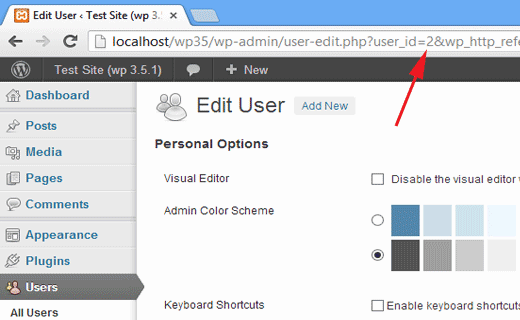
 A user ID can also be found by editing a user. Go to Users » All users and click on the user name. WordPress will open the user’s profile and you can get the user ID from browser’s address bar.
Simion C. That solution worked for all users since it has been provided. Either make the modifications in the mentioned file or update the theme to 8.7.2. The latest theme version contains many improvements over the previous version including a fix or the issue. Check the theme changelog
– https://www.screencast.com/t/zDOGYd8Obrq
If you have made the modification in the file, clear all caching installed and CDN if used.
In case there is still an issue, we could take a look. Send us an email at contact@tagdiv.com and provide admin login information and FTP access.
Bogdan B. Hello,
It seems the theme is not grabbing the proper css code for the element. Please clear all caching from your cache plugin, cdn server or hosting side cache.
Also test this withot any plugins. Disable all of theme except the tagdiv composer and test again.
Let us know if you still have this issue afterwards.
Thanks.
Bogdan B. Hi,
Please disable all plugins except the page builder, clear cache and reset cdn files if you use it. Please also check any custom code you might have added to the theme panel or the theme files. If you use a child theme, please switch to the main theme to make sure it does not affect the proper functionality of the theme.
Thank you!
Bogdan B. Hello,
We cannot recreate this issue on our end.
This could be a plugin conflict so please disable all plugins except the page builder, clear cache and reset cdn files if you use it. Please also check any custom code you might have added to the theme panel or the theme files. If you use a child theme, please switch to the main theme to make sure it does not affect the proper functionality of the theme.
Thank you!
 thebackbenchers
 Hello i deactivated all the plugins and removed some unnecessary plugins as you told, i do not use CDN i cleared cache, and i have not added any custom code but still search result when clicked on view all results shows error page.
Please help me it is not a plugin issue.
I double checked that.
Bogdan B. Hello,
The option is there in the widgets area: https://www.screencast.com/t/DJvsHkggK2
If for some reason you do not have these options, please disable all plugins except the page builder, clear cache and reset cdn files if you use it. Please also check any custom code you might have added to the theme panel or the theme files. If you use a child theme, please switch to the main theme to make sure it does not affect the proper functionality of the theme.
Thank you!
Bogdan B. Hello,
This could be a plugin conflict so please disable all plugins except the page builder, clear cache and reset cdn files if you use it. Please also check any custom code you might have added to the theme panel or the theme files. If you use a child theme, please switch to the main theme to make sure it does not affect the proper functionality of the theme.
Thank you!
 pasqualino77
 I don’t use cdn or optimazzion tool
I have only w3 total cache.
The problem are only for desktop site.
Now the skin are aviable in my site
 kulecanbazi
 <script async custom-element = “amp-ad” src = “https://cdn.ampproject.org/v0/amp-ad-0.1 “js> </ script> should be added
you should also make a responsive ad
then you only need to enter the desired codes
 gferrise
Hello, Im starting with the theme. Im not sure about all the steps for setting up AMP ADS
I did all the steps in the AMP Settings on the theme pannel:
Add type google and adsense settings codes for header, footer and article ads.
I am all set?
1. According to the adsense instruccions I have to add this script to the header section:
<script async custom-element=”amp-ad” src=”https://cdn.ampproject.org/v0/amp-ad-0.1.js”></script>
Is it necesary for the theme or is it included by default?
2. Do I have to create responsive AMP-compatible ad unit or does the theme do all the job automatically?
Thank you!
Bogdan B. Hello,
Unfortunately I cannot test this on my end as we do not get the issue. This happens when using cdn or optimization tools with untested options such as wprocket, minification of the css, rocket loader, autoptimize, etc.
We do not recommend any of those tools.
You should add the code in the advanced css section so it only affects the desktop version though.
Thanks.



