
No search results were found in Documentation!
 Anamaria
 Hello,
You can’t use the cloud template files in the child theme. You can use only standard templates https://forum.tagdiv.com/the-child-theme-support-tutorial/
Please let me know what changes you did.
Thank you!
 pedromoliv
1. I’m using Advanced Ajax Page Loader, some plugin that allows me to load all page content without reloading the window. Everything works properly, expect that when I switch to some other page I have to trigger image loading and other tagdiv js again. Is there a simple way to trigger it when some user clicks a new page?
2. Other question. I’ve made many changes to some files.
> plugins/td-cloud-library/shortcodes/single/tdb_single_author.php
> plugins/td-composer/td-multi-purpose/shortcodes/tdm_block_button.php
> plugins/td-composer/legacy/Newspaper/header.php
> plugins/td-composer/legacy/Newspaper/footer.php
how to make it part of my child theme? is that possible?
 KC
KCHi,
Understand there are ready child theme folder for the root theme folder is td-standard-pack plugin folder. May I know is it possible to create child theme for the mobile theme which the root theme folder is td-composer/mobile?
Thanks.
Anamaria Hello,
In most cases, this problem occurs because you have the latest version of WordPress with an older version of the theme.
Please use the last version of WordPress 6.1.1 with the last theme version Newspaper 12.3 (if you have a theme version older, then tagDiv Composer does not work) and check to see if the problem persists.
If you need to make an update, before please make a full backup to all files and the database, in case something goes wrong. => https://forum.tagdiv.com/how-to-update-the-theme-2/
Here you can find information about the changes that have occurred in each update over time https://tagdiv.com/newspaper/
I recommend that you update the theme manually https://forum.tagdiv.com/how-to-update-the-theme-2/ via FTP/cPanel/File Manager, also if possible disable extra plugins during the theme update to avoid any problems that may arise and make sure that you have activated the tagDiv Standard pack plugin to keep the website’s look. You can try to update the theme on a staging website.
After you update the theme, you need to update the theme plugins too.
In the worst cases, the settings in the theme panel may be lost (there have been isolated cases), in these cases, after the theme plugins that were previously used are activated, you will have to use a backup for the theme panel -> https://forum.tagdiv.com/import-export-theme-settings/
Also, make sure that all the settings are like in our requirements, please follow the guide carefully: https://forum.tagdiv.com/requirements-for-newspaper/
and please increase all requirements that are lower, and follow all steps.
Also, if the problem persists please check if you do not have a plugin conflict, please deactivate ALL plugins except tagDiv plugins, also if you are using a child theme or cache plugin, deactivate them, clear all cache (also from your browser) and try again.
Let me know the results!
Thank you!
 vlalovic
Hi,
Is there a way to create a category prefix to show up on single post trmplates before the H1 title? And also to be visible on the category pages as well as all td composer blocks throught the website. What i need is something you can see on this url/website for example: https://monochrome-watches.com/ the prefix (in brown) before the title of the post should be the name of the category and should be visible on all places where this post appear (category page, single post..). It should not be clickable but only to appear as a <span> tag before (not inside) the h1 tag. It should however dynamicaly populate based on the category that single post belongs to.
What i need is the info regarding which of the category/single post templates from newspaper theme should i use and edit to achieve this type of a category show-up. I looked up the sigle.php loop-single and category.php but couldnt fi d the place where i should implement something additionaly to achive this. Can you assist please? All of this, if achiveable, I would implement through the child theme folder so that the cha ges remains during the update process.
Thanks
 Bettina
 Hello!
Try to implement this with the help of a child theme. Check this guide: https://forum.tagdiv.com/the-child-theme-support-tutorial/
Thank you!
 DesignExtreme
 Just to clarify, the [td_block_x] Shortcodes are not being rendered/appearing either in the editor or the frontend. The child theme seems to be ignored, instead, it is loading the parent theme (Newspaper). The child theme is set in WordPress.
Anamaria Hello,
UPDATE:
Please use this code to change the link for a password reset; please make sure that you have the latest version 12.3 add_filter( 'td_login_password_reset_link', function($password_reset_link) {
return str_replace( 'wp-login.php', 'login_page_name', $password_reset_link );
});
Set the code in functions.php or in the child theme.
Thank you!
Bettina Hello!
There is no way to use a child theme. Better save the code and replace it after the update.
Thank you!
 JackHeartBlog
 All is good Bettina. With your help I have gotten this to go the way I desire. Final question, how can I put the link into the functions.php of the child theme so I don’t lose the changes upon update?
-
This reply was modified 3 years by
JackHeartBlog.
 mediax
 Hello Bettina
Yes this did help tremendously, thank you. The single post cloud template is now with Related articles.
Please will you upscale the request regarding a filter or action hook that can be use in the cloud template output. (using the default blank template for Single) This was edited and then a Mobile template was created from that content.
The problem for me is – as you have mentioned, that the cloud template is stored in the database. There is no option to do any overrides in the child-theme.
For that reason, the only option then is to use an action or filter hook to adjust content.
Adding the PHP script via shortcode (Insert PHP Code Snippet) / using the theme shortcode block – this did not have any results.
What the script does is filter the correct advert for that category and insert that advert into the post.
Could you perhaps suggest any options that I am not seeing here?
Thank you!
mediaxHello world
Within the Newspaper theme there is a single.php page in my child-theme. The single page contains some extra php to filter ads depending what category they are in. For the default post template this is working fine.
When I create a template from a cloud based template and activate that in theme settings to display my single post, could you possible indicate to me, what “single.php override” file can be created for use or is this page dynamically created – the challenge is that the “if elseif” statements no longer fire and the related articles in the footer also no longer are visible.
 Calin
Calin Hi kpivarnik,
What I can suggest is to update to the latest version of the theme, Newsmag v5.2.3
Then if you are using a child theme, please deactivate it and see if the problem persists. I saw that you use php v8, please do a test with php v7.4, and if the problem persists, please do a test only with the plugins in the theme.
Thank you!
Anamaria Hello,
Do you have a child theme created? If you use the main theme, this warning appears?
Thank you!
Anamaria Hello,
In most cases, this problem occurs because you have the latest version of WordPress with an older version of the theme.
Please use the last version of WordPress 6.1.1 with the last theme version Newspaper 12.2 (if you have a theme version older, then tagDiv Composer does not work) and check to see if the problem persists.
If you need to make an update, before please make a full backup to all files and the database, in case something goes wrong. => https://forum.tagdiv.com/how-to-update-the-theme-2/
Here you can find information about the changes that have occurred in each update over time https://tagdiv.com/newspaper/
I recommend that you update the theme manually https://forum.tagdiv.com/how-to-update-the-theme-2/ via FTP/cPanel/File Manager, also if possible disable extra plugins during the theme update to avoid any problems that may arise and make sure that you have activated the tagDiv Standard pack plugin to keep the website’s look. You can try to update the theme on a staging website.
After you update the theme, you need to update the theme plugins too.
In the worst cases, the settings in the theme panel may be lost (there have been isolated cases), in these cases, after the theme plugins that were previously used are activated, you will have to use a backup for the theme panel -> https://forum.tagdiv.com/import-export-theme-settings/
Also, make sure that all the settings are like in our requirements, please follow the guide carefully: https://forum.tagdiv.com/requirements-for-newspaper/
and please increase all requirements that are lower, and follow all steps.
Also, if the problem persists please check if you do not have a plugin conflict, please deactivate ALL plugins except tagDiv plugins, also if you are using a child theme or cache plugin, deactivate them, clear all cache (also from your browser) and try again.
Let me know the results!
Thank you!
 pavel_t
 SOLUTION (for someone with the same problem): I use Newspaper Cloud Template for eshop with WooCommerce plugin. Finally I found plugin Product Attachment for WooCommerce in free version. Now I could for product attach PDF files for download. It appears in Product Tab element in TD editor. I needed to change a little bit design so I created child theme for Newspaper and modified CSS and functions.php. Works perfect.
 Luca
LucaHi guys , can someone tell me how to remove the category menu when the theme is viewed from a smartphone .
I do not have and I do not want mobile theme , because I know I mess up , before I had the same set that you see in the video , only in the mobile view the category menu was not there and then everything was perfect , then I must have touched something myself and now the view from smartphone has this problem . I repeat I don’t have mobile theme installed and I don’t want to install it , I tried to remove the categories item while in smartphone view but it gets deleted on all devices , can you please tell me how do I fix it ? Pretend you are writing to a moronic child , this is my level of understanding , thank you .
I attach the video of my mess here https://uploadnow.io/f/lf4wstS
please help a poor silly guy , thank u
 fernandosantos
Hello, we are using Newspaper theme with a child theme where we define a set of custom post types and some related custom taxonomies. Up to now we have successfully used Categories Layout Settings on the Newspaper Theme Panel options so that we can customize category templates per each category. Now that we have some custom taxonomies we would like to customize their related terms (categories) the same way, but we only see categories of core built-in taxonomies in the section “Per category settings”.
How can I manage to do this? How can I arrange ‘category template’, ‘category top post style’, ‘category top posts grid style’, ‘article display view’,… etc… options for custom taxonomy terms?
Kind regards.
Fernando Santos
Bettina Hello @coinedition!
Save the code and replace it after the update. This won’t work with the child theme.
Thank you!
Anamaria  ALEXDEANGEL
https://www.anpiprovinciaterni.it/wp-admin/admin.php?page=td_theme_welcome
please support me to create the child theme in order to work on it in the future.
I’ve created only the home page on my website using tagdiv tool.
I know that is better to work on the child theme and I need support to create it and use in the future.
I’m not expert in web site management.
thanks very much
Alex
Bettina Hello Marco!
No. You need to create every page in the tagdiv Composer.
You can not use page template created with the TagDiv Composer on a child theme.
Thank you!
 mcdv01
 Hi Betina,
If my requirement is to create a page template that would be the same for all the pages, then what I can do is to create a child theme and create a page template is that correct?
What is the best practice to use page template on a child theme?
Would using the tagDiv Standard Pack be appropriate solution for this?
Let me know.
Thanks,
Calin Adding multiple authors to your articles
Content
In this tutorial we will show you how to implement multiple authors to your posts using the Co-Authors Plus plugin.
We will make the implementation in the child theme so it will be easier to manage on theme updates. You will need to install and activate the Co-Authors Plus plugin first.
Adding the multiple authors is a three step process.
- Step 1 – Adding the required functions in your child theme functions.php file.
We created 2 custom functions for the author and for the author box which we can then call on the post styles and not have to use the entire functions each time.
Add these functions in your Child theme functions.php file: https://pastebin.com/ciYrSZvQ These will create the custom implementation to add the co-author and the author box for each co-author in particular.
- Step 2 – Adding the single post templates to your child theme.
In your main child theme folder, you will need to create the following folder structure:
Newspaper-child/parts/single
Then, under the “single” folder add both the single-template and the loop-single files for each of the post styles you use on your articles.
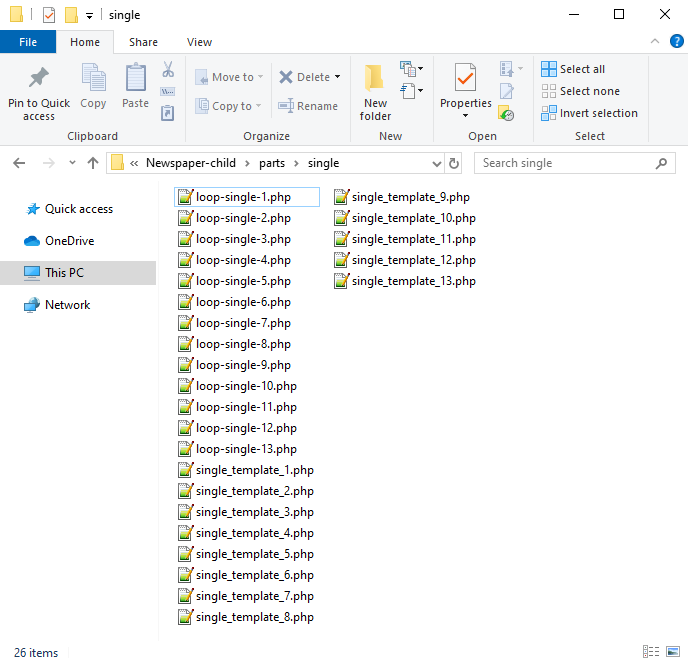
Now you will have to identify where the author is being called in each post style.
For styles 1, 5, 9 and 10 you will find the author code in the loop-single files while for styles 2, 3, 4, 6, 7, 8, 11, 12 and 13 the code is fount under the single_template files.
Edit the files corresponding to the style you want to apply the co-authors to and then call the functions added at step 1. Replace the default author and author box codes:
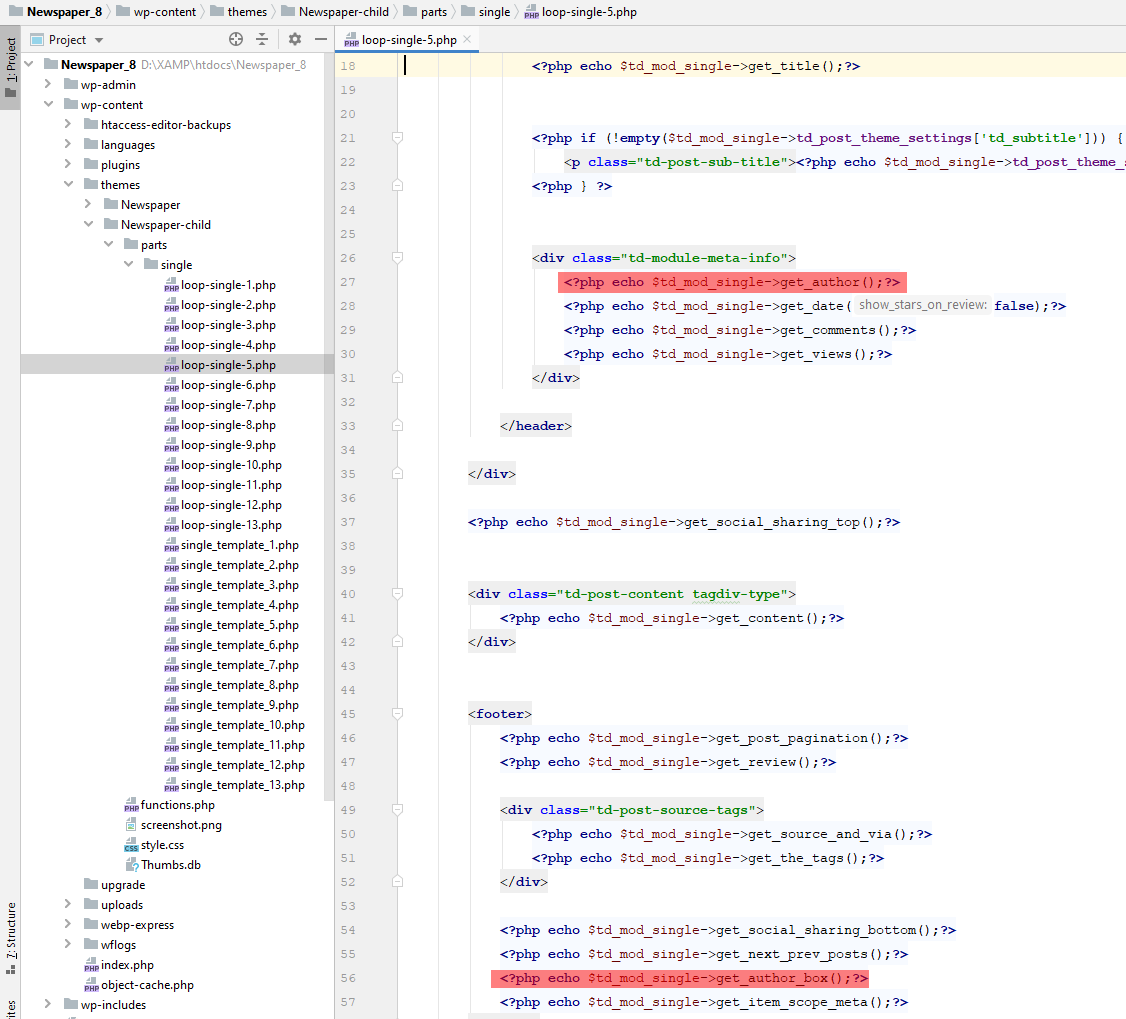
Replace the highlighted code with the following codes:
<?php echo td_get_post_coauthors();?>
and
<?php echo td_get_post_coauthors_box();?>
Maintain the codes position in the .php file though for proper results. \
- Step 3 – CSS styling
In order for the co-authors to position properly we also need a bit of CSS code to ensure proper styling so please add the following CSS code in the the theme panel under custom code-> custom CSS:
https://pastebin.com/dRaStewQ
Now you simply need to edit your post and add multiple authors using the plugin author field:
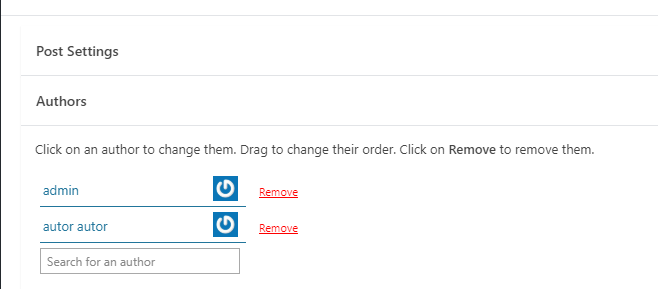
Calin Hi,
If I understood correctly, you want to update to the latest version of the theme and get rid of the child theme.
If so, I must inform you that now the latest version will give you the impression that you are using a completely different theme, the theme has its own builder and everything can be edited in the frontend.
My suggestion is to do staging and do some tests there.
To get rid of the child theme, all you have to do is activate the parent theme – https://i.imgur.com/ndod9VE.png
Thank you!

