
No search results were found in Documentation!
 Anamaria
 Hi,
The child theme is coming with the theme package. This can be gotten using our guide from here -> https://forum.tagdiv.com/the-child-theme-support-tutorial/
In case that you can not find it you can also download it from here -> https://we.tl/t-MSVx14UsM0
Thank you!
 erinnemtgroup
Hi! Don’t you have a separate zip folder for the child theme? It’s kinda hassle on our part to create the child theme of the Newspaper. The steps here (https://forum.tagdiv.com/the-child-theme-support-tutorial/) are complicated to follow.
Thank you.
Anamaria Hello,
Did you make any changes to the theme files? do you use a child theme?
Also, please deactivate, delete and re-install the tagDiv cloud library and see if the problem persists.
Also, please check if you don’t have a plugin conflict.
Thank you!
 Calin
Calin Hi,
The child theme is coming with the theme package. This can be get using our guide from here -> https://forum.tagdiv.com/the-child-theme-support-tutorial/
In case that you can not find it you can also download it from here -> https://we.tl/t-MSVx14UsM0
Thank you!
 SamRe
SamReYou can send us the files of child theme? Thanks
Calin Hi,
If you set the code in the theme panel, then will no longer be need a child theme, because the theme panel settings are saved in database and is not affected by the theme update.
Thank you!
Calin Hi rbmagazine,
I think that you are referring to this https://paste.pics/GGN38 if fi so, then the problem can be related to the theme install, maybe it was not installed the right file, also, it can be if you had a child theme or more theme versions (when the theme was updated the old theme was not removed).
If you want, we can take a look at it, for this you can contact us via email at contact@tagdiv.com, we’ll need wp-admin access and you need to have a full backup for your website.
Thank you!
 Greg45
 Thanks. Would you recommend I make a child theme to add this change? Especially the second one? Will subsequent Newspaper 11 updates erase this margin-bottom set to 0 and reset it to 48?
 yonish3
 Hi Bettina,
As mentioned, when I try to update the theme it brakes my site.
Trying to restore the older version using the time machine doesn’t help as well and I need to restore the website from BU.
Seems like it’s overwriting the child theme.
I don’t want to try it again as I don’t what the site to be down again.
Can you please log in to my site and check these issues?
Calin Hi,
For this situation I know two solutions.
1. One solution would be to add the excerpt manually to your articles – http://screencast.com/t/mtJF1mvygm7
2. You need to uncomment a code in the theme files, unfortunately, this can not be overwrite in a child theme -> https://i.imgur.com/esvsxKm.png -> wp-content/plugins/td-composer/legacy/common/wp_booster/td_util.php
Thank you!
Anamaria Hello,
In most cases, this problem occurs because you have the latest version of WordPress with an older version of the theme.
Please check if you use the last version of WordPress 5.9.2 with the last theme version Newspaper 11.4.2 (if you have a theme version older, then tagDiv Composer does not work) and check to see if the problem persists.
If you need to make an update, before please make a full backup to all files and the database, in case something goes wrong. => https://forum.tagdiv.com/how-to-update-the-theme-2/
Also, make sure that all the settings are like in our requirements, please follow the guide carefully: https://forum.tagdiv.com/requirements-for-newspaper/
and please increase all requirements that are lower, and follow all steps.
Also, if the problem persists please check if you do not have a plugin conflict, please deactivate ALL plugins except tagDiv plugins, also if you are using a child theme or cache plugin, deactivate them, clear all cache (also from your browser) and try again.
Let me know the results!
Thank you!
yonish3 FYI, I have opened another case on theme update issue:
https://forum.tagdiv.com/topic/updating-theme-overwrite-all-child-theme-changes/#
yonish3When I try to update the theme version from 10.3.8 to 11.4.2 it overwrites all child theme changes.
I tried to use the theme updater:
https://prnt.sc/sVU58kOtyqHh
Here is my website:
Anamaria Hello,
Did you make any changes to the theme files? do you use a child theme?
Also, please deactivate, delete and re-install the tagDiv plugins (tagDiv composer, tagDiv cloud library, tagDiv Opt-in Builder) and see if the problem persists.
Also, please check if you don’t have a plugin conflict.
Thank you!
Calin Hi,
I just checked the situation and it looks that it is only on desktop and for some blocks, o mobile for me everything seems to be ok.
Can you make a test and set a new block to see if this is working. Also, you can make a test using only the tagDiv plugins (and in case that you are using a child theme or some custom css, then please remove them and try again).
Let us know the results!
Thank you!
 smilelondon
Hi there
after updating to the latest version of newspaper theme we cam mo longer see all cloud templates.
We can access cloud templates but the ALL option is no longer visible
We can access the templates via the tag div composer but not from the admin panel
When we tried to re-upload the theme this did not help unfortunatelly.
As info: We are running newspaper theme on a multisite.
We also tried to delete the cloud plugin and the tag div composer plugin.
But when we then tried to download these the site crashed and we had to restore from a backup.
Also as note: Newspaper theme runs in a child theme.
Hope you can help as this is a critical news website.
livetube.tv/news
Thanks
Sven
 GP_Media
 the child theme is not disabled.
Calin Hi,
I think that this solution can be solved if you overwrite the css in the child theme css file. In this way you’ll no longer need to remove the width: auto\9; after each theme update.
I will also make a notice to our developers to check and see if they can replace the css code with a better one, but I can not promise that this will be done for the coming update.
Thank you!
Calin Hi,
So, if the child theme is disabled the problem is solved? If yes, then the code set there must be adjusted.
In case that the problem persist, then we’ll love to take a look at it via email.
Thank you!
GP_Media Yes, but I used the child theme of the latest downloaded theme and then I updated the theme.
Calin Hi GP_Media,
Do you also used a child theme? Can you please provide a link to the website?
Maybe there are some theme plugins that are not enabled, for example tagDiv Standard Pack (from Newspaper > plugins).
Also, in case that you agree, we can take a close low, for this please make sure that you have a full backup for your website and contact us via email at contact@tagdiv.com and provide wp-admin access. Please include the link of this topic. we’ll check it as soon as possible!
Thank you!
 zzboba
 Hello,
our site is running on WP 5.4.9 (kind of stuck there for now since 5.5 broke the pagination) and theme is on 9.2.2 I think. Same problem as OP, theme is a higly customized child which doesn’t work properly since Newspaper changed the file structure that much — yes, both not up to date, but isn’t it strange that the TagDiv Composer deactivated itself twice nearly on identical times on two completely different website?
Regarding the update: I just read the instructions for child theme on the TagDiv website, where it says that all content now gets in “wp-content\plugins\td-standard-pack\Newspaper\”. This can’t be, or can it?
https://forum.tagdiv.com/the-child-theme-support-tutorial/
Thanks,
Jan
Anamaria Hello,
This can be done in the theme files, but you need to edit the files for the post template that you use.
For example, if you want to edit the post template 1, edit this file -> wp-content/plugins/td-standard-pack/Newspaper/parts/single/loop-single-1.php or it is the default template edit this file -> wp-content/plugins/td-standard-pack/Newspaper/loop-single.php
Please note that any change you make in the theme files after update will be overwritten and you have to make the changes again. Better save the code somewhere and then apply it again after every update. Or you can set them in child-theme, please take a look in the documentation: https://forum.tagdiv.com/the-child-theme-support-tutorial/
Thank you!
Calin Hi jmbenech,
This kind of problems can appear from multiple situations, maybe you already tried some of them:
Is this problem happening on the last theme version, Newspaper v11.4.1?
Do you use a child theme or changes in the theme files?
The problem is happening when you test it on a new page only with the tagDiv plugins? (the problem can be from a plugin conflict that is blocking the js)
If you tried all those and the problem is still there, then please make a full backup for your website and contact us via email at contact@tagdiv.com and provide wp-admin and cPanel access. We’ll check what can be the problem and we’ll try to solve it. Also, include the link of this topic in email.
Thank you!
 Tim
Tim Hi Calin,
The error is that that Tagdiv plugin deactivates, and therefore the site loses page-builder formatting – see attached.
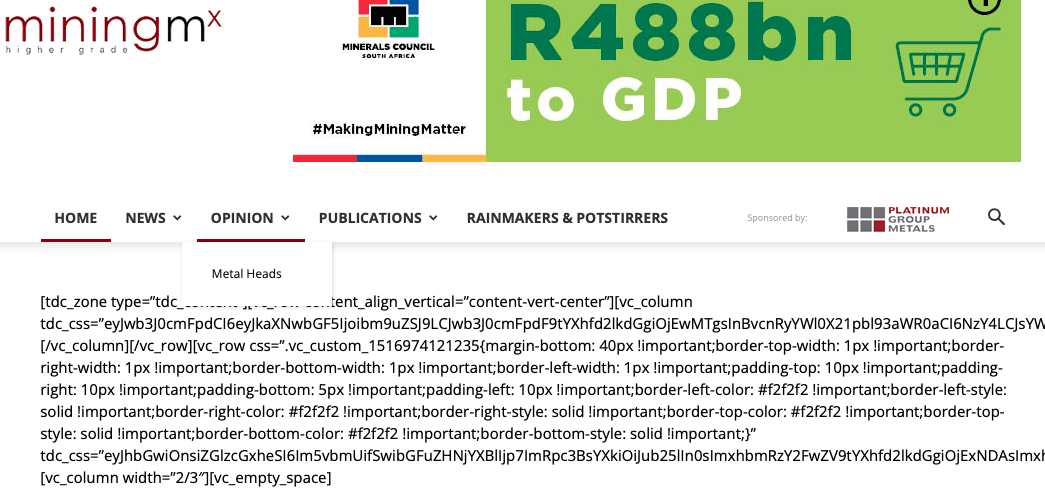
We can obviously reactivate the plugin quick enough. The issue is it did it twice today for no reason we can see from any of the logs, and we did not install a new plugin to cause any sort of conflict. It was out of the blue, and we run a number of sites using Newspaper Theme, so this is a real concern.
The site is http://www.miningmx.com – we are running WordPress 5.9.1, A child theme set-up of Newspaper, version 9.6.1.
If on our staging environment we replace the parent theme with latest Newspaper version, then the entire site breaks, so that is not an option.
Thanks,
Tim

