No search results were found in Documentation!
 Calin
Calin Hi,
Can you please make a test using only tagDiv plugins? From your details it’s like something is interfering with the Opt-in Builder and most of the time this is when you have a plugin conflict (or when a child theme is used and the code from it is interfering, in case you have child theme, please set the main theme for a test).
Thank you!
Calin Hi,
This situation can be created by an extra plugin that it is used or even some custom code. My recommendation is if you are using a child theme then please set the main theme and check if the problem persists, also please do a test using only tagDiv plugins to see if it is not a plugin conflict.
Something else that can help to re-save the permalink.
Thank you!
 santiagocalaforra
 Hi Calin,
Thanks again for your reply!
I tried using the method you shared from StackExchange — I added this line to my child theme’s functions.php:
php
Copiar
Editar
add_shortcode( ‘output_post_excerpt’, ‘get_the_excerpt’ );
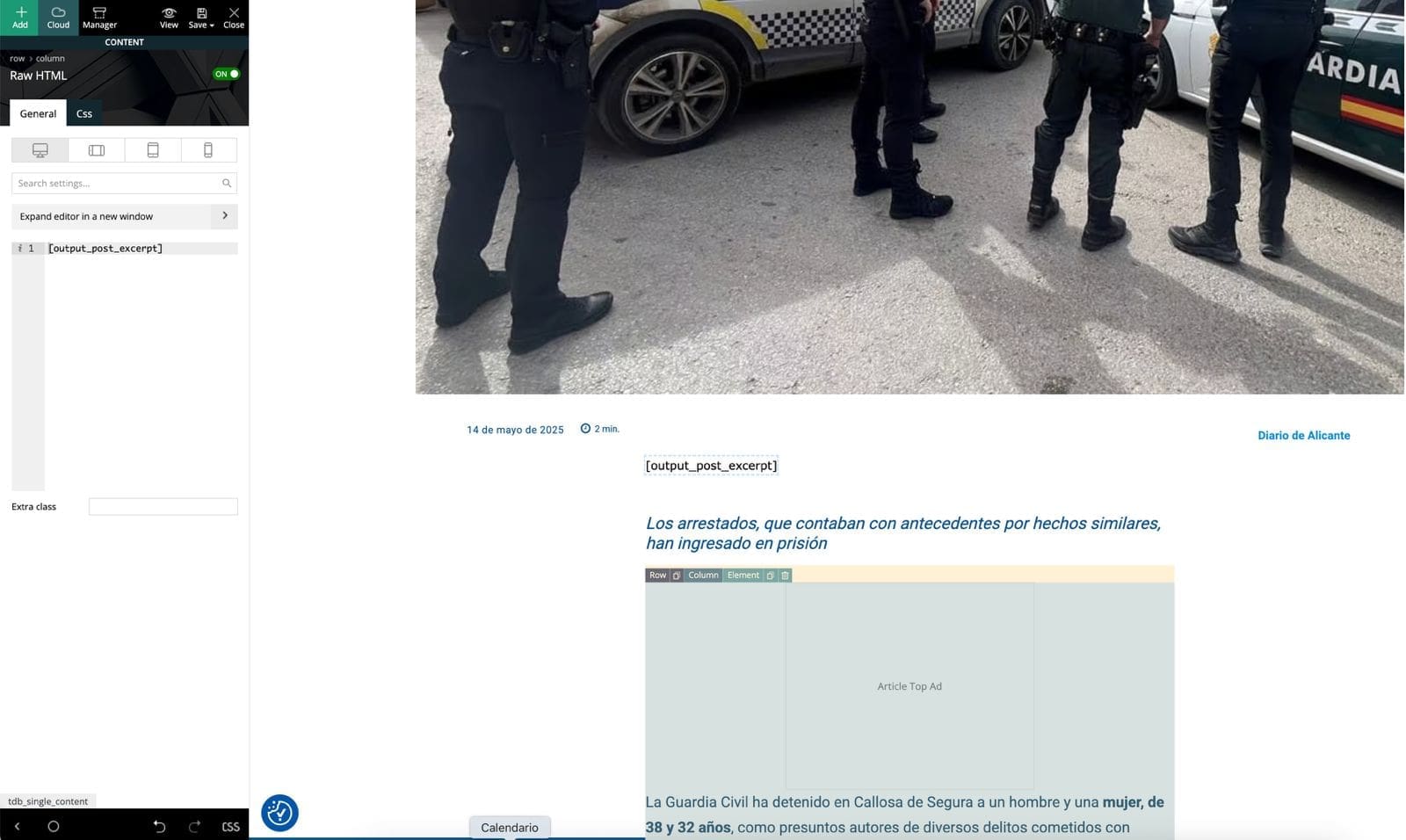
Then I edited my Single Post Cloud Template in tagDiv Composer, added a Text block, and inserted [output_post_excerpt].
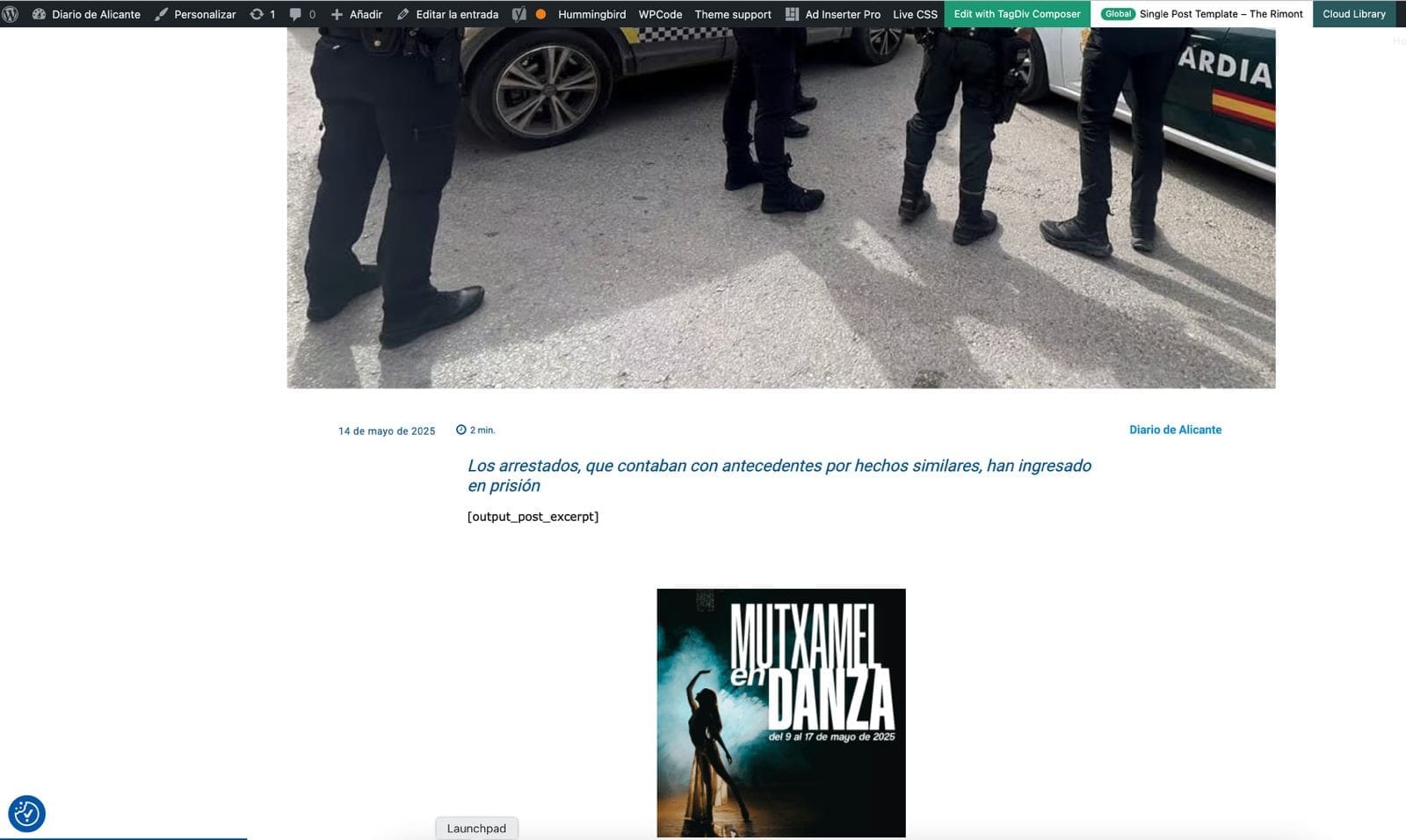
Unfortunately, the shortcode doesn’t render anything on the frontend. It just leaves a blank space where the excerpt should be. I’ve cleared all cache and reloaded everything, but still no result.
Is it possible that tagDiv Composer blocks don’t render shortcodes like this, or do I need a different type of block?
Any ideas or workaround would be greatly appreciated.
https://diariodealicante.net/wp-content/uploads/2025/05/editor.jpeg
https://diariodealicante.net/wp-content/uploads/2025/05/single.jpeg
Thanks!
Calin Hi,
Okay, let’s go through a few methods to help identify the issue.
Step 1: Start by testing your site using only the tagDiv plugins. If you’re using a child theme, please switch to the main theme temporarily to eliminate potential conflicts.
Step 2: If the issue persists, check multiple pages to see whether it occurs site-wide or only on a specific page.
If it’s only affecting one page, the problem may be related to recent changes made on that page.
If the issue appears on all pages, continue to the next step.
Step 3: Check whether the issue is coming from the cloud header or cloud footer templates. These are applied globally, so if one of them is corrupted, the problem will show up on every page and template that uses them. You can test this by temporarily changing the global header and footer.
Let us know what you find, and we’ll assist you further from there.
Thank you!
 Anamaria
 Hello,
You don’t need to make changes in the child theme, you just need to set a placeholder from Theme Panel -> Blocks Settings -> https://i.imgur.com/mo0Cbu2.png
After you set the placeholder, you need to use this to regenerate the thumbs -> https://forum.tagdiv.com/thumbs-on-modules-and-blocks/
Thank you!
 emailwie
 Hlw Bettina,
I tried to replace a no thumb image by “Newspaper-child theme”
But it not works actually:
I created below path on child theme:
public_html/wp-content/themes/Newspaper-child/legacy/Newspaper/assets/images/no-thumb/td_696x0.png
But the “no thumb image” still come from Main theme part
https://autoarabia.me/wp-content/plugins/td-composer/legacy/Newspaper/assets/images/no-thumb/td_696x0.png
What’s wrong ?
 FBM
FBM Just set it up on an entirely new site. Also without any childtheme or any other custom code.
Still behaves the same way.
The result page of the CPT search CloudTemplate always applies the header that is meant for the global regular search.
 Bettina
 Hello!
Then you can use it with default templates: https://forum.tagdiv.com/the-child-theme-support-tutorial/
Thank you!
emailwie Hello!
I’m bit confused what you meant.
I want to replace “no-thumb/td_696x0” from Newspaper child theme so that If I Update Newspaper main theme then it don’t effect no-thumb/td_696x0
Bettina Hello!
You do not need a child theme with cloud templates. But you can use the child theme you have with the default templates.
Thank you!
emailwie Hello….
If I want to change this Thumb image using Child theme.
So what will be the path of child theme for
https://autoarabia.me/wp-content/plugins/td-composer/legacy/Newspaper/assets/images/no-thumb/td_696x0
emailwie Hi Bettina,
I know these are featured image of an article….
I will have many articles on website which don’t have their featured image.
and I see the placeholder image come from :
https://autoarabia.me/wp-content/plugins/td-composer/legacy/Newspaper/assets/images/no-thumb/td_696x0
(right now I have changed this image on main directory)
My question is-
# Is there have any option on Theme panel to change this no-thumb/td_696x0 image with my own image ?
# if you don’t have this option on theme panel, Can you suggest me- How can I manipulate/replace this image using child theme ? Because I’m using child theme of newspaper.
-
This reply was modified 1 year by
emailwie.
 fruitchat
 Hi,
Thanks for reply, I just found out that plug inn was configured with child themes setting. I restore that and plugin activated as normal.
Now my fruit- chat is good.
Thanks again.
Anamaria Hello,
You need to use the main Newspaper, not a default theme, because I saw that you have a child theme there.
Thank you!
Anamaria Hi,
Have you checked for a plugin conflict? Please deactivate ALL plugins, including WP Bakery, except tagDiv ones. Also, if you use a child theme or cache plugin, deactivate them, clear all cache, and try again.
Thank you!
Bettina Hello!
It depends on the code you want to add and what you need to do. You can add some JS code in the theme panel -> analytics/js codes. In the tagdiv Composer, you can find some shortcodes RAW HTML and RAW CSS: https://forum.tagdiv.com/create-custom-code-using-the-browsers-inspector/. You can add an extra class on each shortcode to easily refer the CSS code to them. If you use default templates, you can have a child theme: https://forum.tagdiv.com/the-child-theme-support-tutorial/
Thank you!
 regio-online
 UPDATE: it seems I have solved the issue somehow, but I do not want to cheer ahead. For now it is working.
Solution (for possible other readers):
1. restarted my server
2. Accessed Plesk and started SSH
3. used command: sudo systemctl edit mariadb.service
4. located [Service]
5. typed below that: OOMScoreAdjust=-1000
6. Important that you type minus (-) 1000
7. Changed theme from Child theme to Newspaper main theme and that solved the wrong display
8. After an hour testing everything changed the theme back to Child the of Newspaper
9. Display stayed as intended
Hopefully this has resolved the issues I’ve encoutered. Can you leave this ticket open for a few weeks in case the issue reappears?
I don’t think it is a real Nespaper issue in hindsight.
I am however curious if anyone knows what that alexusMailer_v2.0.php etc can come from. As far as I good figure out it is a programm to send anonimous emails, probally missusing our domain.
Any other insights on all above issues are very welcome. Thanks for your time spend anyway!
regio-online Update: I tried reinstalling theme and plugins, but that did not solve the current issue. Then I remembered I am using the the Newspaper Child-theme. I activated the main theme and deactivated the child theme. Now it seems to work both in backend and frontend.
I can not find anything strange in the childtheme, only some settings for RankMath SEO plugin that I know are there.
Still could use your professional advice dough regarding the database issue.
Sorry for the long read!
 Viju
Viju First, read carefully and try to understand because I wrote plenty of emails to tagDiv, so don’t have much time to repeat and repeat one thing all the time.
Can you tell me how to enable AJAX Live Search without the help of the tagDiv Cloud Library?
From the last 2 versions of the Newspaper theme, you have disabled (invisible) the “Live Search” ON Button from the Theme Panel.
AJAX Live Search works on mobile and wants to be enabled on desktop.
tagDiv Cloud Library: delete the plugin and reinstall it many times without success.
The main thing is I do not use any kind of Cloud Templates, so maybe I don’t need “tagDiv Cloud Library plugin”.
I don’t use a page for a homepage.
I don’t use the child theme.
Only activated tagdiv plugins with no luck because from the last 2 versions of the Newspaper theme, you have disabled (invisible) the “Live Search” ON Button from the Theme Panel.
tagDiv Composer, tagDiv Mobile Theme, and tagDiv Standard Pack are already installed and activated with no luck for “AJAX Live Search”.
If you want to visit my site: SOFTFULLY.COM
I think I changed the default Admin ID 1 in WordPress a few days ago. That might be why the old ID 1 needs to be updated in the database for the tagDiv Cloud Library plugin to work.
My main purpose is to enable AJAX Live Search on the Desktop without the help of the tagDiv Cloud Library plugin.
You have to guide me to enable “AJAX Live Search” manually from theme or plugin files in any way because I have been struggling past 2 months.
Anamaria Hello,
Do you use a child theme? If yes, please use the main theme. Also, please do a test using only tagdiv plugins because maybe you may have a plugin conflict.
Also, please make sure that you have the latest version of the theme, 12.7
Also, I checked and you no longer have paid support, so normally we shouldn’t be providing support anymore.
Thank you!
 Simion C.
 Hi,
While that may seem unusual, it is however working correctly. The modified date can be before the publish date if the post is scheduled. But I understand what you mean, and how having an option to control the modified date would he useful. I will add this on our list, but I can’t promise that will be added unfortunately.
I could provide a solution that you could use. It will make the modified date match the publish date, when scheduling posts. This is the code https://pastebin.com/8Vfp07wY and it can be entered in the theme functions file, or a child theme functions file, or loaded with a code plugin in the functions file. The code should make sure that the modified date matches the publish date. The modified date will continue to change if you actually modify the post after it was published.
You could test it for your next scheduled post. Add the code at the end of the theme functions file for now, just to test it. If it works correctly, and it should as I tested it as well, then a more permanent solution for loading it can be found, like a child theme or a plugin.
Let me know.
Thank you!
Anamaria Hi,
Please tell me where it only appears on one page or the entire site. Did you add any code or elements from another plugin?
Please follow the steps from this topic https://forum.tagdiv.com/topic/error-at-zones-6models-1dom-the-model-does-not-match-the-content-currene/ if you have a child theme; please use the main theme.
You can try to revert an old revision on a page/template -> https://www.wpbeginner.com/beginners-guide/complete-guide-to-wordpress-post-revisions/
Thank you!
Anamaria Hello,
This is strange. Have you checked for a plugin conflict? Please deactivate ALL plugins, including WP Bakery, except tagDiv ones. Also, if you use a child theme or cache plugin, deactivate them, clear all cache, and try again.
Also, please delete the Redis cache a few times.
Thank you!
Anamaria Hello @Joe,
This is strange. I did a few tests, and this issue has not happened to me.
Have you checked for a plugin conflict? Please deactivate ALL plugins, including WP Bakery, except tagDiv ones. Also, if you use a child theme or cache plugin, deactivate them, clear all cache, and try again.
Thank you!
 nearview
 @anamaria,
Please see the site info below.
### wp-core ###
version: 6.7.2
site_language: en_US
user_language: en_US
timezone: America/New_York
permalink: /%postname%/
https_status: true
multisite: false
user_registration: 0
blog_public: 0
default_comment_status: open
environment_type: development
user_count: 15
dotorg_communication: true
### wp-paths-sizes ###
wordpress_path: /code
wordpress_size: 94.86 MB (99465258 bytes)
uploads_path: /code/wp-content/uploads
uploads_size: 0.00 B (0 bytes)
themes_path: /code/wp-content/themes
themes_size: 8.03 MB (8415114 bytes)
plugins_path: /code/wp-content/plugins
plugins_size: 28.00 B (28 bytes)
fonts_path: /code/wp-content/uploads/fonts
fonts_size: 2.28 MB (2386544 bytes)
database_size: 29.67 MB (31113216 bytes)
total_size: 134.83 MB (141380160 bytes)
### wp-active-theme ###
name: Newspaper Child theme (Newspaper-child)
version: 9.0c
author: tagDiv
author_website: http://themeforest.net/user/tagDiv/portfolio
parent_theme: Newspaper (Newspaper)
theme_features: core-block-patterns, post-formats, post-thumbnails, automatic-feed-links, html5, woocommerce, bbpress, align-wide, align-full, editor-font-sizes, widgets-block-editor, editor-style, menus, widgets
theme_path: /code/wp-content/themes/Newspaper-child
auto_update: Disabled
### wp-parent-theme ###
name: Newspaper (Newspaper)
version: 12.6.9
author: tagDiv
author_website: https://themeforest.net/user/tagDiv/portfolio
theme_path: /code/wp-content/themes/Newspaper
auto_update: Disabled
### wp-themes-inactive (1) ###
Twenty Twenty-Five: version: 1.1, author: the WordPress team, Auto-updates disabled
### wp-mu-plugins (1) ###
Pantheon MU Plugin Loader: version: 1.0, author: Pantheon Systems
### wp-plugins-active (41) ###
Advanced Custom Fields: version: 6.3.12, author: WP Engine, Auto-updates disabled
Autocomplete WooCommerce Orders: version: 3.4.0, author: QuadLayers, Auto-updates disabled
Bulk Move: version: 1.3.0, author: Sudar, Auto-updates disabled
Classic Editor: version: 1.6.7, author: WordPress Contributors, Auto-updates disabled
Classic Widgets: version: 0.3, author: WordPress Contributors, Auto-updates disabled
Code Snippets: version: 3.6.8, author: Code Snippets Pro, Auto-updates disabled
Convert Pro: version: 1.8.1, author: Brainstorm Force, Auto-updates disabled
Convert Pro – Addon: version: 1.5.14, author: Brainstorm Force, Auto-updates disabled
Disable Bloat for WordPress & WooCommerce: version: 3.5.0, author: Disable Bloat, Auto-updates disabled
Disable Comments: version: 2.4.7, author: WPDeveloper, Auto-updates disabled
Duplicate Page: version: 4.5.4, author: mndpsingh287, Auto-updates disabled
FluentSMTP: version: 2.2.90, author: FluentSMTP & WPManageNinja Team, Auto-updates disabled
Gravity Forms: version: 2.9.4, author: Gravity Forms, Auto-updates disabled
Gravity Forms ActiveCampaign Add-On: version: 2.1.0, author: Gravity Forms, Auto-updates disabled
Gravity Forms Advanced Post Creation Add-On: version: 1.5.0, author: Gravity Forms, Auto-updates disabled
Gravity Forms Authorize.Net Add-On: version: 2.11, author: Gravity Forms, Auto-updates disabled
Gravity Forms Google Analytics Add-On: version: 2.3.0, author: Gravity Forms, Auto-updates disabled
Gravity Forms reCAPTCHA Add-On: version: 1.6.0, author: Gravity Forms, Auto-updates disabled
GTM4WP – A Google Tag Manager (GTM) plugin for WordPress: version: 1.20.3, author: Thomas Geiger, Auto-updates disabled
Legendary Core for WordPress: version: 1.01.134, author: support@legendarydata.com, Auto-updates disabled
Legendary Data – Search Plugin: version: 1.00.022, author: Alvin Kreitman / Legendary Data, Auto-updates disabled
Molongui Authorship: version: 5.0.15, author: Molongui, Auto-updates disabled
Native PHP Sessions for WordPress: version: 1.4.3, author: Pantheon, Auto-updates disabled
Redirection: version: 5.5.2, author: John Godley, Auto-updates disabled
Simple User Avatar: version: 4.7, author: Matteo Manna, Auto-updates disabled
tagDiv Cloud Library: version: 3.8 | built on 10.02.2025 10:50, author: tagDiv, Auto-updates disabled
tagDiv Composer: version: 5.3 | built on 10.02.2025 10:50, author: tagDiv, Auto-updates disabled
Temporary Login Without Password: version: 1.9.0, author: StoreApps, Auto-updates disabled
The Events Calendar: version: 6.10.2, author: The Events Calendar, Auto-updates disabled
TotalPoll – Pro: version: 4.11.0, author: TotalSuite, Auto-updates disabled
User Role Editor: version: 4.64.4, author: Vladimir Garagulya, Auto-updates disabled
WooCommerce: version: 9.7.1, author: Automattic, Auto-updates disabled
WooCommerce.com Update Manager: version: 1.0.3, author: Automattic, Auto-updates disabled
WooCommerce Authorize.Net Gateway: version: 3.10.10, author: SkyVerge, Auto-updates disabled
WooCommerce Memberships: version: 1.26.11, author: SkyVerge, Auto-updates disabled
WooCommerce Subscriptions: version: 7.2.1, author: WooCommerce, Auto-updates disabled
WP-DraftsForFriends: version: 1.0.2, author: Lester ‘GaMerZ’ Chan, Auto-updates disabled
WP All Import – ACF Add-On: version: 3.3.9, author: Soflyy, Auto-updates disabled
WP All Import – User Import Add-On Pro: version: 1.1.8, author: Soflyy, Auto-updates disabled
WP All Import Pro: version: 4.10.1, author: Soflyy, Auto-updates disabled
WP Crontrol: version: 1.18.0, author: John Blackbourn, Auto-updates disabled
### wp-plugins-inactive (7) ###
EWWW Image Optimizer: version: 8.1.2, author: Exactly WWW, Auto-updates disabled
Featured Image Admin Thumb: version: 1.6, author: Sean Hayes, Auto-updates disabled
Pantheon Advanced Page Cache: version: 2.1.1, author: Pantheon, Auto-updates disabled
WP Fusion Lite: version: 3.44.8, author: Very Good Plugins, Auto-updates disabled
Yoast SEO: version: 24.7, author: Team Yoast, Auto-updates disabled
Yoast SEO: News: version: 13.3, author: Team Yoast, Auto-updates disabled
Yoast SEO Premium: version: 24.5, author: Team Yoast, Auto-updates disabled
### code-snippets (12) ###
snippet-5: name: Customize WP Login Screen, scope: global, modified: 2025-02-11 16:10:24
snippet-6: name: Issue Archive and Current Issue Shortcode, scope: global, modified: 2025-02-11 16:20:31, tags: [Shortcode]
snippet-7: name: Remove unnecessary fields from user edit screen, scope: global, modified: 2025-02-11 16:26:01
snippet-9: name: WordPress Admin Styles, scope: global, modified: 2025-02-04 16:55:35
snippet-12: name: Disable Yoast Redirects, scope: global, modified: 2025-02-21 18:52:27
snippet-13: name: Remove WooCommerce Payments Menu Item from Admin, scope: global, modified: 2025-02-05 18:01:46
snippet-14: name: WooMemberships Paywall Message, scope: global, modified: 2025-02-20 21:10:16
snippet-15: name: Disable Contributor upsell widget, scope: global, modified: 2025-03-11 14:14:04, tags: [Molongui Authorship]
snippet-16: name: IMPORT SCRIPT – For Guest Authors and Image Attachments, scope: global, modified: 2025-03-18 18:35:41, tags: [WP All Import]
snippet-17: name: Latest Poll Shortcode, scope: global, modified: 2025-03-11 14:14:52, tags: [TotalPoll Pro]
snippet-18: name: Rotate ConvertPro CTAs Shortcode, scope: global, modified: 2025-03-11 14:41:26, tags: [ConvertPro, Shortcode]
snippet-20: name: Add Hide Featured Image Checkbox and functionality., scope: global, modified: 2025-03-18 19:46:30
### wp-media ###
image_editor: WP_Image_Editor_Imagick
imagick_module_version: 1693
imagemagick_version: ImageMagick 6.9.13-17 Q16 x86_64 18482 https://legacy.imagemagick.org
imagick_version: 3.7.0
file_uploads: 1
post_max_size: 100M
upload_max_filesize: 100M
max_effective_size: 100 MB
max_file_uploads: 50
imagick_limits:
imagick::RESOURCETYPE_AREA: 251 GB
imagick::RESOURCETYPE_DISK: 9.2233720368548E+18
imagick::RESOURCETYPE_FILE: 24576
imagick::RESOURCETYPE_MAP: 126 GB
imagick::RESOURCETYPE_MEMORY: 63 GB
imagick::RESOURCETYPE_THREAD: 1
imagick::RESOURCETYPE_TIME: 0
imagemagick_file_formats: 3FR, 3G2, 3GP, AAI, AI, APNG, ART, ARW, AVI, AVS, BGR, BGRA, BGRO, BIE, BMP, BMP2, BMP3, BRF, CAL, CALS, CANVAS, CAPTION, CIN, CIP, CLIP, CMYK, CMYKA, CR2, CR3, CRW, CUR, CUT, DATA, DCM, DCR, DCX, DDS, DFONT, DNG, DOT, DPX, DXT1, DXT5, EPDF, EPI, EPS, EPS2, EPS3, EPSF, EPSI, EPT, EPT2, EPT3, ERF, EXR, FAX, FILE, FITS, FLV, FRACTAL, FTP, FTS, G3, G4, GIF, GIF87, GRADIENT, GRAY, GRAYA, GROUP4, GV, H, HALD, HDR, HISTOGRAM, HRZ, HTM, HTML, HTTP, HTTPS, ICB, ICO, ICON, IIQ, INFO, INLINE, IPL, ISOBRL, ISOBRL6, J2C, J2K, JBG, JBIG, JNG, JNX, JP2, JPC, JPE, JPEG, JPG, JPM, JPS, JPT, JSON, K25, KDC, LABEL, M2V, M4V, MAC, MAGICK, MAP, MASK, MAT, MATTE, MEF, MIFF, MKV, MNG, MONO, MOV, MP4, MPC, MPEG, MPG, MRW, MSL, MSVG, MTV, MVG, NEF, NRW, NULL, ORF, OTB, OTF, PAL, PALM, PAM, PANGO, PATTERN, PBM, PCD, PCDS, PCL, PCT, PCX, PDB, PDF, PDFA, PEF, PES, PFA, PFB, PFM, PGM, PGX, PICON, PICT, PIX, PJPEG, PLASMA, PNG, PNG00, PNG24, PNG32, PNG48, PNG64, PNG8, PNM, POCKETMOD, PPM, PREVIEW, PS, PS2, PS3, PSB, PSD, PTIF, PWP, RADIAL-GRADIENT, RAF, RAS, RAW, RGB, RGBA, RGBO, RGF, RLA, RLE, RMF, RW2, SCR, SCT, SFW, SGI, SHTML, SIX, SIXEL, SPARSE-COLOR, SR2, SRF, STEGANO, SUN, SVG, SVGZ, TEXT, TGA, THUMBNAIL, TIFF, TIFF64, TILE, TIM, TTC, TTF, TXT, UBRL, UBRL6, UIL, UYVY, VDA, VICAR, VID, VIDEO, VIFF, VIPS, VST, WBMP, WEBM, WEBP, WMF, WMV, WMZ, WPG, X, X3F, XBM, XC, XCF, XPM, XPS, XV, XWD, YCbCr, YCbCrA, YUV
gd_version: bundled (2.1.0 compatible)
gd_formats: GIF, JPEG, PNG, WebP, BMP, AVIF, XPM
ghostscript_version: 9.27
### the-events-calendar ###
### wp-server ###
server_architecture: Linux 6.1.112+ x86_64
httpd_software: nginx/1.27.1
php_version: 8.3.19 64bit
php_sapi: fpm-fcgi
max_input_variables: 10000
time_limit: 120
memory_limit: 1024M
max_input_time: 900
upload_max_filesize: 100M
php_post_max_size: 100M
curl_version: 7.61.1 OpenSSL/1.1.1k
suhosin: false
imagick_availability: true
pretty_permalinks: true
htaccess_extra_rules: true
current: 2025-03-20T14:32:51+00:00
utc-time: Thursday, 20-Mar-25 14:32:51 UTC
server-time: 2025-03-20T10:32:50-04:00
### wp-database ###
extension: mysqli
server_version: 10.4.25-MariaDB-log
client_version: mysqlnd 8.3.19
max_allowed_packet: 67108864
max_connections: 1024
### wp-constants ###
WP_HOME: https://dev-hartfordbusiness-com-wp.pantheonsite.io
WP_SITEURL: https://dev-hartfordbusiness-com-wp.pantheonsite.io
WP_CONTENT_DIR: /code/wp-content
WP_PLUGIN_DIR: /code/wp-content/plugins
WP_MEMORY_LIMIT: 512M
WP_MAX_MEMORY_LIMIT: 1G
WP_DEBUG: true
WP_DEBUG_DISPLAY: false
WP_DEBUG_LOG: true
SCRIPT_DEBUG: false
WP_CACHE: false
CONCATENATE_SCRIPTS: undefined
COMPRESS_SCRIPTS: undefined
COMPRESS_CSS: undefined
WP_ENVIRONMENT_TYPE: undefined
WP_DEVELOPMENT_MODE: undefined
DB_CHARSET: utf8mb4
DB_COLLATE: undefined
### wp-filesystem ###
wordpress: writable
wp-content: writable
uploads: writable
plugins: writable
themes: writable
fonts: writable
mu-plugins: writable
### acf ###
version: 6.3.12
plugin_type: Free
update_source: wordpress.org
ui_field_groups: 3
php_field_groups: 0
json_field_groups: 0
rest_field_groups: 0
post_types_enabled: true
ui_post_types: 27
json_post_types: 0
ui_taxonomies: 17
json_taxonomies: 0
rest_api_format: light
admin_ui_enabled: true
field_type-modal_enabled: true
field_settings_tabs_enabled: false
shortcode_enabled: false
registered_acf_forms: 0
json_save_paths: 1
json_load_paths: 1
-
This reply was modified 1 year by
nearview.