
 Gogi2025
 Dear Calin,
May I current Global settings, duplicate with a new name, for example, “Category template – Znew”, then customize it and use it for the Category Cloud Library Template, as you advised me?
Thank you
 Calin
Calin Hi,
The Center Magazine Pro does not have a shop design, but this can be done, you can install the tagDiv Shop plugin and WooCommerce, and you can get from the cloud a template you like and adjust it using tagDiv Composer.
Thank you!
 bounama17
hi
after active Activate Preloading on wp rocket
i see erro like : : Undefined array key “*************” in
/home/*******.cloudwaysapps.com/******/public_html/wp-content/plugins/td-composer/legacy/common/wp_booster/td_video_playlist_render.php
can you help me
Calin Hi,
I understand what you want to achieve. Unfortunately, we haven’t tested the Polylang plugin with our theme, so we cannot provide a solution or guarantee compatibility for it.
Our theme is normally tested with WPML, which allows you to create different Cloud Templates for each language (check if the Polylang plugin provides this option). For example:
When you select Arabic, you can use and edit a template in RTL.
When you select French, it can be a completely different template.
For more details on how to use WPML with our theme and set up templates for multiple languages, please check this guide: https://forum.tagdiv.com/using-theme-translations-together-wpml/
Calin Hi Ling,
For CPTs, you can add Cloud Templates from Cloud Templates → CPT/Taxonomies https://i.imgur.com/pqIa2fo.png
Please note that these templates use different elements than Single or Category templates, so the same template used for Articles cannot be applied to CPTs. Since you’re using tagDiv Composer, you can edit a CPT template and adjust the layout as needed.
At the moment, we offer fewer templates specifically for CPTs, but I’m confident you’ll find one that works well as a base for customization.
https://forum.tagdiv.com/introduction-cpt-acf-newspaper-theme/
Thank you!
 widernet
 Hi Calin, which country are you accessing the site from?
We are hosting the WordPress site on our main website using Cloudflare as a proxy. Search queries should be directed to a subdirectory (/dating-advice), rather than the root URL (/). Is this possible?
Thank you.
Calin Hi,
In case you want to have this functionality https://demo.tagdiv.com/newspaper_podcasts/ then you need to use audio formats for your articles, set the links for audio, and the featured image will be transformed into audio. Also, on your websites, you should use flex blocks to have the audio icon displayed. https://i.imgur.com/zceMuk7.png
Also, you can import from cloud the blocks you like for audio and video format and just adjust them using tagDiv Composer.
Also, for the single post template, make sure that you are using the Single Featured image, not the background one.
Thank you!
Calin Hi,
Could you please provide some screenshots of the message you are getting?
Is something like this “An issue has been encountered while trying to validate your license key”
This issue can occur for different reasons. One possible cause could be a plugin conflict, so please run a test using only the tagDiv plugins and check if the verification process works.
Another possible reason could be the permalinks. Please perform a test by setting the permalinks to ‘Plain’ and then check if the verification process works.
If it does work, it’s likely that you’re using an NGINX server, and you’ll need to configure pretty links accordingly -> https://cloudarcade.net/tutorial/pretty-url-on-nginx-server/ -> https://www.cyberciti.biz/faq/how-to-configure-nginx-for-wordpress-permalinks/
If none of these solutions work, it’s possible that a hosting option is interfering.
Thank you!
Calin Hi,
When the logged-in and logged-out versions are not the same, this is usually due to caching. Please make sure that all cache is cleared.
If you are using Cloudflare or another CDN, be sure to purge the cache there as well.
Calin Hi,
That is a very old theme version. However, even after updating the theme, the website should look the same. Before making any changes, please ensure you have a full backup.
After updating the theme, it is important to install the Standard Pack plugin: https://i.imgur.com/8heENe0.png This plugin, introduced in Newspaper 10, contains all the old blocks and templates, which are now separated from the main theme. You can find more details in this article: https://tagdiv.com/newspaper-theme-update-standard-pack-or-tagdiv-cloud-templates/
Please also make sure to clear the cache, optimized resources, and Cloudflare cache (if you are using Cloudflare) after updating the theme.
If you are using a child theme, we recommend deactivating it after the update, as it may cause compatibility issues.
Additionally, if you prefer, you can request custom work to update the theme to the latest version. One of our developers will handle the update and ensure everything remains unchanged. To proceed, please send a request to services@tagdiv.com
, and our colleagues will ask for temporary wp-admin access to review the site and assess the changes made. Based on this, they will provide a time and cost estimate for the update.
Let me know if you’d like a more casual or more technical version.
bounama17 can this work
add_action( 'admin_menu', function () {

    if ( current_user_can( 'editor' ) ) {

        // Replace 'tdb_templates' with the actual menu slug for Cloud Templates

        remove_menu_page( 'tdb_templates' );

        // If it is a submenu under Newspaper / Website Manager, use remove_submenu_page instead:

        // remove_submenu_page( 'td_theme_panel', 'tdb_templates' );

    }

}, 999 );
bounama17hi
how Hide Cloud templates with code for editors
also h used PublishPress Capabilities Pro / User Role Editor Pro
 gschrijvers
I have an audio file on soundcloud, but when I paste the link in the Featured Audio and set the post on posttype audio. The player is not visible.
This is the soundcloud link
Calin Hi,
This type of situation usually occurs when the Google Fonts option is disabled in the theme panel. Please make sure this option is enabled on your site and that no additional plugin is interfering with font loading. Some cache or optimization plugins disable Google Fonts for performance reasons. You can check this here: https://prnt.sc/o9JyrNM9HGrp
When the default fonts are enabled, the theme normally uses Open Sans and Roboto. However, if the browser you are using has a different default font configured, that font may be displayed instead.
How can theme fonts be used?
They can be applied globally through the theme panel settings, but only if no individual font settings are defined for specific elements. You can find a detailed guide here: https://forum.tagdiv.com/font-customization/
Additionally, if you are using cloud templates, you will need to edit them with tagDiv Composer and check for any extra fonts in use. Elements that do not rely on the default fonts will be listed under Website Manager > Fonts:
https://forum.tagdiv.com/tagdiv-composer-website-manager/
Thank you!
Calin Hi E K,
I think there’s been a bit of a misunderstanding here, so let me clarify the situation in simple terms.
This is not a code injection vulnerability in td_ajax.php. What the user reported is a case where fake users were being created, and they noticed that the registration process uses code from a specific line in a theme file. Up to this point, I believe everything is clear.
In the discussion, I explained that the theme already includes protection against fake registrations through Google reCAPTCHA, which can be enabled from the theme panel. This option was added specifically to protect the login and registration functionality from the theme. However, the user mentioned that they are using Cloudflare CAPTCHA instead and do not want to use Google reCAPTCHA. Because of this choice, the built-in theme solution cannot be applied in their case. The workaround they chose was to comment out a line of code, which stops the registration popup from creating new user accounts. This works for them, but it also changes how that functionality behaves (for example, if login is required for comments or if the popup is used elsewhere on the site).
So the situation is not that there is no solution, there is a solution, but it’s not the one the user wants to use. When someone chooses a different CAPTCHA system, a different approach is needed.
What I did was:
– clearly explain the existing solution provided by the theme
– acknowledge the user’s setup and limitations
– notify the developers that offering an alternative option could help other users in the same situation
From my perspective, this was handled correctly. If my straightforward writing style caused any confusion or gave the wrong impression, that certainly wasn’t my intention.
Thank you for your understanding!
Calin Hi,
The “ Errors at columns elements: 11(models) : 12(dom). The model does not match the content Current state has involved an issue. You could try an UNDO operation (CTRL+Z / CTRL+SHIFT+Z)” most of the time the problem is from a shortcode that is not compatible with our theme or a plugin conflict, therefore after you set it with tagDiv Composer and save the page/cloud template, the next time when you try to edit it, you’ll get that error.
If is only for one page or a cloud template (it can be on the header or footer, you can change them for tests and see if the problem persists), this is from some settings/shortcodes set on it and it can be fixed using the page revision https://wordpress.com/support/page-post-revisions/
Thank you!
 cyberhrc
Hi
In following
I wonder why i have different fonts while i am using draft vs published ?
For example, #1 image is draft, i like the look but in published version its another font.
Also, when i try to use any of Cloud templates, in preview there is one styling but when i import in my web all is messed up.
Since i do have your theme for a few years now i wonder if i can somewhere ‘reset’ all fonts and select overall look for headings and paragraphs or every block should have their own settings? Which in case of importing cloud – is not working at my web ?
I did check https://forum.tagdiv.com/font-customization/ so here is breakdown and correct me if i am wrong:
At this moment we have
– website manager with “Global fonts” [ if i import multiple various blocks all those fonts should appear here when having them on one page ]
– we have fonts for each block individually [when i click particular block it shows in sidebar]
– and last we have Theme fonts in settings
Whats puzzling here is what is priority of usage? What is purpose of theme panel if for example i set VERDANA font there and when i import anything it will be overridden ?
If i disable google fonts there, and your block is using them – why do i see different fonts instead of default one ?
Basically what i want [ here is my plan, correct me if i am wrong ]
– i would like to combine multiple blocks from your library
– blocks should be imported with styles you made them
– i will have to use Website manager > global fonts for changes of all visible styles there
Is this correct flow ? And again, why does preview shows differently ?
Calin Hi,
This is because you are using 2 cloud headers, one of which is set as global, and one of which is set as individual.
Also, another situation can be related to the cache plugin and settings. When you are logged in, and the cache is not applied, is it working correctly?
 VOP
VOP Still, I believe the issue lies elsewhere. I use WP Rocket across all my projects — including several websites built with the Newspaper theme — and I’ve never encountered this problem before. So I don’t think WP Rocket is the cause.
What I’ve noticed is that these extra CSS elements don’t appear everywhere — only in modules taken from the Cloud Library. On a test site, I replaced the footer with one from a different demo layout, and the issue was gone.
This leads me to conclude that the problem is specifically related to the ECHOVERSE demo.
Calin Hi,
The reported “vulnerability in tagDiv Cloud Library 3.9” does not apply to our setup. The current installed version is 3.9.2, and as shown in the Patchstack reports, the issue has already been fixed.
However, because the plugin version string includes the text “| built on 12.01.2026 14:31”, some security scanning tools are not interpreting the version number correctly and are flagging it incorrectly.
A theme update will be released soon that removes this extra text from the version field and places it in the description instead, which should resolve the false positives.
If you would like to test this now, an RC version is available under Newspaper → Updates (click Check Updates and look for the RC version). Please ensure this is tested on a staging environment, not on the live site.
Thank you.
 alicaglayan@yahoo.com
 You say fixed but is still says so.
“vulnerability in tagDiv Cloud Library 3.9”
I use Newspaper 12.7.3 latest
You should tell us what is the problem or publish new update asap
Calin Hi,
Unfortunately, we do not have a pre-made single post template that looks similar to this one https://link.springer.com/article/10.1007/s11695-020-05197-6, but this can be created using the tagDiv Composer and a single post template.
If you want, you can import an existing template and just make the edits to it.
 da zuoshou
 I’ve used Autoptimize, WP Super Cache, and Cloudflare, but not image compression! However, I’m still seeing JS and CSS issues on mobile devices, so this isn’t related to image compression! The main problem seems to be resolving the JS and CSS issues!
 wertikoo
Hello,
I’d like to greet your wonderful team of developers behind the Newspaper theme. Unfortunately, I have encountered a small issue that I hope you can help me resolve.
I installed the Newspaper theme along with the pre-built website “ECHOVERSE”. In some places, I’m using ready-made blocks from Cloud Templates. Visually, everything looks fine, but when I inspect the HTML, I notice that the headings are rendered with extra CSS coming from the templates.
I’m attaching a screenshot from the browser’s SEO inspection tool, where you can see that the headings are “cluttered” with unnecessary code. I suspect this might be due to unclosed tags in the templates.
Could you please take a look? If you need anything from me, just let me know — I’ll be happy to provide it.
Thank you!
https://kando.md/wp-content/uploads/2026/01/2026-01-12_16-24-17.png” alt=”” />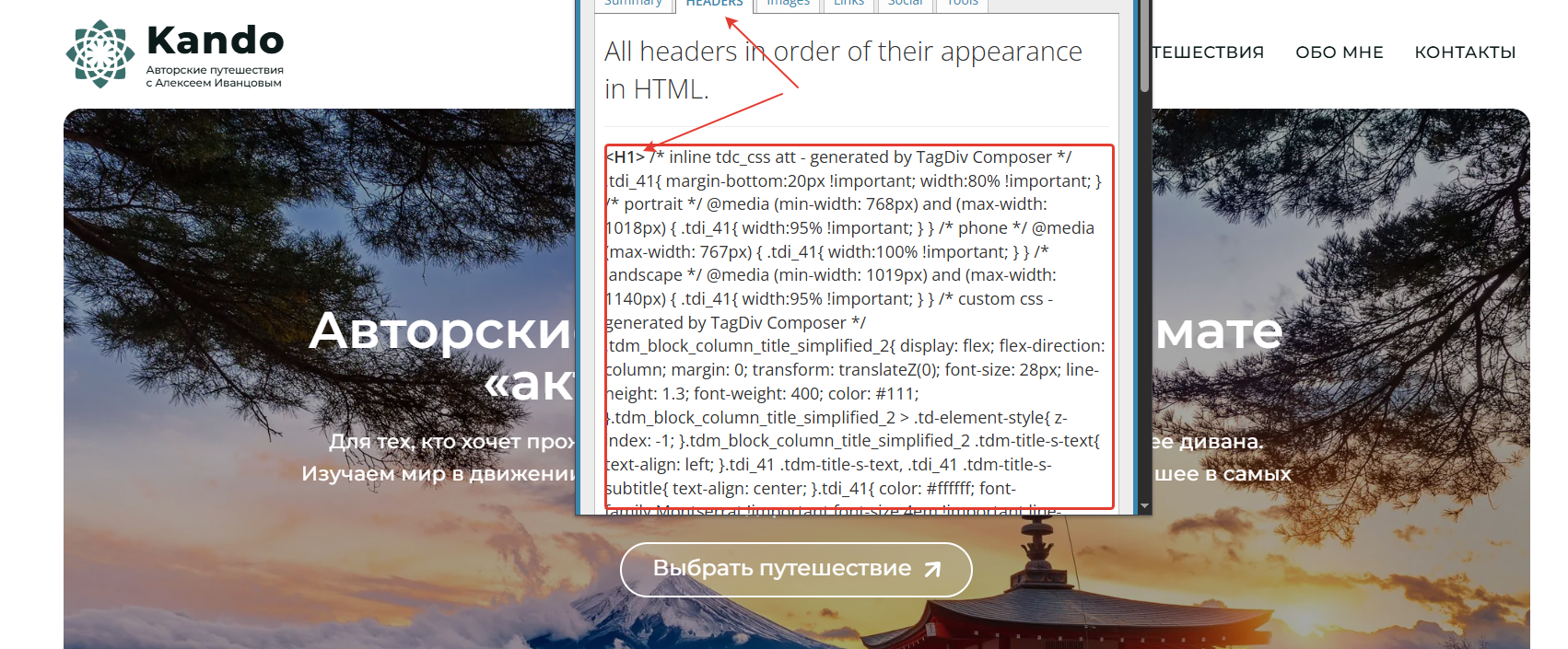
 AI-AZ
AI-AZSubject: Error in TagDiv Composer – Column Models Issue in Global Header Template
Hello TagDiv Support Team,
I am experiencing a critical issue with the TagDiv Composer while trying to edit the “Global Header Cloud Template – Tech News Pro” on my website: https://gettoolspro.com
**Issue Description:**
When I try to edit the header template using TD Composer (wp-admin/post.php?post_id=634&td_action=tdc), I receive the following error message:
“Errors at columns elements: 1(models): 0(dom). The model does not match the DOM. Current state has invalid DOM issue. You could try an UNDO operation (CTRL+Z / CTRL+SHIFT+Z)”
**What I’m trying to do:**
I want to add the site logo (Header Logo element) to the header template, but the composer error prevents me from editing or adding any elements.
**Theme Details:**
– Theme: Newspaper by TagDiv
– Version: 12.7.3
– Template: Global Header Cloud Template – Tech News Pro
– WordPress Version: Latest
**What I’ve tried:**
– Refreshing the page
– Clearing browser cache
– The error persists
**Request:**
Please help me fix this column model error so I can properly edit the header template and add the logo element.
I can provide admin access if needed for debugging.
Thank you for your assistance!
Best regards,
Website: https://gettoolspro.com



