
 Michelle26
We have different mobile versions of our pages since our traffic is mainly mobile, however, they are not loading, I unplugged the cache, clear cookies, deleted search history and it is not loading some of the mobile versions of the pages. The website log indicates there is an error td-cloud-library.
Do you have any ideas what may be going on and how to fix it?
 Calin
Calin Hi,
Most of the time, this https://i.imgur.com/LwIKnm1.png problem is from a shortcode that is not compatible with our theme or a plugin conflict; therefore, after you set it with tagDiv Composer and save the page/cloud template, the next time you try to edit it, you’ll get that error.
If is only for one page or a cloud template (it can be on the header or footer, you can change them for tests and see if the problem persists), this is from some settings/shortcodes set on it and it can be fixed using the page revision https://wordpress.com/support/page-post-revisions/
This one https://i.imgur.com/Xcp7e8m.png usually it’s from a plugin conflict, please make a test using only tagDiv plugins and see if the problem persists.
Thank you!
Calin Hi,
The mentioned demo is using cloud template, so you need to use tagDiv Composer to edit the sidebars and/or add ads https://forum.tagdiv.com/ads-adsense-overview/
Thank you!
Calin Hi,
If you want to set a default a cloud template this can be done using the one of the options – https://i.imgur.com/K34wGD7.png or from Cloud Templates – https://i.imgur.com/0qo1iY2.png
Thank you!
Calin Hi,
That means there are problems. And I believe they aren’t related.
For the first issue with editing with the composer I suggest entering the code from the bottom of this guide https://forum.tagdiv.com/requirements-for-newspaper/ meaning this one https://prnt.sc/MQRKxmjITK4V in the htaccess file. You can add it at the bottom of the existing code. Then check if the composer works correctly.
For the other issue, with the cloud library, you could try as a first step to check the wp memory and the rest of these parameters mentioned here https://prnt.sc/flMy0UJQE0W3 If these are lower than recommended, I suggest increasing them, the methods are described in the guide I provided.
Or, if you want, we can check these things on the website directly. You can send us an email at contact@tagdiv.com and provide a link to the website, admin login, also access to cPanel or FTP. We will check as soon as possible.
Thanks.
Calin Hello,
In general, in the cloud templates, you can find almost all the templates from the standard pack (for articles, categories, authors …), but users cannot add others. If this were possible, our server would not be able to handle how many templates would be hosted on the server, and the solution we recommend and as is generally recommended is a general backup that should be done once a week or month, so there will always be a version of the site that is as recent as possible, which will be exactly as the site is now.
Thank you!
 brenbrinkman
I just created a Woo product template via the cloud templates. Whenever I go to my Woocommerce plugin and open a product, I get to see the standard Woocommerce layout instead of the Woo product template that I created.
https://brain3r.com/product/stroomhuis-t-shirt/
How do I implement Cloud ‘Woo product template’ into my products?
 David Desreumaux
Hello,
since the Newspaper update I applied the 1st october, shop home page does not work anymore. I have instead the title and nothing else.
It seems it may be related to «tagdiv» things. If I deactivate “tagDiv Composer” and “TagDiv Cloud Library” a page with the product is displayed (but not with a correct layout).
I don’t have any clue about how I can fix that.
I use the last wordpress version, in a php 8.4 server, and I don’t know what other information I should give you.
Can you help me ?
 Simion C.
 Hi,
That means there are problems. And I believe they aren’t related.
For the first issue with editing with the composer I suggest entering the code from the bottom of this guide https://forum.tagdiv.com/requirements-for-newspaper/ meaning this one https://prnt.sc/MQRKxmjITK4V in the htaccess file. You can add it at the bottom of the existing code. Then check if the composer works correctly.
For the other issue, with the cloud library, you could try as a first step to check the wp memory and the rest of these parameters mentioned here https://prnt.sc/flMy0UJQE0W3 If these are lower than recommended, I suggest increasing them, the methods are described in the guide I provided.
Or, if you want, we can check these things on the website directly. You can send us an email at contact@tagdiv.com and provide a link to the website, admin login, also access to cPanel or FTP. We will check as soon as possible.
Thanks.
 profitdotde
Hi, in the cloud templates section, I see the option to change the template for single posts. However, I can’t find the option to change any of the other styles that I can set as the default for posts.
 ROY.wu
 I am very happy when you say “forever”.
But if possible, I would still like to host it on your TD_cloud_lib. This is what lasts forever. I hope you have a solution.
At the very least, it should be multiple plans.
Simion C. That’s great news. Glad to help.
You can use what you want, we will never remove the standard pack plugin. The differences in performance while using either the standard pack or the newer cloud library are in some cases negligible. With decent caching and optimization and decent hosting, the results are good regardless of using one or the other. Your website will perform in the same way as it did before updating. Then if maybe in the future you want to switch to the cloud library and a PRO demo, then you can always do that. There’s no pressure.
Thanks.
 observatorulprahovean
Hello. We recently found out that we have a huge wp_options table (over 70 GB!!!) and over 12 000 000 rows are filled with td transients. I am attaching you a screenshot here: https://prnt.sc/E806MILYD0T0
We started to delete them batch by batch because, even if we have a cutting edge webserver, it is impossible to run a query to delete 12 M rows.
Can you help us in preventing this situation since, in the past few days, we had few server dropdown because of this?
We are using TagDiv Newspaper 12.7.1, which is the latest version, with tagDiv Composer, tagDiv Cloud Library, tagDiv Mobile Theme, Official AMP for WP and tagDiv Standard Pack plugins activated and updated to the latest build.
Also, we using WordPress LiteSpeed Cache plugin with Litespeed Webserver.
 miltonrodas_yum
I just installed Newspaper and this is my first experience with the theme.
I want to update Header and I noticed it is using a Cloud template.
When using Cloud templates, I go to Header templates, try to Edit with TD Composer the template “Header Template – Gourmet PRO” and I get page that says:
“Sorry, this page doesn’t exist.
Please check the URL or go back a page.
404 Error. Page Not Found.”
Then I close that and go back to Cloud templates, and click the “+” symbol to see if it will let me add a new template, and it show blank page with “Invalid reply from server endpoint.”
I basically can’t do anything with header. I want to use the Header of the sample website, but add my logo to it. That is all I wanted to do.
What is going on with this theme?
ROY.wu Thanks for your answer
This is the homepage situation after I upgraded the theme
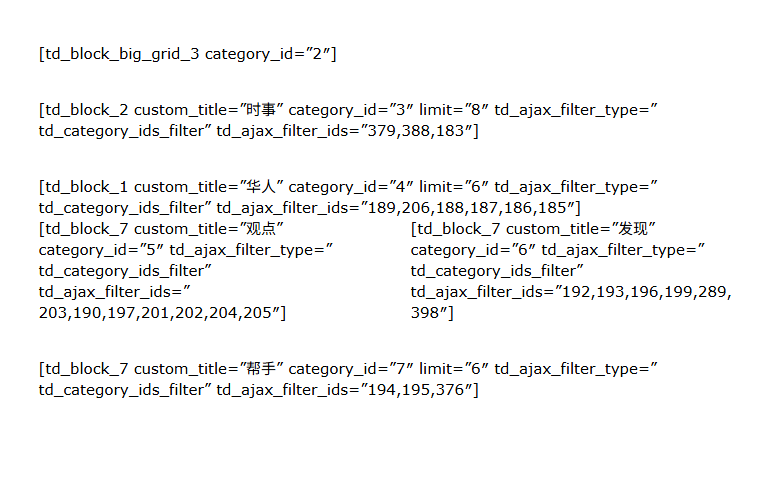
Your answer has solved my problem.
But the article you recommended also illustrates that continuing to use standard plug-ins will slow down the website.
So can I only use tagDiv Cloud Library to redesign the website? I don’t have this kind of experience and I just want to keep it. Are there any more good ways to import and export?
There is another problem:

 rumosdabolsa
Hello,
I have been developing a new version of my website after purchasing the Newspaper Pro theme. While working on localhost (XAMPP) everything was fine — the login/register section worked correctly, as you can see on the left side of the image.
However, after migrating the site from localhost to HostGator hosting, and after adding the Cloudflare and Complianz plugins (I don’t think these plugins affect this part), the Register option disappeared. On the right side of the image you can see how it looks now. (https://imgur.com/a/2NQGNN1)
I checked the forum and saw that the option “Anyone can register” should be enabled. I did activate it, but it still didn’t work.
Interestingly, on localhost the Register button appeared even when this option was disabled, which makes me think the theme handled it differently.
Could you please help me understand what I might be missing, or if there is a specific setting inside the theme panel/header builder to enable the “Register” link again?
Thank you in advance!
 De Karperhoeve
Hi,
I’m really into for support.
URL: https://dekarperhoeve.com/
I’ve followed every documentation steps, I’ve been working with ChatGPT for the last 48 hours on this menu, nothing seems to work.
On the webpage, the menu looks amazing. But when I browse via browser on phone, it’s a struggle to work on it. Somehow it’s a Cloud template and I tried so many steps with TD Composer I lost track. On the mobile version the menu I see the signin option and the social media buttons. I want these to dissapear. I can’t find it. Also when I select background color I don’t see this option.
Please Please assist me in this matter, thank you so much.
Simion C. Hi,
That’s a very old theme version. However, even if you update the theme the website should look the same.
It is important that you install the standard pack plugin after you update https://prnt.sc/AjDfjpCqFbq_ This plugin we added in Newspaper 10 contains all the old blocks and templates, which are separate from the main theme now. There is an article about it here https://tagdiv.com/newspaper-theme-update-standard-pack-or-tagdiv-cloud-templates/
Be sure to also clear the cache, or the optimized resources, or cloudflare if you use it, after updating the theme.
If you use a child theme I suggest deactivating it after updating, as it could cause problems.
And maybe it would be best to try updating on a staging/testing clone of the website first, if possible. If you have a staging already, I could take a look there as well, you can send the access details and link to contact@tagdiv.com
Thanks.
Simion C. Hi,
If you use a cloud category template https://prnt.sc/ZiKgb8aDYKDt then you must edit it with the composer and add the category description element in it https://prnt.sc/coQVn_n4OZ3u That element will display the category descriptions you have set.
I believe you already did this as I see the descriptions on the category pages at this time https://prnt.sc/LzdtrcTkmUEN
Let me know if I can help with something else.
Thanks.
Simion C. Hi,
The cloud templates should be excluded from the sitemap, they don’t have any value or reason to be included.
Most SEO plugins have options for excluding types of content from the sitemap. I believe you are using Yoast, so you can exclude the cloud templates like this https://prnt.sc/6dy1z41k91v5 You can exclude other types of content as needed. Please try it.
Thanks.
Simion C. That’s a very unusual issue. I see no conflict or something that could create such a problem.
Eventually I created a cloud header template with the composer, I made it to look like the one you were using. This one uses the fonts correctly. Please check it as well. This type of header can be customized with the composer, you can edit it from the homepage for example. You could continue using this header, and if you want to customize it and you need help, please let me know.
Thanks.
 Delicatu
 Hello. Today my site is “Briefly unavailable for scheduled maintenance. Check back in a minute.”
In error log I have:
Date: Wed, 01 Oct 2025 06:19:24 GMT
Content-Type: text/html; charset=UTF-8
Transfer-Encoding: chunked
Connection: close
Content-Encoding: br
X-Powered-By: PHP/8.0.20
Access-Control-Allow-Origin: *
Access-Control-Allow-Methods: POST,GET,OPTIONS
Access-Control-Allow-Headers: Origin, X-Requested-With, Content-Type, Accept
cf-cache-status: DYNAMIC
Report-To: {“endpoints”:[{“url”:”https:\/\/a.nel.cloudflare.com\/report\/v4?s=JUDOWwoNEqE9jB6as43O3yqW6RNSPJBjUvL1D2dNFQG4yOm2pNl9BOX9ch4hoU%2B3ivhiwyTR9kqOA2HguObN%2BxX8f%2Fj%2FElk6HpNvvg0szh4CnT4wwCmn8EY3bihJLwEzk9U%3D”}],”group”:”cf-nel”,”max_age”:604800}
NEL: {“success_fraction”:0,”report_to”:”cf-nel”,”max_age”:604800}
Server: cloudflare
CF-RAY: 9879d924ec180533-OTP
server-timing: cfL4;desc=”?proto=TCP&rtt=1275&min_rtt=1272&rtt_var=483&sent=4&recv=6&lost=0&retrans=0&sent_bytes=2836&recv_bytes=989&delivery_rate=2229407&cwnd=252&unsent_bytes=0&cid=8c11637ce6c3dd9d&ts=532&x=0″
{
“api_reply”: {
“key_is_valid”: true,
“key_status”: “active_key”
},
“debug”: {
“sql”: [
{
“query”: “SELECT * FROM ip_tagdiv WHERE IP = ‘86.107.43.36’ LIMIT 1”,
“run_time”: 5.888938903808594e-5
},
………….
[status_code] => 200
[protocol_version] => 1.1
[success] => 1
[redirects] => 0
[url] => https://cloud.tagdiv.com/api/templates/check
[history] => Array
(
)
[cookies] => WpOrg\Requests\Cookie\Jar Object
(
[cookies:protected] => Array
(
)
)
)
[filename:protected] =>
)
Why does this error occur, and how can I fix it? Thanks!
Simion C. Hi,
That depends on the type of post template you are using.
If you use a cloud post template, then you can edit the template with the composer https://prnt.sc/trKaygjQFR98 and remove the sharing buttons https://prnt.sc/tlVLbR-IqqjU
Or if you use a standard post template then you can disable the sharing bottom in the theme panel https://prnt.sc/2kdtySQQVPB_
In case there is a problem or if you have more questions please let me know.
Thanks.
Simion C. Hi,
You can add anything you want in the header. The cloud header templates can be built with the composer. There are a lot of already made header templates in the cloud library https://cloud.tagdiv.com/#/load/Headers You could import one that you like and customize it https://forum.tagdiv.com/header-manager/ Please try it and let me know if you have more questions.
Thanks.
Simion C. Hi,
That’s a bit unusual, because we use cloudflare for almost all our websites and demos, and there are a lot of theme users that use it as well.
Are you using any custom rules in cloudflare perhaps? Or you could try to create a rule to not block the theme ajax requests used for pagination.
Something like this:
https://community.cloudflare.com/t/admin-ajax-error-403/609324
https://community.cloudflare.com/t/wp-admin-admin-ajax-php-returning-a-403-error/424352
I suggest checking the rules first, you can pause them and check again. By default cloudflare should not cause such problems.
Thanks.



