
- NewsmagRequirements for Newsmag
- NewsmagtagDiv Social Counter tutorial
 jkfriendsnm
 For A), I need a clean url ending with /amp so that I can setup page cache correctly. With ?amp, it messes up the mixed caching for mobile & desktops. Please suggest how to fix the ?amp to /amp using the mobile plugin.
For B), OK
For C), how do I go about debugging this? Any suggestions?
For D), when I try to open cloud templates, I get this error: Invalid reply from server endpoint. Please suggest.
Thanks.
 Rodolfo
 I do not know what to do!!!!
I deleted from one of the pages I wanted to edit and save the Google search script. -> saved my page. I switched to another page where the google code was not there -> I tried to save and I didn’t save the page!
I did:
I disabled all plugins … all … one at a time
I emptied the brouser cache
I changed brouser
I had already disabled cloudflare
I had already disabled the cloudflare plugin
I DON’T KNOW WHAT I CAN DO AGAIN … don’t save the changes to the pages
 Decentralbox
Hello,
I installed Newspaper 10 today.
I have deactivated the standard plugin package and want to build everything myself with the Cloud Template plugin.
Unfortunately I have 2 problems:
1.) I can’t change the copyright at the bottom when I select a footer menu. How is this supposed to work? I already searched the whole backend. There is this text: “© Newspaper WordPress Theme by TagDiv”. I want to change it to my copyright.
Image: https://imgur.com/qNr4N0p
I haven’t found an option to disable this bar either, so I can simply recreate it with a footer template. Is this not possible anymore?
2.)If I want to create a footer, there is the possibility to insert social icons into the footer. But there is no way to add Telegram. Have you forgotten that? Telegram is by far one of the most important social icons. How can I add it now?
Image: https://imgur.com/KsHf5Ty
Thank you for the update. I’m really excited to see how the speed behaves when we have rebuilt our site as it looked with 9.8.
Best Regards
 Jose
JoseHi team,
Where can I modify these original files for the ones created by me in Cloud Library?
I can’t find the option on the control panel.
– single.php
– taxonomy.php
– Sidebar.php

I can’t wait to test the speed of the new update, but I still have to remove a lot of dependencies I can’t find.
Thanks
 Calin
Calin Hi,
A) The link for amp are like this site.com/page/?amp only for testing the actual link from google amp will look like this -> https://www.screencast.com/t/BqlFLsYx5
B) Please check this similar topic -> https://forum.tagdiv.com/topic/how-to-implement-adsense-amp-ads-in-amp-posts/
C) Usually this a plugin conflict that reset the mobile theme settings.
D) This can be achieve if you are using the a header template from tagDiv Cloud Library and responsive version in mobile theme ( set the option “Amp” ) in this way the logo set with TagDiv Composer will be display on desktop and mobile and the logo for mobile set in theme panel will be show only on amp version.
Hope this will help you!
Thank you!
Calin Hi,
1. Please notice that the Disqus plugin was not tested with our theme, therefore we can not provide technical support for the provide provide by this plugin, please make sure that you are using this plugin only on posts, not pages.
2. Unfortunately there is no settings for the default top bar to change the size ( height ), only the width -> http://prntscr.com/pt9edo
In order to have more control over the header and top bar we recommend to use a cloud header from tagDiv Cloud Library and edit it with tagDiv Composer
3. Unfortunately for the moment there is no option to set the social media in the order you want, sorry!
4. if the H2 is inside the content, then the settings from theme panel should be apply -> http://prntscr.com/pt9hkq, please provide some more details or a link where I can inspect this problem.
5. So if I understand correctly you want to have unique articles on pages, if is so then you can use this option -> https://forum.tagdiv.com/unique-articles/
6. The page templates are these -> https://forum.tagdiv.com/page-templates-2/the unfortunately there is no settings to make a page template, the design nee to be make with tagDiv Composer.
7. Only the the videos from YouTube will work -> http://prntscr.com/pt9ojh, maybe this option will be add in the coming updates.
8. The WP Rocket plugin was not tested with our theme, therefore I can not say how or it will work properly with our theme, sorry! -> https://www.screencast.com/t/cmPkh9jba4sZ
9. The flex can be adjust for all device individual -> http://prntscr.com/pt9qrl -> http://prntscr.com/pt9r37 you can check more about flex blocks in our documentation from here -> https://forum.tagdiv.com/flex-block-settings-guide/
10. There is an general option in theme panel -> http://prntscr.com/pt9s7p but this will not apply only on block headers that do not have set an individual style.
11. That is happen because the standard width of the website is 1068px -> http://prntscr.com/pt9z53 + margin -> https://www.screencast.com/t/FmgLs3wRkAAS when you edit the page will add and extra width from tagDiv Composer sidebar and some padding on the page content, so this will exceed the 1366px.
12. If you are referring to the mega menu next/prev buttons -> https://www.screencast.com/t/xZxnf7Sq2 then you can hide theme only with custom css, you can try this custom css
.td_block_mega_menu .td-next-prev-wrap{
  visibility : hidden;
}
The code need to be set in Theme panel> Custom code> Custom css
If you still have some questions, or I was not clear enough please let me know!
Thank you!
 Vlad S
 Hello !
Your page seems to be affected the most by the lack of a cloudflare, images, external requests as you can see it here: https://gtmetrix.com/reports/stave.myprobet.com/X5ZGKPgq
Thank you !
 Alsok
Alsok I didn’t manage to add anything to Cloud Templates. Only pictures are saved. I already have a million of them, I tried to add
https://cloud.tagdiv.com/blog-page-restro/
to Cloud Templates many times
Thanks you!
 Alina S
Hello, Community!
We know you all want to make your website faster :), we want that for you, too. Newspaper theme 10 brings you a new way to build a faster WordPress website. For the first time in WordPress, you have the freedom to choose how much code the theme is loading and optimize your website’s performance straight from the beginning.
To give you this functionality, we’ve introduced a new plugin called the Standard Pack (available to you for free.) When you update to Newspaper 10, you must activate this plugin, or your website will display the shortcodes on the frontend. We cannot make the plugin automatically activate for you, so you’ll need to go to WordPress Admin area > Newspaper Theme > Plugins and enable the Standard Pack plugin.
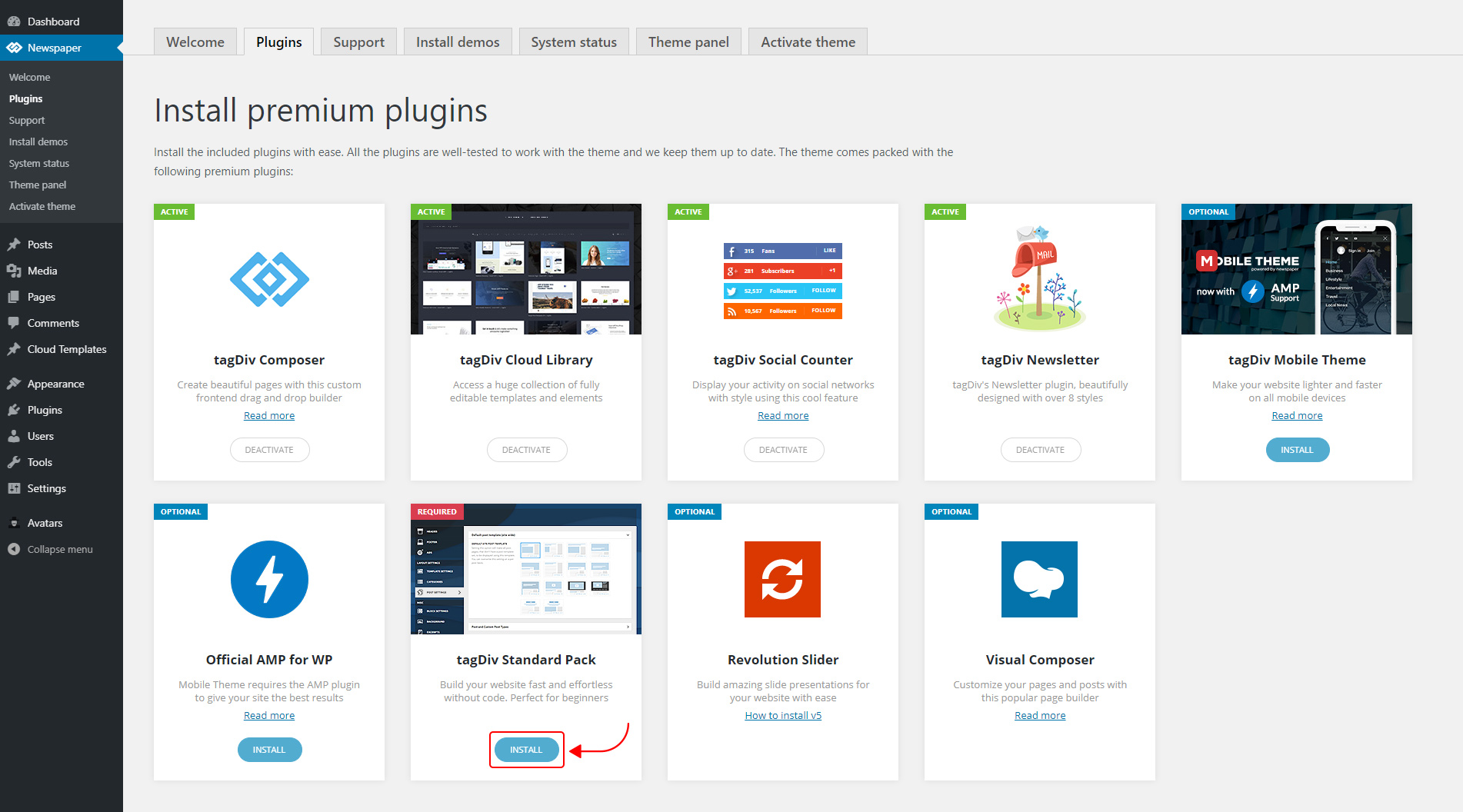
The new Standard Pack Plugin has two functions:
– it brings all the functionality you love in the previous versions
– allows you to separate things when you want to build everything customized and go for website’ performance.
The complete list of templates influenced by the Standard Pack plugin:
In the theme panel:
15 Headers
8 Category templates
10 Big Grids
19 Modules for blocks
14 Single post styles
14 Footer templates
In the tagDiv Composer:
25 Blocks
12 Big Grids
10 Big Grid Full
1 Big Grid Slide
Extra
All the demos that are not marked as PRO Demos.
You can find more details on how to use the Standard Pack Plugin in the dedicated article. When your website has no more dependencies on the Standard Pack plugin, you can deactivate it to increase the page loading time and performance.
If you need the previous version, you can download it from here (Newspaper v9.8).
I hope you’ll enjoy this update!
Thank you!
Calin Hello,
I do not quite understand, you want to show dates for one category and the posts that make part from that category? if is so then you can achieve this with using tagDiv Composer with tagDiv Cloud Library, get from cloud two single post template and two category templates and edit them, let on one category the date and set it in theme panel on the category you need to set the date -> http://prntscr.com/pt84iy, on the second category template remove the date -> http://prntscr.com/pt83zq and set it general in categories templates ( theme panel -> http://prntscr.com/pt84tg), do the same with single post template.
Also from home page you can use flex blocks and remove the date from the blocks you want -> https://forum.tagdiv.com/flex-block-settings-guide/
Hope this will help you!
Thank you!
Calin Hi,
Please notice that the Influencer PRO is made only with tagDiv Composer and cloud templates, so the settings from the theme panel will not affect the pro demos.
In order to change the logo you need to edit the header template with tagDiv Composer -> http://prntscr.com/pt32m2 -> http://prntscr.com/pt331k
Hope this will help you!
Thank you!
Calin Hi,
If you are using a header cloud from tagDiv Cloud Library, then you need to edit it with tagDiv Composer. You’ll need to do the same setting for sticky menu as you made for main menu, you’ll need to edit the sticky zone and set that image -> http://prntscr.com/pj1qw7
Thank you!
AlsokI would like that when clicking on this link
https://yadi.sk/i/o2iwBW72_3BS3A
one specific templates is always will be used, for example, this
https://cloud.tagdiv.com/blog-page-restro/
I tried saving the “blog-page-restro” template to “Cloud Templates” but could not. Media files are saved, but not the template itself.
Thank you!
 umariqbal31
 archana
I want to use Single Post Template 3 for my posts, but i am unable to add the template from cloud library, while adding it is giving an error, screenshot link- https://more.myextrapages.com/wp-content/uploads/2019/11/template.png
I also want to do sum customization to this template, like
1-Want to add side widget of “Hot News”
2-Want to change the look of social sharing icons of post
3-At end of Post only “tags” required
4-Also “More From Author” tab beside related posts
Alsok Today, after cleaning cache access to Cloud Templates has been appeared. Yesterday that didn’t work .
I will write if the error repeats.
Thank you!
 alamisharia
I need help for some issue, i can access Cloud Templates,
“Failed to contact the templates API server.” what can i do for allow this issue ?
Calin Hello,
From what I can see now the problem is gone -> http://prntscr.com/psnhjl please make sure that you set the CDN as in our guide from here .
Also I saw that you have set and image that do not longer exist -> http://prntscr.com/psnil6
Thank you!
 MML
MML Hello,
I facing a problem with view the site on desktop browser after I cleared the cache with WP Super Cache and cloud flare plugins, the site is appeared like (mobile theme) from the mobile browser
How can I fix it?

Calin Hi,
If you are using a single post template from tagDiv Cloud Library, then you should be able to edit it with tagDiv Composer and set the column text at the beginning the post content and at the end of post content -> http://prntscr.com/pslgqa -> http://prntscr.com/pslh0e -> http://prntscr.com/pslh9b -> http://prntscr.com/pslhh6
Thank you!
Calin Hello,
If you used a cloud header, then you’ll need to edit it and make the setting from this screenshot -> http://prntscr.com/psld92
Thank you!
Calin Hi,
From what I can see you are using the Newspaper theme with cloud templates -> http://prntscr.com/pskoo6 not the Newsmag theme, click on edit template -> http://prntscr.com/pskoo6 and change that text using tagDiv Composer.
Thank you!
 Thomas Dominikowski
 Okay, understood: I can load a template from the cloud library, and afterwards I can edit it in the tagdiv composer.
But what I want is slightly different: I want to edit the existing default template that comes with the “black version” theme.
I tried to find this in the cloud library, but it doesn’t exist.
AlsokI can’t open Cloud Templates.
“Loading templates…”
and after
“Invalid reply from server endpoint.”
https://yadi.sk/i/KiGeGMTEIwP7GQ
define( ‘WP_MEMORY_LIMIT’, ‘256M’ ); in wp-config.php file exist.
Thanks you!
Vlad S Hello !
All the Cloud Templates are fully editable using the tagDiv Composer. In order to edit the we recommend looking through our tutorials which can be found in here: https://forum.tagdiv.com/design-post-pages-using-cloud-library-templates/
Thank you !

