
 alaid
alaid Hi
I have the same issue
Warning: getimagesize(https://soynuevaprensadigital.com/news1053fm/wp-content/uploads/sites/3/2019/04/news-logo-180×180-negativo.png): failed to open stream: HTTP request failed! HTTP/1.1 403 Forbidden in /home/soynueva/public_html/wp-content/plugins/td-cloud-library/shortcodes/header/tdb_header_logo.php on line 639
I tried and reviewed everything you mentioned and the issue continues, no matter which header template the issue continues to appear, it is only solved if I do not use a header template.
I need to solve this urgently
-
This reply was modified 7 years by
alaid.
 pedropapito
I use Google Ad Manager and display ads of different sizes, depending on the size of the user’s screen. Mapping works perfectly (https://support.google.com/admanager/answer/3423562?hl=en). However, when creating a model of single post with Infinty Scroll in the Cloud Template, from the second post, the ads are not displayed in the correct sizes. It looks like the mapping gets lost.
Would this be a problem with Ad Manager tags or would it be a problem with Infinite Scroll?
Would anyone have a solution for this?
Here’s a sample link:
 prajwalkarki
I installed newspaper 9 and downloaded fastmag post template. I added couple block items on the sidebar, but featured photos do not load on some posts.
I use w3 total cache for caching, and visual composer to create posts.
Have tried so many things and this is not helping my website at all.
 pmats777
 I was able to migrate my customizations to the footer in a child theme by moving all of the customizations to /footer.php and disabling the footer in the theme panel.
When I tried to do the same with the header..no love. I even experimented with deleting the file in /parts/header one by one and they and no effect.
So I did what was suggested and tried to build the header in tagDiv Cloud library.
WHAT A NIGHTMARE!
I’ve been working a lot with ELEMENTOR lately which is pretty much drag and drop with granular control over everything you do.
To get things the way I wanted, requires extensive CSS manipulation (there are only limited options for creating columns) and worse when I tried to create the mobile version of the header, I started getting a barrage of error messages, which ended up nuking the whole template (hours of work lost) which I now have to go in and recreate and hope it doesn’t happen again.
If you want your big plan was to “require the use the tagDiv Cloud Library” then maybe you should have made sure that it was up to the task before this release.
And oh by the way, how the heck do I migrate from my staging site, to the live site. I don’t see any way to export anything from the library. Since your initial post said to use a staging site first to test, then what accommodations did you make for getting the template from point A to point B?
-
This reply was modified 7 years by
pmats777.
 gunhanunal
 It is giving the following error
PLUGINS DISABLED AUTOMATICALLY
The following plugins were disabled because they are incompatible with this version of Newspaper:
tagDiv Composer
tagDiv Cloud Library
tagDiv Social Counter
tagDiv Mobile Theme
Even though the plug-ins are updated online.
 Simion C.
 Hi,
That would be the 9.6.1 theme version, you can download it from here
– https://forum.tagdiv.com/topic/important-new-update-newspaper-9-7/
From what I know there are no issues currently with the cloud library plugin, haven’t seen other reports. There was an issue a few days back when the cloud server was down for a while, that has been taken care of.
What is the error you are getting? I will pass it along to the developer team. Let me know if possible.
Thanks
 Calin
Calin Hi,
If you are not using the single post template from tagDiv Cloud Library, the sidebar set in theme panel will be overwrite by sidebar set in post; if you are using single post templates, these do not inherit the sidebar and can be set only in template.
Thank you!
Simion C. Hi,
1. That is possible with some CSS. A code like this will center align the title for that smart list style – http://prntscr.com/njx38s
.td_smart_list_8 .td-number-and-title {

text-align: center;

}
It will align it regardless of using a sidebar or not.
2. A post can have only one featured image set. Such a result visually could be achieved if for example you use a cloud template and enter an image element in the post template, and position it over the featured image. Like in this quick example
– http://prntscr.com/njx65m
But that image will be the same for all posts that use that post template, it won’t be a different image unless more post template are created each with a different image.
Thanks
 daler96
 Hey Catalin,
Thanks for the advice, indeed using Header Cloud Template gives more control over header.
 BYS
BYS Hi Vlad.
Sorry for impatience.
I specifically mentioned the ‘related posts’ next-previous arrows, showing more related posts. And specifically in ‘Cloud Templates’.
This button don’t work anymore!
I’m not talking about next articles funktion.

Regards BYS

 Vlad S
 Hello !
In order to have a global header that can be customized you have to import one from our cloud library and then set it up in the theme panel. After you do that you will have a fully customizable header all around your website. Please take a look at this documentation regarding how to use cloud library and also i’ve posted a picture to show you how to activate the header.
https://tagdiv.com/what-is-the-cloud-library/ ;https://www.screencast.com/t/vgYmI0ICAvgD
Thank you !
Simion C. Hi,
@printing3d This method is quite old, there are other ways now. Now it is possible to create category templates with the tagDiv composer (cloud templates)
– https://forum.tagdiv.com/tagdiv-cloud-library-plugin/
– https://cloud.tagdiv.com/#/load/Category
Using a cloud category template, the category description is an element, it can be positioned in any location possible – http://prntscr.com/njvs57 so displaying it just before the footer is a matter of drag and drop – http://prntscr.com/njvsjj
The code solution may still work, but it would be impractical. Since the 9.7 update many theme files were moved in the tagDiv composer plugin – https://tagdiv.com/updating-the-core-of-tagdiv-themes/
So they can’t be modified in a child theme anymore, they have to be modified in the plugin. This means this modification will have to be made after each theme update. The category template files are now here – http://prntscr.com/njvtzb
Let me know if you have more questions.
Thanks
Calin Hi,
The Newspaper theme update brings a change for the theme implementation.
When you’ll be updating to the Newspaper 9.7 version, you’ll need to activate the tagDiv Composer to keep the Newspaper theme functionality you’ve previously used.
Otherwise, you will have basic WordPress functionality, complying with Envato WordPress Requirements – https://help.author.envato.com/hc/en-us/articles/360000472383-WordPress-Theme-Requirements
Please read this article we wrote on the new update https://tagdiv.com/updating-the-core-of-tagdiv-themes/ to learn what it changes and what you must do in order to keep the functionality intact.
The 521 error is a Cloudflare error/problem, please make sure that you made all settings for Cloudflare ( CDN ) like in our documentation -> https://forum.tagdiv.com/cloudflare-cdn/ also clear all the caches, purge CDN files and check the results.
Thank you!
Simion C. Hi,
Block 22 is a predefined block, it will always look the same
– https://demo.tagdiv.com/newspaper/block-22/
When on two columns there will be only one module.
You could check some block designs made by us based on flex blocks, maybe you find something you like or similar to block 22
– https://cloud.tagdiv.com/#/load/Blocks
For example this one – https://cloud.tagdiv.com/#/single/page/Blocks/537
These can also be modified, flex blocks have many customization options
– https://tagdiv.com/discover-flex-blocks-customization/
– https://tagdiv.com/tagdiv-composer-flex-block-elements/
Let me know if you have more questions.
Thanks
 spu
spuHi,
We created a new single post cloud template and we are facing an issue.
1) When the article ends, there is a lot of white space. We tried reducing the margin too, but when we reduced margin/padding then the box below it which is the author’s box, goes into the article/overlaps it. How to resolve this? (example https://www.gadgetbridge.com/news/oneplus-7-pro-press-renders-leaked-shows-full-display-and-triple-rear-camera-setup/)
2) In infinite loading, when the next article appears the statement on Chrome tab shows undefined. This should not be the case. It should show the article name. https://prnt.sc/njsw9l
3) When someone is reading an old article, say from 2-3 days ago or older. When they scroll down and trigger infinite scroll/auto load, they see an article before that date only or the next article of that day. Is there a way to show them the latest articles from the current date.
4) When can we get infinite scroll/auto loading on mobile single post pages?
5) How can we show the time also when the article was posted. Right now, only date appears, but Google gives extra marks if time also appears.
Thanks
Website: gadgetbridge.com
Simion C. So when you edit that header with the composer there are errors. What if you import the header again from the cloud library and try to edit it?
If the same happens, we could take a look at it. Send us an email at contact@tagdiv.com and provide admin login. Include a link to this topic in the email. Let us know.
 tausifkhan
 Hi there
I have checked cloud library there is no 2 sidebar template,
and single post the composer does not show http://prntscr.com/njndkk
 berg
bergWhen I click the main image of a WooCommerce product, the theme header appears on top the lightbox and image. See here:
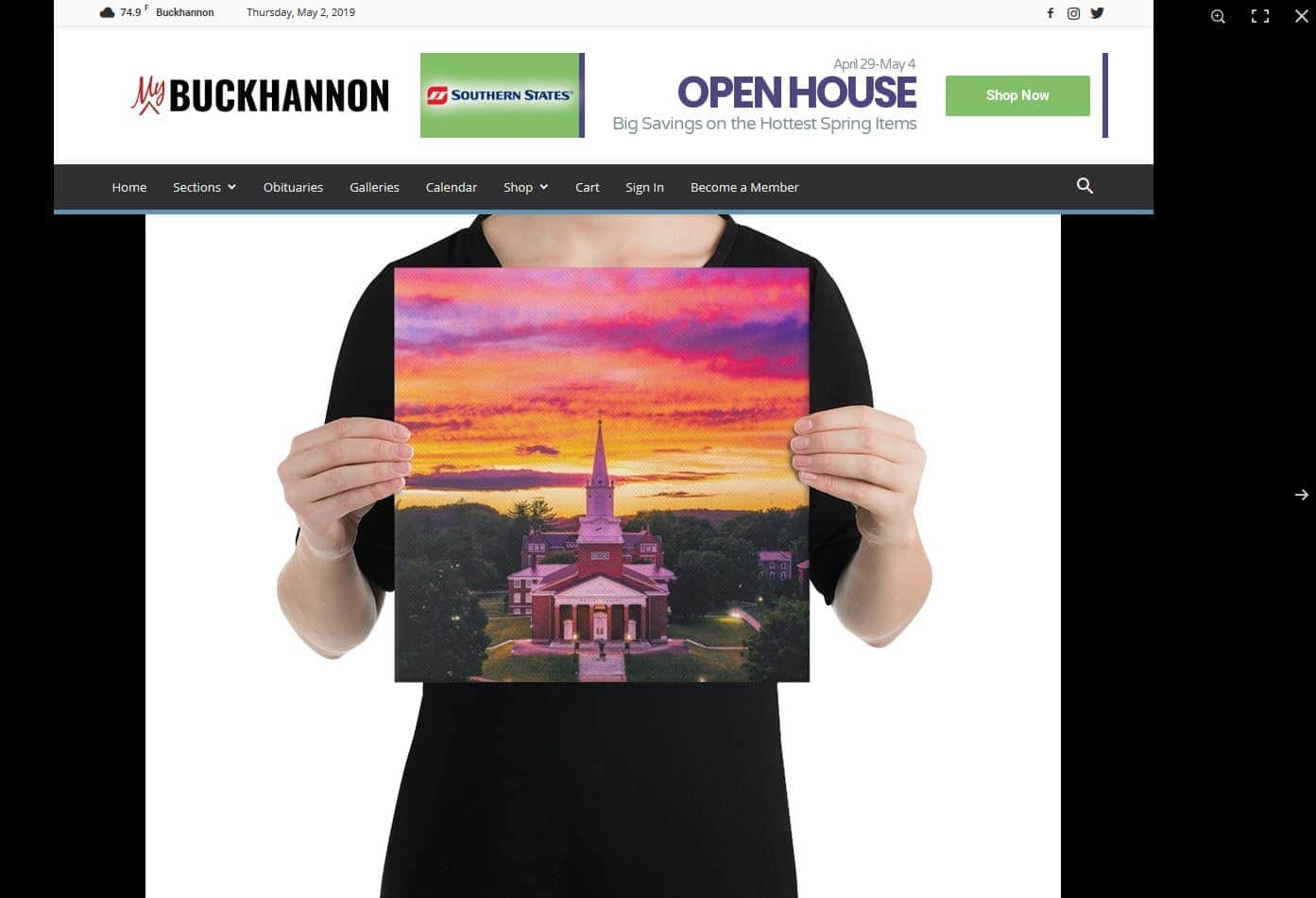
https://www.mybuckhannon.com/store/art-store/pictsburgh/hurricane-clouds-over-wesleyan-canvas/
How can I reverse the order so the lightbox is on top?
 getfreshtoast
Need a copy of the version beforetagDiv Cloud Library Version 1.2. The newest version is causing the theme panel to have an error.
 egm_ar
 Hi Catalin, thanks for your answer!
This is what happens when I try to do that:
1 – http://prntscr.com/njj3hk
2 – The cloud template library doesn’t automatically opens, so I have to click on TagDiv Composer http://prntscr.com/njj460
3 – Here I go to Load Template http://prntscr.com/njj5kb
4 – And the Single Post doesn’t show: http://prntscr.com/njj60e
Now, look what I found out in the process:
When I click in the “Add New” on the left menu, I don’t get the whole library. That’s the only way I have to add a new template….but if I go to the Published or Draft categories, then I do have the “Add New” button on top of the page:
Which it does open the whole cloud template library:
So now, happy 😛
Calin Hi,
Please note that the single post templates can be apply only on posts, what you can do is to get from tagDiv Cloud Library the homepage for Fast News -> https://www.screencast.com/t/Eclm12xL3x1p
Thank you!
Calin Hi,
The cloud library seems to work alright at the moment, may have been something temporary with the servers. Let us know if you have any further problems with it.
Thanks
Simion C. Hi,
So you want to do this in a page or in a post? In a post it would be possible but only if you use a cloud post template – https://forum.tagdiv.com/tagdiv-cloud-library-plugin/
– https://cloud.tagdiv.com/#/load/Single
These row layouts – http://prntscr.com/njiawg will appear only if the cloud library plugin is active. Maybe you are not seeing them because of this.
Thanks
Simion C. Hi,
@ML You can edit the template of the category page, if it is a cloud category template
– https://cloud.tagdiv.com/#/load/Category
– https://forum.tagdiv.com/tagdiv-cloud-library-plugin/
The template can contain any of the elements available in the composer. You can add blocks, grids, text etc. Let me know if you need help or you have more questions.
Thanks
Simion C. Hi,
Now it should work correctly, I believe there was a temporary problem with the cloud library server. Please try again, and sorry for the inconvenience.

