
- TutorialstagDiv Social Counter Tutorial
 Anamaria
 Hello,
Please make sure that you have installed the plugin tagdiv Cloud Library and tagdiv Opt-in BuiLDER. When you have shortcodes on the page it means that you don’t have the plugins installed and activated.
Thank you!
 babak.s.z
Hi there
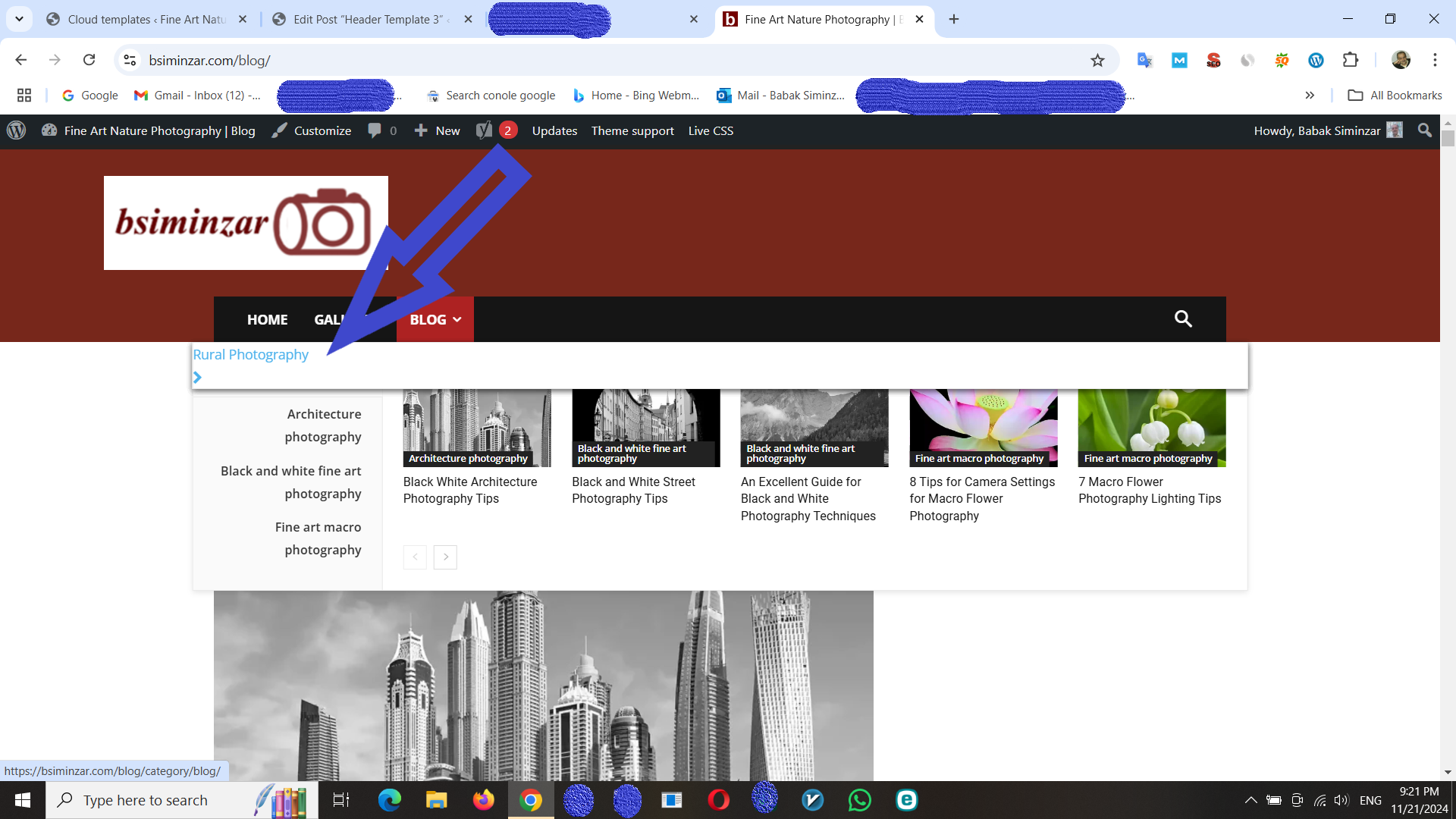
In the picture, you can see a redundant box between the menu and the mega menu. I marked it with an arrow, and the name of the last category, Rural photography, is displayed on it. I downloaded the header from the cloud and edited it. The redundant box covers the top of the post images in the Megamenu. How can I remove this box? I did not find a way.
bsiminzar.com/blog/
 jatt
jattHi all,
I am using newsmag with movile theme and amp and have cache plugins like wprocket. I tried clearing all cache including varnish cache, wp rocket cache, cloudflare cache but the mobile theme is still showing old version of my site and i am not able to know how to fix this. Please help to have the mobile theme clear its cache everytime a post is published or changes are made.
Site: androidcrunch.com
Anamaria Hi,
Normally the most used one is the one that appears on comments, the one from opt-in builder was added for the options provided with the opt-in builder plugin, but it can be used now for anything.
Here are all the files that are related to login and register and can be used with our theme (depends on the templates and options you choose):
– wp-content/plugins/td-composer/legacy/Newspaper/parts/register.php
– wp-content/plugins/td-composer/legacy/Newspaper/parts/header/td-login-modal.php
– wp-content/plugins/td-cloud-library/parts/tdb-login-modal.php
– wp-content/plugins/td-cloud-library/parts/tdb-comments.php
Thank you!
 Oktay
OktayI am using the East Coast pre-built website as the main template. I want to import specifically just this page which is from the Cali Sight website.
I open the East Coast “post listing” page with composer but I cannot find the Cali Sight “post listing” page in the cloud library. How to import that specific page? Thanks
Anamaria Hello,
As I said, please create your modules. Those that need to be done in the code are more difficult to achieve than you want.
You need to edit the both files https://i.imgur.com/d89A60O.png, so please create your own module with tagdiv Composer and cloud template https://forum.tagdiv.com/modules-builder-newspaper-theme/
Thank you!
Anamaria Hello,
Unfortunately, like that, there is no cloud template. That template is made custom like that. You need to set the caption here https://i.imgur.com/NmRFa8P.png and this will be displayed in the post content -> https://i.imgur.com/kh9mFf4.jpeg
Thank you!
Anamaria Hello,
You can use two cloud templates; one with a featured image and one without a featured image. You can duplicate the single post template, and delete the featured image element if the post is video format and assign that template for this type of the posts https://forum.tagdiv.com/featured-image-or-video-7/
The same steps are for all templates -> https://forum.tagdiv.com/topic/how-to-add-different-sidebare-for-different-posts-with-the-same-category/
Thank you!
Anamaria Hello,
To have a gallery for posts, you need to use a cloud template https://i.imgur.com/nu0Mwvy.png -> https://i.imgur.com/SzmqJh6.jpeg
Thank you!
Anamaria Hello,
When you have shortcodes on the page, you don’t have one or more plugins installed and activated, such as the tagDiv Composer and tagdiv Cloud Library.
After you update the theme, you must also update the theme plugins.
In most cases, plugins install automatically after an update. However, they might not install if the update is performed with active extra plugins or if the site has certain restrictions.
Thank you!
 MKJ
MKJ As I said in my previous post: No, I can’t download a template from the cloud library. This is why I asked how to create it manually. A blank template would be fine. I just don’t know where it is stored. Besides, I have no clue why the template wasn’t copied. But again, the customer did the migration.
 Mark Gilbert
 I have managed to work around by modifying the Town Talk template as here:
…but it involves inserting the image in WordPress (never any fun) and I would rather have a cloud template that automatically includes a featured image in this position – so please do answer my initial enquiry above.
Another question: if I do use the WP method and manually insert the featured image, how can I get the featured image to show the caption allocated in the media directory? I can’t see any option to so in WP, nor in the Single Post Content element.
Thanks
MG
 manufacturing-international
We are not seeing the author or source in the top of the article. Site is manufacturing.international working with newspaper 12 theme.
example page is here of the issue
Feedzy said this:
“Feedzy is designed to be compatible with a wide range of themes and plugins, including popular ones like Newspaper 12. However, conflicts can still occur due to the specific configurations or customizations in place. As you can see in my screenshot, the Newspaper 12 theme is enabled, and the author is visible correctly on the page. The problem occurs when we enable the tagDiv Cloud Library plugin. We recommend that you please contact the theme author and ask them to check why it is happening. Since they developed the theme, they are well-equipped to guide you on this matter.”
Their screen shot
https://vertis.d.pr/i/cRiDxf
My guess is their is another way to fix this besides disabling the tagDiv Cloud Library. I think that may have other ramificaitions
Please help
Mike
Mark GilbertHello – is there any single-post cloud template that imitates the standard post template, with featured image cut into the post content on the left? I have flicked through the cloud templates but none seem to cater for the possibility of a very deep featured image, like this example below, where you don’t want a huge picture before arriving at text:
https://jazzjournal.co.uk/2024/09/10/pat-metheny-stories-beyond-words/
Thanks
Mark Gilbert
Anamaria Hello,
Using the import/export option from the theme will allow you to import only the theme panel settings, to import the cloud templates go in tool > export – https://i.imgur.com/3Wxk885.png then to import you need to go in tool > import, then install the wordpress importer and clink on run import – https://i.imgur.com/tyxoVvg.png
Also, you have to use a plugin for migrate https://wordpress.org/plugins/duplicator/
Thank you!
Anamaria Hello,
Usually, this error appears when there is a plugin conflict, so please let only tagdiv plugins activate and check after. Also, do you use nginx server? If you have nginx, you need to set pretty links because sometimes this causes the issue https://cloudarcade.net/tutorial/pretty-url-on-nginx-server/ -> https://www.cyberciti.biz/faq/how-to-configure-nginx-for-wordpress-permalinks/
Thank you!
 jackpapy
 I went to Cloudflare, and the Rocket Loader was already disabled. I then created the request with Rocket Loader disabled, but it still doesn’t work.
Here are the error messages I see.
consol error
Anamaria Hello,
Please check this topic https://forum.tagdiv.com/topic/column-text-wp-editor-not-working/
Also, if you are using Cloudflare, please make sure that is set as in our guide https://forum.tagdiv.com/cloudflare-cdn/, you need to disable the Rocket Loader.
Thank you!
 egosuriname
Hi,
I am facing an issue where the cloud template for categories loads different content on mobile, and I don’t know why.
I turned off the mobile and AMP plugins as I want to have the same structure on every device.
But the category template is showing different results if loaded from mobile.
I can load the same category page from a browser and resize it to mobile and get the desired result. But the moment I toggle the device toolbar, it renders something different.
Image Browser Responsive
Image Browser Responsive
Image Device Toolbar
Image Device Toolbar
Anamaria Hello,
You have the mobile theme plugin activated; please deactivate it and clear the cache.
Using our theme, you can choose from 3 mobile versions
-> mobile responsive => https://www.screencast.com/t/oJ2ShOp47
-> mobile theme plugin => https://forum.tagdiv.com/the-mobile-theme/
-> mobile page => https://tagdiv.com/newspaper-10-3-7-update-brings-customizable-and-fast-mobile-pages/ The option that you need to use.
Suppose you created the mobile pages with tagDiv Composer. In that case, when you install the Mobile Theme plugin, your pages will be overwritten by the plugin (the mobile theme comes with its templates for page, post, category, etc, so your current templates from the desktop theme will get converted to the mobile theme layout, the page content is made without builders in mobile editor => https://www.screencast.com/t/xbgZG8kH also, the options that are provided to edit the mobile theme version are limited (this keeps the things simple)).
This is a video about Responsive Newspaper Theme, AMP & Mobile Theme, Mobile Pages & Templates -> https://www.youtube.com/watch?v=SpGkOnJeNZY.
So, the mobile responsive is what you see when that you select the viewport on phone => https://www.screencast.com/t/matV17hH, so some settings may apply for each viewport(where is the border blue), and others are not(where the border is black).
The mobile page has the mobile templates from Cloud Library => https://www.screencast.com/t/YCcZ8rL8
The Mobile responsive version of the theme and the mobile page editor can be edit with tagDiv Composer, the mobile theme plugin cannot.
For example, you can have the mobile theme plugin activated and use the mobile page/mobile responsive version for the homepage/pages, but for the categories pages/404 page, you can’t use the mobile page/mobile responsive version if you have the mobile theme plugin activated.
So, if you want to design the pages with tagDiv Composer, you can use the mobile page or mobile responsive version.
Thank you!
 b1lly2sheds
After installing a pre-built website on Newspaper (in my case Cosmopolitan Pro), the site does not display as per the demo. Are there extra steps to take when configuring the theme settings? Do you also have to install the cloud templates for the homepage, posts etc? The demo looks completely different and doesn’t incorporate the layout and design I like.
What else do I need to do to get the demo site working and looking like the preview?
I’m running the very latest version of Newspaper, and have tried the cloud templates as well with no luck. Have deleted all posts and pages and have tried removing and reinstalling the pre-built Metropolitan Pro demo, but still doesn’t work.
Any help or advice appreciated as it’s driving me nuts!
Oktay Yes that is what I did.
I created a page called “Articles”. I customise it with cloud library blocks. It looks like this for example: https://prnt.sc/Jv50u3UhI6qb
But when I change the posts page on settings>readings>Posts page to “Articles”, the green button “Edit with TagDiv Composer” button disappears and the appearance reverts to default layout and does not show my customise design. It looks like standard template again when I set the post page to my custom design: https://prnt.sc/p5rcGqXXOEQ6
With the post page set to “Articles”, it says “TD Composer is disabled on Posts page” and does not permit me to edit the page via the cloud library. See this link: https://prnt.sc/cJiaBgRzfjuA.
Again the appearance becomes just a standard layout despite that I customised it prior to setting it to Posts Page.
 David
DavidHi, how can the sticky cloud header be set to display only when a user scolls back up? I remember that this was somehow possible (at least the none cloud headers were able to display on upscroll via smart snap).
Thanks!
 Hellpress
Hi, I have updated the Newspaper theme and got into a mess. Before the update all the content images that appeared in categories were the same size, and now each one appears cropped differently, without keeping the same ratio / proportion between them.
My webmaster died two months ago and all I do is experiment without success. This is a screenshot: https://imagizer.imageshack.com/v2/385x425q70/r/922/PYRCB5.jpg
My webmaster also had a modified functions.php that he uploaded every time he updated the theme, which solved a lot of things, although I don’t know about this. For example I have lost the header and footer “wordpress-driven” I had before and I have redone them as I could with Cloud Templates. I do not know how to recover the old ones (maybe uploading the modified functions.php instead). I also don’t know how to remove these empty columns to make everything more compact:
https://imagizer.imageshack.com/v2/991x340q70/r/922/fVPDfG.jpg
Anamaria Hi,
You can create your own blog page, and after set the blog page here -> https://i.imgur.com/n3QYYIT.png You can import what blocks you want from tagdiv Cloud Library.
Thank you!



