
 Anamaria
 Hello,
I’m glad that you managed to solve it.
Usually, the color and image are set on the row, so please edit with tagDiv Composer and select the row and go in the tab CSS, and there you can add/remove it
Have a great day!
 rainteq
Hello,
I use a newspaper with default Pro as a prebuilt template (12.6.8). I am struggling with containers. I would like to force the background image/color in containers to be full-width, but the content keeps the padding as it is.


I tried a few different ways but none gave proper results in stretching the background image, and changing padding in CSS for 0px does more harm than good:
@media (max-width: 767px) {

    .tdc-row.td-stretch-content, .tdc-row-composer.td-stretch-content {

        padding-left: 20px;

        padding-right: 20px;

    }

}
Result of changing padding from 20px to 0px:

Current mobile look of the image as the background of container

Result that I would like to get

Container structure in BLock Builder looks like below:


I would be grateful for help.
 cherryannwilliams
I updated the website domain (from dailyscoopslu.com to saintluciadailypost.com) in DreamHost using the domain update tool. It seems to have worked everywhere except in the header background image which still uses the old domain. As a result, the image path is broken. I have been trying unsuccessfully to fix this using TagDiv Composer but the particular area can not be selected. As such, the background image can not be added to the correct div. I checked the code and the code below is where it should be updated, but I can not find a place I can click on the page to access this div, not can I figure out where it is in the database. How can I fix this?
<div class=”tdi_29_rand_style td-element-style”><div class=”td-element-style-before”><style>.tdi_29_rand_style>.td-element-style-before{content:”!important;width:100%!important;height:100%!important;position:absolute!important;top:0!important;left:0!important;display:block!important;z-index:0!important;background-image:url(“https://www.dailyscoopslu.com/wp-content/uploads/2024/11/xxx_menu-bg_xxx.jpg”)!important;background-position:center center!important;background-size:cover!important}</style></div><style>.tdi_29_rand_style{background-color:#f9f9f9!important}</style></div>
 Bettina
 Hello!
I’m glad! Deactivate the Woocommerce and Opt-in builder plugins after you delete their elements from the page. You can use another element for login, a basic one, without needing those plugins. Please edit the search template with the tagDiv Composer, click on that block, and check the settings, or use a flex block instead with no offset value.
Thank you!
Bettina Hello!
You should check the errors from the console (CTRL + right-click -> Inspect -> Console) while is loading, so you can see which errors are you encounter there.
Please check the steps from here: https://forum.tagdiv.com/topic/unable-to-edit-text-with-title/ and also other possible issue as here: https://forum.tagdiv.com/topic/403-error-on-tagdiv-composer-when-trying-to-use-wp-editor-wpedito-php/
Please check your .htaccess file: https://www.screencast.com/t/MJ78SDZr4Gl -> https://forum.tagdiv.com/general-options-may-interfere-newspaper-theme/
Let me know the results!
Thank you!
Bettina Hello!
You should not add any code to the theme file because it will be overwritten when you update the theme.
If you are required to add some code between the head and body, you should add it there(Theme panel -> Analytics/JS Codes).
You can also add the ad code in the theme panel and choose where to display the ad in the shortcode Ad box from tagdiv composer using a cloud template.
In the cloud templates, you can add the ads when you edit the post with TagDiv Composer in the “Single Post Content” element in the ADS tab. Documentation here: https://forum.tagdiv.com/article-ads/
Or you can use the element called “Ad Box” from TagDiv Composer, and there you need to add the ads: https://forum.tagdiv.com/ads-adsense-overview/
Thank you!
Bettina Hello!
The cloud template should be edited with TagDiv Composer. If you want to add a shortcode from a plugin, then you can use “column text” or “text with title” elements from TagDiv Composer. These elements have a button called “edit content” and if you click on that button, the wp editor will open and you can add the shortcode there, press SAVE and view. Check this example: https://forum.tagdiv.com/add-cryptocurrency-price-ticker-widget/
Let me know the results!
Thank you!
Bettina Hello Dimitri!
You can add a flex block builder shortcode in Gutenberg, but you should also specify the module name and ID.
For example: [tdb_flex_loop_builder cloud_tpl_module_id=”47861″]
tdb_flex_loop_builder => This is the name of the flex loop builder that is general
The module name and ID can be found if you first build the flex block builder in the tagdiv Composer: https://app.screencast.com/zVWPVDzI5QYbt. From here, you can get all your info.
I can also help you via email at contact@tagdiv.com if you let us know all the details.
Thank you!
 David
DavidHi,
I have a single background image in my Cloud Template, placed above the fold, but it’s currently being loaded lazily (td_lazy applied). This causes a noticeable delay in the image rendering, which I’d like to avoid.
I want to disable lazy loading only for this specific image, while keeping the lazy loading functionality enabled for all other images on my site.
- The image is part of a TagDiv Cloud Template
- The td-lazy-img class and data-img-url attributes are applied automatically.
I attempted to override the lazy loading behavior with CSS, but the td_lazy JavaScript seems to reapply it.
Question:
Is there a built-in way to disable lazy loading for a specific background image in the TagDiv Composer or Theme Panel? If not, what would be the recommended method to handle this efficiently without affecting other images or performance?
Thank you for your help!
 magnusstrandberg
Hey
I like to add shortcodes in the tagdiv composer (not the predefined ones), like one can do in the standard WP-editor. How is that possible?
Cheers!
Anamaria Hello,
I don’t have access to the link -> https://i.imgur.com/HZ9xItZ.png The tagDiv Composer is our page builder and it can be used for building pages and cloud templates, but not for creating posts. For this, you’ll need to use Gutenberg or a classic editor.
Using tagDiv Composer, you can build/edit the single post template (the layout of the posts).
Here is a video that will show you how to use the builder to create a website from scratch https://www.youtube.com/watch?v=SoGQ0d5kIBg to do this you’ll need to have the posts already.
Thank you!
Anamaria Hello,
I see; I recommend using a cloud template for the tags/posts/categories/search and so on because are more flexible and you can edit them with tagdiv Composer https://forum.tagdiv.com/how-use-tagdiv-cloud-library-templates/ -> https://forum.tagdiv.com/cloud-library-templates/
To change now the text color is by using a custom code css-> .td-page-title, .td-page-title h1 {
color: red!important;
}
Set the code in Theme Panel ->Custom code -> Custom CSS
Also, the posts from this block are working -> https://i.imgur.com/gOni3jB.png can you please provide more details about your issue?
Thank you!
Anamaria Hello,
You have the mobile theme plugin activated; please deactivate it and clear the cache.
Also, this plugin Spectra has not been tested with the theme and can cause issues.
Using our theme, you can choose from 3 mobile versions
-> mobile responsive => https://www.screencast.com/t/oJ2ShOp47
-> mobile theme plugin => https://forum.tagdiv.com/the-mobile-theme/
-> mobile page => https://tagdiv.com/newspaper-10-3-7-update-brings-customizable-and-fast-mobile-pages/ The option that you need to use.
Suppose you created the mobile pages with tagDiv Composer. In that case, when you install the Mobile Theme plugin, your pages will be overwritten by the plugin (the mobile theme comes with its templates for page, post, category, etc, so your current templates from the desktop theme will get converted to the mobile theme layout, the page content is made without builders in mobile editor => https://www.screencast.com/t/xbgZG8kH also, the options that are provided to edit the mobile theme version are limited (this keeps the things simple)).
This is a video about Responsive Newspaper Theme, AMP & Mobile Theme, Mobile Pages & Templates -> https://www.youtube.com/watch?v=SpGkOnJeNZY.
So, the mobile responsive is what you see when that you select the viewport on phone => https://www.screencast.com/t/matV17hH, so some settings may apply for each viewport(where is the border blue), and others are not(where the border is black).
The mobile page has the mobile templates from Cloud Library => https://www.screencast.com/t/YCcZ8rL8
The Mobile responsive version of the theme and the mobile page editor can be edit with tagDiv Composer, the mobile theme plugin cannot.
For example, you can have the mobile theme plugin activated and use the mobile page/mobile responsive version for the homepage/pages, but for the categories pages/404 page, you can’t use the mobile page/mobile responsive version if you have the mobile theme plugin activated.
So, if you want to design the pages with tagDiv Composer, you can use the mobile page or mobile responsive version.
Thank you!
Anamaria Hello,
Please let me know if you have used the shortcode from Composer for my account page for woocommerce. Can you please provide some screenshots?
You can create a new page, publish and edit it with tagdiv Composer and add the element https://i.imgur.com/lvhOJh5.png -> https://i.imgur.com/YE4JYGK.png -> https://i.imgur.com/VENbBnm.png
Thank you!
Anamaria Hello,
You have the mobile theme plugin activated; please deactivate it and clear the cache.
Using our theme, you can choose from 3 mobile versions
-> mobile responsive => https://www.screencast.com/t/oJ2ShOp47
-> mobile theme plugin => https://forum.tagdiv.com/the-mobile-theme/
-> mobile page => https://tagdiv.com/newspaper-10-3-7-update-brings-customizable-and-fast-mobile-pages/ The option that you need to use.
Suppose you created the mobile pages with tagDiv Composer. In that case, when you install the Mobile Theme plugin, your pages will be overwritten by the plugin (the mobile theme comes with its templates for page, post, category, etc, so your current templates from the desktop theme will get converted to the mobile theme layout, the page content is made without builders in mobile editor => https://www.screencast.com/t/xbgZG8kH also, the options that are provided to edit the mobile theme version are limited (this keeps the things simple)).
This is a video about Responsive Newspaper Theme, AMP & Mobile Theme, Mobile Pages & Templates -> https://www.youtube.com/watch?v=SpGkOnJeNZY.
So, the mobile responsive is what you see when that you select the viewport on phone => https://www.screencast.com/t/matV17hH, so some settings may apply for each viewport(where is the border blue), and others are not(where the border is black).
The mobile page has the mobile templates from Cloud Library => https://www.screencast.com/t/YCcZ8rL8
The Mobile responsive version of the theme and the mobile page editor can be edit with tagDiv Composer, the mobile theme plugin cannot.
For example, you can have the mobile theme plugin activated and use the mobile page/mobile responsive version for the homepage/pages, but for the categories pages/404 page, you can’t use the mobile page/mobile responsive version if you have the mobile theme plugin activated.
So, if you want to design the pages with tagDiv Composer, you can use the mobile page or mobile responsive version.
Thank you!
 Alex harper
 – wp-content/plugins/td-composer/legacy/Newspaper/parts/register.php
– wp-content/plugins/td-composer/legacy/Newspaper/parts/header/td-login-modal.php
– wp-content/plugins/td-cloud-library/parts/tdb-login-modal.php
deleted all codes from this 3 file now extra code has removed
Anamaria Hello,
The settings from theme panel are used for standard templates, only for a few elements.
You can change that color in the tagdiv composer: https://app.screencast.com/Zeot2ydVHgKZg
Edit your article with the TagDiv Composer; click on that element, and you can see those settings.
Also, you can create global colors -> https://forum.tagdiv.com/tagdiv-composer-website-manager/
To change the font and color for the mobile menu please go to Theme Panel -> Theme Colors -> Mobile menu/mobile search => https://www.screencast.com/t/0CvSgXp9H to set a background image go in Theme Panel -> Background -> Mobile menu/mobile search => https://www.screencast.com/t/uvDejzbX to change the font from Theme Fonts => https://www.screencast.com/t/ANBQe7hQhJd
To set the menu edit with tagdiv Composer, select the viewport for phone element and change the menu https://i.imgur.com/JJJ1WB7.png
Thank you!
Anamaria Hi,
You should check the errors from the console (CTRL + right-click -> Inspect -> Console) while it is loading so you can see which errors you encounter there.
Please check the steps from here: https://forum.tagdiv.com/topic/unable-to-edit-text-with-title/ and also another possible issue as here: https://forum.tagdiv.com/topic/403-error-on-tagdiv-composer-when-trying-to-use-wp-editor-wpedito-php/
Please check your .htaccess file: https://www.screencast.com/t/MJ78SDZr4Gl -> https://forum.tagdiv.com/general-options-may-interfere-newspaper-theme/
Let me know the results!
Thank you!
 mlazzeri
I need to update the newspaper theme version: 9.2.2 to the last one and I don’t see the update button to get the last version automatically.
Now I had to deactivate the tagdiv Composer plugin because is infected.
I want to update automatically, how can I make this action?
 perspektive
theres a white bar at the top of the website (perspektive-online.net) and i cant find a way to remove it, neither in the tagdiv composer of the pages nor in the customizer. it also wasnt there on the stage website (stage.perspektive-online.net) where i built the pages and imported them to the original page.
Anamaria Hello,
Please let me know what error you have when you try to edit with tagdiv Composer.
Thank you!
 remodelschool
My tagdiv composer stopped working randomly about 24 hours ago. I tried to update the theme to the most recent version and I keep receiving this error:
“An issue has been encountered while trying to validate your license key
Please reset the key from the System status tab and try to activate it again, or contact our customer support team at contact@tagdiv.com.”
I reset the key and then I even purchased another key just to see if that would resolve the issue. Neither solution worked. I need help to resolve this issue ASAP as I use my site to sell products and I can’t update it.
What are my options?
 Pazan
PazanHello,
I’m experiencing an issue with the Newspaper theme and the tagDiv Composer. When I click on “Edit Content” in the frontend editor, the screen keeps loading indefinitely, and I’m unable to make any changes to the content.
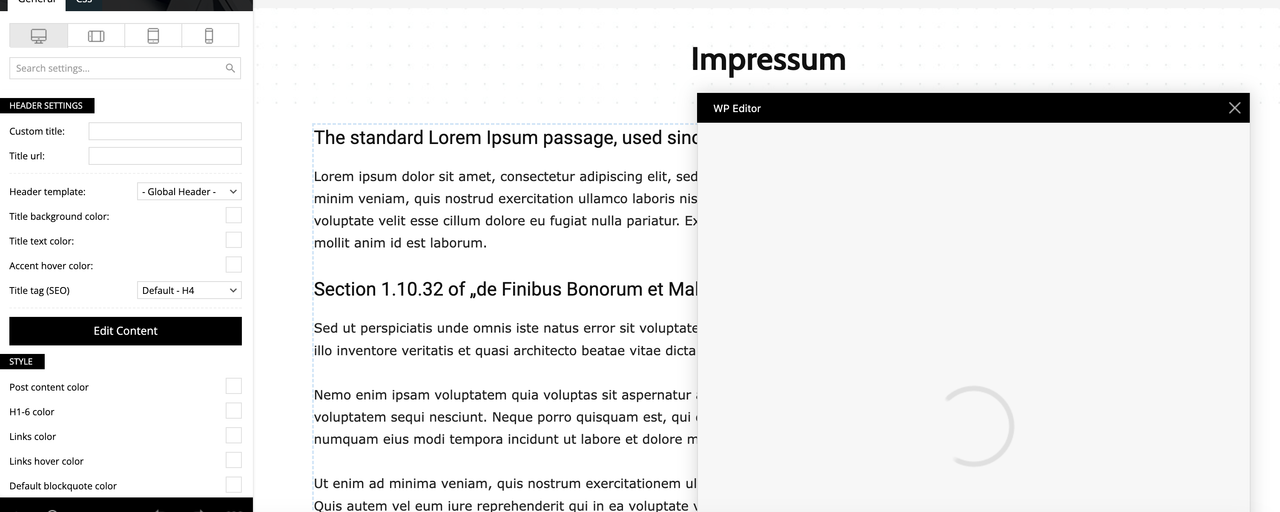
Here is some information about my setup:
Theme: Newspaper (Version 12.6.8)
Page Builder: tagDiv Composer
PHP Version: 8.0.30.4
WordPress Version: (6.7.1)
Memory Limit: 256M (recently increased, confirmed in the system status)
Server: GoDaddy hosting
Steps I’ve Already Taken:
Increased PHP memory limit to 256M in wp-config.php.
Cleared browser and WordPress cache.
Despite these actions, the problem persists. Could you please advise me on how to resolve this issue? I’m unsure if it’s a conflict or a server-related problem.
Thank you in advance for your help!
Best regards,
(Philipp)
 jay-2
jay-2I can’t edit my website through tagDiv Composer. Please help
Anamaria Hello,
A shortcode can be inserted using the element “Column text” or “Text with title”. “Column text” and “text with title” elements have a button called “edit content” and if you click on that button, the WP Editor will open, and you can add some text/code/shortcode there. Close the WP Editor from X, save the changes from Composer and view the page to see the changes.
Please also to add only the shortcode without other parameters https://i.imgur.com/1tIpVr4.png
Thank you!



