
- TutorialsFrom WPBakery to tagDiv Composer
- TutorialsDefault Block Settings Guide
- TutorialsOffset Feature
- TutorialstagDiv Social Counter Tutorial
- TutorialsHow to Update the WPBakery Page Builder plugin
 Simion C.
 Hi,
A first method to place ads in pages is to use the ad box element provided in the composer
– https://www.screencast.com/t/4LCPkXYb
– https://www.screencast.com/t/5sg0zniuQry
In an Ad box you can select from ad spots in which you entered ad codes. You can select from the custom ad spots and the sidebar ad. So if you have ad codes in those sections they will be displayed
– https://www.screencast.com/t/RdYdifrG0P
Another method is to use a widget sidebar element
– https://www.screencast.com/t/lg9DUisvapqT
Maybe you already have created sidebars containing ads and set them for posts. You can also set them for pages with the widget sidebar. In it you can choose from all your sidebars
– https://www.screencast.com/t/hrl9rBGZ
Worth mentioning that if you select the latest articles template for a page
– https://www.screencast.com/t/7M3xC7WNB
This section that displays your latest posts will appear at the bottom of the page, you can select a sidebar for it as well.
Please let us know if you have more questions.
Thanks
Simion C. Hi,
So there is still a problem with the composer. You could try the solution mentioned in this topic, it worked for similar cases when the composer would not load
– https://forum.tagdiv.com/topic/javascript-error-td-composer-wont-load/
Also could be caused by insufficient resources, this is a guide you can read
– https://forum.tagdiv.com/newsmag-requirements-for-newsmag/
Setting a memory limit of 256M would be enough for most users.
In case the problem remains, you could try another suggestion. To eliminate a plugin being the cause, deactivate them all except theme plugins. Check if this has any effect.
Let us know the results after trying these suggestions.
Thanks
 Calin
Calin Hi allmyhoney,
You need to have the plugin tagDiv Composer install and activate, after that the field will appear in your theme panel.
Thank you for your understanding.
 Graphic Oracle
 Hi Catalin,
I created a page rule on Cloudflare that removes the admin area of the website from any of Cloudflare’s settings. I now receive an “Error 520” when attempting to access the tagDiv composer plugin. The “Live CSS” feature of the theme does work. So I did remove Cloudflare from the equation as tagDiv email support suggested with no luck. Other than this, the site works perfectly fine.
 Jean-Paul
 Just to add, The composer you guys have needs to improve…a lot. The padding is comical! The website is https://www.aculco.co.uk. Look at the first advert, Sonria Dental’. The spaces above and below are as big as the advert itself!
Then, I try and reduce them only to be told that ‘Invalid Page Template’.
Jean-PaulIn TAGDIV COMPOSER, I went to the CSS page and tried to reduce the padding. I set it to 0 around the border I wanted to. When saving it, nothing happened and I got a RED box stating ‘Invalid Page Template’. Can you help with this please?
 ALM2000
 Thanks for the response.
I followed your directives and the frontpage is now back online. (Still curious though, how it got changed in the first place, because the site was fine for months and I made no changes).
Thanks once again.
However, I’m still unable to edit the page with TD Composer, (Even after adding the code to htaccess, as directed). The panel shows on the left, but the big rolling icon (that shows it’s loading) just keeps going on continuously without ever starting.
Please help.
Thank you.
 feroz-hasan
My Newspaper 9 Theme Plugin tagDiv Composer Not Working. Show this error message
This page isn’t working
sirajganjtimes.com didn’t send any data.
ERR_EMPTY_RESPONSE
My site >>> https://sirajganjtimes.com
 artimag
Hello tagDiv team,
Your theme is awesome but I have three problems I can not solve.
1. I have a problem with my full big grid block.
I turned off the date and the author name on the homepage. It works everywhere except the full big grid block at the top.
There appears under the headline a small gray box (remains of the td-module-meta-info)
I can hide the box with ther CSS code
.td_block_big_grid_fl_1 .td-module-meta-info{
display:none;
}
The problem with the method is that when the page loads, the date still appears for about a second and then disappears. Since the big grid block is at the top of the homepage, the date is visible to everyone for a short time.
Interestingly, the little gray box appears in every browser except in Firefox.
2.) In tagDiv Composer I get the error message at the top
Notice: Undefined index: post_ID in */wp-content/plugins/wordpress-seo-premium/premium/classes/premium-metabox.php on line 146
In the file premium-metabox.php is written:
/**
* Retrieves the post ID from the globals.
*
* @return {int} The post ID.
*/
protected function get_post_ID() {
return $GLOBALS[‘post_ID’]; (<- This is line 146)
3.) At Dashboard -> Plugins -> Add New I get the error message at the top
Notice: Undefined property: stdClass::$plugin in */wp-includes/class-wp-list-util.php on line 150
In the file class-wp-list-util.php is written:
/*
* This is simple. Could at some point wrap array_column()
* if we knew we had an array of arrays.
*/
foreach ( $this->output as $key => $value ) {
if ( is_object( $value ) ) {
$this->output[ $key ] = $value->$field; (<-This is line 150)
} else {
$this->output[ $key ] = $value[ $field ];
}
}
return $this->output;
}
/*
Can you help me?
Many Thanks
best regards,
arti
Simion C. Hi,
As a first note, the mobile theme plugin is optional. You can find out more about it here
– https://forum.tagdiv.com/the-mobile-theme/
1. Pages do work, it’s just that while the mobile theme is active you have to create two versions for each page. One with the composer or in any way possible with the theme, and one with the mobile editor and it’s simple capabilities
– https://www.screencast.com/t/IJiXKgISxx
So this plugin would be used only if you intend to display a simpler and lighter version of the website on mobile. If not, deactivate it and the same content from desktop will show on mobile.
2. Currently categories will appear there even if they have no posts. I believe this might change in a future theme update. Sorry for any inconvenience.
Thanks
Simion C. Hi,
That would be a current issue with the composer, it is already fixed and the theme is going to be updated. A quick fix is provided in this topic
– https://forum.tagdiv.com/topic/tagdiv-composer-and-apostrophes-in-text/
We are very sorry for this inconvenience.
Simion C. Hi,
That would be possible with the tagDiv composer. But you could also do that with some CSS in the Advanced CSS sections of the theme panel. In this example I used a code that will make the post title to have one size for desktop and a different one on mobile.
For example – https://www.screencast.com/t/FtI5BZBrz
– https://www.screencast.com/t/KXe20qLZr
– https://www.screencast.com/t/8V19sgOOn
With the browser inspector you can create the code and then enter it in the theme panel
– https://forum.tagdiv.com/create-custom-code-using-the-browsers-inspector/
Simion C. Hi,
In the footer you can either choose from the predefined footer templates
– https://forum.tagdiv.com/footer-templates/
Some have predefined content (your widgets will appear below this content) others are empty and will display only your widgets.
Or create a page containing the elements you want, then place it as a footer page
– https://www.screencast.com/t/cEKzmEhcs
In this case you can simply design a page with the tagDiv composer and set it as mentioned.
Note that through the cloud library plugin you also have access to footer page templates
– https://forum.tagdiv.com/tagdiv-cloud-library-plugin/
– https://www.screencast.com/t/hfsfoH5bE
These templates can also be customized by you in the composer if needed.
Thanks
 pavel@earnware.com
So after hitting save button, closing a page, then opening it up again in TD COMPOSER moder – near every ‘ symbol, this symbol is added \ so in the end all ‘ – are – \’
I just added ‘ on this page below, closed it, opened it again – with TD Composer and here is what it added automatically:
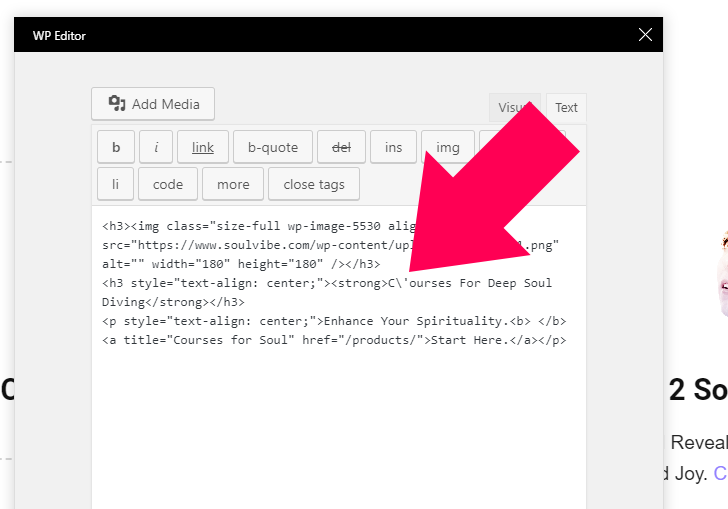
I am talking about ' symbol – ASCII: apostrophe-quote
So to be clear, I close it – open it again – and I work in Column Text.
ALM2000Hello,
Please I need your urgent intervention. The frontpage of my site, http://africanleadership.co.uk, just stopped functioning all of a sudden.
Other pages are still OK, but the frontpage (and all pages also handled by TD Composer plugin) are no longer showing.
All that shows is the top menu.
Thanks for your prompt response
 jeff6923
Hello,
I am struggling to design my footer.
I would like to have 4-5 links centered like on this tagdiv forum theme or this website https://www.mindbodygreen.com/.
What is the process through the composer to have the same results ?
Additional question : is it possible to have the parallax effect with a background image in the footer like on https://www.mindbodygreen.com/ ?
Thanks !
Geoffray
 paragraf22
Hello,
We use the dentist theme as a basis for building our project.
We can not find a way to put a url on the photo(element, column, row) of the specialists and clicking on the individual team photo to lead to an internal database (category) where the profiles of the team’s specialists are announced.
Is there a way to do that?

 uzairktk
 I think the tagdiv composer should have a backend editor similar to WPBakery. Never used the frontend editor on WPBakery either and I think most / all other buyers would agree.
Calin Hi KokoShanel,
Please activate the tagDiv Composer ( https://www.screencast.com/t/bFCg7zkgIr ), and you will be able to active that demo.
Thank you for your understanding.
 bobbymc
 Not sure I made my question clear – for example this page was created with TD Composer https://brandinginasia.com/china-surpasses-u-s-as-samsungs-biggest-market/
I want to convert it to cloud template. I don’t want to have to convert all 5,000+ posts. How can I change a previous post style to the Cloud Template?
 afterKa
Hi,
I need to implement a big search box like this one (at the beginning of the website) http://www.greenmedinfo.com/
and can’t know how to do it. Should I use a specific TagDiv Composer box or write code?
Thank you a lot.
Calin Hi,
The best way will be if you migrate to TD Composer, in that way you will be able to use cloud template.
You can read more about How to move your pages to tagDiv Composer here: https://forum.tagdiv.com/visual-composer-tagdiv-composer-transition/
If you decide to take this step please make a full backup first.
Thank you for your understanding.
 themes10
I get this error when I try to open TAGDIV Composer today:
“Errors happened during tdcIframeData.init() -> bindViewsModelsWrappers()!”
How can I fix this ?
Calin Hi,
Using TD Composer that will be very easy just take a look at this example:
For desktop/px: https://www.screencast.com/t/SAFcdXJml
For mobile : https://www.screencast.com/t/Jkyq8kRlsx
You can read more about TD Composer in this documentation: https://forum.tagdiv.com/tagdiv-composer-tutorial/
Thank you.
Graphic Oracle Hi Catalin,
The website has already been converted to SSL and running through Cloudflare. Everything is working perfectly. The ONLY glitch is that the Tag Div composer on the home page will not load— I keep receiving a “522 Error”. Tech support at Cloudflare is confused by this also. I have toggled Cloudflare settings as well as WordPress plugins. No luck. I was thinking of deleting the Tag Div Plugin, then reinstalling it. However, I could not find anything in the knowledge base about how to do this properly. Would you know how to remove and reinstall the Tag Div Composer plugin without damaging the existing content? Thank you.
