
 Calin
Calin Hi c386,
There was a different option added, now you can create mobile pages and mobile templates using tagDiv Composer and you can use the same content/layout or you can set a different content/layout – https://tagdiv.com/newspaper-10-3-7-update-brings-customizable-and-fast-mobile-pages/ also the options that can be edited per devices have a left bar like this one – https://i.imgur.com/ZDYeyLa.png
Thank you!
 khenline
Hello I am not able to change any colors when working in TagDiv composer on any of my pages.
fromtheinfield.com
 thelansingjournal
https://thelansingjournal.com/
I’m using the Header Live Search element to be able to search my site for previously published information. I looked at the options for this element in tagDiv Composer, but they all seem to relate to the style the results appear in rather than the quality of the results themselves. Are there any settings I can change that might lead to results that are actually more relevant to my search?
For example, when I search for “Sierra Club,” the first result listed is a story titled “Local Sierra Club to host ‘Members’ Slides Night’,” which is relevant, but it was published in January. Is there a setting that would list results in reverse chronological order, so that “Local Sierra Club to host ‘Birding in the Fall’ (published in October) would be listed first?
Also, the second search result is “Financial concerns force Lansing Country Club to sell,” which does not have the word Sierra in it anywhere, and it was published in 2021, so it is neither relevant nor recent.
Is there any way I can affect the search results I get by changing settings in the Header Live Search element in tagDiv Composer?
 arkeonline
 Thanks, do I need to do this in a whole new created (cloud) post template? My current loaded template (imported demo) does not support the Tagdiv composer to make adjustments as far as I know.
Also, how do I make the content area 1358px width when working with percentages for the width?
 besthomegear
Please provide simple steps to Add Users’ Review Ratings for each Post, Site-Wide. The “Reviews” in the dashboard, or Tagdiv Composer, or Classic Editor?
Or if this is a Code Snippet, where/what is it?
thanks
Kevin
 Bettina
 Hello @ezilins !
A shortcode can be inserted by using the element called “Column text” or “Text with title”. For example, in the step3 here: https://forum.tagdiv.com/add-cryptocurrency-price-ticker-widget/
“Column text” and “text with title” elements have a button called “edit content” and if you click on that button, the WP Editor will open, and you can add some text/code/shortcode there. Close the WP Editor from X, save the changes from Composer and view the page to see the changes.
I hope that helps you!
Thank you!
Bettina Hello Rob!
We have 3 options for mobile versions that you can use:
1. Responsive version: A responsive version of your website looks similar to the desktop version. TagDiv Composer is used to edit the page.Click on the mobile viewport: https://www.screencast.com/t/XDQJedlggSB. There, you can see your mobile version and edit or adjust the elements to look better.
2. Mobile pages: https://tagdiv.com/newspaper-10-3-7-update-brings-customizable-and-fast-mobile-pages
3. Mobile theme plugin: The Mobile Theme is a performance-optimized theme included in the main Newspaper theme that only loads on mobile devices. It comes with its own templates and designs for pages, posts, categories, etc., so your current templates from the desktop theme will get converted to the mobile theme layout. Please see https://forum.tagdiv.com/the-mobile-theme/ and https://forum.tagdiv.com/mobile-theme-introduction/ for more information.
A full explanation is here: https://www.youtube.com/watch?v=SpGkOnJeNZY
If you need to use mobile version 1 or 2, then you need to uninstall the Mobile Theme plugin and AMP.
Thank you!
 joviberton@gmail.com
Hi i got a problem with the pic from Instagram.
You can see at unamamma.it , the column on the right has the Instagram fatch plugin, with everything but the images. They were there, until a couple of weeks ago.
Then they did not appear anymore.
In the console they are listed as “Failed to load resource: the server responded with a status of 403 ()”, and following the URLs they say “URL signature expired”.
So I tried to
– pump the php.ini
– pump the .htaccess
– disabling the cache
– revoking the access from the Instagram application, because the ‘revoke’ from Theme Setup is not working https://forum.tagdiv.com/instagram-widget/
but nothing worked out the problem.
Checking the area inside the TagDiv Composer, and changing setup, this appears “Error decoding the Instagram API json”.
Thanks
 WEALTHSIDE
 Hello Bettina
Yes I know, the TagDiv Composer shows everything fine. But if I open the website with my smartphone it is not displayed correctly. Sometimes even a standard template is loaded.
Rob
 Sophia_FACES
 These are the error logs from your website:
/home2/qzj6hn7y/public_html/wp-content/plugins/td-composer/legacy/common/wp_booster/td_util.php
/home2/qzj6h in /home2/qzj6hn7y/public_html/wp-content/plugins/td-cloud-library/td-cloud-library.php
Which direct to the plugins under your website.
Bettina Hello @davidglass !
We have a shortcode in the TagDiv Composer that can be added to a cloud page called the Authors box that displays a list of your authors.
Thank you!
Bettina Hello!
A shortcode means the element Flex block or Posts Loop from the TagDiv Composer.
So, the element Flex block with a special filter, for example, the current category, will dynamically display the posts from the current category depending on which one you are in. So, you need to add a flex block with that filter in the category template once, and it will display the posts for each category if you have the same category template assigned to your categories.
You can use a flex block with a special filter instead of a big grid. Set an offset to the posts loop of how many posts display the previous element, the flex block.
Thank you!
 ezilins
Themes–> Widgets –> Special page
How can i add in widget without tagDiv Composer table of contents?
Just can’t find in widgets, table of contents.
Image : https://ibb.co/JtRct35
Bettina Hello @oposum !
Please execute these steps:
1. disable TagDiv Composer
2. uninstall(delete) TagDiv Composer
3. install TagDiv Composer
4. activate TagDiv Composer
Clear all the cache and try again.
If the problem is still there, then contact us via email at contact@tagdiv.com and provide the following:
– admin url and credentials
– cpanel url and credentials
– a link to this topic in order to identify you
We will take a look and try to help you asap.
Thank you!
Bettina Hello @Olawax!
This issue with the error from Composer has also been discussed here: https://forum.tagdiv.com/topic/errors-at-columns-elements-5/
Please make sure you did all the steps which I mentioned here: https://forum.tagdiv.com/topic/errors-at-columns-1models-0dom-the-model-does-not-match-the-content-curr/
If the problem is still there, then contact us via email at contact@tagdiv.com and provide the following:
– admin url and credentials
– cpanel url and credentials
– a link to this topic in order to identify you
We will take a look and try to help you asap.
Thank you!
Bettina Hello @iamramgarhia !
We have 3 options for mobile versions that you can use:
1. Responsive version: A responsive version of your website looks similar to the desktop version. TagDiv Composer is used to edit the page.Click on the mobile viewport: https://www.screencast.com/t/XDQJedlggSB. There, you can see your mobile version and edit or adjust the elements to look better.
2. Mobile pages: https://tagdiv.com/newspaper-10-3-7-update-brings-customizable-and-fast-mobile-pages
3. Mobile theme plugin: The Mobile Theme is a performance-optimized theme included in the main Newspaper theme that only loads on mobile devices. It comes with its own templates and designs for pages, posts, categories, etc., so your current templates from the desktop theme will get converted to the mobile theme layout. Please see https://forum.tagdiv.com/the-mobile-theme/ and https://forum.tagdiv.com/mobile-theme-introduction/ for more information.
A full explanation is here: https://www.youtube.com/watch?v=SpGkOnJeNZY
If you need to use mobile version 1 or 2, then you need to uninstall the Mobile Theme plugin and AMP.
From my point of view, if you don’t use the Mobile Theme plugin, then there is no reason or benefit to AMP. Unfortunately, AMP is not working with the cloud templates because the AMP’s layout is not fully customized.
The AMP version works best with default templates and not cloud templates. That’s why we integrated it with the Mobile theme plugin.
The feedback from our clients about AMP was negative and it is not used anymore, that’s why we didn’t add more customization options.
Thank you for understanding!
 Simion C.
 Hi,
You could try it in a testing/staging install first. A copy of the website can be created with the duplicator plugin for example, or by any other means. Then you can remove the Newsmag theme and its plugins, and install the Newspaper theme and its plugins.
Then it depends on how you want to proceed. One way would be to install a Newspaper demo, which will provide a new homepage and the templates. Or you can import demo parts, they are all available in the cloud library https://cloud.tagdiv.com/#/load/All
Besides sharing a few blocks from the composer, they are different themes after all.
In terms of risks, not sure what to say. Be sure to move your ad codes, analytics codes, also check the SEO, set the widget sidebars. If you use a child theme perhaps, that will have to be remade, in case it is still needed. If you have other pages, check those as well after switching the themes, they may have to be rebuilt or adjusted.
Let me know if you have questions, we can discuss more.
Thank you!
Bettina Hello @RPECAdmin !
This site can’t be reached. Let me know exactly which element is there. Did you enable it from the theme panel settings, or can you click it when you edit the homepage with the TagDiv Composer?
Thank you!
 dlicoppe
 We understood where the problem was coming from, it was Adblock which was blocking the ads and which was not displaying the ads in the composer. Thanks to the team for the help.
Bettina Hello @fpnet !
You can load the Portuguese / Brazil languages: https://forum.tagdiv.com/loading-translations/ and correct it in the Newspaper-> Theme panel-> Translations-> Translations and replace the words on the right side.
In the cloud templates, you can add the ads when you edit the post with TagDiv Composer in the element called “Single Post Content” in the tab ADS. Documentation here: https://forum.tagdiv.com/article-ads/
Or you can use the element called “Ad Box” from TagDiv Composer, and there you need to add the ads: https://forum.tagdiv.com/ads-adsense-overview/
You can set the ad to display in posts after X paragraphs, please check this topic: https://forum.tagdiv.com/topic/google-adsense-in-articles/
You can specify also the Par.(Paragraph) in the tagdiv Composer.
Thank you!
 commandeleven
 Hello Bettina,
They aren’t working as they should.
When I use the pages created by TagDiv Composer, there are no payment options.
When I use the WordPress native composer, there are payment options available.
Here’s the screenshots: https://imgur.com/a/XseSA2N
There seems to be some problem with the TagDiv Composer and the plugin that we use for payments.
Regards,
Khalid
Bettina Hello @Kari7 !
This issue with the error from Composer has also been discussed here: https://forum.tagdiv.com/topic/errors-at-columns-elements-5/
Please make sure you did all the steps which I mentioned here: https://forum.tagdiv.com/topic/errors-at-columns-1models-0dom-the-model-does-not-match-the-content-curr/
If the problem is still there, then contact us via email at contact@tagdiv.com and provide the following:
– admin url and credentials
– cpanel url and credentials
– a link to this topic in order to identify you
We will take a look and try to help you asap.
Thank you!
Bettina Hello Rob!
I can see that you use the responsive version. A responsive version of your website looks similar to the desktop version. TagDiv Composer is used to edit the page. Click on the mobile viewport: https://www.screencast.com/t/XDQJedlggSB. There, you can see your mobile version and edit or adjust the elements to look better.
Thank you!
 samnash68
hi
I am using User Frontend plugin to upload posts with audio files.
I am also using ACF for custom fields.
I managed to upload audio files okay and I can see the audio files in the backend WordPress posts
However I was not able to add the audio on my post page.
Do I need a special plugin to display the audio on the post page?
and where can I find the audio element on the tagdiv composer?
arkeonlineI can’t figure out how to do something that should be relatively simple to do with the Newspaper theme.
I want to have a single post layout with on both sides a configurable sidebar (either through Appearance > Widgets, or the tagDiv composer). The layout should be as shown in the image below.
I did create the 2nd sidebar, but I can’t seem to figure out how to add both sidebars to the single post template and have one appear on the left, in a width of 300px, then have the content div of 728px and then the right sidebar with 300px as well. I can only select either right or left sidebar from the post / blog template section in the admin.
Example of how I want it (not Newspaper): https://shorturl.at/czK38
Example of what I have now (with Newspaper): https://shorturl.at/kAIJO
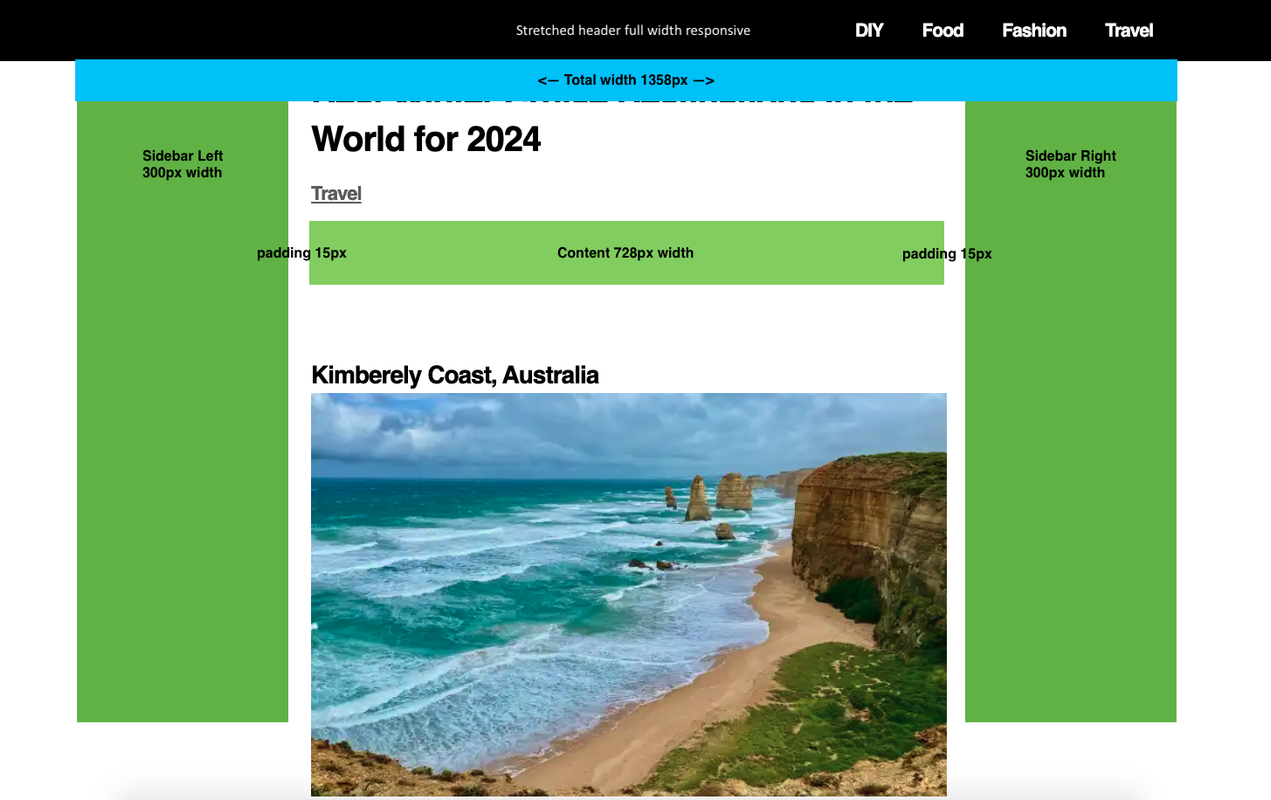
Please let me know how to achieve this layout for my single post, with the correct dimensions and keeping the content area centered. Thank you.

