Alin [tagDiv]
 Hi,
Unfortunately there is no option for this if you are displaying for your front page latest post. Visual Composer plugin works only on pages, so if you change to front page static: http://screencast.com/t/sm1LGx0DV and you build an Homepage you can always add that block above the footer.
For example I use a block 5 for Latest Articles, a Widgetised Sidebar and Block 16 for Latest Videos:
http://screencast.com/t/I1QDWDrg
For your setting on block 16:
http://screencast.com/t/Tv1OAQhv9XO
http://screencast.com/t/ZjJ61rph7A
http://screencast.com/t/b8sUu7ogV
Hope this helps!
 mrbambang
 It works! Thanks Lucian.
I have another question about the visual composer. In Backend Editor, we can set the column by clicking on the pencil icon (Edit menu this column). On the tab “width and responsiveness”, there is an option to hide columns on certain devices that are checked in. I try to check on some screens, but when checked from smartphones, there is no difference with the previous. This function does not work.
http://screencast.com/t/K9NAxYL0
How do I fix this? The goal is to ensure that the content on the small screen (smartphone) is less than on the desktop, so access is faster and more efficient. Thanks.
 Lucian
 Hi,
I have checked yours site and also noticed the slow functionality of search feature and that it’s also not working. I’m not sure about this as this should work fine as I have also tested this and found no issues with it.
Please also make sure you update your VC plugin, you are now using the 4.3.4 version and the version we have included with the latest theme version(4.6.1) is 4.3.5.
I also suggest to check this without any plugins active, leaving just the Visual Composer plugin active, as this could happen due to other plugins which you use.
Please use this guide to update the Visual Composer plugin and upload the plugin from the /plugins folder which was provided with the theme files: https://forum.tagdiv.com/update-the-visual-composer-plugin-wpbakery/
There is no option to disable search only if you edit this file an remove it’s code like this:
* http://screencast.com/t/B7a7kAoA4EQ
* http://screencast.com/t/x9yeu6aN2UrC
Regarding the rev slider issues please make sure that you remove the current plugin that you have and install it from the plugins folder of the theme files.
Also noticed that you are not using MySQL but Microsoft SQL which I’m not sure that is compatible with revolution slider plugins and send this error. Have you used this plugin before on this host?
Please let me know how it goes!
Thanks
 simchris
 You might post the issue on the Yoast SEO support page on WordPress.org. If you have the “premium” version of plugin, you can ask them to check your site for you.
TagDiv does not manage the Yoast SEO plugin.
I’m using it on ALL our sites with no issues, with various themes.
Also note that technically there is no “index.xyz” file just your website:
So, on the “page” you create to develop your home page be sure to put in all the info for Yoast to optimize it. It should work.
If you have a problem, it might be another plugin, or caching.
Try editing the Yoast settings with ONLY the Visual Composer plugin running, and Yoast SEO, and ALL other plugins OFF.
Lucian Hi,
Yes, the VC version tested and included within the Newspaper theme files is version 4.3.5.
You don’t have to worry about the plugin update warnings just ignore them.
We will test it and we will release an update with the new version of VC as soon as they will fix issues that apparently they have with the current version. You can see their forum for more info: http://codecanyon.net/item/visual-composer-page-builder-for-wordpress/242431/comments?page=332
Thanks
Alin [tagDiv] Hi,
I have checked your site on IE and I didn’t found that issues:
http://screencast.com/t/f9avL1RemM
http://screencast.com/t/SLq2Xjed
http://screencast.com/t/cJmNJndel
Please make sure you use last theme version(4.6.1) and if you are not, update the theme using this guide and the FTP method: https://forum.tagdiv.com/how-to-update-the-theme/ Also update Visual Composer plugin from the /plugins folder that was provided together with the theme files when you’ve downloaded.
After that please deactivate all plugins, leave only Visual Composer active and try again. Also make sure you empty cache and purge files if you use any CDN host services.
Thanks!
Lucian I understand now, sorry about that! Those grid columns are created using text block elements from Visual Composer page builder and the columns layouts like this: http://screencast.com/t/4iBp3ZelXmgv
I’m not sure about the js matter as I need to inspect your site to make an idea about it so please provide if possible your site’s URL and also let me know if you have tried this without plugins.
Thanks
 Finland
I’m using an SEO plugin by Yoast but the homepage index removed.
when i search domain.com. search results domain.com/category or posts.
yoast seo

homepage with visual composer

Alin [tagDiv] Hi,
I checked your site and I found JavaScript errors in console: http://screencast.com/t/PJbZgOA0 which means that a plugin’s script is conflicting with theme’s js and causes this.
Please make sure that you use this right using this guide: https://forum.tagdiv.com/video-playlist-newsmag/
and check this without any plugins active, empty all caches/purge files if you use CDN host services then check again (leave just the Visual Composer plugin active).
I have also tested this with last theme update(1.4) and found no issues with it: http://screencast.com/t/zsDoB2yfJD
Thanks!
mrbambang Dear Emil,
Visual Composer only worked in the Page editor box, how to activate this feature in Custom Content Type?
Thanks.
 kovachx
Hi there,
I want to know is it possible to add the icons from visual composer and assign them to the menu. For example I want to have a computer icon representing my pc section on the menu. I don’t know if its possible or I have to use another plug in. Also I want to know how can I set margin for the Logo and menu so I can reposition them the way I want and also how can I move the advert from the header above the Big slider.
 newbie
Hi,
it would be kind if you could fix this bug with a high priority as is really annoyoing:
If I install Newspaper and only install the MUST use Plugin (Visual Composer) but not the other suggetesd Plugins (like Jetpack, Contactform, socaial Counter tagdiv)… I will get on newly created Users (with custom Roles (=not having admin rights)) the following Admin Notice:
“Sorry, but you do not have the correct permissions to install the Contact form 7, Jetpack, Revolution slider and tagDiv social counter plugins. Contact the administrator of this site for help on getting the plugins installed.
Dismiss this notice.”
This is major Bug because of two things:
1.) These users do not habe any Install_Plugin Capabiities so will never be able to install a plugin! This does not make any sense at all, showing this message to a user, that only has subscriber rights/role etc…
2.) Secondly I have installed the must use plugins (but not the recommended plubings) and therefore all requirements are fulfilled. So this message should even for administrators not be printed, once the must use plugins (Visual Composer) is installed.
Code is in:
public function notices() {
global $current_screen;
// Remove nag on the install page.
if ( $this->is_tgmpa_page() ) {
return;
}
=>you should at least include a check if the user has the install_plugin capability!
=>I also reported some months ago a bug similar, wthere the Activation Messages is shown also to all users (this is a similar problem)…
thanks
 salocharly
Hi guys,
I have google custom search results code in a page, I added the code in visual composer. The thing is that when i look from mobile results are cutted and not responsive. what can I do regarding this?
Thanks!
 nikkidale
 Hell Alin,
Thanks for the suggestions. I’ve updated my theme to 4.6.1 and tried disabling all of the plugins except for Visual Composer, but the font still doesn’t load in Firefox. Do you have any other suggestions?
Thank you,
Nikki
 newsthrottle
 To confirm, the latest in the bundled folder for Newspaper Theme for Visual Composer is 4.3.5? This is the tested and certified correct? We still receive the update message for VC within WP dashboard FYI. The latest VC has numerous updates, will this be applied and tested soon to Newspaper Theme? This was the original topic and questions from all. Thank you for the support
Alin [tagDiv] Hi,
I checked your site and found that your theme is not updated. Please update the theme to the latest version(4.6.1) following this instructions: https://forum.tagdiv.com/how-to-update-the-theme/
After that disable all plugins(leave only Visual Composer active) and see if the issue persist.
This should solve the issue because you also have some errors in console: http://screencast.com/t/WtqnlxlbjT
If you still have issue with this please provide more details about the steps you have made to loads custom fonts.
Thanks!
simchris Yes, you don’t need the update for anything yet … the updated version of Visual Composer has bugs and not fully stable.
A new version tested to work with the theme will be included with next theme update.
As noted in second post on this thread, current version tested compatible with the theme is 4.3.5.
The bundled version is only updated when the theme is updated. You cannot update it separately, nor would you want to as it might break the theme custom modules 🙂
SEE STICKY TOPIC TOP OF FORUM FRONT PAGE:
https://forum.tagdiv.com/topic/how-to-update-visual-composer-2/
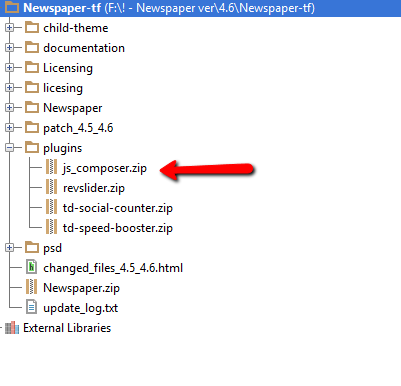
The Visual Composer plugin that comes with the theme is licensed to the theme, the license specifies that only we can provide the updates and you don’t have to buy it or register it. We provide updates on a regular basis, after we test the plugin for theme compatibility the plugin is included in the latest theme update, inside the Plugins folder:
https://forum.tagdiv.com/wp-content/uploads/2015/01/visualc_newspaper.png
Here is guide on how to update the plugin – https://forum.tagdiv.com/update-the-visual-composer-plugin-wpbakery/
Emil G.
 shiftanddrive
Hey tagDiv!
Have I told you lately you folks are awesome? Well, you’re awesome. I’m saying it.
Anyway, I have a feature request and I am posting it here to see if other owners of Newsmag might also see the value in it.
While the customization options for category indexes are great, they’re also fairly limited.
Solution? Assigning a Page to a Category in the ‘Theme panel -> Categories’ panel so that when a user goes to http://www.website.com/category they are served a Visual Composer or other page instead of a category index template page.
Yes, I know, you can create custom category templates by creating category-slug.php files. But, if you want to edit them on a fairly regular basis, this isn’t a user friendly solution.
Whatcha think, folks?
Mark
 Anonymous
 When can we update to v4.4 downloaded the theme again an there is no update to the js_composer
Lucian Hi,
Thanks Chris!
@clearwood
The Visual Composer Frontend Editor button was removed from the theme as it’s not compatible with theme blocks.
I think you can leave it if you want, should work with the default elements but you should consider this if you have issues.
You can enable it like this: http://screencast.com/t/ObPqoA4By
@idansx
We will test it and we will release an update with the new version of VC as soon as they will fix issues that apparently they have with the current version. You can see their forum for more info: http://codecanyon.net/item/visual-composer-page-builder-for-wordpress/242431/comments?page=332
Thanks
 hoops
hoops hi! thanks for the reply!
by the way, i updated my WPBakery Visual Composer – followed your instructions here, but when i checked the plugins –> 
did i miss anything?
Lucian Hi,
The Visual Composer Frontend Editor button was removed from the theme as it’s not compatible with theme blocks.
I think you can have it if you want, should work with the default elements.
You can enable it like this: http://screencast.com/t/6gvarpkbW
Thanks
-
This reply was modified 11 years by Lucian.
simchris You need to activate the theme with your license code in order to verify you purchased a license.
The theme does not phone home every day or anything like that (“check in”). The registration cannot “crash” widgets or plug-ins. Since it doesn’t have any code being loaded to interact with plugins or widgets, how would it crash the same? Since the code is already there, why would it suddenly damage your system by activating it? Seems more logical it would stop working by NOT activating your license (!).
Never seen that in 10 years of using themes; so it must have been some pretty “funky” themes with that requirement.
One presumes you’re talking about the THEME license, and not the Visual Composer license, which does not apply to the theme. Same with stupid Envato plugin, which is not recommended for anything.
-
This reply was modified 11 years by
simchris.
simchris Nope. You can only update the version included with the theme, when the theme is updated.
See the theme docs, right side of page for more info.
Or, the “sticky topic” top of the forum:
https://forum.tagdiv.com/topic/how-to-update-visual-composer-2/
-
This reply was modified 11 years by
 idansx
 Visual Composer released a new version (4.4)
Should I update to this version?